How to Go to a Cell or Range with the Name Box in Excel

The Name Box is the small box at the left end of the formula bar. It shows which cell is selected, and you can type an address into it to select that cell or range: B7, B2:C4, or a whole set of columns like A:H. It's faster than scrolling or dragging, and exact.
The examples are from the old overtime timesheet in Part 1 of the Overtime Timesheet series, where every cell in the posts was selected this way.
Prerequisites
- A workbook open in Excel, here Excel for the web.
Step 1: Type the Address in the Name Box
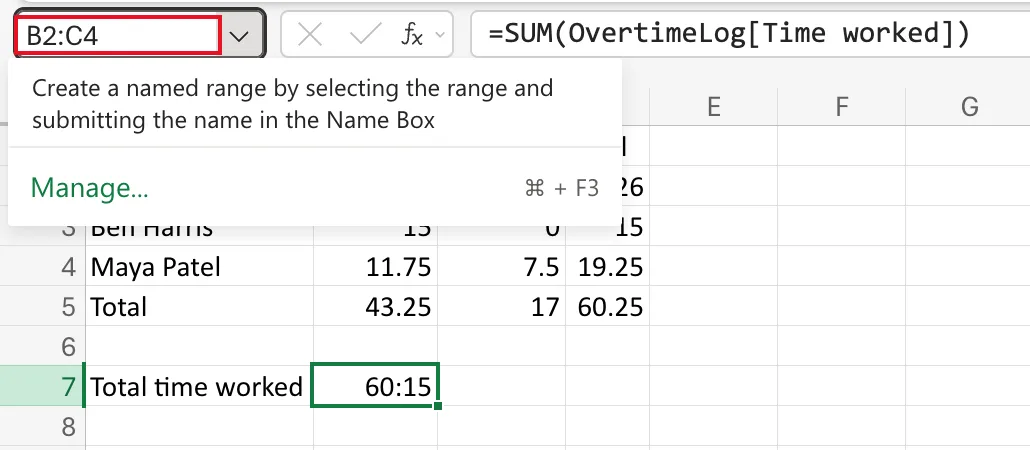
Select the Name Box, type the address and don't press anything else yet. Here I typed B2:C4, the monthly totals on the Monthly totals sheet. While you type, Excel shows a reminder that the Name Box can also create a named range:
Step 2: Press Enter
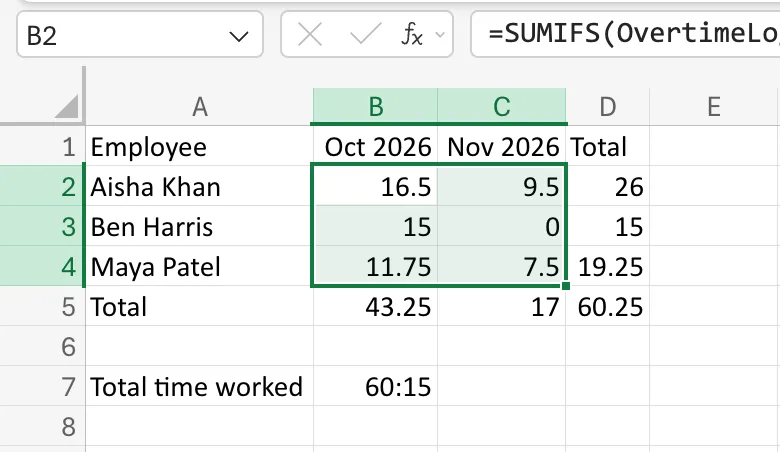
Press Enter. Excel selects the range and the Name Box shows its first cell, B2:
Addresses You Can Type
| Type | Selects |
|---|---|
B7 | One cell |
B2:C4 | A block of cells from B2 to C4 |
A:A | All of column A |
A:H | Columns A to H |
I:J | Columns I and J |
Selecting whole columns this way is how the timesheet's columns were auto-fitted: type A:H, press Enter, then use Format → Auto Fit Column Width.
Common Mistakes
| Mistake | What happens | Do this instead |
|---|---|---|
| Typing a word that isn't an address | Excel treats it as a name for a new named range | Type an address such as B2:C4 |
| Forgetting Enter | Nothing is selected | Press Enter after the address |
Troubleshooting
| Symptom | Likely cause | Fix |
|---|---|---|
| A flyout appears under the Name Box | That's Excel's reminder about named ranges | Keep typing the address and press Enter |
| The Name Box shows only one cell after selecting a range | It always shows the active cell, the first one | That's expected; the whole range is still selected |
FAQ
What's the Name Box for, besides selecting?
Naming ranges: select cells, type a name into the Name Box and press Enter. The flyout's Manage link lists the names in the workbook.
Does it work in the Excel desktop app too?
Yes. The Name Box is in the same place, at the left of the formula bar.
Conclusion
Type an address in the Name Box and press Enter to select it. It's the fastest way to reach a cell, a range or whole columns.
