How to Give Someone Viewer Access to a Power BI Workspace

A Power BI workspace has four roles: Admin, Member, Contributor and Viewer. Viewer lets people open the workspace's reports without changing them, and it's the only role that row-level security applies to. Here's how to give someone Viewer access.
Microsoft's Give users access to workspaces describes Manage access and the roles, and its row-level security article says RLS roles are applied to people with the Viewer role, while Admin, Member, or Contributor have edit permission for the semantic model and, therefore, RLS doesn't apply to them. The example gives Aisha Khan Viewer access to a workspace called How-to Examples.
Prerequisites
- The Admin or Member role in the workspace.
- A Power BI Pro or Premium Per User license for each viewer, unless the workspace is on a Premium or Fabric F64 or larger capacity. Microsoft's licensing article explains the rule.
Step 1: Open Manage Access
Open the workspace and select Manage access at the top right:

Step 2: Add the Person as a Viewer
In the Manage access panel, select Add people or groups. Type the person's or group's name and pick the match. The role below the box was Viewer already; the note above explains the difference: Admins, members, and contributors have edit and view access. Viewers only have view access.
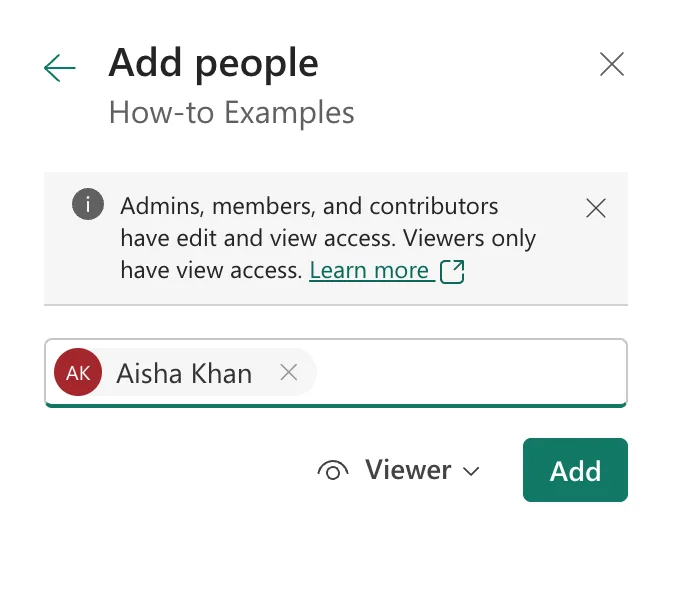
Select Add.
Step 3: Check the List
Select the back arrow. The Manage access list shows everyone and their role: here Admin User as Admin, and Aisha Khan as Viewer:
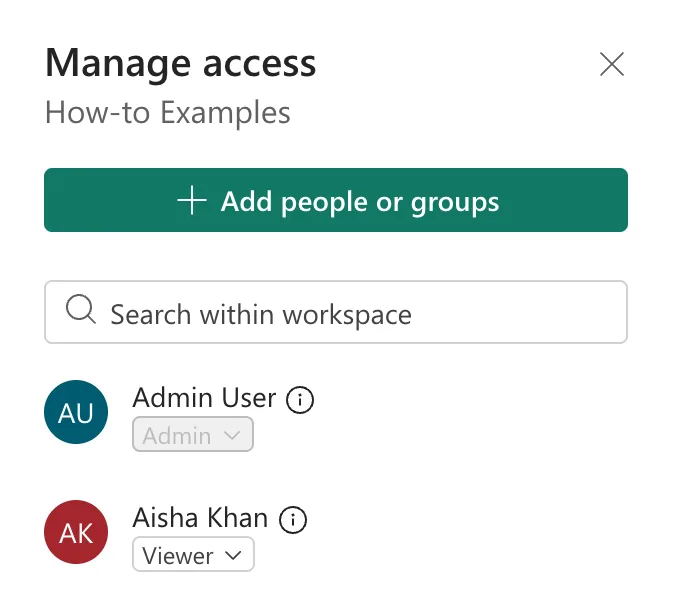
The drop-down under each name changes that person's role later.
Common Mistakes
| Mistake | What happens | Do this instead |
|---|---|---|
| Making report readers Members | They can edit, and RLS doesn't apply to them | Viewer |
| Adding people one by one | Every joiner and leaver needs a change here | Add a security group |
| Forgetting the license | Viewers without Pro can't open a Pro workspace's content | Pro or Premium Per User, or a capacity |
Troubleshooting
| Symptom | Likely cause | Fix |
|---|---|---|
| No Manage access button | You're a Contributor or Viewer | Ask an Admin or Member |
| The person can't open the report | No Pro or Premium Per User license | Assign one, or use a capacity |
| The person sees no rows | RLS applies and they're in no role, or their role matches nothing | Test as that person (How to Test Row-Level Security in Power BI) |
FAQ
What can a Viewer do?
Open and interact with the workspace's content, without editing it. Microsoft's Roles in workspaces lists each role's abilities.
Can I share one report instead of the whole workspace?
Yes, with the report's Share button, which gives access to that report alone.
Conclusion
Manage access > Add people or groups, pick the person or group, keep Viewer, and Add. The example's Aisha Khan became a Viewer of How-to Examples, so row-level security applies to her.
Additional Resources
- Give users access to workspaces
- Roles in workspaces in Power BI
- Power BI service features by license type
