How to Give a MySQL Docker Container a Certificate with the Right Host Name

A client that checks host names can't pass against MySQL's automatic certificate, because that certificate has no name you could connect to. You don't need a new CA or any extra tools: the container has OpenSSL and the CA's key, so you can sign a certificate with the right name right there.
What You Need
MySQL in Docker, started with its automatic certificates, as in How to Run MySQL in Docker with Docker Compose. Every command here runs inside the container, so nothing needs installing, and they're the same in bash, zsh and PowerShell.
Step 1: See What's There Now
docker compose exec mysql openssl x509 -in /var/lib/mysql/server-cert.pem -noout -subject -issuer -enddate -ext subjectAltName
No extensions in certificate
subject=CN=MySQL_Server_9.7.4_Auto_Generated_Server_Certificate
issuer=CN=MySQL_Server_9.7.4_Auto_Generated_CA_Certificate
notAfter=Nov  3 06:02:30 2036 GMT
No extensions means there's no Subject Alternative Name (SAN), the list of names a certificate is valid for. And no client connects to a server called MySQL_Server_9.7.4_Auto_Generated_Server_Certificate.
Step 2: Sign a New One
--user mysql makes the new files belong to the account MySQL runs as. Change the names on the second line to what your clients use. These two suit a server on your own computer:
docker compose exec --user mysql mysql sh -c '
  cd /var/lib/mysql &&
  printf "subjectAltName=DNS:localhost,IP:127.0.0.1\n" > san.ext &&
  openssl req -newkey rsa:2048 -nodes -keyout new-server-key.pem -out server.csr -subj "/CN=inventory-mysql" &&
  openssl x509 -req -in server.csr -CA ca.pem -CAkey ca-key.pem -CAcreateserial -days 825 -extfile san.ext -out new-server-cert.pem &&
  mv new-server-key.pem server-key.pem &&
  mv new-server-cert.pem server-cert.pem &&
  rm server.csr san.ext &&
  ls -l server-cert.pem server-key.pem
'
Certificate request self-signature ok
subject=CN=inventory-mysql
-rw-r--r-- 1 mysql mysql 1253 Nov  6 06:04 server-cert.pem
-rw------- 1 mysql mysql 1704 Nov  6 06:04 server-key.pem
The new files are written under temporary names, and moved into place only when everything before them has worked. So a failure partway leaves the old certificate in place. It's signed by the CA that was already there, so clients with ca.pem don't need anything new.
Step 3: Tell MySQL to Use It
As root, with no restart:
SHOW GLOBAL STATUS LIKE 'Ssl_server_not_after';
ALTER INSTANCE RELOAD TLS;
SHOW GLOBAL STATUS LIKE 'Ssl_server_not_after';
+----------------------+--------------------------+
| Variable_name        | Value                    |
+----------------------+--------------------------+
| Ssl_server_not_after | Nov  3 06:02:30 2036 GMT |
+----------------------+--------------------------+
1 row in set (0.007 sec)
Query OK, 0 rows affected (0.001 sec)

+----------------------+--------------------------+
| Variable_name        | Value                    |
+----------------------+--------------------------+
| Ssl_server_not_after | Feb  8 06:04:42 2029 GMT |
+----------------------+--------------------------+
1 row in set (0.000 sec)
Step 4: Check the Result
docker compose exec mysql openssl x509 -in /var/lib/mysql/server-cert.pem -noout -subject -issuer -enddate -ext subjectAltName
subject=CN=inventory-mysql
issuer=CN=MySQL_Server_9.7.4_Auto_Generated_CA_Certificate
notAfter=Feb  8 06:04:42 2029 GMT
X509v3 Subject Alternative Name:
    DNS:localhost, IP Address:127.0.0.1
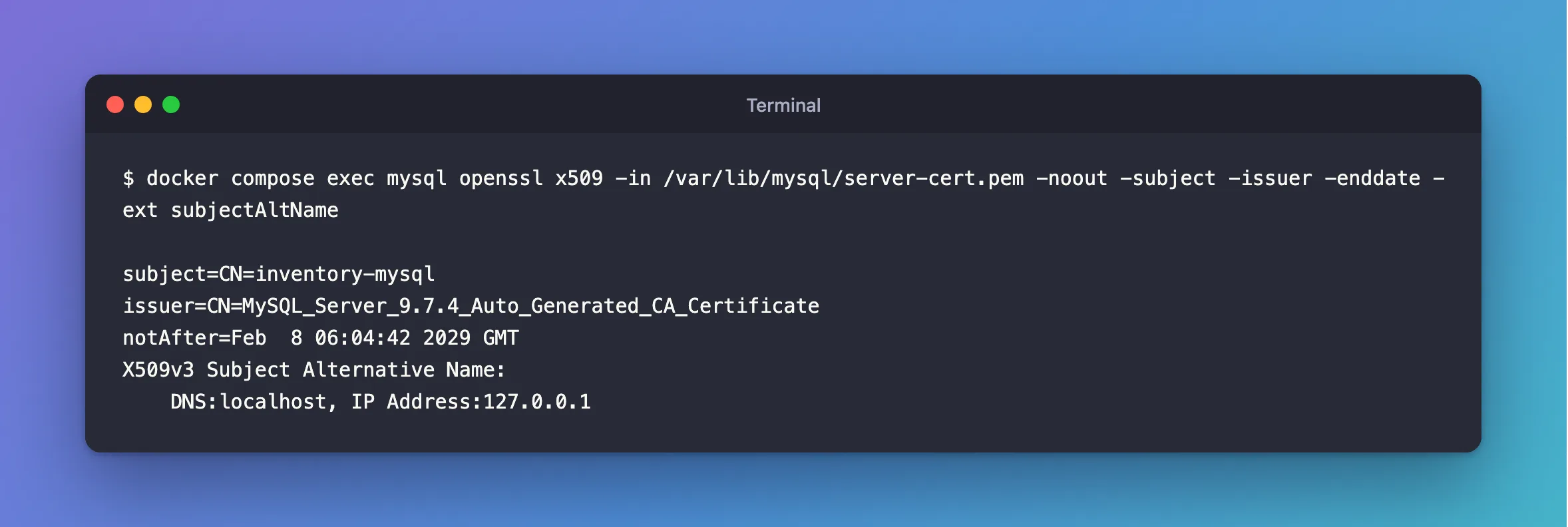
A client that checks names now connects, by either name. This one is a .NET app with SslMode=VerifyFull:
Connected as inventory_app@% to MySQL 9.7.4
TLS: TLSv1.2
What This Is, and Isn't
This is for a MySQL you run in Docker, where the CA's key is already sitting in the data folder. In production, keep a CA's key away from the server it signs for, which How to Use Your Own Certificates with the MySQL Docker Image does.
The new certificate lives in the data volume. It survives restarts and docker compose down, and docker compose down -v removes it, along with the CA.
Common Mistakes
| Mistake | What happens | Do this instead |
|---|---|---|
Running it without --user mysql | The files belong to root, and MySQL can't read the key | Keep --user mysql |
| Forgetting the reload | MySQL keeps the old certificate | Run ALTER INSTANCE RELOAD TLS |
| Listing a name but connecting by IP | Refused | List everything you connect by |
Troubleshooting
| Symptom | Likely cause | Fix |
|---|---|---|
The host name does not match the name on the certificate | The name isn't in the SAN, or MySQL hasn't reloaded | The fix |
openssl can't find ca-key.pem | The container mounts other certificates | Use your own CA |
ERROR 3888 from the reload | The key and certificate don't match | The fix |
Conclusion
Inside the container, openssl and the CA's key can sign a certificate with the right names, and ALTER INSTANCE RELOAD TLS puts it to work. Your clients' ca.pem keeps working.
Additional Resources
- ALTER INSTANCE —
RELOAD TLS. - Creating SSL Certificates and Keys Using openssl — MySQL's recipe.
