How to Get the Token Usage and Cost of a Microsoft Agent Framework Agent Run in C#

Every call to a model is paid for by the token, and Microsoft Agent Framework tells you how many each run used: AgentResponse.Usage holds the run's input, cached, output and reasoning tokens. This guide reads them in a small C# agent, turns them into a cost in dollars, and gets the same numbers when the answer is streamed.
Syntax
AgentResponse <response> = await <agent>.RunAsync(<message>);
UsageDetails? <usage> = <response>.Usage;

<usage>?.InputTokenCount
<usage>?.CachedInputTokenCount
<usage>?.OutputTokenCount
<usage>?.ReasoningTokenCount
<usage>?.TotalTokenCount
| Part | What it is |
|---|---|
<agent> | Your agent, an AIAgent |
<message> | What you send to the agent |
Usage | The run's token counts, a UsageDetails from Microsoft.Extensions.AI, or null when the model service reported none |
InputTokenCount | The number of tokens in the input: everything the run sent to the model, including the instructions, the conversation and the descriptions of the tools |
CachedInputTokenCount | The number of input tokens that were read from a cache. They're part of the input count, and they cost less |
OutputTokenCount | The number of tokens in the output, reasoning tokens included |
ReasoningTokenCount | The number of "reasoning" / "thinking" tokens used internally by the model |
TotalTokenCount | The total number of tokens used to produce the response: the input and the output together |
The descriptions in italics are the reference's own. Each count is a long?, which is empty when the service doesn't report it, so read them with ?..
The Example
A console app runs an agent that writes very short poems. It asks for a two-line poem about the sea, prints the poem, then prints the run's token counts and what the run cost.
Prerequisites
- A model deployment in a Microsoft Foundry project, and the Foundry User role on the Foundry resource for your account. The app calls the model as you.
- The .NET 10 SDK (
dotnet --versionprints a version that starts with10.0) and the Azure CLI, signed in withaz login.
Step 1: Create a Console App
In a terminal, in the folder where you keep your projects, create a console app, move into it and add two packages:
dotnet new console -n PoemAgent
cd PoemAgent
dotnet add package Microsoft.Agents.AI.Foundry --version 1.28.0-preview.261106.1
dotnet add package Azure.Identity --version 1.21.0
The template "Console App" was created successfully.

Processing post-creation actions...
Restoring /Users/you/source/PoemAgent/PoemAgent.csproj:
Restore succeeded.
| Package | What it gives the app |
|---|---|
Microsoft.Agents.AI.Foundry | AsAIAgent, which turns a model in a Foundry project into an agent. It also brings in Microsoft.Extensions.AI, where UsageDetails lives |
Azure.Identity | AzureCliCredential, which signs the app in to Foundry with your Azure CLI sign-in |
Microsoft Agent Framework 1.28.0 is generally available, but its Foundry package ships only as a preview of the same release, so it needs its exact --version. Open the PoemAgent folder in VS Code, or PoemAgent.csproj in Visual Studio.
Step 2: Read the Usage After a Run
Replace everything in Program.cs with:
using Azure.AI.Projects;
using Azure.Identity;
using Microsoft.Agents.AI;
using Microsoft.Extensions.AI;

AIAgent agent = new AIProjectClient(
        new Uri("https://foundry-devblogs-exp.services.ai.azure.com/api/projects/proj-devblogs-exp"),
        new AzureCliCredential())
    .AsAIAgent(
        model: "gpt-5.6-luna",
        instructions: "You write very short poems.");

AgentResponse response = await agent.RunAsync("Write a two-line poem about the sea.");
Console.WriteLine(response.Text);
Console.WriteLine();

// The tokens the run used, as the model service reported them.
UsageDetails? usage = response.Usage;
Console.WriteLine($"Input tokens:  {usage?.InputTokenCount} ({usage?.CachedInputTokenCount} read from the cache)");
Console.WriteLine($"Output tokens: {usage?.OutputTokenCount} ({usage?.ReasoningTokenCount} for reasoning)");
Console.WriteLine($"Total tokens:  {usage?.TotalTokenCount}");
- The
AIProjectClientURI andgpt-5.6-lunaare my Foundry project's endpoint and model deployment. Use your own; How to Create a Microsoft Foundry Resource and Deploy a Model shows where to find them. RunAsyncruns the agent and returns anAgentResponseonce the whole answer is there.response.Usageis the run's token counts. The three lines after it print them, with the cached part of the input and the reasoning part of the output in brackets.
Run the app:
- VS Code
- Visual Studio
In the terminal, in the PoemAgent folder, run:
dotnet run
Press Ctrl+F5 (Debug > Start Without Debugging). The output appears in a console window.
The sea hums softly under skies of blue,
Its waves carry dreams to the far-off view.

Input tokens:  25 (0 read from the cache)
Output tokens: 25 (0 for reasoning)
Total tokens:  50
The run sent 25 tokens, the instructions and the question, and got 25 back: the poem. The total is the two together. Nothing came from the cache, because a prompt this short is never cached, as the FAQ explains.
Step 3: Turn the Tokens into a Cost
Add these lines to the end of Program.cs:
// gpt-5.6-luna on a Global Standard deployment, in US dollars per million tokens.
const decimal InputPrice = 0.20m;
const decimal CachedInputPrice = 0.02m;
const decimal OutputPrice = 1.20m;

long input = usage?.InputTokenCount ?? 0;
long cached = usage?.CachedInputTokenCount ?? 0;
long output = usage?.OutputTokenCount ?? 0;
decimal cost = ((input - cached) * InputPrice + cached * CachedInputPrice + output * OutputPrice) / 1_000_000m;
Console.WriteLine($"Cost:          ${cost:0.000000}");
- The three prices are what
gpt-5.6-lunacosts on a Global Standard deployment: $0.20 per million input tokens, $0.02 per million input tokens read from the cache, and $1.20 per million output tokens. How to Look Up Azure OpenAI Model Prices with the Azure Retail Prices API shows where they come from. Put in your own model's prices. input - cachedis the input that didn't come from the cache, at the full input price. The cached tokens get the cache price.?? 0turns a count the service didn't report into zero.- Reasoning tokens need no line of their own. They're already inside the output count, and Microsoft's guide to reasoning models says they are billed as output tokens.
Run the app again:
The sea hums blue beneath the sun,
Its waves chase where the clouds have run.

Input tokens:  25 (0 read from the cache)
Output tokens: 38 (13 for reasoning)
Total tokens:  63
Cost:          $0.000051
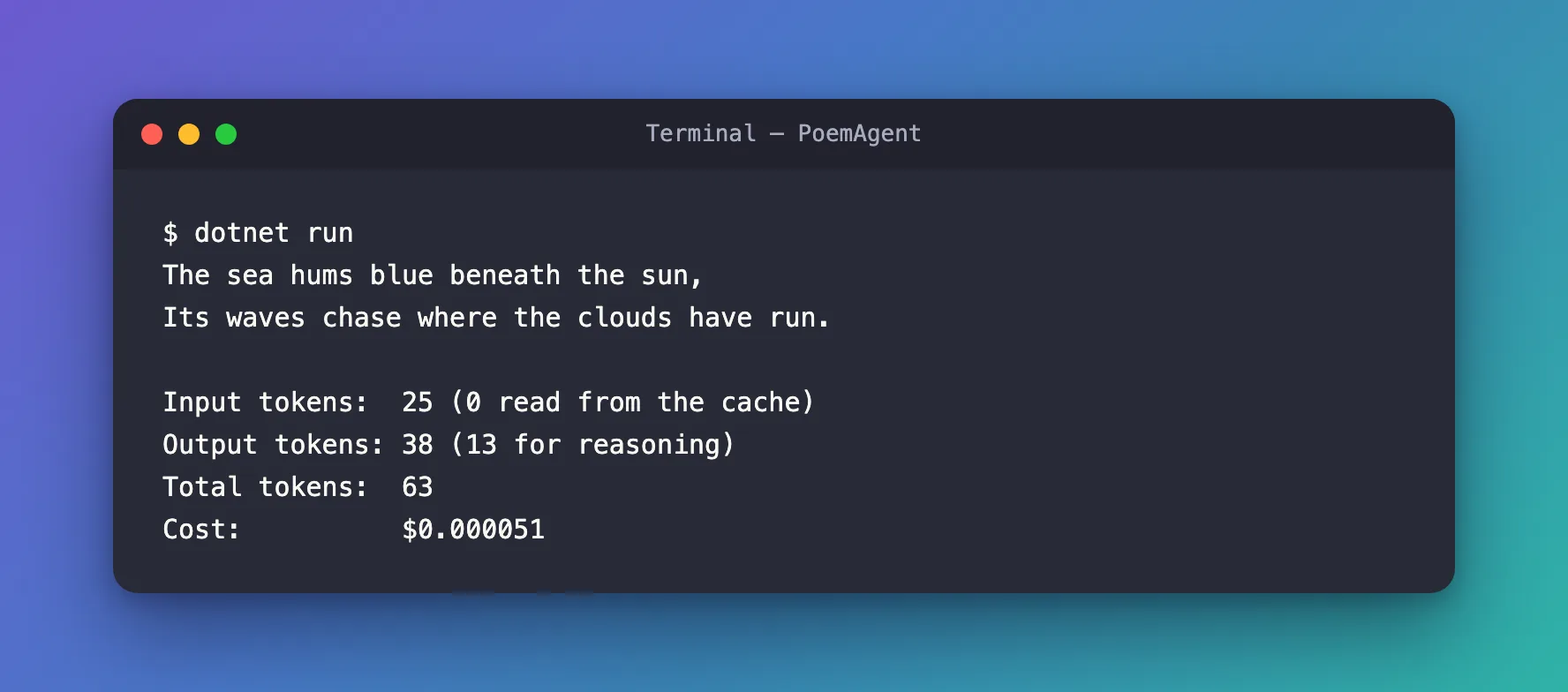
This time the model reasoned before it wrote: 13 of the 38 output tokens never appear in the poem, and they're paid for all the same. 25 input tokens at $0.20 and 38 output tokens at $1.20, per million, come to $0.0000506, which the format rounds to $0.000051.
On GPT-5.6 models, writing to the prompt cache can cost extra, and UsageDetails has no count for it: its AdditionalCounts were empty in every run I made. The formula covers everything Usage reports. For the complete bill, check the costs in Azure Cost Management.
Step 4: Get the Usage from a Streamed Run
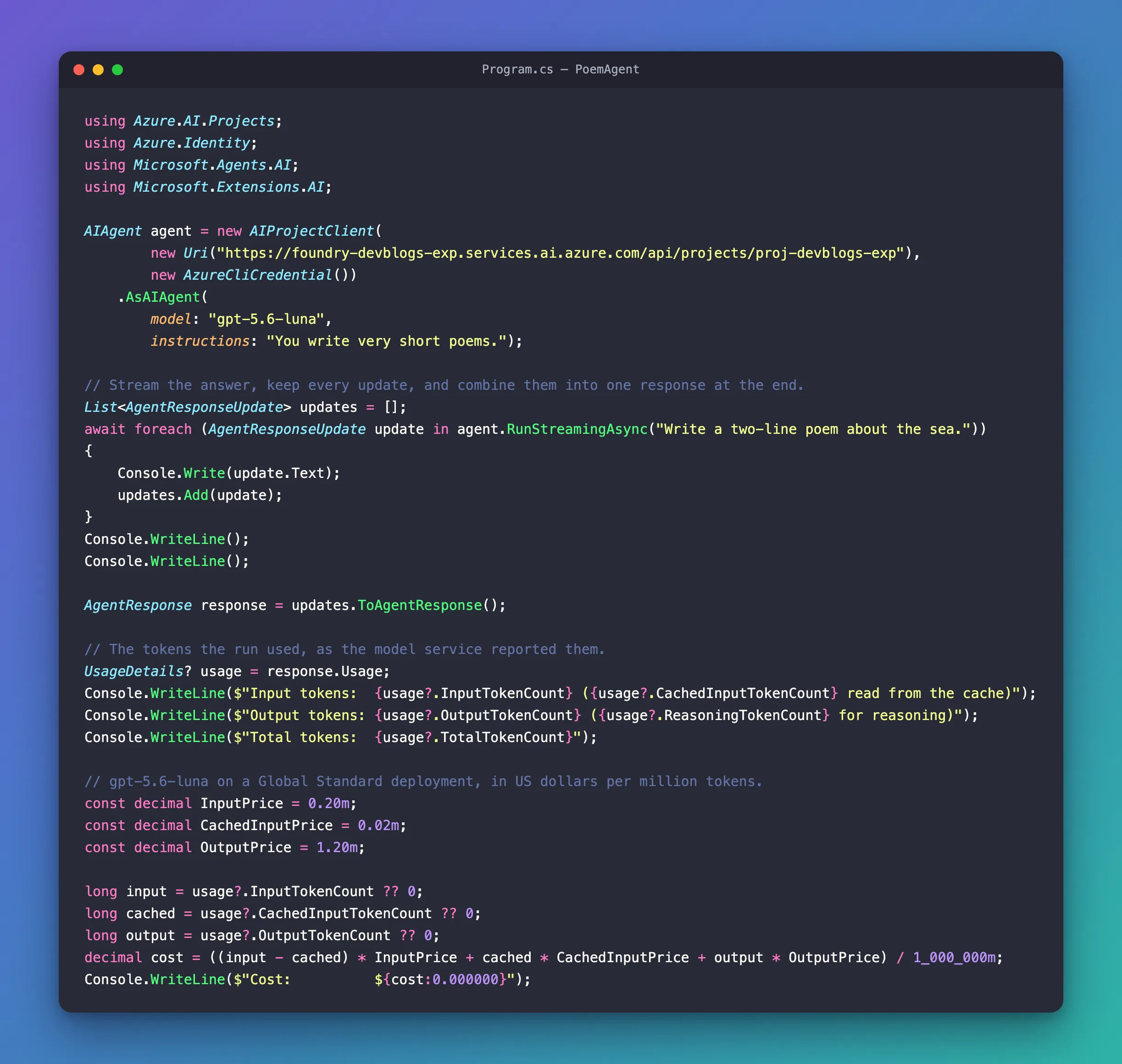
With RunStreamingAsync, the answer arrives in pieces, as AgentResponseUpdate objects, and an update has no Usage property. Keep the updates, and combine them into one response at the end. Replace these three lines:
AgentResponse response = await agent.RunAsync("Write a two-line poem about the sea.");
Console.WriteLine(response.Text);
Console.WriteLine();
with:
// Stream the answer, keep every update, and combine them into one response at the end.
List<AgentResponseUpdate> updates = [];
await foreach (AgentResponseUpdate update in agent.RunStreamingAsync("Write a two-line poem about the sea."))
{
    Console.Write(update.Text);
    updates.Add(update);
}
Console.WriteLine();
Console.WriteLine();

AgentResponse response = updates.ToAgentResponse();
Console.Write(update.Text)prints each piece of the poem as it arrives.ToAgentResponse()combines the updates into oneAgentResponse, withUsagefilled in, so the rest of the file works unchanged. The counts travel inside the updates asUsageContentitems, one for each call to the model, andToAgentResponse()adds them up.
Run the app again:
Moonlit waves softly gleam,
The sea hums an endless dream.

Input tokens:  25 (0 read from the cache)
Output tokens: 20 (0 for reasoning)
Total tokens:  45
Cost:          $0.000029
The counts came out of the combined response, exactly as they did from RunAsync.
The Complete File
using Azure.AI.Projects;
using Azure.Identity;
using Microsoft.Agents.AI;
using Microsoft.Extensions.AI;

AIAgent agent = new AIProjectClient(
        new Uri("https://foundry-devblogs-exp.services.ai.azure.com/api/projects/proj-devblogs-exp"),
        new AzureCliCredential())
    .AsAIAgent(
        model: "gpt-5.6-luna",
        instructions: "You write very short poems.");

// Stream the answer, keep every update, and combine them into one response at the end.
List<AgentResponseUpdate> updates = [];
await foreach (AgentResponseUpdate update in agent.RunStreamingAsync("Write a two-line poem about the sea."))
{
    Console.Write(update.Text);
    updates.Add(update);
}
Console.WriteLine();
Console.WriteLine();

AgentResponse response = updates.ToAgentResponse();

// The tokens the run used, as the model service reported them.
UsageDetails? usage = response.Usage;
Console.WriteLine($"Input tokens:  {usage?.InputTokenCount} ({usage?.CachedInputTokenCount} read from the cache)");
Console.WriteLine($"Output tokens: {usage?.OutputTokenCount} ({usage?.ReasoningTokenCount} for reasoning)");
Console.WriteLine($"Total tokens:  {usage?.TotalTokenCount}");

// gpt-5.6-luna on a Global Standard deployment, in US dollars per million tokens.
const decimal InputPrice = 0.20m;
const decimal CachedInputPrice = 0.02m;
const decimal OutputPrice = 1.20m;

long input = usage?.InputTokenCount ?? 0;
long cached = usage?.CachedInputTokenCount ?? 0;
long output = usage?.OutputTokenCount ?? 0;
decimal cost = ((input - cached) * InputPrice + cached * CachedInputPrice + output * OutputPrice) / 1_000_000m;
Console.WriteLine($"Cost:          ${cost:0.000000}");
Common Mistakes
| Mistake | What happens | Do this instead |
|---|---|---|
Reading the counts without ?. | A NullReferenceException when a service reports no usage | Read them as usage?.InputTokenCount ?? 0 |
| Pricing every input token at the full price | The cost comes out too high once prompts are cached | Price the cached tokens at the cache price, and only the rest at the input price |
Adding ReasoningTokenCount to the output | Reasoning is counted twice | It's already part of OutputTokenCount |
| Looking for usage on a streamed update | AgentResponseUpdate has no Usage property | Keep the updates and call ToAgentResponse() |
Troubleshooting
| Symptom | Likely cause | Fix |
|---|---|---|
CachedInputTokenCount stays at 0 | The prompt is shorter than 1,024 tokens, or its start changed | Keep long, repeated text, such as instructions, at the start of the prompt and unchanged |
| The bill is higher than your calculation | Cache writes on GPT-5.6 models, which Usage doesn't count | Compare with the costs in Azure Cost Management |
FAQ
Does Usage include the tool calls?
Yes. When the model calls a tool, one run makes several calls to the model, and Usage adds them all up. I checked with a dice-rolling agent and a small piece of middleware that printed the usage of each call to the model: the two calls used 82 and 113 input tokens and 19 and 10 output tokens, and the run's Usage said 195 and 29.
When does input come from the cache?
Microsoft's prompt caching guide names two conditions: the request must be a minimum of 1,024 tokens in length, and the first 1,024 tokens in the prompt must be identical. To see it, I gave an agent about 2,000 tokens of instructions and asked the same question three times. The first run reported 2,005 input tokens and none cached; the second and third each reported 2,002 of their 2,005 input tokens as cached.
Why isn't the total bigger than input plus output?
Because the reasoning tokens are already inside the output count. In Step 3, 25 input and 38 output tokens make the total of 63, and the 13 reasoning tokens are part of the 38.
Conclusion
AgentResponse.Usage tells you what a run cost in tokens: input, the part of it read from the cache, output, and the part of that spent on reasoning. Multiply the uncached input, the cached input and the output by your model's prices to get the cost in dollars. When you stream, combine the updates with ToAgentResponse() first. On GPT-5.6 models, cache writes are the one charge the counts don't cover.
Additional Resources
- UsageDetails class — every count, as the reference describes it.
- Prompt caching — when input is cached, and what cache writes cost on GPT-5.6 models.
- Azure OpenAI reasoning models — reasoning tokens, and how they're billed.
- Running Agents —
RunAsync,RunStreamingAsyncand the responses they return.
