How to Get the First Record of a Table in Power Apps with First

When every record of a table holds the same value, any of them will do, and the first is the easiest to get. First returns a table's first record, and a dot after it reads one of its columns.
Syntax
First(Table)
First(Table).Column
| Part | What it is |
|---|---|
| Table | The table to take the first record from. |
| Column | A column of that record, to read one value. |
From Microsoft's First reference:
- First returns the first record of a table, and Last the last.
- FirstN and LastN return several records, as a table, even when you ask for one.
- Index(Table, n) returns the record at position n, counting from 1, so
First(Table)is the same record asIndex(Table, 1). - With a data source, these functions aren't delegated: Power Apps fetches the first part of the data and applies the function to that.
The example is the list of people on the Reports screen of the Overtime Timesheet app. It groups a month's approved entries by email, so each person gets one card. The name to show on the card is on every one of their entries.
Step 1: Read the Name from the First Entry
In the gallery's Items, AddColumns adds an Employee column to each group, from its first entry (How to Add a Column to a Table in Power Apps with AddColumns):
AddColumns(
    GroupBy(locRowsRS, Email, Rows),
    Employee, First(Rows).Employee
)
First(Rows)is the group's first entry..Employeereads its name.
A group always has at least one entry, because GroupBy makes groups only from records that exist, so First always has a record to return here.
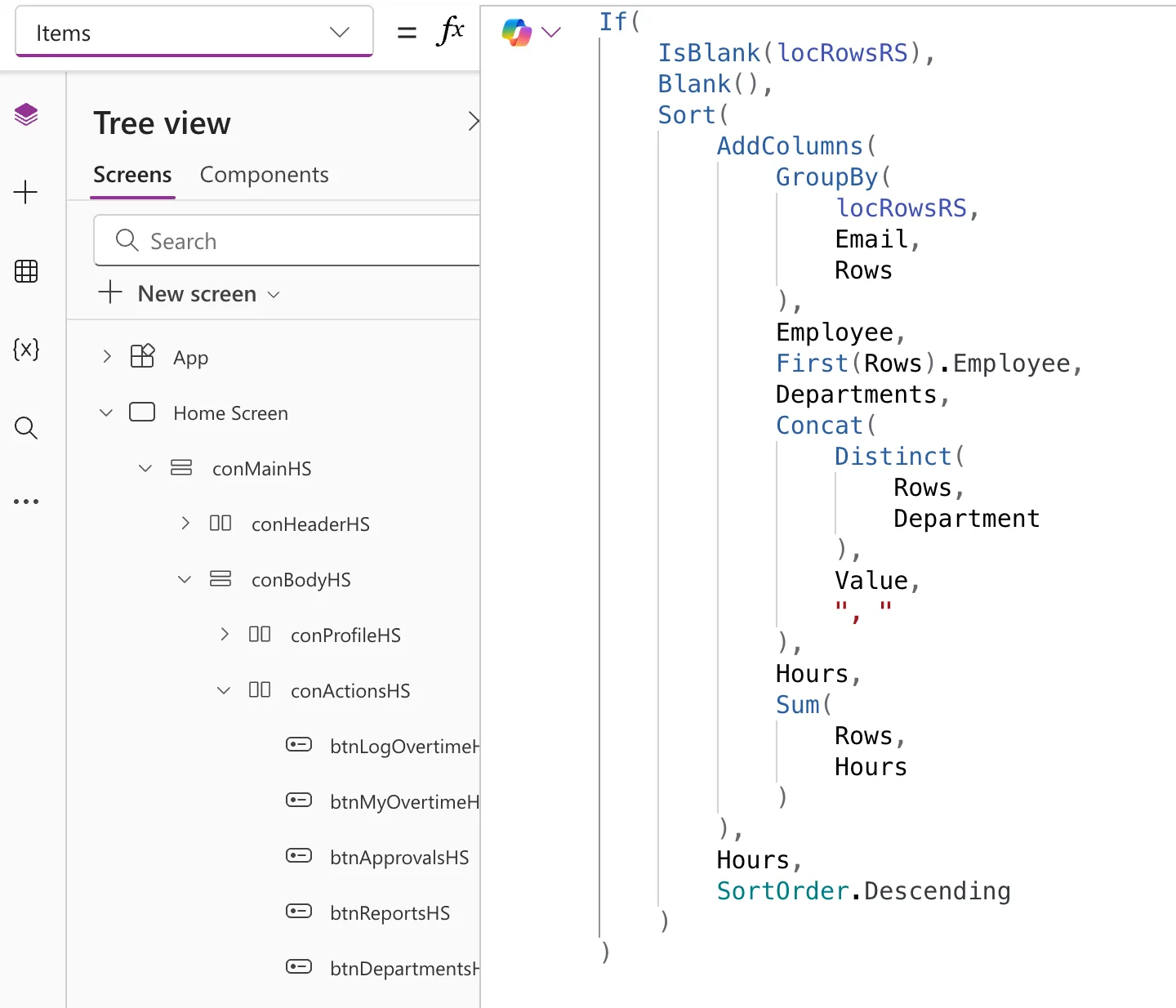
The whole formula, as Studio shows it, also lists each person's departments and adds up their hours:
Step 2: Show It
On the card, the name label's Text is ThisItem.Employee (How to Use ThisItem in a Power Apps Gallery).
The Result
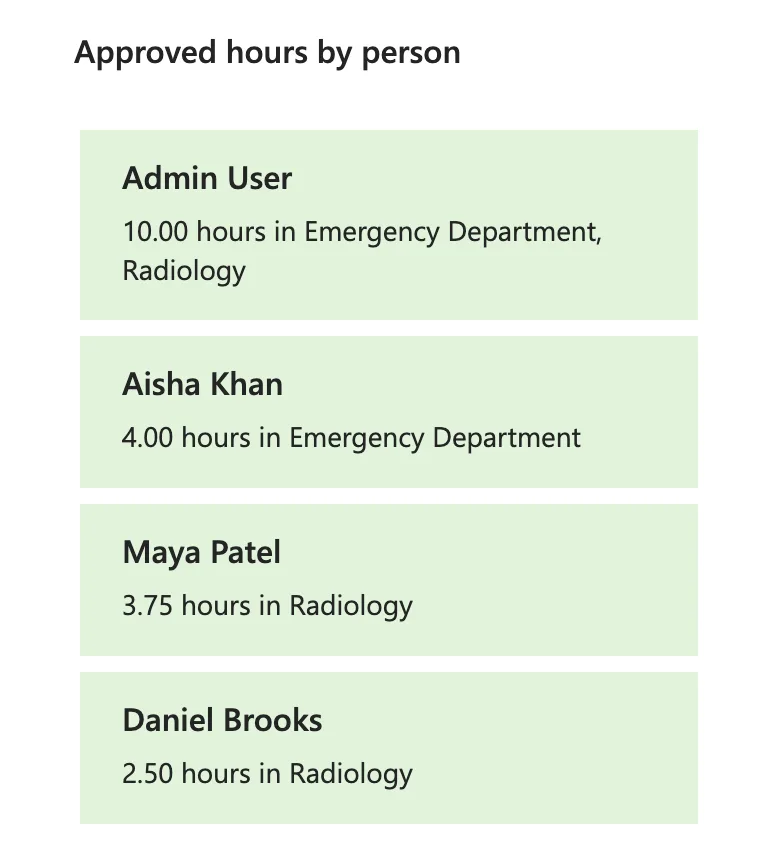
Each card shows the person's name, read from their first entry:
Common Mistakes
| Mistake | What happens | Do this instead |
|---|---|---|
| First where the records hold different values | You get whichever record happens to be first | Sort the table first, or use LookUp with a condition |
| FirstN to get one record | It returns a table, not a record | First |
| Last on a large data source | It returns the last of the records Power Apps fetched, not of the whole list | Sort the other way in the data source and use First |
Troubleshooting
| Symptom | Likely cause | Fix |
|---|---|---|
| The value is blank | The table has no records, or the column is empty in the first record | Check the table; IsEmpty(Table) tells you if it has none |
| A delegation warning | First on a data source | Work on a table already in the app, or filter in the data source first |
FAQ
What's the difference between First and LookUp?
LookUp returns the first record that meets a condition. First returns the first record, whatever it holds.
First or Index?
First(Table) and Index(Table, 1) return the same record. Microsoft's reference says Index returns an error when the table is empty.
Can I read several columns of the first record?
Yes. Each First(Table).Column reads one. To read several without repeating First, keep the record with With and read its columns from there (How to Use the With Function in Power Apps).
Conclusion
First(Table) returns a table's first record, and First(Table).Column one value from it. Inside a grouped table, it reads a value every record of the group shares, such as a person's name.
