How to Get the First Day of the Next Month in Excel with EDATE

EDATE moves a date by a number of whole months: =EDATE(B1,1) is one month after B1. If B1 is the first of a month, the result is the first of the next month. That's how a row of month headings can build itself from the first one.
The example is the Monthly totals sheet of the old overtime timesheet from Part 1 of the Overtime Timesheet series. B1 holds 01/10/2026, shown as Oct 2026, and C1 should be the month after it.
Prerequisites
- A date to start from, such as the first of a month in a heading cell. How to Show a Date as Month and Year in Excel formats it as Oct 2026.
Step 1: Type the Formula
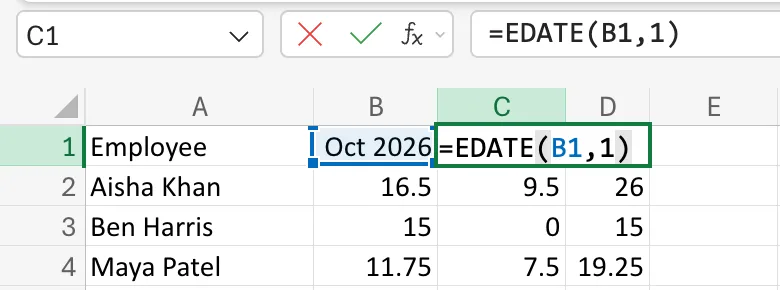
Select C1 and type:
=EDATE(B1,1)
B1is the start date.1is the number of months to move. A negative number moves back.
Step 2: Check the Result
Press Enter. C1 shows Nov 2026, and the formula bar =EDATE(B1,1):
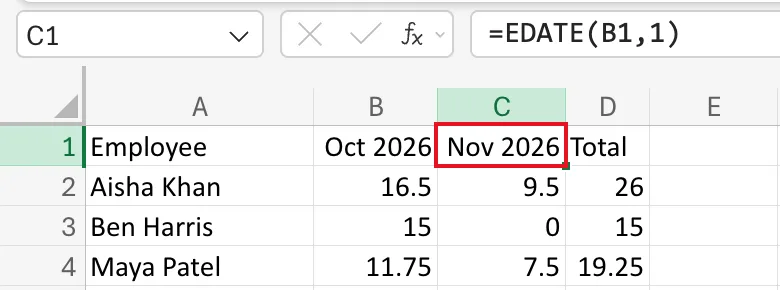
C1 shows a month name because it already had the mmm yyyy format. EDATE returns a date's serial number, as Microsoft's EDATE function page says, so in a cell with the General format the result shows as a number like 46327; Add or subtract dates says to format such results as dates.
The totals under C1 didn't change: the cell still holds 01/11/2026, now calculated instead of typed.
Step 3: Use It Inside Other Formulas
EDATE is also how the monthly totals find the end of each month. The total for October counts dates from B1 up to, but not including, EDATE(B1,1):
"<"&EDATE(B$1,1)
How to Sum Values Between Two Dates in Excel with SUMIFS explains the whole formula.
Common Mistakes
| Mistake | What happens | Do this instead |
|---|---|---|
| Starting from a date in the middle of a month | EDATE keeps the day, so you get the 15th of the next month | Start from the 1st |
| Adding 30 to a date for "next month" | Months have 28 to 31 days, so it drifts | Use EDATE(date,1) |
| Leaving the result in General format | It shows as a number like 46327 | Give it a date format |
Troubleshooting
| Symptom | Likely cause | Fix |
|---|---|---|
| The result is a five-digit number | The cell has the General format | Apply a date format, or mmm yyyy |
#VALUE! | The start date is text, not a date | Re-enter it as a date |
FAQ
How do I get the previous month?
Use -1: =EDATE(B1,-1) is 01/09/2026.
Can I fill a whole row of months this way?
Yes. In each new heading cell, refer to the heading before it, the way C1 refers to B1: each month is then one month after the one before it, and changing the first heading moves them all.
Conclusion
=EDATE(date,1) is one month later, keeping the day. Start from the 1st, and it gives the first day of the next month.
