How to Get the First Day of the Month in Power Apps

The first day of a month is the date with that month's year and month, and day 1: Date(Year(d), Month(d), 1). With Today() for d, it's the first of this month; on 8 November 2026 that's 01/11/2026.
The example is the Overtime Timesheet app, whose My Overtime screen shows one month at a time and keeps that month as its first day.
Prerequisites
- The year and month of a date: How to Get the Year, Month and Day of a Date in Power Apps.
Step 1: The First Day of This Month
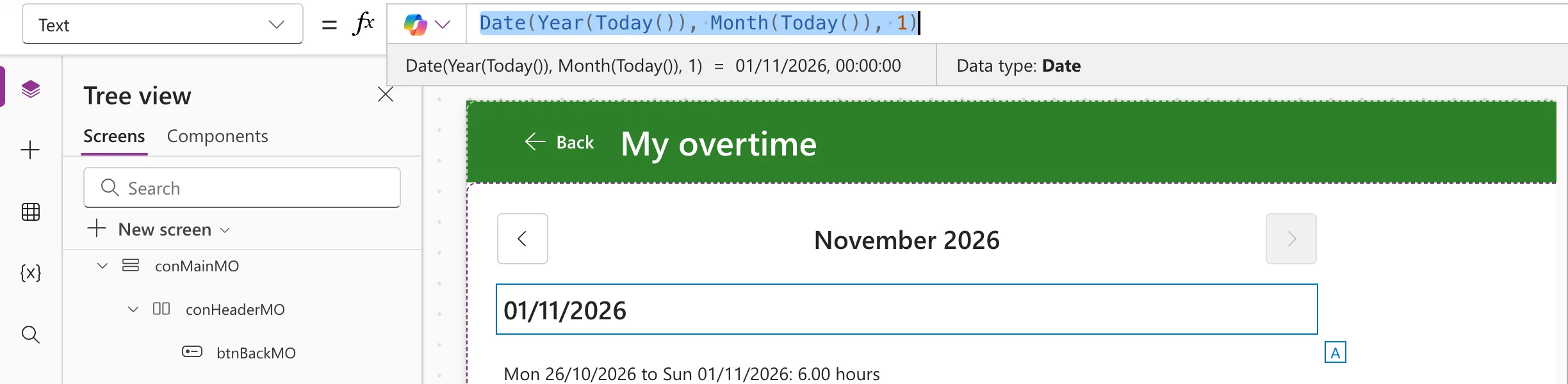
Date builds a date from a year, a month and a day (Date function). I put the formula into a text control's Text for a moment, so Studio's preview strip shows the result:
Date(Year(Today()), Month(Today()), 1)
On 8 November 2026 it's 01/11/2026:
Step 2: The First Day of Any Date's Month
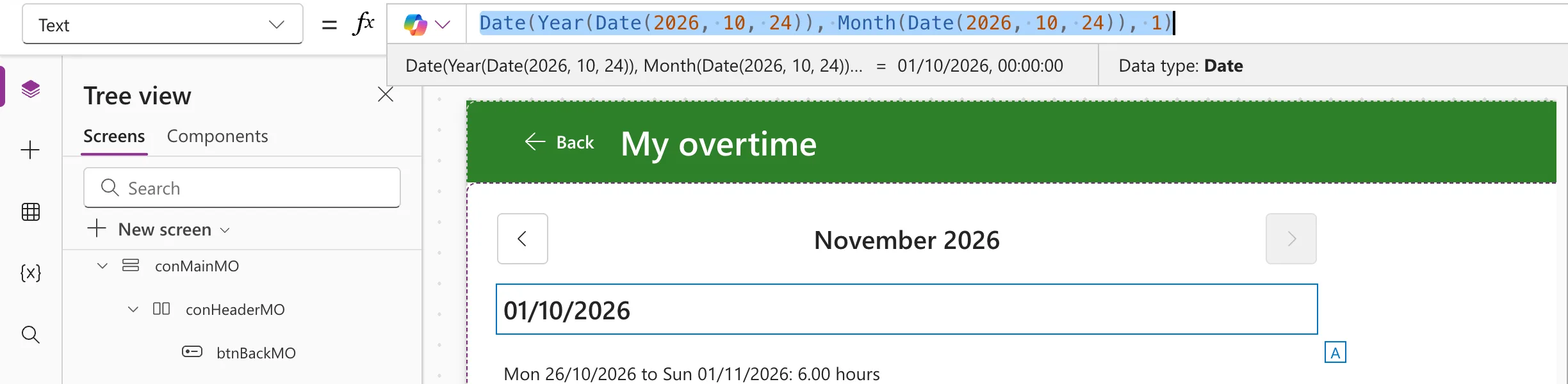
The same formula works for any date. For 24 October 2026:
Date(Year(Date(2026, 10, 24)), Month(Date(2026, 10, 24)), 1)
In an app, the date is usually a control or a column, such as Date(Year(dpWorkDate.SelectedDate), Month(dpWorkDate.SelectedDate), 1).
How the Example Uses It
The My Overtime screen remembers the month it shows in a context variable, as that month's first day. When the screen opens for the first time, it starts on this month:
If(
    IsBlank(locMonthMO),
    UpdateContext({locMonthMO: Date(Year(Today()), Month(Today()), 1)})
);
Select(btnRefreshMO)
IsBlank(locMonthMO)keeps the month someone chose when they come back to the screen (How to Use Context Variables in Power Apps with UpdateContext).- Keeping day 1 means moving a month back or forward is always a whole month: How to Add Previous and Next Month Buttons in Power Apps.
Common Mistakes
| Mistake | What happens | Do this instead |
|---|---|---|
DateAdd(Today(), -Day(Today()), TimeUnit.Days) | The last day of the previous month, not the first of this one | Date(Year(d), Month(d), 1) |
| Keeping the month as a name, such as November | No year, and nothing to compare or add to | Keep the first day as a date; format it to show |
Troubleshooting
| Symptom | Likely cause | Fix |
|---|---|---|
| The result shows 00:00:00 in the preview strip | The strip shows the whole date-and-time value | Format it where people see it: How to Format a Date in Power Apps with Text |
| The month is empty when you preview the screen | Preview started on this screen, so its OnVisible didn't run | Preview from the screen before it and go to this one |
FAQ
How do I show it as a month name?
Text(d, "mmmm yyyy") shows November 2026: How to Show the Month Name and Year in Power Apps.
How does Excel do this?
Excel builds a date the same way with DATE: How to Build a Date from a Year, Month and Day in Excel with DATE.
Conclusion
Date(Year(d), Month(d), 1) is the first day of d's month. Keep a month as its first day, and adding, comparing and showing it stay simple.
Additional Resources
- Date, DateTime, and Time functions: building a date from its parts.
- Day, Month, Year, Hour, Minute, Second, and Weekday functions: taking a date apart.
