How to Get the Day of the Week in Power Apps with Weekday

Weekday turns a date into the number of its day in the week. By default the week starts on Sunday, so Sunday is 1 and Saturday 7. Add StartOfWeek.Monday and Monday is 1 and Sunday 7, the way a UK week runs.
The example is the Overtime Timesheet app, which totals overtime by week, Monday to Sunday.
Syntax
Weekday(DateTime [, WeekdayFirst])
- DateTime is the date to look at.
- WeekdayFirst is optional: which day is 1. Leave it out and Sunday is 1.
Microsoft's Weekday reference lists the choices, as a StartOfWeek value or an Excel code:
| StartOfWeek | Excel code | Numbers |
|---|---|---|
StartOfWeek.Sunday | 1 or 17 | 1 (Sunday) to 7 (Saturday). The default |
StartOfWeek.Monday | 2 or 11 | 1 (Monday) to 7 (Sunday) |
StartOfWeek.MondayZero | 3 | 0 (Monday) to 6 (Sunday) |
StartOfWeek.Tuesday … StartOfWeek.Saturday | 12 to 16 | 1 for that day, up to 7 |
Step 1: The Default, Sunday First
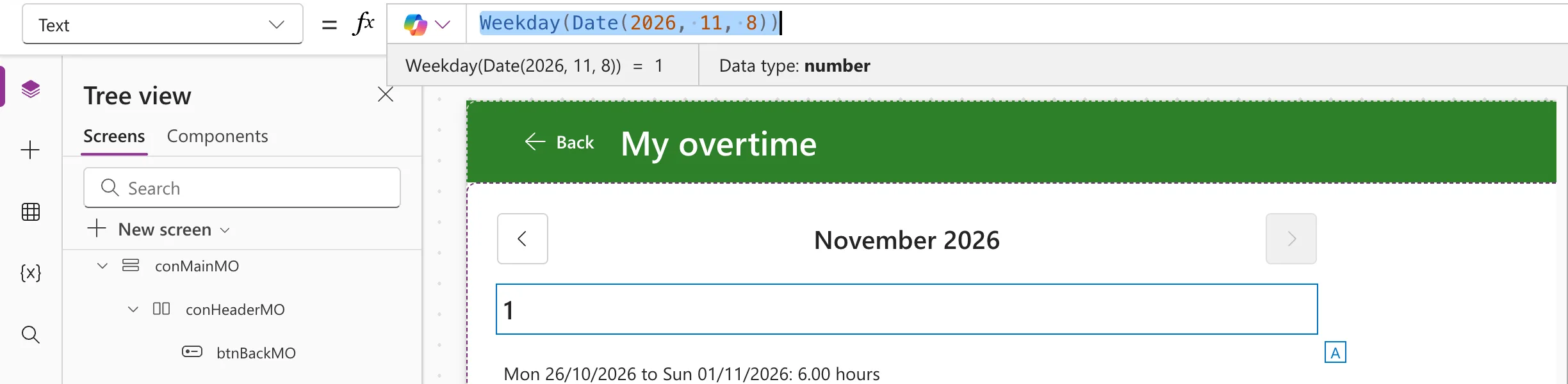
I put each formula into a text control's Text for a moment, so Studio's preview strip shows the result:
Weekday(Date(2026, 11, 8))
8 November 2026 is a Sunday, the first day of a default week, so the result is 1:
Step 2: Monday First
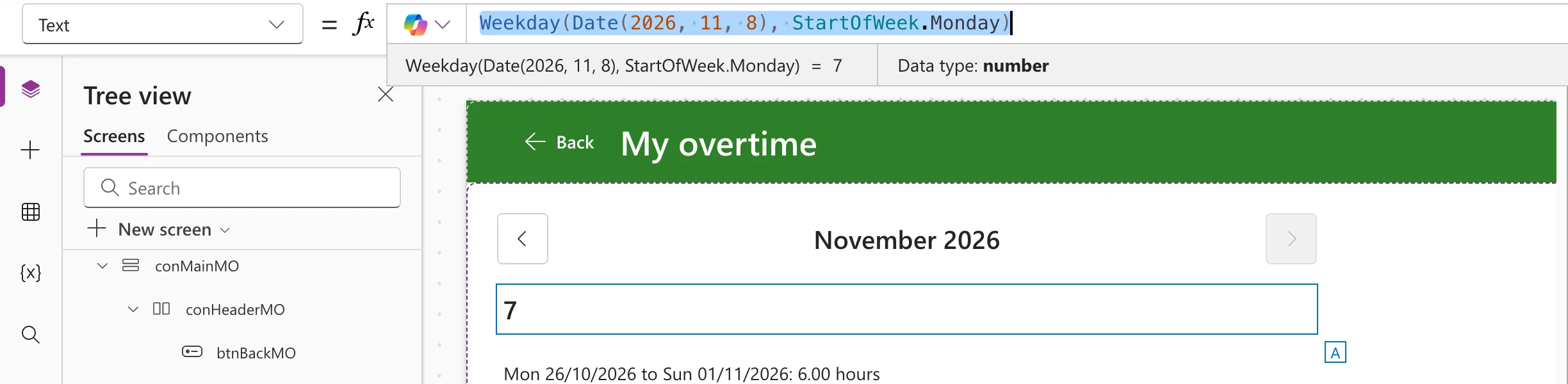
Weekday(Date(2026, 11, 8), StartOfWeek.Monday)
With Monday as day 1, Sunday is the last day of the week, 7:
Use the StartOfWeek name rather than the Excel code: StartOfWeek.Monday says what it means, where 2 doesn't.
How the Example Uses It
The app adds up each person's overtime per week, Monday to Sunday. With Monday as 1, Weekday(d, StartOfWeek.Monday) - 1 is how many days d is after its Monday, so going back that many days finds the Monday. The app keeps this in a function in App.Formulas:
MondayOf(AnyDate: Date): Date = DateAdd(AnyDate, 1 - Weekday(AnyDate, StartOfWeek.Monday), TimeUnit.Days);
The whole method, with results: How to Find the Monday of a Week in Power Apps.
Common Mistakes
| Mistake | What happens | Do this instead |
|---|---|---|
| Leaving out the second argument for a UK week | Sunday is 1 and Monday is 2 | StartOfWeek.Monday |
| Treating the result as a name | It's a number | Text(date, "dddd") for the name: How to Show the Day Name of a Date in Power Apps |
| Mixing week starts across formulas | Weeks that don't line up | Use the same StartOfWeek everywhere |
Troubleshooting
| Symptom | Likely cause | Fix |
|---|---|---|
| Every result is one more than expected | The week starts on Sunday | Add StartOfWeek.Monday |
| Monday gives 0 | StartOfWeek.MondayZero | Use StartOfWeek.Monday for 1 to 7 |
FAQ
How do I check for a weekend?
With Monday first, Saturday and Sunday are 6 and 7: Weekday(d, StartOfWeek.Monday) > 5 is true at the weekend.
Does Excel have the same function?
Yes, WEEKDAY, with the same codes: How to Get the Day of the Week as a Number in Excel with WEEKDAY.
Conclusion
Weekday(date) numbers the days from Sunday; Weekday(date, StartOfWeek.Monday) numbers them from Monday, 1 to 7. Pick one week start and use it everywhere.
Additional Resources
- Day, Month, Year, Hour, Minute, Second, and Weekday functions: the StartOfWeek values and Excel codes.
