How to Get the Day of the Week as a Number in Excel with WEEKDAY

WEEKDAY tells you which day of the week a date falls on, as a number: by default 1 for Sunday up to 7 for Saturday. It's the building block for "the last Sunday of the month", "the next Monday", or anything else that depends on the day of the week.
The example is from the Clock change sheet in How to Calculate Hours Worked Across a Daylight Saving Time Change in Excel. It needs the weekday of the last day of March and of October 2026.
Prerequisites
- A date in a cell. Here B4 holds 01/04/2026, built with How to Build a Date from a Year, Month and Day in Excel with DATE.
Step 1: Type the Formula
In B5:
=WEEKDAY(B4-1)
B4-1is the day before B4: 1 April minus one day is 31 March. Subtracting from a date goes back that many days.WEEKDAY(…)gives that day's number.
Step 2: Read the Number
Press Enter. B5 shows 3: 31 March 2026 is a Tuesday. In C5, =WEEKDAY(C4-1) gives 7: 31 October 2026 is a Saturday:
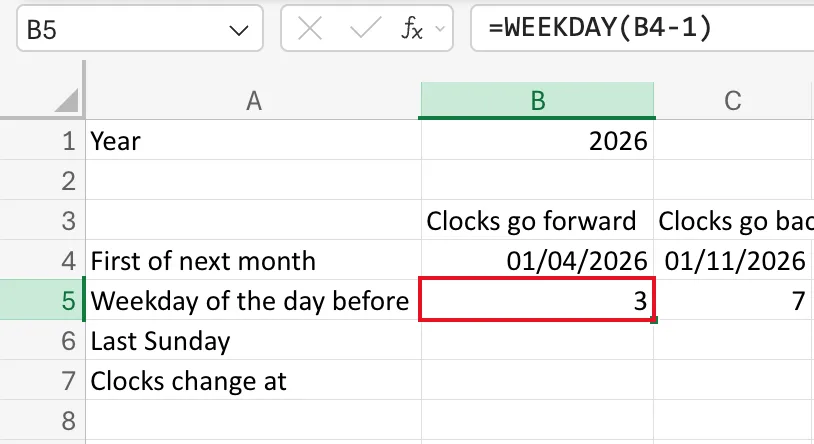
The result is a plain number, in the General format.
The Numbers
Microsoft's WEEKDAY function page: without a second argument, the day is "an integer, ranging from 1 (Sunday) to 7 (Saturday)".
| Day | WEEKDAY |
|---|---|
| Sunday | 1 |
| Monday | 2 |
| Tuesday | 3 |
| Wednesday | 4 |
| Thursday | 5 |
| Friday | 6 |
| Saturday | 7 |
The optional second argument, return_type, changes the numbering; the same page lists every option, such as 2 for Monday as 1.
How It's Used Next
Because Sunday is 1, subtracting a date's weekday number from the day after it lands on the most recent Sunday. That's how the next row finds the last Sunday of the month: How to Find the Last Sunday of a Month in Excel.
Common Mistakes
| Mistake | What happens | Do this instead |
|---|---|---|
| Expecting Monday to be 1 | Every result is one off | Use return_type 2, or remember Sunday is 1 |
Using WEEKDAY(B4) when you need the day before | You get the weekday of the 1st, not of the last day of the previous month | Subtract 1 first: WEEKDAY(B4-1) |
Troubleshooting
| Symptom | Likely cause | Fix |
|---|---|---|
| The result shows as a date | The cell has a date format | Set it to General |
#VALUE! | The cell isn't a date | Use a date or a date formula |
FAQ
How do I get the day's name instead?
Format a date with the custom code dddd to show it as Tuesday.
Does WEEKDAY work with dates that have times?
Yes. It only looks at the date part.
Conclusion
=WEEKDAY(date) gives 1 for Sunday to 7 for Saturday. A date minus 1 is the day before, so =WEEKDAY(B4-1) is the weekday of the last day of the previous month.
