How to Get the Current Date and Time in Power Apps with Now

Now() returns the current date and time. Use it to record when something happened, such as when a response was sent; Today() gives the date alone.
The Functions
| Function | Returns |
|---|---|
Now() | The current date and time, in the person's time zone |
Today() | The current date, with the time at midnight |
UTCNow() | The current date and time in UTC |
IsToday(date) | Whether a date is today |
(Now, Today, IsToday, UTCNow, UTCToday, IsUTCToday functions)
Prerequisites
- Somewhere to use the value, such as a Patch to a Date and Time column (How to Create or Update a SharePoint List Item with Patch).
Example: Stamp When a Response Was Sent
In the Career Development Plan app, every send records the moment in the SubmittedOn column:
SubmittedOn: Now()
Select Now() in the formula bar, and the preview strip shows its value and type, DateTime:
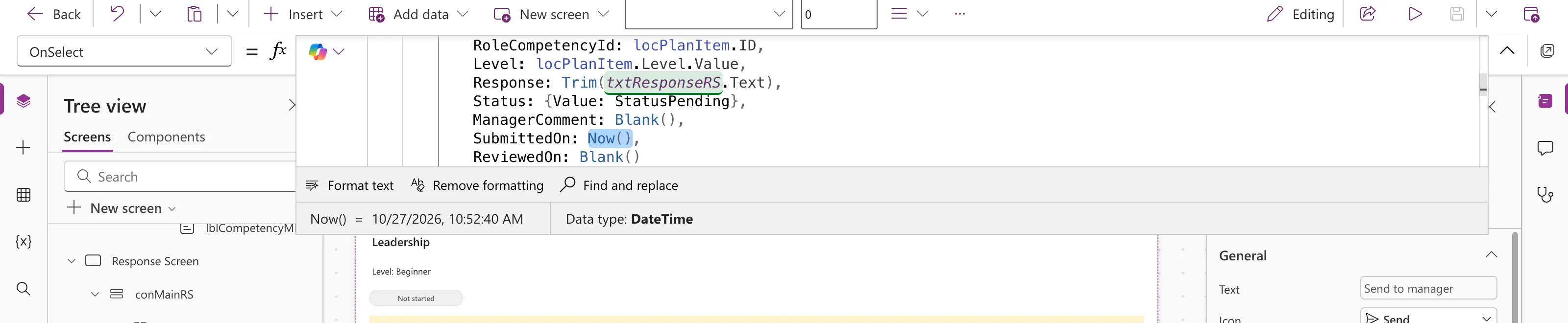
After a send, the item in SharePoint had the date and time in SubmittedOn. The app then shows it in words with Text (How to Format a Date in Power Apps with Text): You sent this on Tuesday, October 27, 2026.
Now or Today?
- Now() for a moment: when something was sent, approved or changed.
- Today() for a day: due dates, or "is this today?".
Microsoft's examples show the difference: Text( Today(), "mm/dd/yyyy hh:mm:ss" ) gives midnight, while the same with Now() gives the current time.
Common Mistakes
| Mistake | What happens | Do this instead |
|---|---|---|
Today() for a timestamp | Every save says midnight | Now() |
| Formatting before saving | A text column instead of a date | Save the date; format only for display |
Troubleshooting
| Symptom | Likely cause | Fix |
|---|---|---|
| The saved time looks hours off | It's shown in another time zone | Compare in the same time zone, or use UTCNow |
FAQ
What time zone does Now use?
The person's own. UTCNow gives UTC.
Can I add days?
Yes, with DateAdd, as in Microsoft's example DateAdd( Now(), 12 ).
Conclusion
Now() is the current date and time; save it straight into a Date and Time column when something happens, and format it only when you show it.
