How to Get Related Fields in a SharePoint REST Request with $expand

Some fields in SharePoint point to something else: a list item's Created By points to a person, and a lookup column points to an item in another list. $expand brings the related thing into the answer, and $select picks its fields, so one REST request returns, say, an item's title and its creator's name.
Syntax
<request address>?$select=<field>,<related field>/<its field>&$expand=<related field>
<request address>: a SharePoint REST address, such as a list's items:https://<site address>/_api/web/lists/getbytitle('<list name>')/items.<field>: an ordinary field to return, such asTitle.<related field>: a field that points to something else, by its internal name. Created By isAuthor.<its field>: the field of the related thing to return, such as a person'sTitle, their display name.
The related field goes in both options: $expand brings it in, and $select names what to keep from it.
Microsoft's Use OData query operations in SharePoint REST requests puts it this way: To do this, specify the field name in both the $select and $expand query options, with the example …/items?$select=Title,Products/Name&$expand=Products/Name. It also says: Bulk expansion and selection of related items isn't supported.
The Example
The Announcements list on the root site contoso.sharepoint.com has one item, Office closed on Friday. The address returns its title and the name of the person who created it.
Prerequisites
- Access to the list and a signed-in SharePoint session in the same browser. The browser sends your sign-in with the request.
Step 1: Open the Address
In the browser where you use SharePoint, type the address in the address bar and press Enter:
https://contoso.sharepoint.com/_api/web/lists/getbytitle('Announcements')/items?$select=Title,Author/Title&$expand=Author
Use your own site's address in place of contoso.sharepoint.com.
Step 2: Read the Answer
The browser sends no Accept header asking for JSON, so SharePoint answers in XML. In my browser it appeared as plain text:
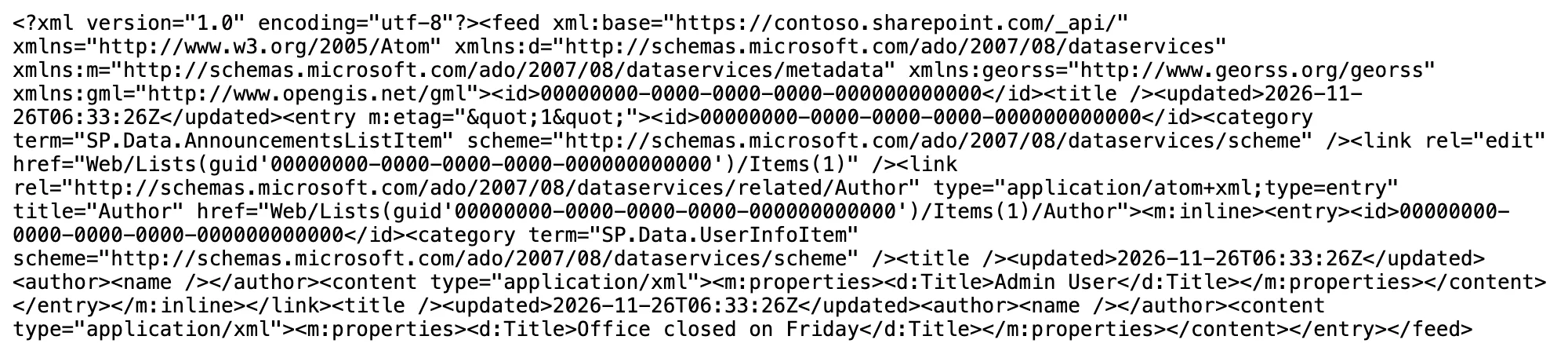
The item's entry holds two things:
| Part of the entry | Value | Where it came from |
|---|---|---|
link titled Author, with m:inline | d:Title Admin User | $expand=Author brought in the person, and Author/Title kept their name |
The item's own m:properties | d:Title Office closed on Friday | Title in $select |
The person is an SP.Data.UserInfoItem, an entry in the site's list of users.
Common Mistakes
| Mistake | What happens | Do this instead |
|---|---|---|
Naming Author/Title in $select without $expand=Author | Microsoft's article names the field in both options | Use both options |
Using the display name, Created By | Created By isn't the field's internal name | Use Author |
A second ? before $expand | Only one ? starts the query options | Join it with & |
Troubleshooting
| Symptom | Likely cause | Fix |
|---|---|---|
| The answer has no person's name | $expand or Author/Title is missing | Use both |
| An error about the field | The related field's name is wrong | Check its internal name |
| A sign-in page or an access error | The browser isn't signed in, or you can't open the list | Sign in to SharePoint in the same browser |
FAQ
Does this work for lookup columns I made?
Yes. Microsoft's own example, Products/Name, reads a field of a lookup column's related item, with the column's internal name in both options.
Can I expand more than one field?
Yes. Separate them with commas in both options. A request for a list's role assignments with $expand=Member,RoleDefinitionBindings returned both in one answer.
Is this safe to try on a real list?
Yes. Opening an address in the browser sends a GET request, which only reads.
Conclusion
Put the related field in $expand and the field you want from it in $select: …/items?$select=Title,Author/Title&$expand=Author returned the item's title, Office closed on Friday, and its creator's name, Admin User.
Additional Resources
- Use OData query operations in SharePoint REST requests:
$select,$expandand the other query options. - Working with lists and list items with REST: reading items with REST.
