How to Get an Access Token with MSAL React

Signing someone in is half the job. To call an API for them, a React app needs an access token for that API, and MSAL, Microsoft's sign-in library, gets it in one call. This guide shows the pattern Microsoft recommends, silent first and interactive only when needed, and a live run of where each token came from.
Syntax
try {
  const result = await instance.acquireTokenSilent({ scopes: [<scope>], account: <account> });
  // use result.accessToken
} catch (error) {
  if (error instanceof InteractionRequiredAuthError) {
    await instance.acquireTokenRedirect({ scopes: [<scope>], account: <account> });
  }
}
| Part | What to put there |
|---|---|
instance | The PublicClientApplication, which useMsal() returns in any component inside MsalProvider |
<scope> | The full scope of the API, such as api://<API client ID>/access_as_user. All scopes in one request must belong to the same API |
<account> | The signed-in account the token is for: accounts[0] from useMsal() when one person signs in |
result | An AuthenticationResult: accessToken, the scopes it grants, expiresOn and fromCache, among others |
InteractionRequiredAuthError | What MSAL throws when it can't get the token without the person, for example to consent or to sign in again |
MSAL's documentation describes the rule: Every time you need an access token you should call acquireTokenSilent and if this fails call an interactive API instead. The silent call will look for a valid token in the cache, and if it is close to expiring or does not exist, will automatically try to refresh it for you using the cached refresh token.
The Example
The example adds a Get an access token button to a Next.js app that already signs people in with MSAL React (How to Sign Users In to a Next.js App with MSAL React). The button asks for a token for an API registered as Dewiride Service Desk API, scope access_as_user, and shows what came back, never the token itself.
The app's registration lists the permission, and the API pre-authorizes the app, so nobody is asked to consent (How to Add an API Permission to an App Registration in Microsoft Entra ID, How to Pre-Authorize a Client Application for Your API in Microsoft Entra ID).
Prerequisites
- Your API's full scope, such as
api://<API client ID>/access_as_user, from the API's Expose an API page.
Step 1: Add the Scope Setting
Add the scope to .env.local, next to the sign-in settings:
NEXT_PUBLIC_ENTRA_CLIENT_ID=33333333-3333-3333-3333-333333333333
NEXT_PUBLIC_ENTRA_TENANT_ID=11111111-1111-1111-1111-111111111111
NEXT_PUBLIC_API_SCOPE=api://22222222-2222-2222-2222-222222222222/access_as_user
Like the IDs, the scope isn't a secret: it's in every token request the browser sends. Use your own API's scope. In app/account.tsx, read it once at the top of the file:
// The permission the access token is for: a scope your API exposes.
const apiScope = process.env.NEXT_PUBLIC_API_SCOPE ?? "";
Step 2: Write getAccessToken
Inside the component, below useMsal(), add the function that every call to your API will use:
// Returns an access token for the API: from MSAL's cache while it's valid,
// otherwise a new one, fetched silently. When Microsoft needs the user
// (to sign in again or to consent), sends them there and returns nothing.
async function getAccessToken(): Promise<AuthenticationResult | undefined> {
  try {
    return await instance.acquireTokenSilent({ scopes: [apiScope], account });
  } catch (error) {
    if (error instanceof InteractionRequiredAuthError) {
      await instance.acquireTokenRedirect({ scopes: [apiScope], account });
      return undefined;
    }
    throw error;
  }
}
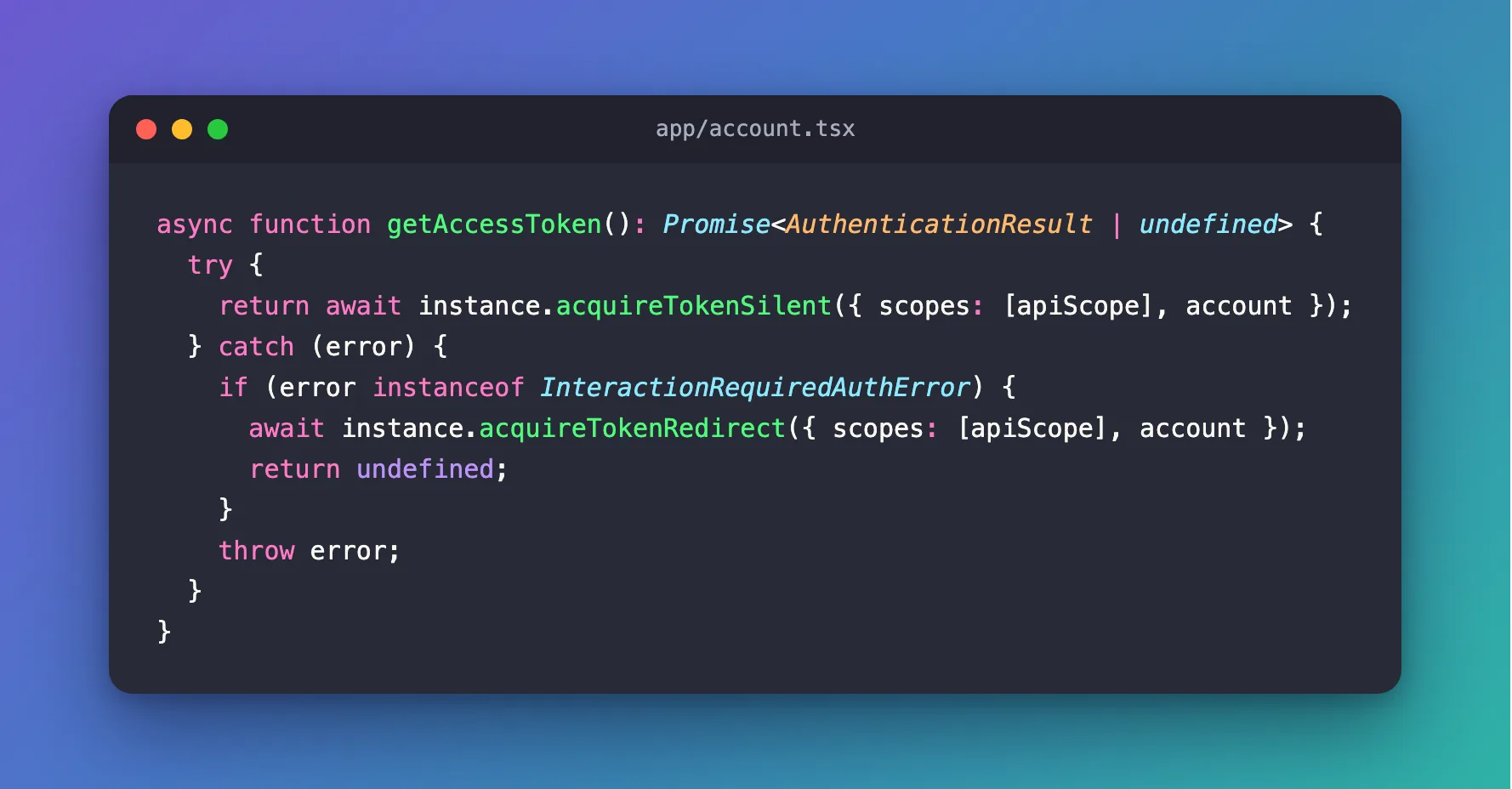
| Line | What it does |
|---|---|
acquireTokenSilent(…) | Returns a cached token while it's valid, or gets a new one with the refresh token, without the person seeing anything |
instanceof InteractionRequiredAuthError | Only this error means the person has to do something; anything else is a real failure |
acquireTokenRedirect(…) | Sends the page to Microsoft for that something, then back through your /redirect page |
return undefined | The page is leaving; the caller gets no token this time and tries again when the page comes back |
throw error | Network problems and other errors reach the caller instead of disappearing |
The fallback is a redirect rather than a popup on purpose: MSAL's best practices say that in Safari and on many mobile browsers, prefer acquireTokenRedirect as the interactive fallback from acquireTokenSilent for better reliability.
Step 3: Show What Came Back
The demo keeps the last result in state and shows three of its fields under a button. The complete file:
"use client";

import {
  type AuthenticationResult,
  InteractionRequiredAuthError,
  InteractionStatus,
} from "@azure/msal-browser";
import {
  AuthenticatedTemplate,
  UnauthenticatedTemplate,
  useMsal,
} from "@azure/msal-react";
import { useState } from "react";

// The permission the access token is for: a scope your API exposes.
const apiScope = process.env.NEXT_PUBLIC_API_SCOPE ?? "";

// Shows a Sign in button to visitors, and the account to signed-in users.
export function Account() {
  const { instance, accounts, inProgress } = useMsal();
  const account = accounts[0];
  const [token, setToken] = useState<AuthenticationResult>();

  // Returns an access token for the API: from MSAL's cache while it's valid,
  // otherwise a new one, fetched silently. When Microsoft needs the user
  // (to sign in again or to consent), sends them there and returns nothing.
  async function getAccessToken(): Promise<AuthenticationResult | undefined> {
    try {
      return await instance.acquireTokenSilent({ scopes: [apiScope], account });
    } catch (error) {
      if (error instanceof InteractionRequiredAuthError) {
        await instance.acquireTokenRedirect({ scopes: [apiScope], account });
        return undefined;
      }
      throw error;
    }
  }

  return (
    <>
      <UnauthenticatedTemplate>
        <p>You aren't signed in.</p>
        <button
          type="button"
          disabled={inProgress !== InteractionStatus.None}
          onClick={() => void instance.loginRedirect()}
        >
          Sign in
        </button>
      </UnauthenticatedTemplate>
      <AuthenticatedTemplate>
        <p>
          Signed in as <strong>{account?.name}</strong> ({account?.username})
        </p>
        <button
          type="button"
          onClick={async () => setToken(await getAccessToken())}
        >
          Get an access token
        </button>
        {token && (
          <dl>
            <dt>Scopes</dt>
            <dd>{token.scopes.join(" ")}</dd>
            <dt>Expires</dt>
            <dd>{token.expiresOn?.toLocaleTimeString()}</dd>
            <dt>From MSAL's cache</dt>
            <dd>{token.fromCache ? "Yes" : "No"}</dd>
          </dl>
        )}
      </AuthenticatedTemplate>
    </>
  );
}
scopes, expiresOn and fromCache are safe to show. token.accessToken is not: anyone who copies it can call the API as the signed-in person until it expires.
Step 4: Get a Token, Twice
Sign in, then select Get an access token:
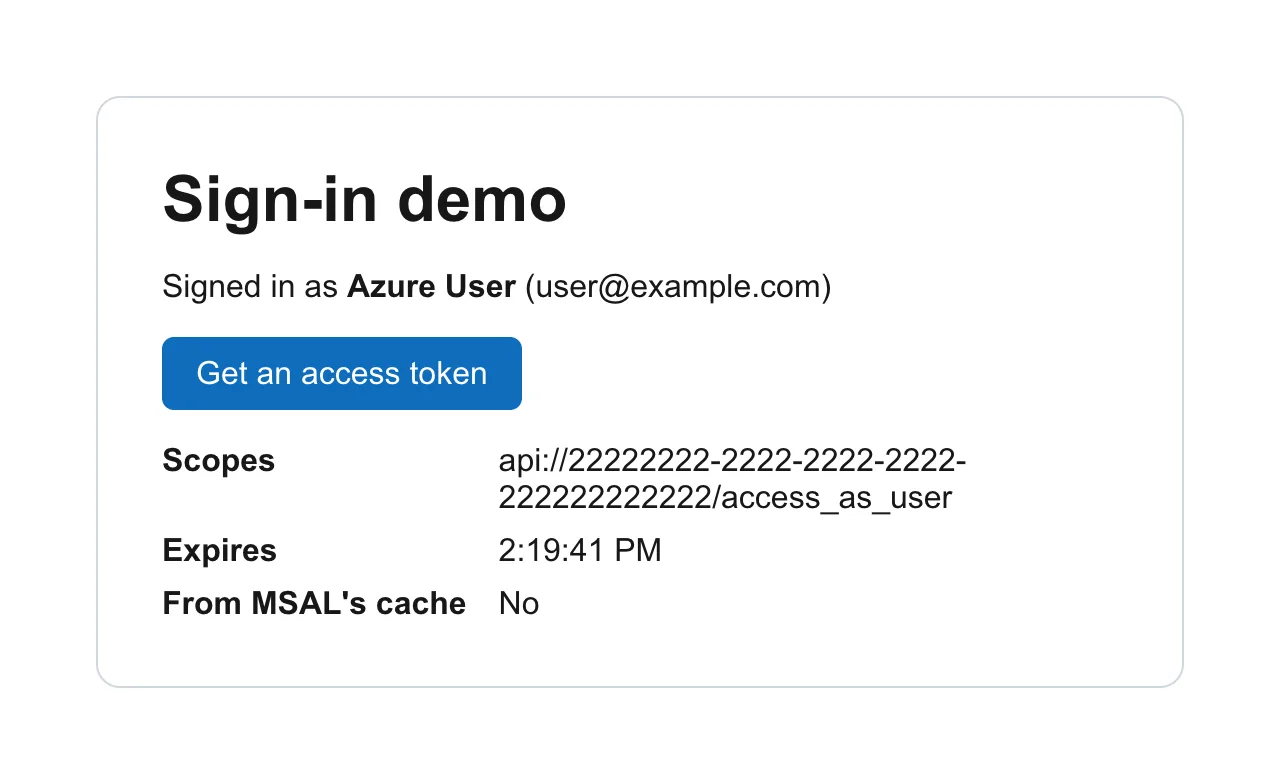
From MSAL's cache: No. Signing in had given MSAL tokens for the sign-in only, none for the API. The browser made exactly one request to Microsoft for this click, a POST to login.microsoftonline.com/<tenant ID>/oauth2/v2.0/token: MSAL used the refresh token from the sign-in to get an access token for the API. Microsoft's documentation explains why that works: Refresh tokens are also used to acquire extra access tokens for other resources.
Select it again:
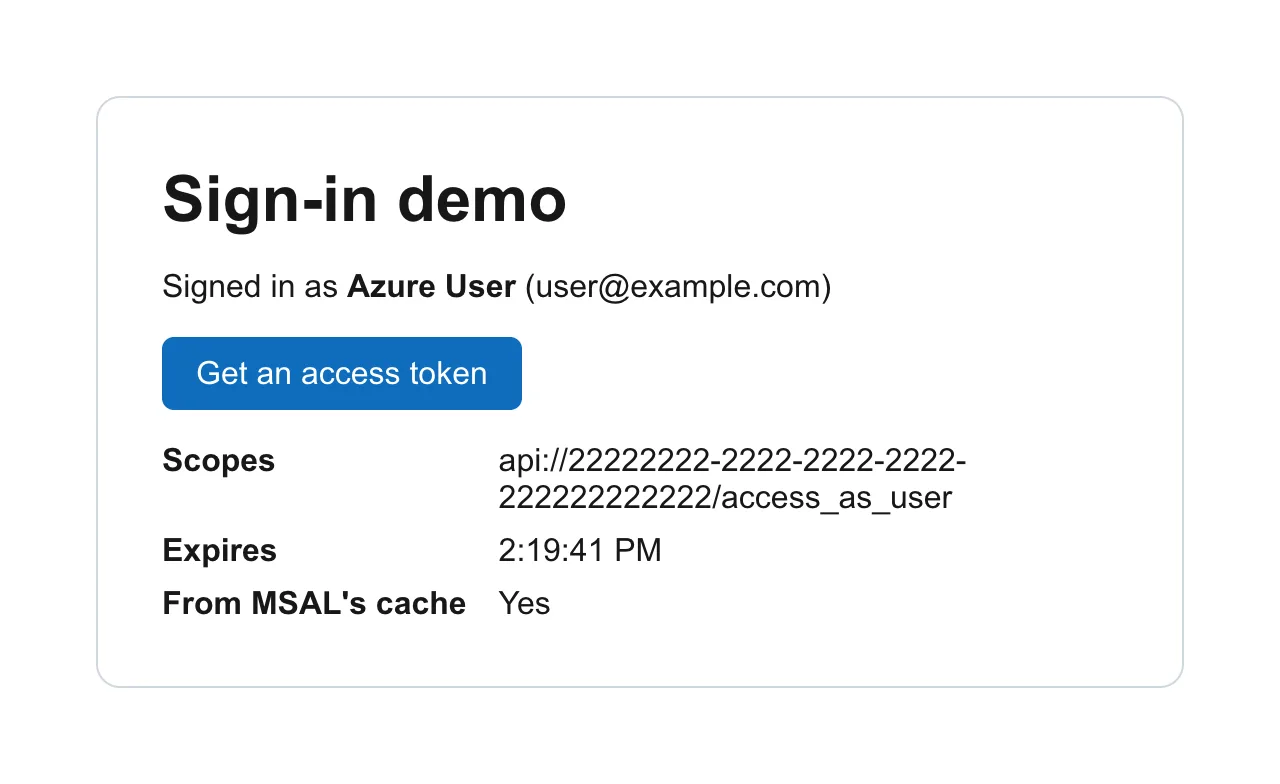
From MSAL's cache: Yes, with the same expiry, and the browser sent no request to Microsoft at all. Calling getAccessToken() before every API request costs nothing while the token is valid. Microsoft gives access tokens a lifetime of 60 to 90 minutes; this one, fetched a few minutes after 1 PM UTC, expired at 2:19 PM.
Step 5: Send It to Your API
MSAL's documentation shows the last step: include it in the Authorization header as a bearer token for the request to the resource you obtained the token for:
const result = await getAccessToken();
if (result) {
  const response = await fetch("https://your-api.example.com/hello", {
    headers: { Authorization: `Bearer ${result.accessToken}` },
  });
}
The chat app in the Microsoft Agent Framework series does this with every message it sends to its agent (Part 9: Add Microsoft Entra ID Sign-In to the Next.js Chat App). When the browser talks to your own Next.js server instead, the server passes the header on to the API (How to Forward the Authorization Header from a Next.js Route Handler).
Common Mistakes
| Mistake | What happens | Do this instead |
|---|---|---|
Calling acquireTokenRedirect or a popup first | The page goes to Microsoft for every token | acquireTokenSilent first; interactive only on InteractionRequiredAuthError |
| Treating every error as "sign in again" | Network failures send people to Microsoft for nothing | Check instanceof InteractionRequiredAuthError, and throw the rest |
| Asking for scopes of two APIs in one request | MSAL's documentation: You can only request access tokens for one resource at a time | One request per API |
| Keeping the token in your own storage | A second copy to protect, and it goes stale | Ask MSAL each time; its cache already keeps the token |
Showing or logging accessToken | Anyone who sees it can use it | Show only scopes, expiresOn, fromCache |
Troubleshooting
| Symptom | Likely cause | Fix |
|---|---|---|
acquireTokenSilent throws InteractionRequiredAuthError | MSAL needs the person: to consent to the scope, or to sign in again | Let the redirect run. To skip consent for your own app, pre-authorize it on the API |
| A redirect to Microsoft about once a day | Refresh tokens for single-page apps last 24 hours, by Microsoft's documentation | Expected; the person usually just sees the page reload |
| The token's audience isn't your API | The scope doesn't start with your API's Application ID URI | Use the full scope from Expose an API |
From MSAL's cache stays Yes for an hour | MSAL returns the cached token while it's valid | Expected |
FAQ
Do I need to check the token's expiry myself?
No. acquireTokenSilent checks it and gets a new token when the cached one is close to expiring. Call it before every request.
Why does the first call go to Microsoft when I'm already signed in?
Signing in gave MSAL an ID token and a refresh token, but no access token for your API. The first acquireTokenSilent for the API's scope redeems the refresh token for one, silently.
Where does MSAL keep the token?
In its cache, in the browser's sessionStorage unless you set cacheLocation otherwise. Closing the tab clears it.
Conclusion
To call an API from a React app, get the token with acquireTokenSilent({ scopes: [<API scope>], account }) before every request, fall back to acquireTokenRedirect only on InteractionRequiredAuthError, and send result.accessToken in an Authorization: Bearer header. The live run showed the first call redeeming the refresh token with one request to Microsoft, and the second answered from MSAL's cache with none.
Additional Resources
- MSAL Browser: acquiring and using an access token — the silent-then-interactive rule and best practices.
- Refresh tokens in the Microsoft identity platform — lifetimes, including 24 hours for single-page apps.
- Access tokens in the Microsoft identity platform — what's inside and how long it lasts.
