How to Get a User's Direct Reports in Power Apps (DirectReportsV2)

To show a manager their team, you need the people who report to them. The Office 365 Users connector's Get direct reports (V2), Office365Users.DirectReportsV2(), returns them from Microsoft 365. It has one quirk that trips everyone up: the people are inside a .value table. Here's how to call it, shape the list, and turn it into a simple "is this person a manager?" check.
Prerequisites
- The Office 365 Users data source in your app. See Part 3 of the Career Development Plan series.
- Managers set in Microsoft 365. In the example's demo organization, the admin manages Olivia Bennett, and Daniel Brooks manages Aisha Khan and Leo Martin.
Step 1: Call It and Use .value
DirectReportsV2 takes a user principal name or Entra object ID, and returns a record whose value column holds the table of people. To list their names, the example joins them with Concat (see How to Join Table Values into Text in Power Apps with Concat):
Concat(Office365Users.DirectReportsV2(MyProfile.id).value, displayName, ", ")
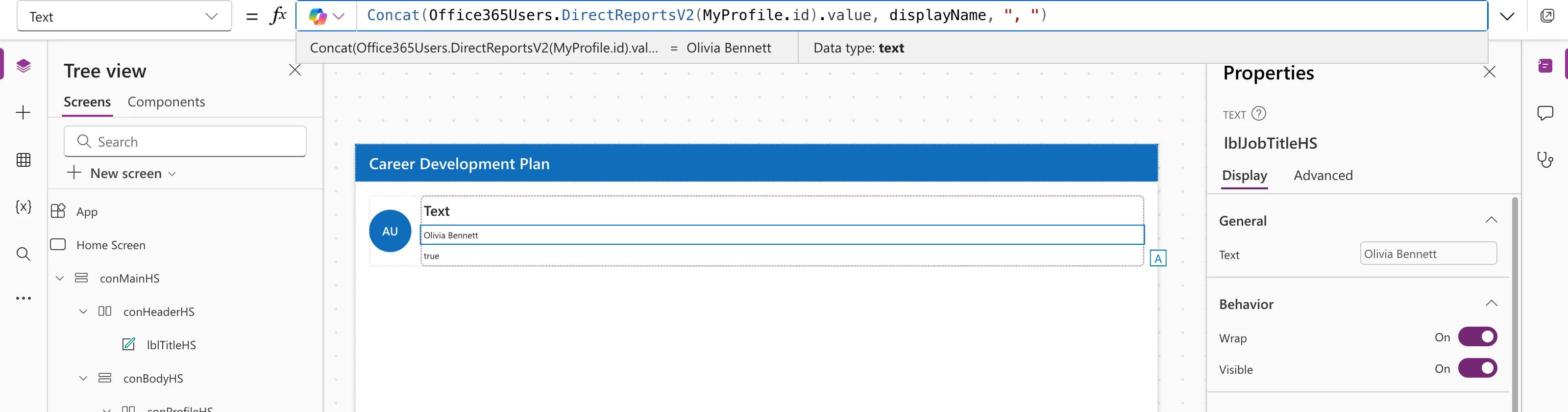
For someone with more reports:
Concat(Office365Users.DirectReportsV2("daniel.brooks@example.com").value, displayName, ", ")
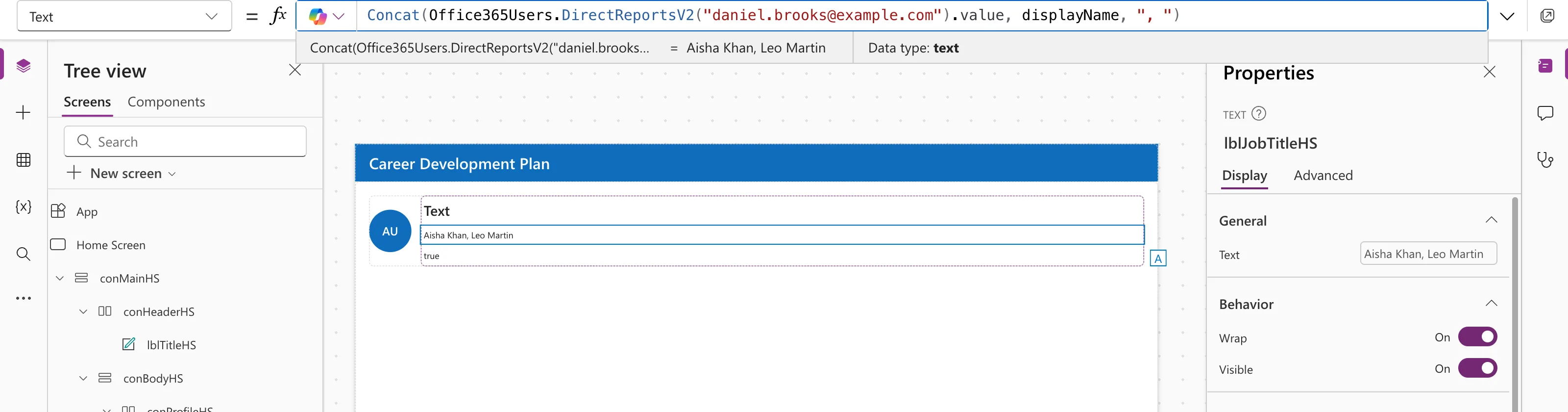
Forget .value and the formula breaks:

Studio reported The function 'Concat' has some invalid arguments and Invalid argument type: Concat needs a table, and the call returns a record.
Step 2: Select Fields, Keep Enabled Accounts, Sort by Name
The example keeps the team in a named formula:
MyDirectReports = Sort(
    Filter(
        Office365Users.DirectReportsV2(
            MyProfile.id,
            {'$select': "id,displayName,mail,userPrincipalName,jobTitle,accountEnabled"}
        ).value,
        accountEnabled
    ),
    displayName
);
'$select'asks only for the fields the app uses.accountEnabledhas to be selected for the filter to work.Filter(…, accountEnabled)keeps people whose accounts are enabled, so someone whose sign-in is blocked, such as a leaver, drops off the list. See How to Filter a Table in Power Apps with Filter.Sort(…, displayName)puts the list in name order. See How to Sort a Table in Power Apps with Sort.
Part 10 of the series will test the leaver case with a blocked account.
Step 3: Is This Person a Manager?
A manager is someone with at least one direct report:
IsManager = !IsEmpty(MyDirectReports);
In the example, it's true for the admin. Use it to show manager-only parts of the app; see How to Show or Hide a Control in Power Apps with Visible, IsBlank vs IsEmpty in Power Apps and How to Use Not in Power Apps.
Common Mistakes
| Mistake | What happens | Do this instead |
|---|---|---|
Forgetting .value | Invalid argument type errors | DirectReportsV2(…).value |
Filtering on accountEnabled without selecting it | Nobody passes the filter | Include it in '$select' |
| Using the deprecated DirectReports (V1) | It may stop working | Use DirectReportsV2 |
Troubleshooting
| Symptom | Likely cause | Fix |
|---|---|---|
| An empty list for a manager | Reports not set in Microsoft 365, or filtered out | Check the managers in Entra; check '$select' |
| 403 Forbidden | Default fields blocked | Add '$select' |
| A leaver still appears | Their account is still enabled | Block sign-in, or remove their manager |
FAQ
Is there a limit on how many come back?
By default, all of them. The Top parameter ('$top') can limit the number.
Can I show the team in a gallery?
Yes. Set the gallery's Items to MyDirectReports. Part 7 of the series does this, with a column added for responses waiting for review.
Does it include indirect reports?
No. Only people who report directly to that person.
Conclusion
Office365Users.DirectReportsV2(id, {'$select': "…"}).value is a table of a person's direct reports. Select the fields you need, filter on accountEnabled, sort by displayName, and !IsEmpty(…) tells you whether someone is a manager.
Additional Resources
- Office 365 Users connector: Get direct reports (V2): parameters,
value, and known issues. - Connect to Office 365 Users from Power Apps: examples with galleries.
