How to Get a Claude API Key (Step-by-Step with Screenshots)

Every app that talks to Claude, from a ten-line script to a full AI agent, needs an API key. Getting one takes about two minutes in the Claude Console. This guide shows every screen, explains each setting, and covers what most guides skip: storing the key safely, paying for usage and replacing a key later.
What a Claude API Key Is
The Claude API lets your own code send a message to Claude and get the answer back as data, instead of typing into a chat window. Every request your code sends must carry an API key: a long secret string that starts with sk-ant-. The key tells Anthropic two things:
- who is calling, so only you can use your account, and
- who pays, because API usage is charged per request.
Treat the key like a password to your bank card. Anyone who has it can send requests that you pay for.
Keys are created in the Claude Console at platform.claude.com, Anthropic's site for developers. That is a different place from the Claude chat app you may already use:
| Claude app (claude.ai) | Claude API (Claude Console) | |
|---|---|---|
| What it is | Chat with Claude in a browser, desktop or mobile app | Call Claude from your own code |
| How you pay | A monthly plan (Free, Pro, Max, Team, Enterprise) | Pay as you go, per token used |
| Where you sign in | claude.ai | platform.claude.com |
A paid Claude plan does not cover general API usage. Anthropic bills the API separately through the Console. Max and Team plans include some monthly API credits; see Anthropic's article Why is Claude API usage billed separately from my paid Claude plan? for the details.
Before You Start
You need:
- An email address or a Google account, to sign in to the Claude Console.
- About five minutes.
- A payment card, to keep using the API. Anthropic's pricing page says new users get a small amount of free credits to test the API. After that, you add credits on the Console's Billing page (covered later in this guide).
Creating the key itself is free. You only pay for the requests you make with it.
Step 1: Sign In to the Claude Console
Go to platform.claude.com. The same page signs you in or creates a new account, so choose whichever method you prefer: Continue with Google, your email address, or Continue with SSO if your company uses single sign-on.
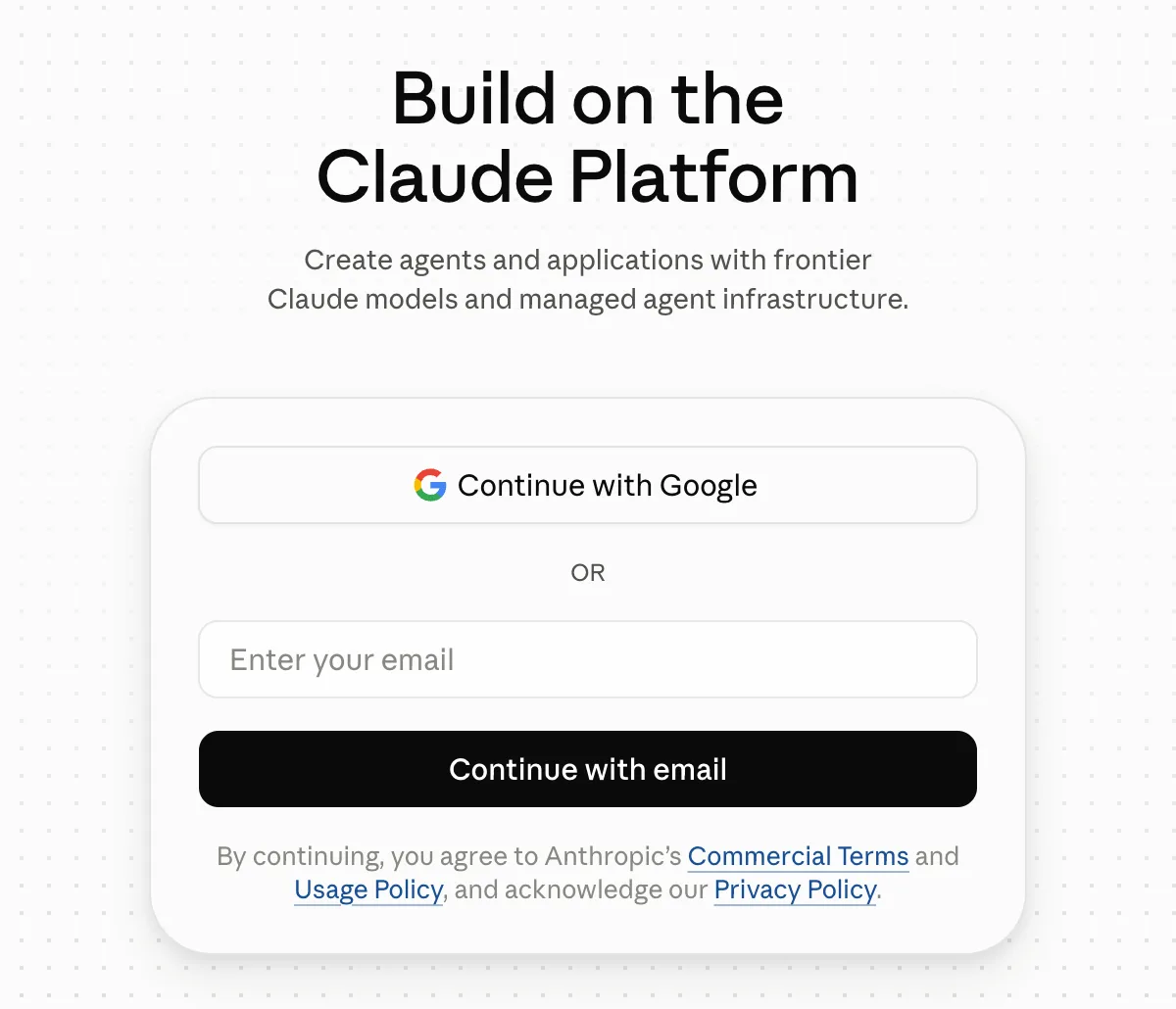
Follow the prompts for the method you choose. When you are signed in, the Console opens.
For a company project, use your work email, so the account, its keys and its bills belong to the business rather than to a personal account.
Step 2: Open the API Keys Page
After signing in you land on the Dashboard. Select API keys in the left-hand menu. You can also go straight to platform.claude.com/settings/keys.
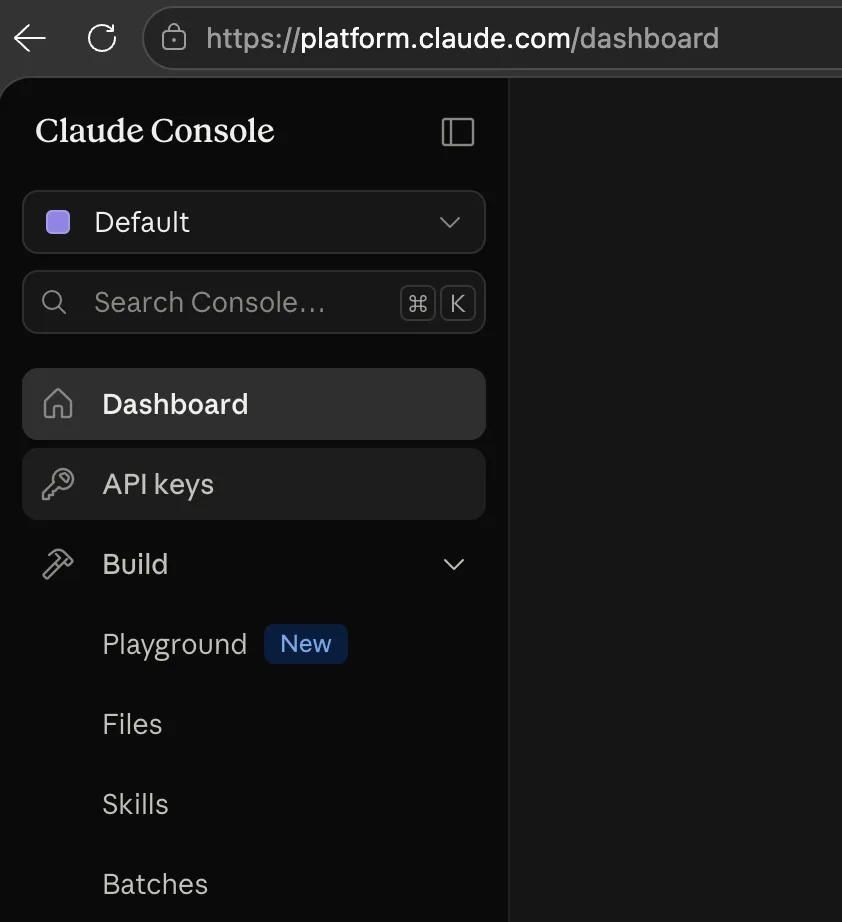
The box at the top of the menu, here showing Default, is the workspace selector. A workspace is a folder inside your account that groups API keys, usage and limits. Every account starts with one called Default, and that is all you need to begin.
The API keys page lists the keys in the selected workspace. On a new account the list is empty and the counter shows 0:
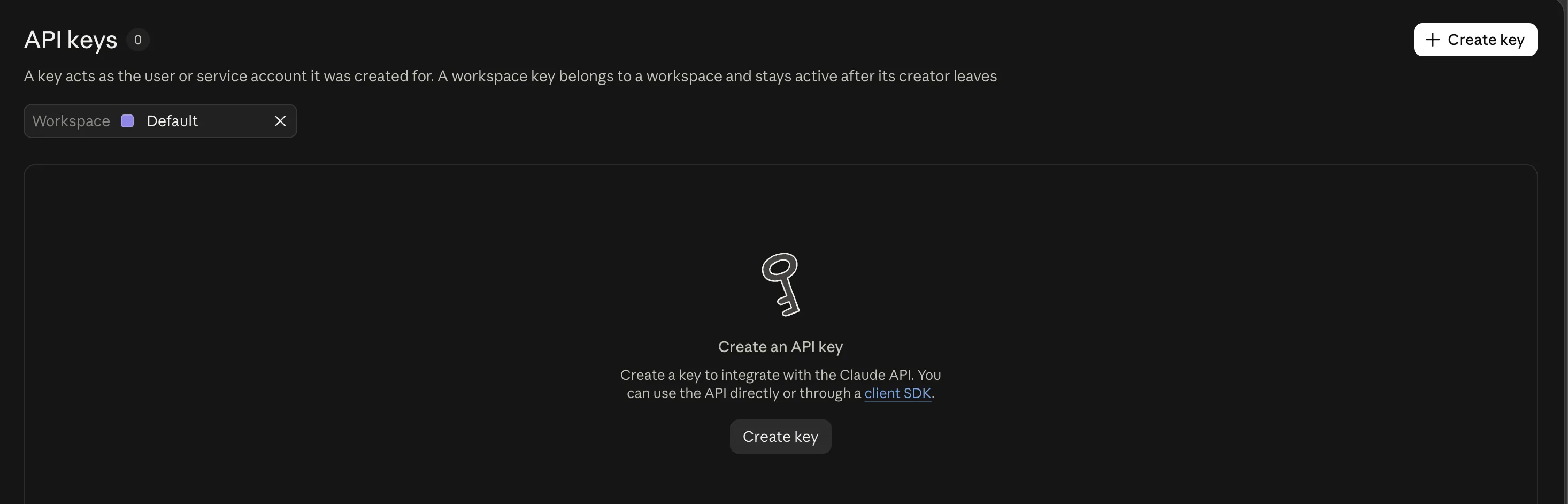
Select Create key.
Step 3: Choose an API Key Instead of Identity Federation
Before the form opens, the Console may suggest a keyless option first:
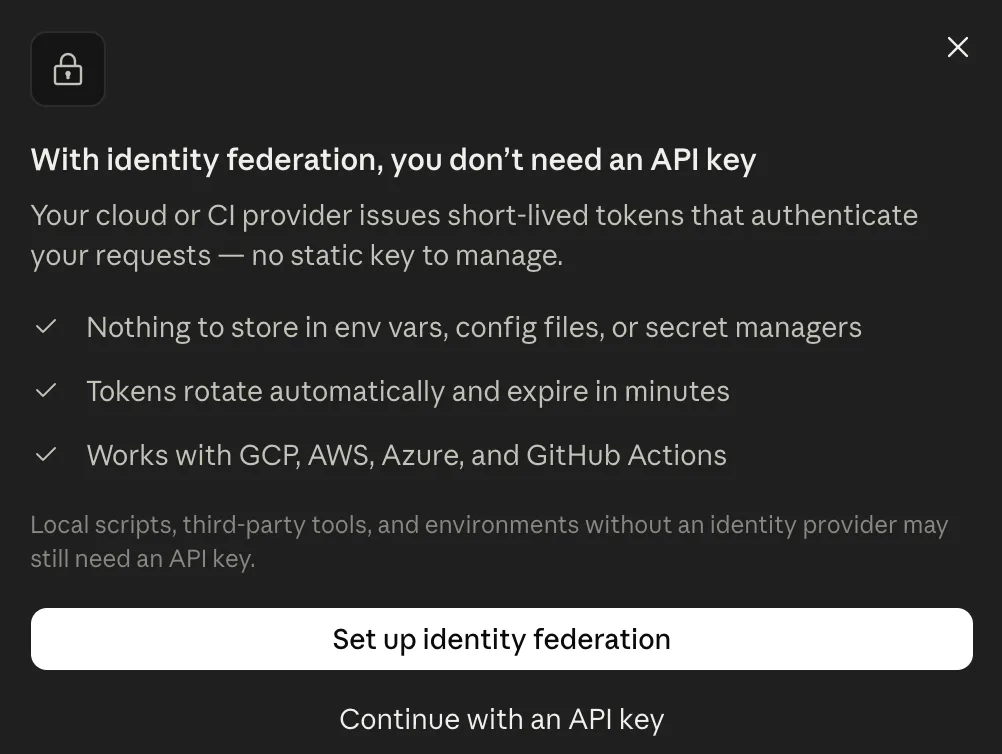
Identity federation (Workload Identity Federation) lets an app that already runs on a cloud platform (AWS, Google Cloud, Azure, GitHub Actions or Kubernetes) prove who it is with a short-lived token from that platform. Nothing secret is stored, and the tokens expire within minutes. It is the better choice for production workloads hosted on those platforms.
For code that runs on your own computer, such as a script, a tutorial project or local development, you need an API key. As the dialog itself says, "local scripts, third-party tools, and environments without an identity provider may still need an API key". Select Continue with an API key.
Step 4: Fill In the Key Details
The Create API key form has four settings:
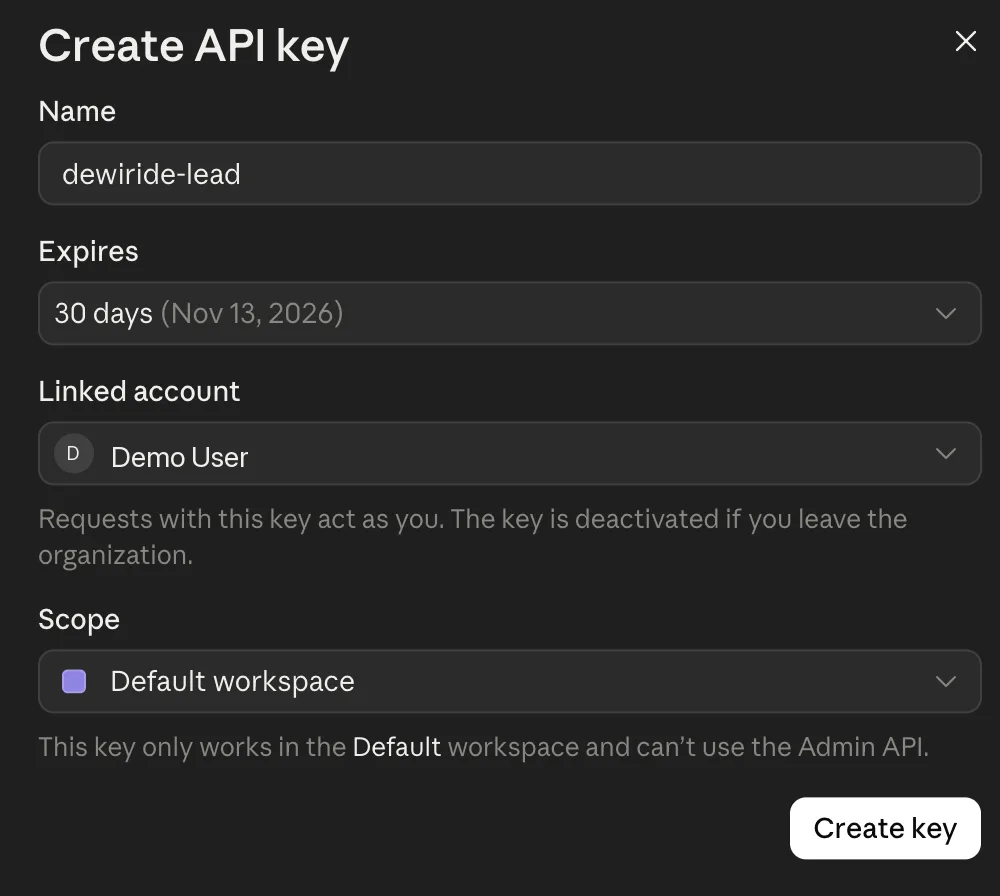
| Setting | What it means | What to choose |
|---|---|---|
| Name | A label so you can recognize the key later. Only you see it. | The app that will use it, for example dewiride-lead for a lead qualification app |
| Expires | When the key stops working on its own. The choices are 3 hours, 1 day, 7 days, 30 days, a custom duration, or Never. | The shortest period that suits you. 30 days is a good default for development. |
| Linked account | Who the key acts as. Linked to you, it is a personal key: requests act as you, and the key stops working if you leave the organization. | Yourself, for your own development |
| Scope | Which workspace the key works in. | Default workspace. The form confirms the key "only works in the Default workspace and can't use the Admin API". |
Select Create key.
Anthropic offers three kinds of key:
- A personal key acts as you. Use it for your own development and scripts.
- A service account key belongs to a non-human identity that an organization admin creates in Settings → Service accounts. Use it for anything shared, such as a production server or a CI pipeline, so it keeps working when people come and go.
- Older workspace keys belong to a workspace and have no owner. Anthropic now treats them as legacy.
For everything on this blog, a personal key is the right choice.
Step 5: Copy the Key and Store It Safely
The Console shows the full key once:
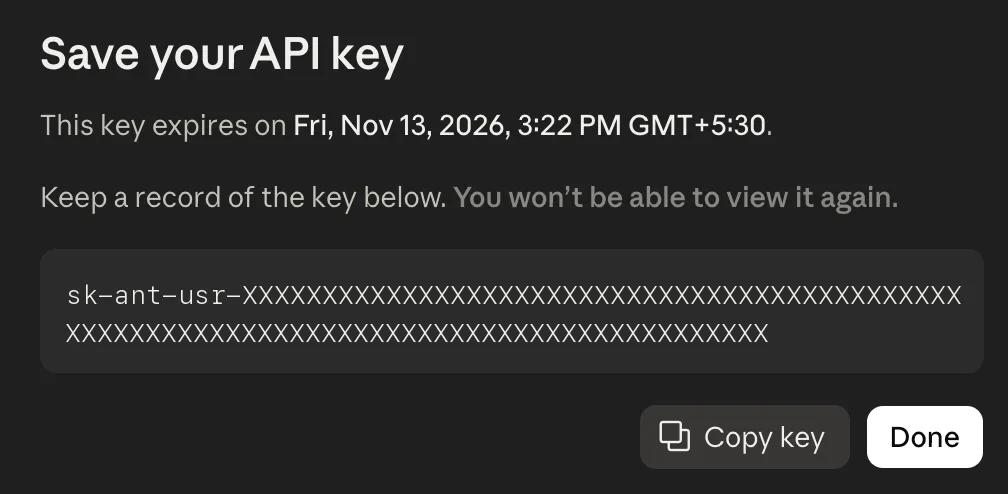
- Select Copy key.
- Paste it straight into the place you will keep it. A password manager is ideal. For a project on your computer, the project's
.envfile works too (see the next step). - Only then, select Done.
As the dialog warns, "You won't be able to view it again". If you close it before copying, the key is lost: create a new one, then delete the one you could not copy.
The real key in the screenshot above has been replaced with X characters. A real key is much longer and starts with sk-ant-. Personal keys like this one start with sk-ant-usr-.
Never paste your API key into a chat (including AI assistants), an email, a screenshot, a public forum or a support ticket. Never write it into your source code or commit it to Git. If a key ever leaks, delete it in the Console straight away and create a new one.
Step 6: Give the Key to Your Code
The official Claude SDKs (Python, TypeScript, Java, Go, C#, PHP and Ruby) look for the key in an environment variable called ANTHROPIC_API_KEY. An environment variable is a named value your terminal hands to every program it starts. Your code never has to contain the key.
You can set it in two ways.
Option A: In the Terminal, for the Current Session
Replace sk-ant-your-key-here with your real key, then run the command for your system:
- macOS / Linux
- Windows (PowerShell)
export ANTHROPIC_API_KEY="sk-ant-your-key-here"
$env:ANTHROPIC_API_KEY = "sk-ant-your-key-here"
This lasts only until you close that terminal window. It is handy for a quick test, but you would have to repeat it every time.
Option B: In a .env File in Your Project
Most projects keep settings in a file named .env in the project folder. It holds one NAME=value setting per line:
ANTHROPIC_API_KEY=sk-ant-your-key-here
The app loads the file when it starts. In Python this is done by libraries such as pydantic-settings or python-dotenv. Because the file holds a secret, it must never reach Git. Add it to your project's .gitignore file:
.env
Commit a copy named .env.example that lists every setting with an empty or fake value. Other developers then know which settings to fill in, and the real key never leaves your computer.
Add Credits and Set a Spend Limit
API usage is paid in advance with credits. A new account starts with a small amount of free credit. When the balance runs out, requests are refused until you add more. Credits and limits live on the Billing page at platform.claude.com/settings/billing.
Two kinds of limit protect you from a surprise bill:
- Your tier's monthly spend cap. Every organization is on a usage tier. Anthropic lists a cap of $500 a month for Start, $1,000 for Build and $200,000 for Scale. Your tier and its rate limits appear on the Rate limits page.
- Your own spend limit. On the Billing page, in the Spend limits section, select Set limit (or Adjust limit if one is already set) and enter a monthly amount below your tier's cap. Setting one before you write any code is good practice. A bug that loops forever then costs you a few dollars, not a few hundred.
You pay per token. A token is a chunk of text of roughly three-quarters of a word, and input (what you send) and output (what Claude writes) have separate prices. As of October 2026, Anthropic's pricing page lists these prices per million tokens:
| Model | Input | Output |
|---|---|---|
| Claude Opus 5.5 | $4 | $20 |
| Claude Sonnet 5.5 | $2 | $10 |
| Claude Haiku 5.5 | $0.10 | $0.50 |
On Claude Opus 5.5, a paragraph of text in and a paragraph out (about 200 tokens each way) costs roughly half a cent. The smaller models cost less.
Rotate, Disable or Delete a Key
Keys do not need to live forever, and short-lived keys are safer. On the API keys page, each key's menu offers:
- Disable pauses the key. It can be turned back on with Re-enable.
- Delete removes the key for good. An expired key can only be deleted.
To rotate a key (swap it for a fresh one without downtime):
- Create a new key, as in Steps 2 to 5.
- Put the new key wherever your app reads it, for example your
.envfile, and restart the app. - Check the app works, then delete the old key.
Rotate a key when it is about to expire, when someone who had it leaves the project, or whenever you think it may have leaked. Anthropic emails you 7 days before a key expires if the key was created to last at least 14 days, and 1 day before if it was created to last at least 7 days.
Common Mistakes
| Mistake | What happens | How to avoid it |
|---|---|---|
| Expecting a Claude Pro or Max plan to cover API calls | API calls fail or are billed separately | Treat the Claude app and the Claude API as separate products, and add API credits in the Console |
| Selecting Done before copying the key | The key can never be shown again | Copy first, paste it somewhere safe, then select Done |
| Pasting the key into source code | Anyone who sees the code can spend your credits | Read it from ANTHROPIC_API_KEY or a .env file |
Committing .env to Git | The key is published with your code | Add .env to .gitignore before your first commit |
| Sharing one personal key with a team or a server | The app stops working when that person leaves | Give each developer their own key, and use a service account key for shared systems |
| Setting the variable in one terminal and running the app in another | The SDK cannot find the key | Use a .env file, or set the variable in the same terminal that runs the app |
Troubleshooting
| Problem | Likely cause | Fix |
|---|---|---|
| Create key is greyed out | Your role in the organization is not allowed to create keys | Ask an organization admin to change your role, or to create the key for you |
401 authentication_error | The key is mistyped, disabled, deleted or expired | Check you pasted the whole key with no spaces or quotes. If it is expired or deleted, create a new one. |
Python says Could not resolve authentication method. Expected one of api_key, auth_token, or credentials to be set. | The SDK found no key at all | Set ANTHROPIC_API_KEY, or load your .env file before creating the client |
400 invalid_request_error saying you reached your specified API usage limits | Usage hit the spend limit you set yourself | Raise or remove your spend limit on the Billing page |
429 rate_limit_error with enforced_spend_limit_reached | Your organization reached its tier's monthly spend cap | Wait until the 1st of next month (00:00 UTC), or use Request tier increase on the Rate limits page |
| A billing error, or requests refused with no credits left | The credit balance is used up | Add credits on the Billing page |
Frequently Asked Questions
Is the Claude API free?
Not beyond a trial amount. Anthropic gives new users a small amount of free credit to test the API. After that you pay per token, from credits you add in the Console. Creating API keys costs nothing.
Does my Claude Pro subscription include an API key?
No. The Claude app plans and the Claude API are separate products with separate billing. Max and Team plans include some monthly API credits, but you still create keys and manage API usage in the Claude Console.
Can I see my API key again after I close the dialog?
No. The Console shows the full key only once. If you lose it, create a new key and delete the old one.
How many API keys should I create?
One per app, and per environment where it matters (for example, separate keys for development and production). Then you can see each app's usage and replace one key without breaking the others.
What does the sk-ant-usr- prefix mean?
Every key starts with sk-ant-. In our tests, a personal key created from the API keys page started with sk-ant-usr-. Anthropic's documentation shows sk-ant-api03- in its examples. Either way, it is still a secret.
What is the Default workspace?
A container for keys, usage and limits that every account has. You can create more workspaces later, for example one per client or per environment, and give each its own limits. Note that you cannot set custom limits on the Default workspace itself.
Conclusion
Getting a Claude API key comes down to five moves:
- Sign in at platform.claude.com.
- Open API keys and select Create key.
- Choose Continue with an API key.
- Name the key, pick an expiry, link it to yourself and select Create key.
- Copy the key, which you see only once.
Keep it out of your code with an environment variable or a .env file, set a spend limit, and rotate it before it expires.
The key is the first thing you need for Build an AI Lead Qualification Agent with Claude and Python — Part 1: Overview, Architecture and Your Claude API Key. That series uses it to turn raw sales inquiries into structured, prioritized leads.
Additional Resources
- Get your Claude API key: Anthropic's own guide to key types and creating keys.
- Authentication: API keys, key expiration and Workload Identity Federation in depth.
- Rate limits: usage tiers, spend caps, setting your own spend limit and requesting higher limits.
- Pricing: current prices for every model, prompt caching and batch processing.
- Get started with Claude: the official quickstart, making your first API call in several languages.
- Why is Claude API usage billed separately from my paid Claude plan?: how Claude app plans and API billing relate.
