How to Format a Date in Power Automate with formatDateTime

Flows often need a date in a particular form: a year and month to match a column, a long date for an email, a time on its own. formatDateTime() takes a date or time and writes it in the form you give it.
Syntax
formatDateTime('<timestamp>', '<format>', '<locale>')
From Microsoft's functions reference:
<timestamp>(required): the date or time to format, as text. A token from an earlier step, such as a date input, works too.<format>(optional): either a single standard format specifier, or a custom pattern made of placeholders. Without it, the result iso, the ISO 8601 form, such as 2018-03-15T00:00:00.0000000.<locale>(optional): the language for month and day names, such asfr-fr. Without it,en-us.
The custom placeholders are .NET's (Custom date and time format strings). The ones you'll use most:
| Placeholder | Writes | Example for 1 November 2026, 18:05 |
|---|---|---|
yyyy | The year, four digits | 2026 |
MM | The month, two digits | 11 |
MMMM | The month's name | November |
dd | The day, two digits | 01 |
dddd | The day's name | Sunday |
HH | The hour, 24-hour clock | 18 |
mm | The minute | 05 |
Capital MM is the month and small mm is the minute. Anything else in the pattern, such as - or /, is copied as it is.
The example is Get Overtime Report, a flow of the Overtime Timesheet app. Its trigger gets any day in a month, like 2026-11-01, and the flow needs the month as 2026-11: the form of the WorkMonth column it filters on.
Step 1: Write the Expression
In the field, type / and choose Insert expression, then enter the expression and select Add (How to Add an Expression in Power Automate):
formatDateTime(triggerBody()?['date'], 'yyyy-MM')
triggerBody()?['date']is the date the app sent, 2026-11-01.'yyyy-MM'writes its year, a hyphen and its month: 2026-11.
If the editor says This expression has a problem after the first Add, select Add again (Fixed: "This Expression Has a Problem" for a Valid Expression in Power Automate).
Step 2: Put Text Around It If Needed
The expression becomes a token, and you can type around it. The example compares WorkMonth, a text column, so the month goes between single quotes, followed by the rest of the filter:
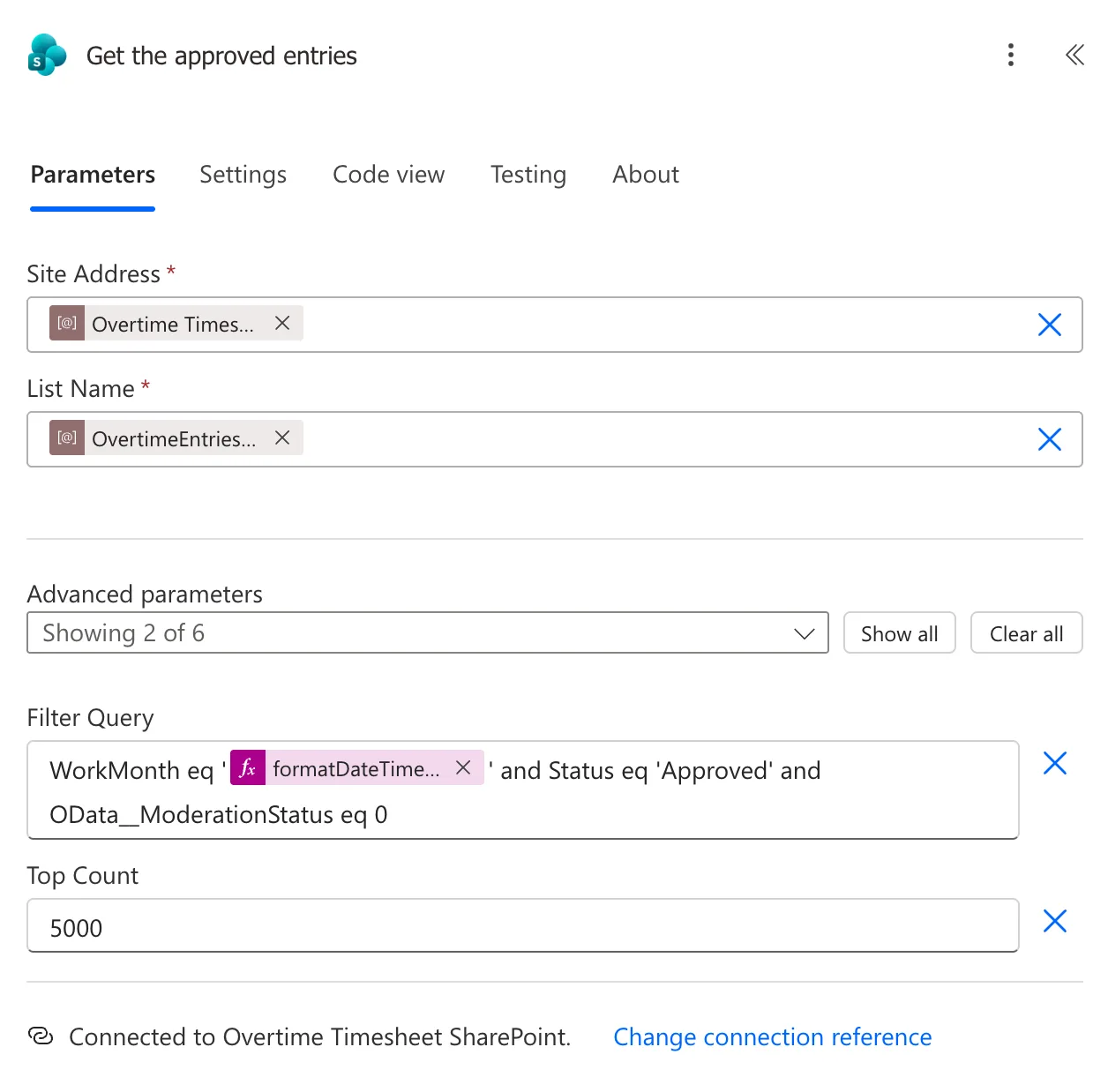
In Code view, the token appears as @{formatDateTime(triggerBody()?['date'], 'yyyy-MM')} inside the text.
The Result
In a run for November, the filter that Get items sent had 2026-11 in place of the token:

Common Mistakes
| Mistake | What happens | Do this instead |
|---|---|---|
'yyyy-mm' for a year and month | mm is minutes, so November becomes the minute | 'yyyy-MM' |
| Leaving out the format | You get the full ISO 8601 date and time | Give the pattern you need |
| Formatting a UTC time for people in another time zone | The time is UTC, hours off for them | convertFromUtc() first (How to Convert UTC to Local Time in Power Automate with convertFromUtc) |
| Typing the expression into the field as text | The field gets the words, not the result | Insert expression |
Troubleshooting
| Symptom | Likely cause | Fix |
|---|---|---|
| A number like 05 where the month should be | mm (minutes) used for the month | MM |
| Month names in English when you want another language | No locale given | Add a locale, such as 'fr-fr' |
| This expression has a problem | The editor's check ran before it finished loading | Select Add again |
| The run fails on the expression | The timestamp isn't a date | Check what the token holds in the run |
FAQ
Can it format the current date?
Yes: formatDateTime(utcNow(), 'yyyy-MM-dd') gives today's date in UTC. Microsoft's Customize or format date and time values in a flow has more examples.
Does Power Apps use the same placeholders?
No. Power Apps' Text function uses mm for the month in a date pattern such as "yyyy-mm-dd" (How to Format a Date in Power Apps with Text). In Power Automate, the month is MM.
Is the result text or a date?
Text. To compare it with a date column, give the column's own format, such as yyyy-MM-dd.
Conclusion
formatDateTime(timestamp, format) writes a date or time in the form you choose. Use MM for months and mm for minutes; here, 'yyyy-MM' turned 2026-11-01 into 2026-11 for a filter.
Additional Resources
- Reference guide to functions in expressions: formatDateTime
- Custom date and time format strings
- Customize or format date and time values in a flow
