How to Format a Date in Power Apps with Text

A date from a data source isn't ready to read. Text turns it into words, either with a ready-made format that follows each person's language, or with your own pattern.
Syntax
Text( Date, DateTimeFormat.LongDate )
Text( Date, "dd mmm yyyy" )
Microsoft recommends the DateTimeFormat formats for dates and times, because they "automatically adjust to each user's language and region" (Text function).
Prerequisites
- A date to format, for example a SharePoint Date and Time column.
- A Text control to show it (How to Add a Text Control in Power Apps).
To format numbers instead of dates, see Convert Number or Integer to Text or String using Power Apps.
Example: When a Response Was Sent
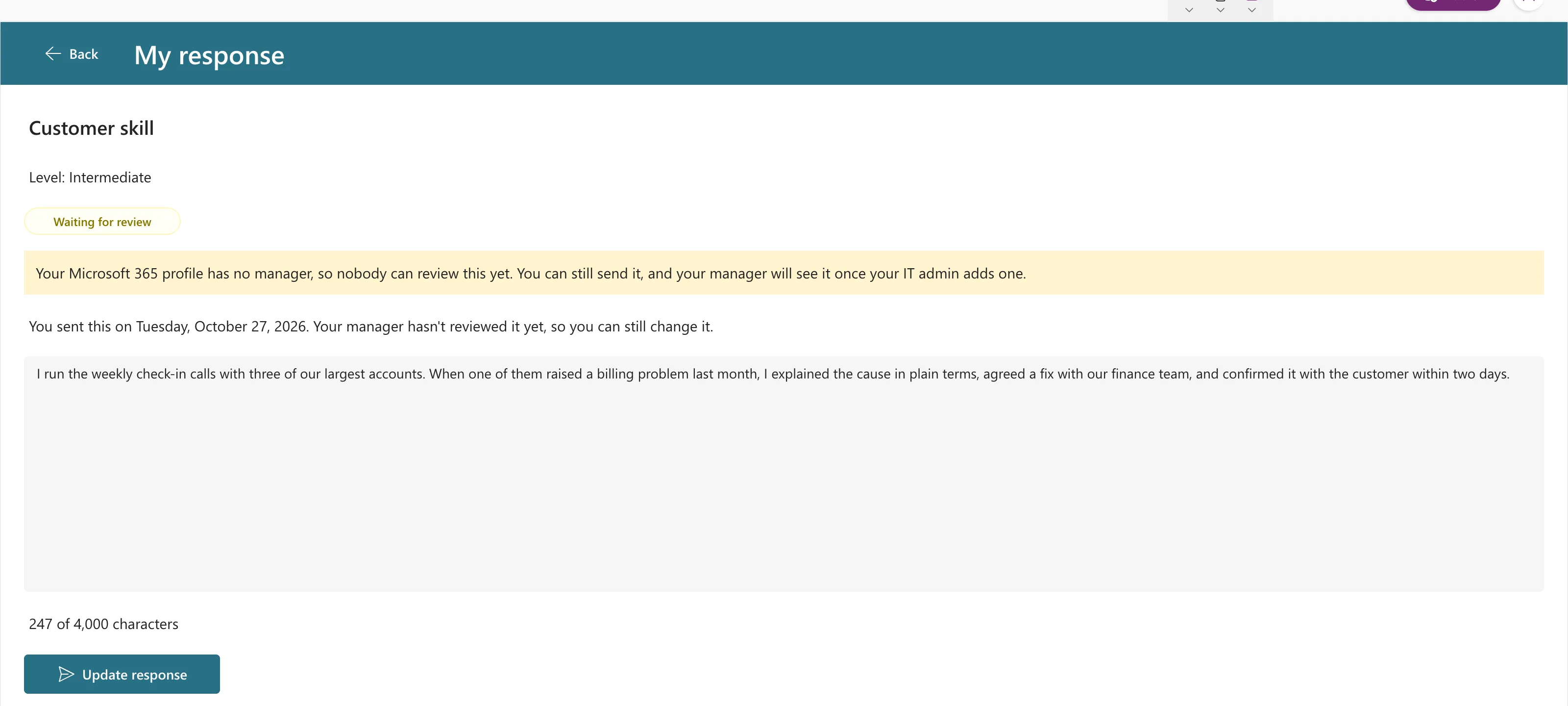
In the Career Development Plan app, the Response screen tells people when they sent their response. The date is the SubmittedOn column of the loaded record, locResponse:
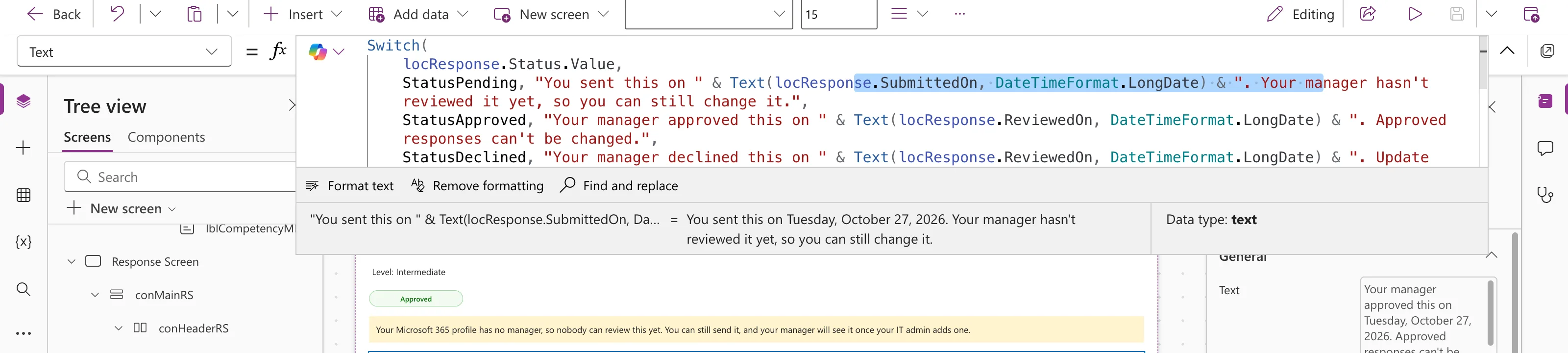
"You sent this on " & Text(locResponse.SubmittedOn, DateTimeFormat.LongDate) & ". Your manager hasn't reviewed it yet, so you can still change it."
With that part of the formula selected, the preview strip shows the result:
And the screen in preview:
Ready-Made Formats
Some of the DateTimeFormat values, with Microsoft's sample results for November 23, 2015, 2:37:47 PM:
| Format | Result in English (US) |
|---|---|
DateTimeFormat.LongDate | Monday, November 23, 2015 |
DateTimeFormat.ShortDate | 11/23/2015 |
DateTimeFormat.LongDateTime | Monday, November 23, 2015 2:37:47 PM |
DateTimeFormat.LongTime24 | 14:37:47 |
In another language or region the words and the order change; that's the point of using them.
Your Own Format
When the layout must be the same for everyone, give Text a pattern of placeholders:
| Placeholder | Shows |
|---|---|
d / dd | Day, 7 or 07 |
ddd / dddd | Day name, Sun or Sunday |
m / mm | Month number, 1 or 01 |
mmm / mmmm | Month name, Jan or January |
yy / yyyy | Year, 15 or 2015 |
hh:mm | Hours and minutes |
AM/PM | 12-hour clock |
For example, Microsoft's Text( Now(), "d-mmm-yy" ) gives 23-Nov-15. Note that mm means minutes only right after h/hh or right before ss; anywhere else it's the month.
Common Mistakes
| Mistake | What happens | Do this instead |
|---|---|---|
| A custom pattern for an international audience | Everyone sees one country's style | Use a DateTimeFormat |
mm for minutes, away from hh | It shows the month instead | Put mm right after hh, as in hh:mm |
| Formatting a blank date | An empty string in the sentence | Show the sentence only when the date exists |
Troubleshooting
| Symptom | Likely cause | Fix |
|---|---|---|
| The words are in an unexpected language | DateTimeFormat follows the person's language and region | Use a custom pattern if the layout must be fixed |
| The sentence has a gap where the date should be | The date is blank | Check the record has the date before showing the sentence |
FAQ
How do I get today's date to format?
With Now or Today (How to Get the Current Date and Time in Power Apps with Now).
Can I format a date inside a sentence?
Yes, join it with & as in the example (How to Join Text in Power Apps).
Conclusion
Text(date, DateTimeFormat.LongDate) gives a readable date that follows each person's language. Use your own pattern only when the layout must be fixed.
Additional Resources
- Text function: DateTimeFormat values and placeholders.
