How to Find Your Microsoft Entra Tenant ID

Apps, scripts and SDK settings often ask for your tenant ID: the GUID that identifies your organization in Microsoft Entra ID. It's on the first page of the Microsoft Entra admin center, with a copy button next to it.
A tenant is your organization's own instance of Microsoft Entra ID, the identity service behind Microsoft 365 and Azure. Its users, groups and app registrations all live in it. Microsoft describes the tenant ID as a globally unique identifier (GUID) that is different than your organization name or domain, and software uses it to point at your organization: a sign-in address such as https://login.microsoftonline.com/<tenant ID>, or a setting that says which organization an app accepts.
The ID goes by other names too. Microsoft's documentation lists directory ID, Microsoft Entra tenant, Microsoft ID and, in some reports, tenantguid. In an app registration, it's shown as Directory (tenant) ID.
Prerequisites
- An account in the tenant. Microsoft's guide signs in to the Microsoft Entra admin center as at least a Global Reader.
Step 1: Open the Overview Page
Sign in to the Microsoft Entra admin center and go to Entra ID > Overview. If your account belongs to more than one organization, check the organization's name under your account at the top right, and switch with the Settings icon if it's the wrong one.
Step 2: Copy the Tenant ID
On the Overview tab, Basic information shows the organization's Name, its Tenant ID and its Primary domain. Select the copy icon next to the tenant ID:
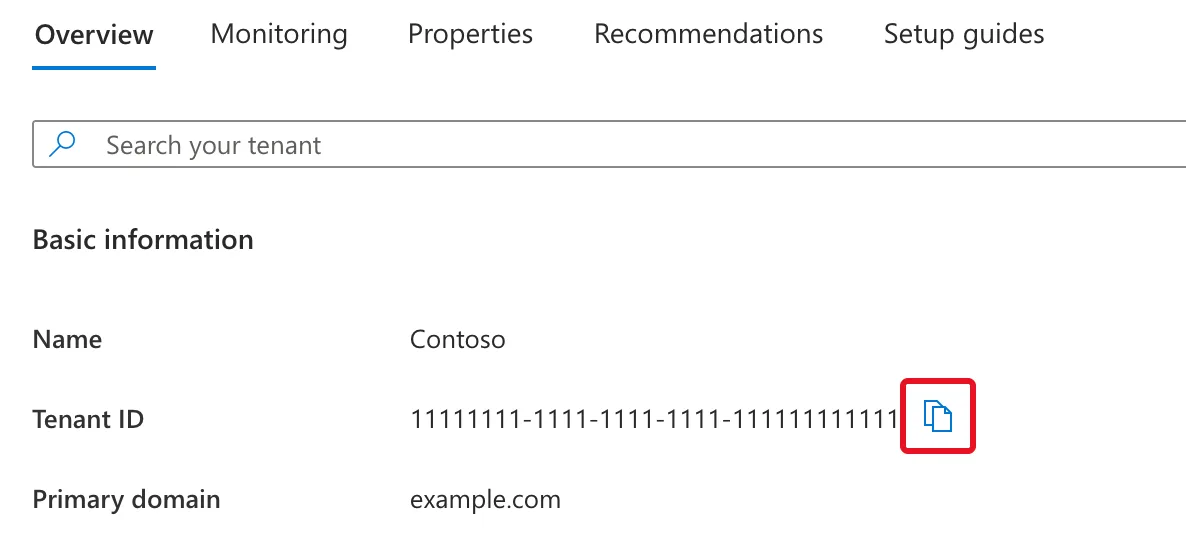
The ID is now on your clipboard, ready to paste into a settings file or a command. Like every GUID, it's five groups of digits and the letters a to f, separated by hyphens, in the pattern 11111111-1111-1111-1111-111111111111.
Common Mistakes
| Mistake | What happens | Do this instead |
|---|---|---|
| Copying the Primary domain instead | Settings that expect a GUID fail | Copy the Tenant ID |
| Copying an app's Application (client) ID | It identifies the app, not the organization | Use Directory (tenant) ID on the app's page, or the Overview page |
| Looking in the wrong organization | The ID belongs to another tenant | Check the organization name at the top right first |
Troubleshooting
| Symptom | Likely cause | Fix |
|---|---|---|
| You can't open the admin center | Your organization restricts it for non-admins | Ask an admin for the tenant ID |
| The ID isn't accepted by an app | It's from a different tenant than the app's | Compare it with the app's Directory (tenant) ID |
FAQ
Is the tenant ID the same as my Azure subscription ID?
No. A subscription is a billing container for Azure resources, and it has its own ID. Microsoft's documentation describes the relationship: Each subscription has a tenant ID associated with it, and one tenant can have many subscriptions.
Can I find it from the command line?
Yes. Microsoft's guide lists az account tenant list for the Azure CLI and Get-AzTenant for Azure PowerShell, once you're signed in.
Conclusion
Your tenant ID is on Entra ID > Overview in the Microsoft Entra admin center, under Basic information, with a copy icon next to it. It's the GUID that identifies your organization, so use it wherever a setting asks for the tenant, rather than the organization's name or domain.
Additional Resources
- How to find your Microsoft Entra tenant ID — the admin center, Azure portal, PowerShell and CLI.
- Locate important IDs for a user — the other names the tenant ID goes by.
