How to Find the Run and Logged Model Behind a Model Version in MLflow

When a registered version misbehaves, the first questions are what trained it and with which settings. Every version records the run that trained it and the logged model it holds, so you can follow it back to the run's parameters and the model's own page. This guide does that from Python, with real output from MLflow 3.18.0.
Syntax
client = MlflowClient()
version = client.get_model_version(name, version_number)
run = client.get_run(version.run_id)
logged_model = mlflow.get_logged_model(version.source.removeprefix("models:/"))
| Part | What it means |
|---|---|
version.run_id | The run that trained the model |
version.source | Where the version's model comes from: models:/ followed by the logged model's ID |
.removeprefix("models:/") | The logged model's ID, without the address in front |
run | The run, with its info (name, status) and data (parameters, metrics, tags) |
logged_model | The logged model, with its name, model_id, source_run_id and more |
The ModelVersion reference describes run_id as "MLflow run ID that generated this model" and source as "Source path for the model". removeprefix is plain Python: How to Remove a Prefix from a String in Python with removeprefix.
Prerequisites
- An MLflow tracking server with a database backend at
http://127.0.0.1:8080, such asmlflow server --port 8080with its default SQLite database. The registry needs one. mlflowandscikit-learnin your project, for example withuv add mlflow scikit-learn pandas.
Step 1: Follow a Version Back
The example trains a ridge regression on scikit-learn's diabetes data in a run named ridge-alpha-1, logs its alpha, and registers it as version 1 of diabetes-lineage. Then it starts from the version alone: it prints what the version records, opens the run, and opens the logged model:
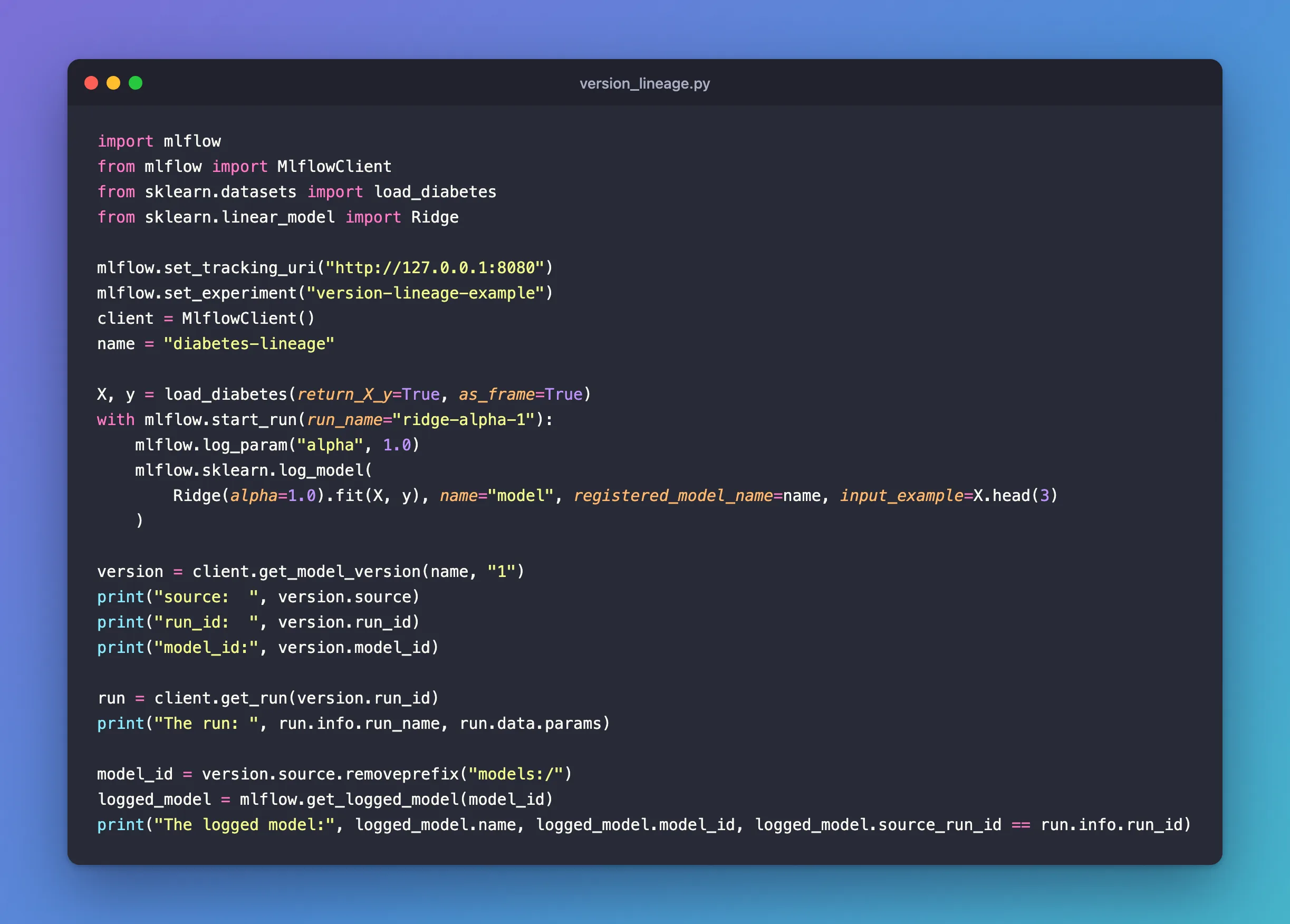
import mlflow
from mlflow import MlflowClient
from sklearn.datasets import load_diabetes
from sklearn.linear_model import Ridge

mlflow.set_tracking_uri("http://127.0.0.1:8080")
mlflow.set_experiment("version-lineage-example")
client = MlflowClient()
name = "diabetes-lineage"

X, y = load_diabetes(return_X_y=True, as_frame=True)
with mlflow.start_run(run_name="ridge-alpha-1"):
    mlflow.log_param("alpha", 1.0)
    mlflow.sklearn.log_model(
        Ridge(alpha=1.0).fit(X, y), name="model", registered_model_name=name, input_example=X.head(3)
    )

version = client.get_model_version(name, "1")
print("source:  ", version.source)
print("run_id:  ", version.run_id)
print("model_id:", version.model_id)

run = client.get_run(version.run_id)
print("The run: ", run.info.run_name, run.data.params)

model_id = version.source.removeprefix("models:/")
logged_model = mlflow.get_logged_model(model_id)
print("The logged model:", logged_model.name, logged_model.model_id, logged_model.source_run_id == run.info.run_id)
uv run python version_lineage.py
source:   models:/m-b65b4ec8b80a4026a17fedc3bb307de5
run_id:   13f86eb5fb0a4986a2b34a8dbf6bbf19
model_id: None
The run:  ridge-alpha-1 {'alpha': '1.0'}
The logged model: model m-b65b4ec8b80a4026a17fedc3bb307de5 True
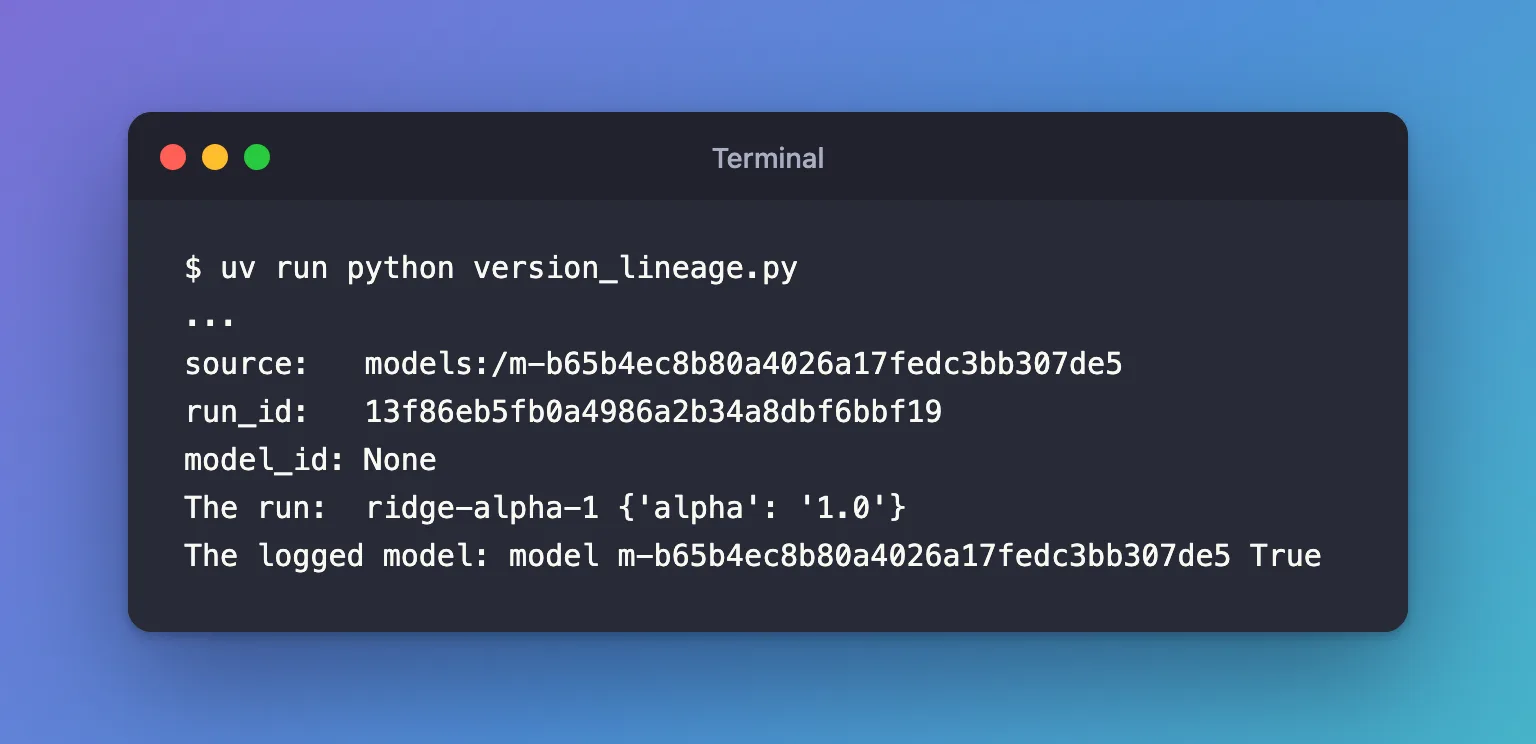
source: the logged model's address,models:/m-b65b....run_id: the run that trained it, whichget_runopened:ridge-alpha-1, withalpha1.0.model_id: None: the version has amodel_idfield, but an open-source MLflow server doesn't store it, so it's always empty. The ID is insourceinstead. I reported it to MLflow as issue #28119.- The logged model:
get_logged_modelfound it by that ID, namedmodelas it was logged, andTrueconfirms it came from the same run.
That empty model_id has a side effect when you evaluate a version: Fixed: MLflow Doesn't Link Evaluation Metrics to the Model When You Evaluate a Registered Model Version.
Common Mistakes
| Mistake | What happens | Do this instead |
|---|---|---|
Reading version.model_id for the logged model | It's None on an open-source MLflow server | Take the ID from version.source |
Passing version.source to get_logged_model as it is | The call gets an address, not an ID | Strip models:/ first |
Troubleshooting
| Symptom | Likely cause | Fix |
|---|---|---|
API request to endpoint /api/2.0/mlflow/logged-models/models:/m-... failed with error code 404 != 200 | get_logged_model got the whole address | Strip models:/ first |
The same 404 for /logged-models/tumour-staging/1 | The version was copied from another registered model, so its source is that version's address, models:/tumour-staging/1 | Read the source of tumour-staging version 1 instead |
FAQ
Can I see the same thing in the UI?
Yes. A version's page in the Model Registry shows its Source Run and Source Model.
Does the logged model know its versions?
Yes. The logged model's page lists Model versions, the registered versions made from it.
Conclusion
Starting from version 1 of diabetes-lineage alone, version.run_id led to the run ridge-alpha-1 and its alpha, and version.source led to the logged model, while version.model_id stayed None.
Additional Resources
- ModelVersion — every field a version records.
- mlflow.get_logged_model — getting a logged model by ID.
