How to Find the Last Sunday of a Month in Excel

UK clocks change on the last Sunday of March and of October, and plenty of other rules use "the last Sunday of the month" too. Excel works it out from two numbers: the first day of the next month, and the weekday number of the day before it. First of next month − WEEKDAY(day before) is the last Sunday.
The example is from the Clock change sheet in How to Calculate Hours Worked Across a Daylight Saving Time Change in Excel, with the year 2026 in B1.
Prerequisites
Step 1: The First Day of the Next Month
For March, that's 1 April. In B4: =DATE(B1,4,1), which is 01/04/2026. For October, C4: =DATE(B1,11,1), 01/11/2026.
Step 2: The Weekday of the Day Before
The day before the 1st is the last day of the month. In B5: =WEEKDAY(B4-1). 31 March 2026 is a Tuesday, so 3. For October, C5 gives 7: 31 October 2026 is a Saturday.
Step 3: Subtract
In B6:
=B4-B5
1 April minus 3 days is 29/03/2026, a Sunday. C6, =C4-C5, is 1 November minus 7 days, 25/10/2026:
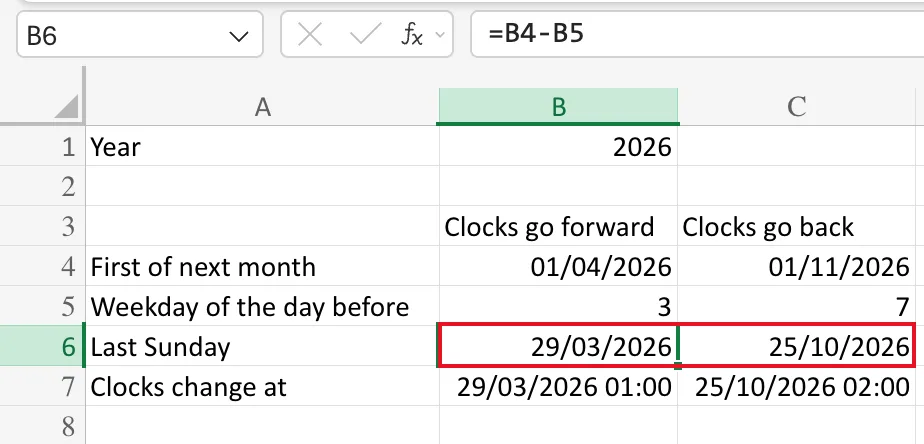
Both match GOV.UK's When do the clocks change?, which lists 29 March and 25 October for 2026.
Why It Works
WEEKDAY counts Sunday as 1. If the month's last day is a Sunday, its number is 1, and the 1st minus 1 day is that Sunday itself. If it's a Monday, 2, and going back 2 days from the 1st lands on the Sunday before. And so on up to Saturday, 7, which goes back a whole week to the previous Sunday.
October 2027 shows the first case: 31 October 2027 is a Sunday, so WEEKDAY gives 1 and the last Sunday is the 31st itself, the date GOV.UK lists for that year.
Common Mistakes
| Mistake | What happens | Do this instead |
|---|---|---|
Using WEEKDAY of the 1st instead of the day before | The result is a week off in some months | WEEKDAY(first-1) |
Using return_type 2 (Monday = 1) | You get the last Monday | Leave return_type out, so Sunday is 1 |
| Typing the dates for one year | They're wrong next year | Build them from the year cell |
Troubleshooting
| Symptom | Likely cause | Fix |
|---|---|---|
| The result is a number like 46110 | The cell has the General format | Apply a date format |
| The result is a Saturday or Monday | A step used the wrong date | Check that B5 uses B4-1 |
FAQ
Can I do it in one cell?
Yes. B6 is B4 minus B5, so writing their formulas in place of the cell addresses gives the same date in one cell: =DATE(B1,4,1)-WEEKDAY(DATE(B1,4,1)-1). The step-by-step cells are easier to check, which is why the sheet keeps them.
Does it work for other years?
Yes. Change the year in B1 and every step follows it, because each one is built from B1.
Conclusion
The last Sunday of a month is the first day of the next month minus the weekday number of the day before it. Two cells, or one formula, for any month and any year.
