How to Filter a SharePoint REST Request with $filter

A SharePoint REST request for a collection, such as a site's lists, returns all of it unless you filter it. $filter adds a condition to the address, and the answer holds only what matches. This guide lists only a site's visible custom lists in the browser.
Syntax
<collection address>?$filter=<field> <operator> <value>
<collection address>: a SharePoint REST address that returns several things, such ashttps://<site address>/_api/web/listsor a list's…/items.<field>: the field to test, by its internal name.<operator>: how to compare, such aseq(equal) orne(not equal).<value>: what to compare with. Text goes in single quotes,'Suggestions'; numbers andtrueorfalsedon't.
Join two conditions with and, and other query options with &.
Microsoft's Use OData query operations in SharePoint REST requests says: Use the $filter query option to select which items to return. Its table of operators lists what SharePoint supports:
| Supported | Not supported |
|---|---|
Number comparisons: lt, le, gt, ge, eq, ne | Arithmetic: add, sub, mul, div, mod |
Text comparisons: startswith(), substringof(), eq, ne | endswith, replace, substring, tolower, toupper, trim, concat |
Date and time functions, such as day() and year() |
The Example
The root site contoso.sharepoint.com has its own hidden lists as well as the lists people made. The address keeps only the lists that are visible and made from the custom list template, and returns their titles:
BaseTemplate eq 100: made from the custom list template. Microsoft's ListTemplateType enum givesGenericListthe number 100.Hidden eq false: not hidden.$select=Title: only each list's title.
Prerequisites
- Access to the site and a signed-in SharePoint session in the same browser. The browser sends your sign-in with the request.
Step 1: Open the Address
In the browser where you use SharePoint, type the address in the address bar and press Enter:
https://contoso.sharepoint.com/_api/web/lists?$filter=BaseTemplate eq 100 and Hidden eq false&$select=Title
Use your own site's address in place of contoso.sharepoint.com. The browser turns the spaces into %20 when it sends the address.
Step 2: Read the Answer
The browser sends no Accept header asking for JSON, so SharePoint answers in XML. In my browser it appeared as plain text:
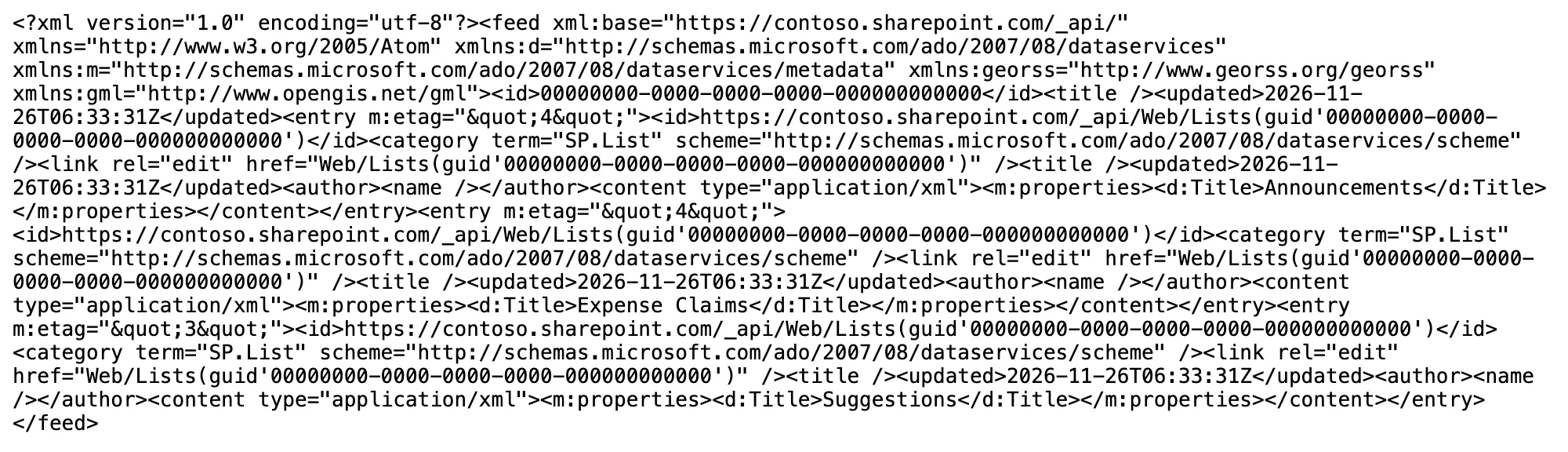
Each entry is one list that matched both conditions:
| Entry | d:Title |
|---|---|
| 1 | Announcements |
| 2 | Expense Claims |
| 3 | Suggestions |
The site's hidden lists and its libraries aren't there: they failed one of the two conditions.
Common Mistakes
| Mistake | What happens | Do this instead |
|---|---|---|
Using = instead of eq | It isn't an OData operator | Write eq |
Text without quotes, Title eq Suggestions | The value isn't read as text | Quote it: Title eq 'Suggestions' |
A second ? before $select | Only one ? starts the query options | Join it with & |
Using a function from the unsupported column, such as endswith | SharePoint doesn't support it in $filter | Use startswith() or substringof() |
Troubleshooting
| Symptom | Likely cause | Fix |
|---|---|---|
| Nothing comes back | No entry matches every condition | Test the conditions one at a time |
| Hidden lists come back | Hidden eq false is missing | Add it with and |
| A sign-in page or an access error | The browser isn't signed in, or you can't open the site | Sign in to SharePoint in the same browser |
FAQ
Can I use $filter on list items?
Yes. …/lists/getbytitle('<list name>')/items?$filter=<column> eq '<value>' returns the items whose column has that value. Use the column's internal name.
Can I filter on a person?
Microsoft's article says users are matched by their display name, and that membership-based queries aren't supported.
Is this safe to try on a real site?
Yes. Opening an address in the browser sends a GET request, which only reads.
Conclusion
Add ?$filter=<field> <operator> <value> to a SharePoint REST address, joining conditions with and and other options with &. …/lists?$filter=BaseTemplate eq 100 and Hidden eq false&$select=Title returned the site's three visible custom lists.
Additional Resources
- Use OData query operations in SharePoint REST requests: every supported and unsupported operator.
- ListTemplateType enum: the numbers of SharePoint's list templates.
