How to Exclude the Item Being Edited from a LookUp in Power Apps

A check for clashes or duplicates that works when adding an item finds the item itself when you edit it. The fix is to skip that item, but SharePoint can't run ID <> x on its ID column, so put it in the query and nothing is delegated. Instead, let SharePoint find the matches with a query it can run, hold them in memory with With, and skip the edited item there.
The example is the Overtime Timesheet app, whose Log Overtime screen checks that a shift doesn't overlap one already logged, and which also edits entries.
Prerequisites
- The overlap check: How to Check for Overlapping Times in Power Apps.
- One screen for adding and editing: How to Use One Screen to Add and Edit Items in Power Apps.
- Delegation: What Is Delegation in Power Apps? (With SharePoint Lists).
The Problem
The app's overlap check looks for one of the person's entries that starts before the new shift ends and ends after it starts:
LookUp(OvertimeEntries, EmployeeEmail = MyEmail && StartTime < Ends && EndTime > Starts)
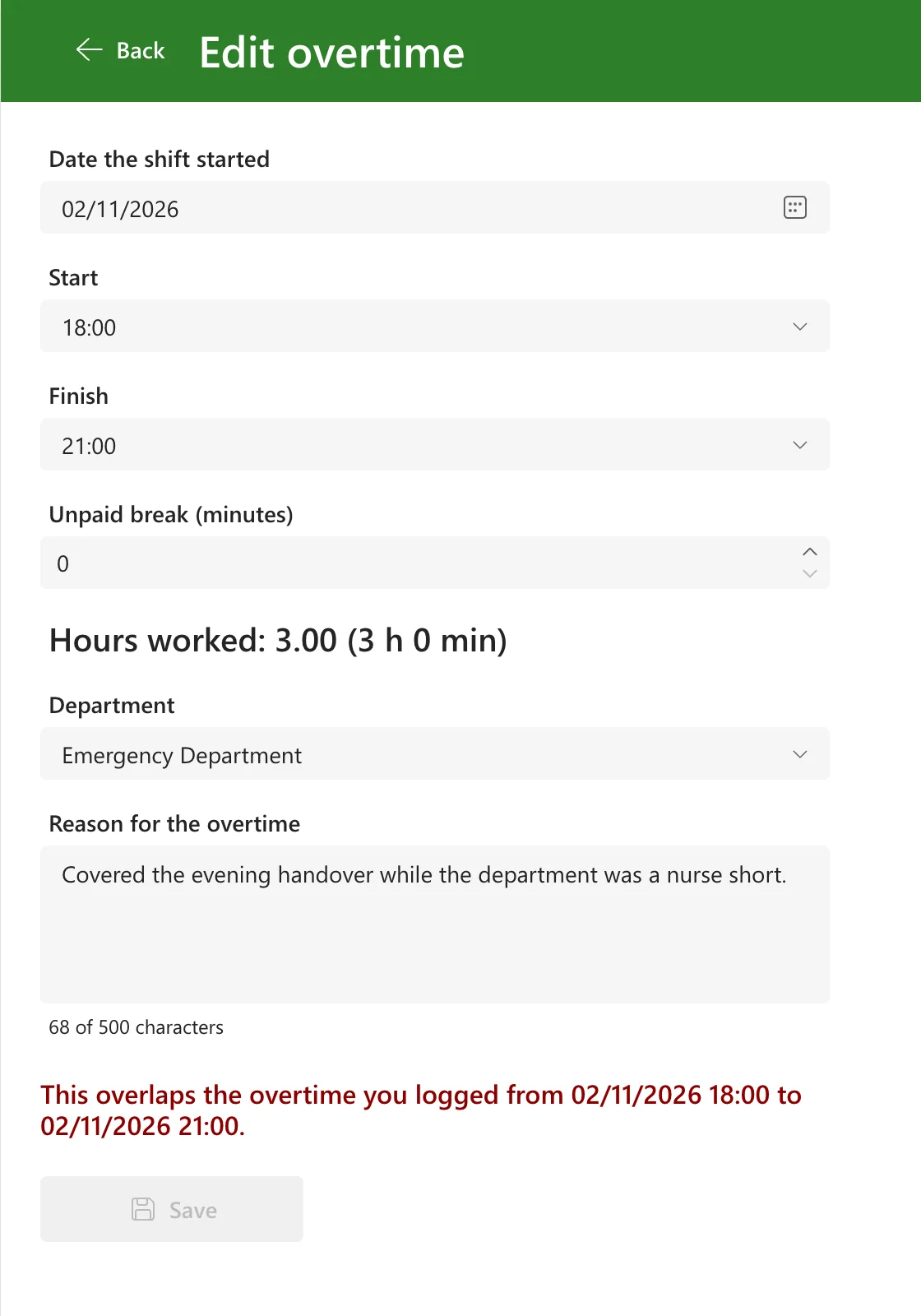
When the screen opened an existing entry to edit it, the check found that entry: it overlaps itself. The screen showed This overlaps the overtime you logged from 02/11/2026 18:00 to 02/11/2026 21:00, the entry being edited, and Save stayed disabled:
Why Not ID <> x
The obvious fix is && ID <> EntryId in the LookUp. Microsoft's delegation table for SharePoint rules it out:
- SharePoint only supports the equal ('=') operation for delegation on an ID field. Relational operations such as
<, <=,<>, >, >=won't work on a SharePoint ID field. - Not won't delegate, so
!(ID = EntryId)doesn't help either.
And the delegation overview says what happens then: If any part of a query expression is nondelegable, Power Apps doesn't delegate any part of the query. The whole check would run on the first 500 entries only.
The Fix: Filter in SharePoint, Skip in Memory
Split the check in two:
- Filter with the conditions SharePoint can run: the person and the times. It returns only the entries that overlap the shift, usually none or one.
- LookUp in that small result for one that isn't the entry being edited.
With holds the result of step 1. The delegation overview: When you use With, UpdateContext, or Set, these functions create collections internally. Collections are a static in-memory list of records and can't participate in delegation. You don't see a delegation warning.
With(
    {Overlapping: Filter(OvertimeEntries, EmployeeEmail = MyEmail && StartTime < Ends && EndTime > Starts)},
    LookUp(Overlapping, ID <> EntryId)
)
EntryId is the ID of the entry being edited. When adding a new entry it's blank, and ID <> Blank() is true for every entry, so nothing is skipped.
How the Example Uses It
The check lives in the app's ShiftProblem function in App.Formulas (How to Create a User-Defined Function in Power Apps). It gained an EntryId parameter:
ShiftProblem(ShiftDate: Date, StartAt: Time, EndAt: Time, BreakMins: Number, EntryId: Number): Text =
    With(
        {Starts: ShiftStart(ShiftDate, StartAt), Ends: ShiftEnd(ShiftDate, StartAt, EndAt)},
        With(
            {
                Minutes: DateDiff(Starts, Ends, TimeUnit.Minutes),
                Overlapping: Filter(OvertimeEntries, EmployeeEmail = MyEmail && StartTime < Ends && EndTime > Starts)
            },
            With(
                {Clash: LookUp(Overlapping, ID <> EntryId)},
                If(
                    EndAt = StartAt, "The start and finish times are the same.",
                    Minutes > 1440, "A shift can't be longer than 24 hours.",
                    BreakMins >= Minutes, "The break must be shorter than the shift.",
                    Ends > Now(), "This shift hasn't finished yet. Log it after it ends.",
                    !IsBlank(Clash), $"This overlaps the overtime you logged from {Text(Clash.StartTime, "dd/mm/yyyy hh:mm")} to {Text(Clash.EndTime, "dd/mm/yyyy hh:mm")}.",
                    ""
                )
            )
        )
    );
The screen passes the edited entry's ID, a context variable that's blank when adding:
ShiftProblem(dpWorkDateLO.SelectedDate, cmbStartLO.Selected.Value, cmbEndLO.Selected.Value, numBreakLO.Value, locEntryId)
The Result
The same entry, opened for editing, with no message and Save enabled:
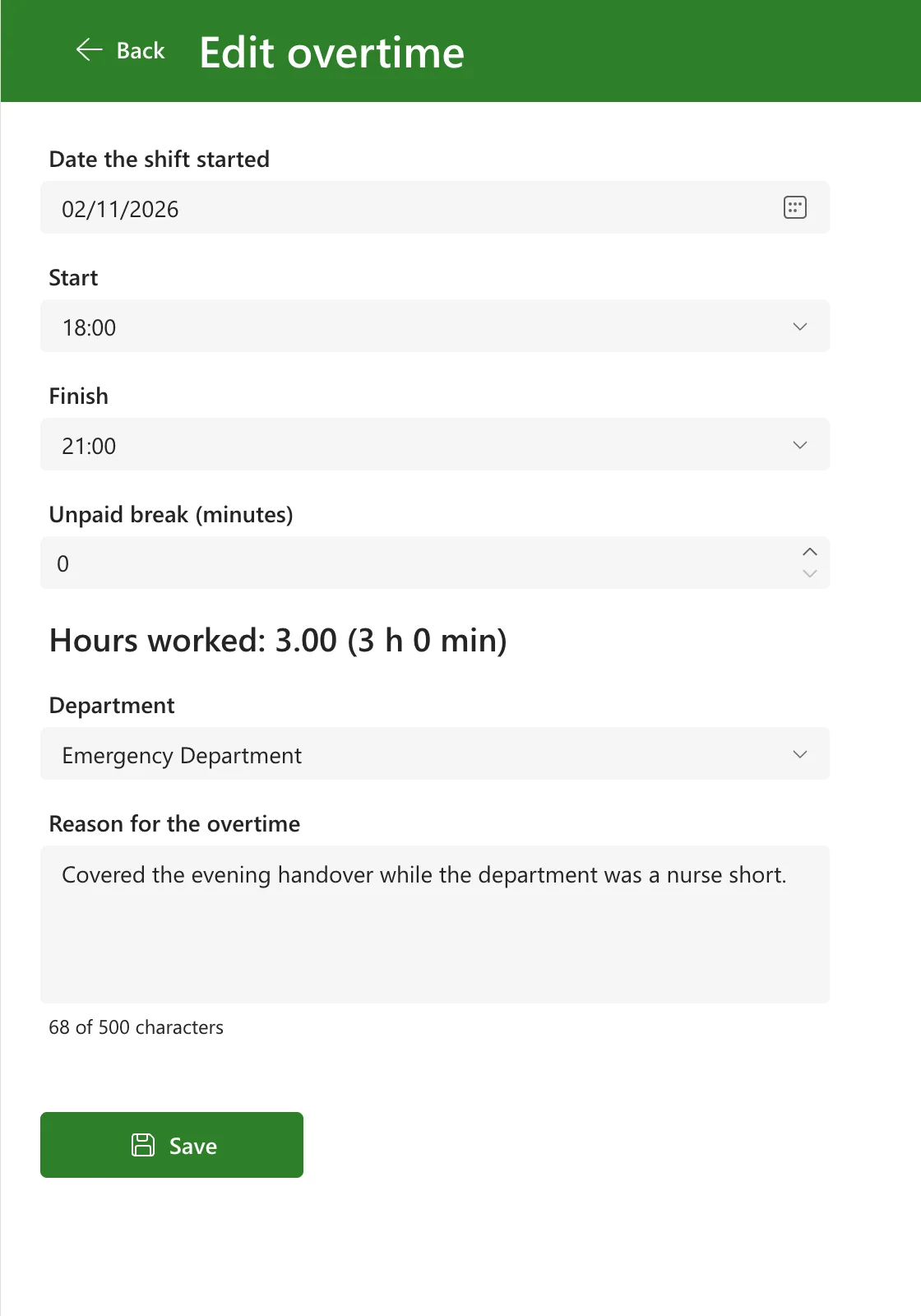
And adding a new shift that does overlap, 23:00 to 02:00 on 24 October, still showed This overlaps the overtime you logged from 24/10/2026 22:00 to 25/10/2026 06:00. The App checker listed nothing under Formulas or Data source: no delegation warning.
Common Mistakes
| Mistake | What happens | Do this instead |
|---|---|---|
ID <> EntryId in the SharePoint query | Nothing is delegated; only the first 500 entries are checked | Filter in SharePoint, skip in memory |
!(ID = EntryId) | Not doesn't delegate either | The same two steps |
| Comparing the clash's ID after a LookUp | LookUp returns only the first match, which may be the edited item, hiding a real clash | Filter first, then LookUp among the matches |
Troubleshooting
| Symptom | Likely cause | Fix |
|---|---|---|
| Editing an entry says it overlaps itself | The check doesn't skip the edited entry | Pass its ID and skip it in memory |
| A delegation warning on the check | ID <> is inside the SharePoint query | Move it into a LookUp on the With table |
| New entries no longer get the overlap message | EntryId isn't blank when adding | Clear it when the screen opens to add |
FAQ
Isn't the in-memory part limited to 500 rows?
The Filter runs in SharePoint and returns only the overlapping entries, so the in-memory table is tiny. The limit would matter only if a person had hundreds of entries overlapping one shift.
Does this work for duplicate checks too?
Yes: filter for the matching values in SharePoint, then skip the edited item in memory.
Conclusion
When a check finds the item being edited, don't put ID <> x in a SharePoint query: SharePoint delegates only = on its ID column. Filter with what it can run, hold the result in With, and skip the edited item there.
Additional Resources
- Power Apps delegable functions and operations for SharePoint: the ID column note.
- Delegation overview: With tables in memory.
- With function.
