How to Evaluate a Classification Model with mlflow.models.evaluate

Computing a classifier's test scores by hand takes a line per metric and more for each plot. mlflow.models.evaluate does it in one call: give it a logged model and labelled test data, and it computes the standard metrics, draws the standard plots and logs everything to the run, linked to the model. This guide evaluates a tumour classifier, with real output from MLflow 3.18.0.
Syntax
result = mlflow.models.evaluate(
    model_uri,
    data,
    targets="label_column",
    model_type="classifier",
)
| Part | What it means |
|---|---|
model_uri | The model to evaluate, such as models:/m-..., the model_uri that log_model returned |
data | A pandas DataFrame with the model's input columns and the true label column |
targets | The name of the label column in data |
model_type | "classifier", so MLflow computes the classification metrics and plots |
result | An EvaluationResult: result.metrics holds the scores, result.artifacts the plots |
The reference for mlflow.models.evaluate: it "evaluates a PyFunc model or custom callable on the specified dataset using specified evaluators, and logs resulting metrics & artifacts to MLflow tracking server." The results go "to the active MLflow run. If no active run exists, a new MLflow run is created".
Prerequisites
- An MLflow tracking server at
http://127.0.0.1:8080. MLflow's tracking server guide shows how to start one. mlflowandscikit-learnin your project, for example withuv add mlflow scikit-learn pandas.
Step 1: Log and Evaluate the Model
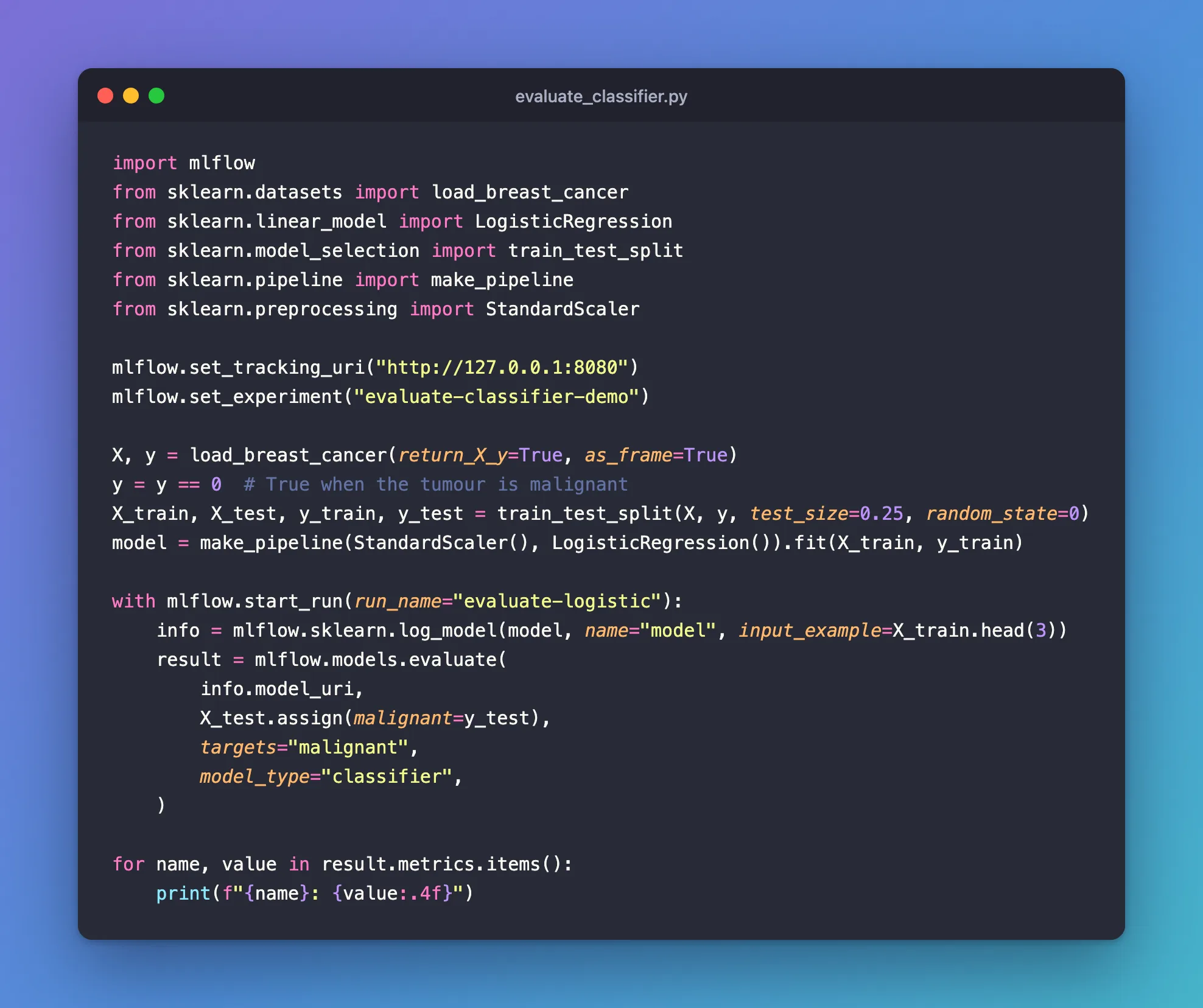
The example trains a logistic regression on three quarters of scikit-learn's breast cancer data, labelled True for a malignant tumour. It logs the model, then evaluates it on the remaining quarter, the rows it never saw:
import mlflow
from sklearn.datasets import load_breast_cancer
from sklearn.linear_model import LogisticRegression
from sklearn.model_selection import train_test_split
from sklearn.pipeline import make_pipeline
from sklearn.preprocessing import StandardScaler

mlflow.set_tracking_uri("http://127.0.0.1:8080")
mlflow.set_experiment("evaluate-classifier-demo")

X, y = load_breast_cancer(return_X_y=True, as_frame=True)
y = y == 0  # True when the tumour is malignant
X_train, X_test, y_train, y_test = train_test_split(X, y, test_size=0.25, random_state=0)
model = make_pipeline(StandardScaler(), LogisticRegression()).fit(X_train, y_train)

with mlflow.start_run(run_name="evaluate-logistic"):
    info = mlflow.sklearn.log_model(model, name="model", input_example=X_train.head(3))
    result = mlflow.models.evaluate(
        info.model_uri,
        X_test.assign(malignant=y_test),
        targets="malignant",
        model_type="classifier",
    )

for name, value in result.metrics.items():
    print(f"{name}: {value:.4f}")
X_test.assign(malignant=y_test)puts the true labels next to the input columns, in one DataFrame: How to Add a Column to a pandas DataFrame with assign.- Labels of
TrueandFalse: MLflow tells a classifier's labels by their type, and warns about1and0: Fixed: the model type looks like None. - Inside the
withblock, so the evaluation goes to the same run as the model.
uv run python evaluate_classifier.py
2026/11/21 17:47:41 INFO mlflow.tracking.fluent: Active model is set to the logged model with ID: m-e57e38be2ca34d269103653e236c6a6e
2026/11/21 17:47:41 INFO mlflow.tracking.fluent: Use `mlflow.set_active_model` to set the active model to a different one if needed.
2026/11/21 17:47:41 INFO mlflow.models.evaluation.evaluators.classifier: The evaluation dataset is inferred as binary dataset, positive label is True, negative label is False.
2026/11/21 17:47:41 INFO mlflow.models.evaluation.default_evaluator: Testing metrics on first row...
2026/11/21 17:47:43 WARNING mlflow.models.evaluation.evaluators.shap: SHAP or matplotlib package is not installed, so model explainability insights will not be logged.
🏃 View run evaluate-logistic at: http://127.0.0.1:8080/#/experiments/5/runs/a339b40ca76f403889b907c8cbb16a42
🧪 View experiment at: http://127.0.0.1:8080/#/experiments/5
score: 0.9580
true_negatives: 87.0000
false_positives: 3.0000
false_negatives: 3.0000
true_positives: 50.0000
example_count: 143.0000
accuracy_score: 0.9580
recall_score: 0.9434
precision_score: 0.9434
f1_score: 0.9434
log_loss: 0.0985
roc_auc: 0.9914
precision_recall_auc: 0.9889
Step 2: Read the Metrics
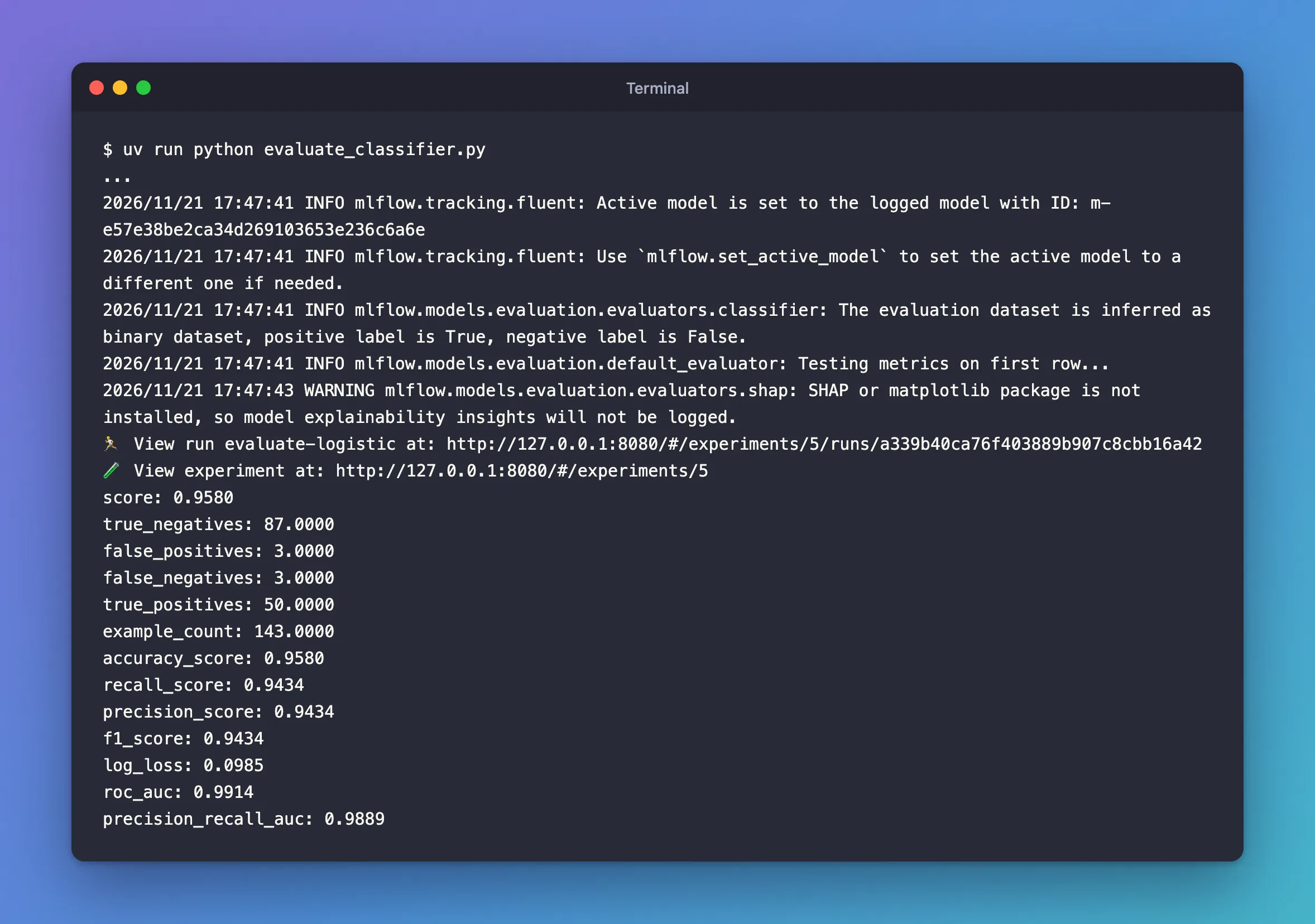
MLflow scored the 143 test rows (example_count) and logged 13 metrics:
- The confusion counts: of the 90 benign tumours, 87 were cleared (
true_negatives) and 3 flagged (false_positives); of the 53 malignant ones, 50 were found (true_positives) and 3 missed (false_negatives). accuracy_score0.958, andscore, the same number from scikit-learn's ownmodel.score.recall_score0.9434, the share of malignant tumours found;precision_score0.9434, the share of "malignant" answers that were right;f1_score, their harmonic mean. How to Calculate Precision, Recall and F1 Score in scikit-learn explains them.roc_auc0.9914 andprecision_recall_auc0.9889, from the model's probabilities: how well it ranks malignant tumours above benign ones.log_loss0.0985, how good those probabilities are: How to Calculate Log Loss in scikit-learn.
The positive label is True line says which class the scores are about. The WARNING line is about SHAP explanations, an optional extra: Fixed: SHAP or matplotlib package is not installed.
Step 3: Know What Else Was Logged
The same call logged five plots to the run, confusion_matrix.png, roc_curve_plot.png, precision_recall_curve_plot.png, lift_curve_plot.png and calibration_curve_plot.png, and linked every metric to the model, so its page shows them too: 26 entries for the 13 metrics, because MLflow 3.18.0 logs each one twice. How to See an Evaluation's Metrics and Plots in the MLflow UI walks through them.
Common Mistakes
| Mistake | What happens | Do this instead |
|---|---|---|
| Evaluating on the rows the model trained on | The scores look better than the model will do | Keep test rows aside with train_test_split |
Labels of 1 and 0 | A warning that the model type looks like None | Labels of True and False |
Troubleshooting
| Symptom | Likely cause | Fix |
|---|---|---|
SHAP or matplotlib package is not installed | No shap package | Fixed: SHAP or matplotlib package is not installed |
TypeError: Cannot interpret '<StringDtype(na_value=nan)>' as a data type | A column of words in the data | Fixed: Cannot interpret StringDtype |
MlflowException: The saved sklearn model references untrusted types while logging | A tree model, such as a random forest, in the skops format | Fixed: The saved sklearn model references untrusted types |
FAQ
Does the model have to be logged first?
No: mlflow.models.evaluate also takes a loaded model, a Python function, or no model at all when the predictions are already in the data: How to Evaluate Predictions You Already Have with MLflow.
Where do the results go without a run?
To a new run, which MLflow creates for the evaluation, as the reference says.
Conclusion
One mlflow.models.evaluate call scored the logged classifier on 143 test rows: 13 metrics, from the confusion counts to ROC AUC 0.9914, five plots, and all of it on the run and linked to the model.
Additional Resources
- mlflow.models.evaluate — every parameter, and the metrics each model type gets.
- MLflow model evaluation — the guide.
