How to Enter a Formula in Excel

An Excel formula is a calculation in a cell. It always starts with =, it can use other cells by their addresses, like B10, and when you press Enter the cell shows the result while the formula stays behind it. This guide enters one that turns a shift's start and finish into hours.
The example is from the Clock change sheet in How to Calculate Hours Worked Across a Daylight Saving Time Change in Excel. A10 holds a shift's start, 24/10/2026 22:00, and B10 its finish, 25/10/2026 06:00.
Prerequisites
- A workbook open in Excel, here Excel for the web.
Step 1: Select the Cell for the Result
Select the cell where the answer should appear, here C10.
Step 2: Type the Formula
Type = first. Everything after it is the calculation:
=(B10-A10)*24
As you type, Excel colours each cell reference and outlines the cell it points to in the same colour: B10 in blue, A10 in red. The formula also appears in the formula bar above the grid:
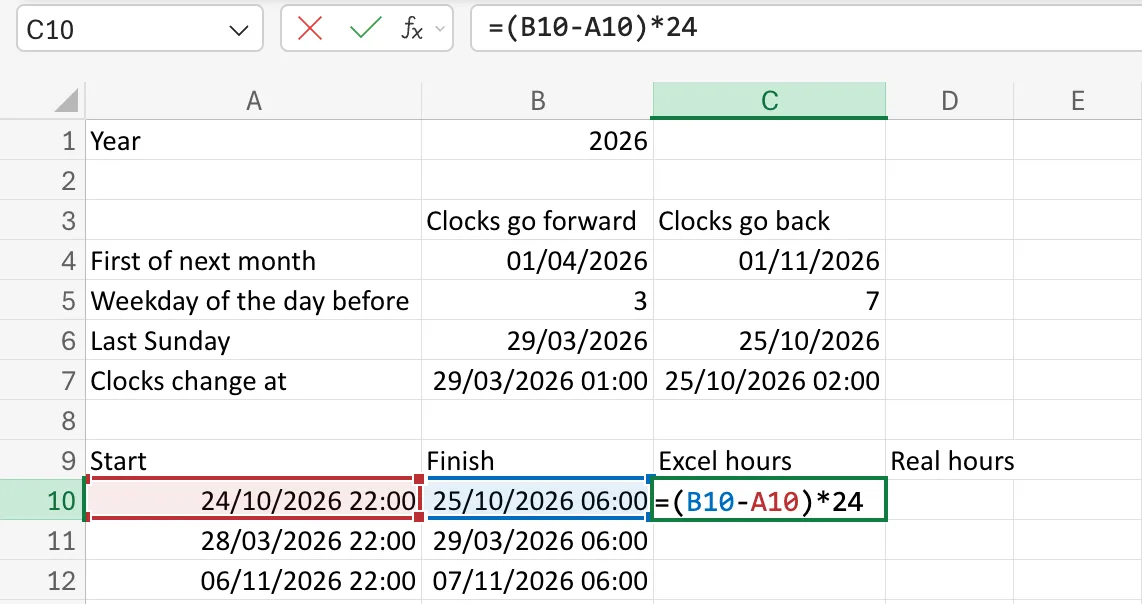
What the formula says:
B10-A10is the finish minus the start, the time between them as a fraction of a day.- The brackets make Excel do the subtraction first.
*24multiplies by 24 to turn days into hours.
Step 3: Press Enter
Press Enter, or select the tick next to fx in the formula bar. C10 now shows the result, 8. Select it again and the formula bar shows the formula, =(B10-A10)*24:
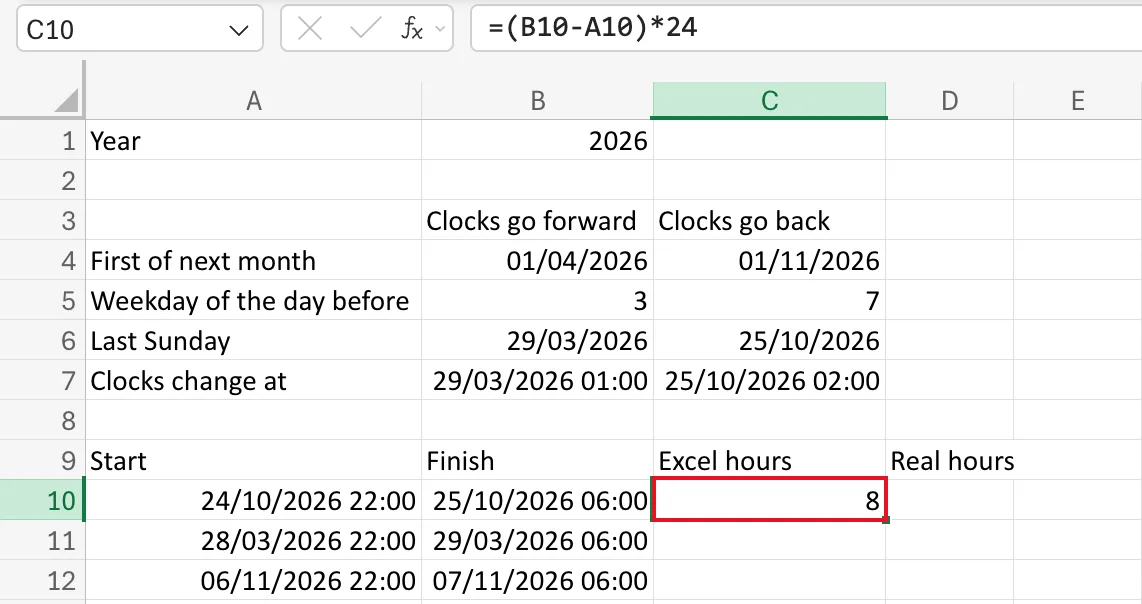
If you change A10 or B10, C10 recalculates by itself. That's the point of using references instead of typing the numbers.
Common Mistakes
| Mistake | What happens | Do this instead |
|---|---|---|
Leaving out the = | Excel stores the text (B10-A10)*24 | Start every formula with = |
| Leaving out the brackets | B10-A10*24 multiplies first, then subtracts | Bracket the part to do first |
| Typing the numbers instead of the cells | The result doesn't update when the data changes | Refer to the cells |
Troubleshooting
| Symptom | Likely cause | Fix |
|---|---|---|
| The cell shows the formula as text | It doesn't start with =, or the cell is formatted as Text | Add =; set the format to General and enter it again |
| The result looks like a date or a time | The cell took a date or time format | Change its Number Format to Number: Fixed: Excel Shows Hours as 12:00 or 00:00 |
#VALUE! | One of the cells holds text instead of a date or number | Check the cells the formula uses |
FAQ
Can I click cells instead of typing their addresses?
Yes. After =, select a cell and Excel types its address for you.
How do I cancel a formula I'm halfway through?
Press Esc, or select the X next to fx. The cell goes back to what it held before.
Conclusion
Select the cell, type = and the calculation using cell addresses, then press Enter. The cell shows the answer; the formula bar shows the formula.
