How to Enter a Date and Time in One Cell in Excel

When a shift starts one day and ends the next, it's easier to keep the date and the time together. Type them into one cell with a space between, like 24/10/2026 22:00, and Excel stores a single value that's the date plus the time.
The example is the Clock change sheet from How to Calculate Hours Worked Across a Daylight Saving Time Change in Excel, where each night shift has a start and a finish date and time.
Prerequisites
- A workbook in Excel, here Excel for the web, with the regional format you want dates read in. These are UK dates, day first, set as in How to Change the Regional Format in Excel for the Web.
Step 1: Type the Date, a Space and the Time
Select the cell and type the date, a space and the time in 24-hour form, then press Tab or Enter. I typed:
24/10/2026 22:00in A10, the start of a night shift,25/10/2026 06:00in B10, its finish.
Step 2: Check What Excel Stored
The cell shows 24/10/2026 22:00, right-aligned like numbers and dates. Excel widened the column to fit it. The formula bar shows the full value, including seconds, 24/10/2026 22:00:00:
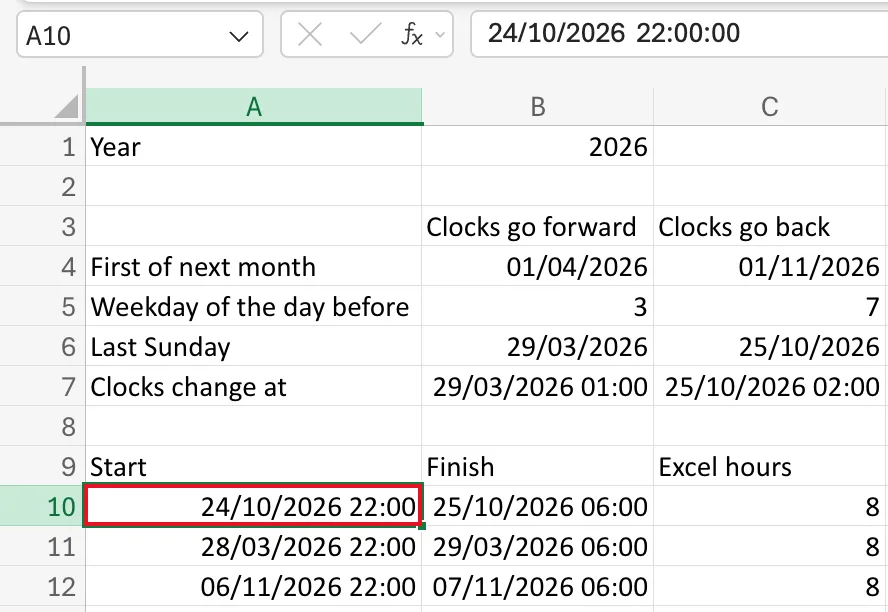
The Number Format box on the Home tab says Custom: Excel gave the cell a date-and-time format by itself.
Step 3: Use It in a Formula
Because each cell holds one number, the date and the time together, you can subtract a start from a finish and get the time between them, even past midnight:
=(B10-A10)*24
That gives 8 hours for the night of 24 October. How to Enter a Formula in Excel builds this formula step by step.
Common Mistakes
| Mistake | What happens | Do this instead |
|---|---|---|
| Typing the date month first in a UK workbook | 10/24/2026 isn't a valid UK date, so Excel keeps it as text | Type dates in the order your regional format reads them |
| Leaving out the space | Excel can't recognise the value and keeps it as text | Put one space between date and time |
Troubleshooting
| Symptom | Likely cause | Fix |
|---|---|---|
| The value is left-aligned | Excel kept it as text | Check the regional format and the date order, then type it again |
| Only the date shows | The cell has a date-only format | See Fixed: Excel Shows Only the Date After Adding a Time to a Date |
FAQ
What does Excel actually store?
One number: the date as a whole number of days and the time as a fraction of a day. 24/10/2026 22:00 is day 46,319 plus 22/24 of a day. How to See the Serial Number Behind a Date in Excel shows the numbers.
Do I need the seconds?
No. Typing 22:00 stores 22:00:00, which is why the formula bar shows seconds.
Conclusion
Type the date, a space and a 24-hour time into one cell. Excel stores a single value you can subtract, and gives the cell a date-and-time format.
