How to Define Routes with Attributes in the Microsoft 365 Agents SDK in C#

Routes in the Microsoft 365 Agents SDK are usually registered in the agent's constructor, one OnMessage or OnActivity call at a time. There's a second way: put an attribute on the handler method itself, and the SDK registers the route for you. The handler and its rule then sit together.
Syntax
[MessageRoute("text")]
[MessageRoute(textRegex: "pattern")]
[MessageRoute]
[ActivityRoute("type")]
[EventRoute("name")]
[MembersAddedRoute]
[MessageReactionsAddedRoute]
Put one of them on a method with the handler signature, Task Name(ITurnContext turnContext, ITurnState turnState, CancellationToken cancellationToken):
[MessageRoute("text")]matches a message whose whole text istext, ignoring case.[MessageRoute(textRegex: "pattern")]matches a message whose text matches the regular expression. The pattern is case-sensitive unless it starts with(?i).[MessageRoute]with no text matches every message, and is tried after all other routes.[ActivityRoute("type")]matches every activity of one type, such asActivityTypes.Message.[EventRoute("name")]matches aneventactivity with that name, ignoring case.[MembersAddedRoute]and[MessageReactionsAddedRoute]match conversation updates that add members, and reactions being added. Their opposites are[MembersRemovedRoute]and[MessageReactionsRemovedRoute].
Every route attribute also takes an optional rank:, such as rank: RouteRank.Last. They're in the Microsoft.Agents.Builder.App namespace, from version 1.9.205 of the SDK.
The Example
The agent for this post answers two questions about the office, and has no routes in its constructor at all:
using Microsoft.Agents.Builder;
using Microsoft.Agents.Builder.App;
using Microsoft.Agents.Builder.State;
using Microsoft.Agents.Core.Models;

namespace AttributeRoutesDemo;

public class OfficeAgent : AgentApplication
{
    // No routes here: the attributes on the methods below register them.
    public OfficeAgent(AgentApplicationOptions options) : base(options)
    {
    }

    [MembersAddedRoute]
    private async Task WelcomeAsync(ITurnContext turnContext, ITurnState turnState, CancellationToken cancellationToken)
    {
        foreach (ChannelAccount member in turnContext.Activity.MembersAdded)
        {
            if (member.Id != turnContext.Activity.Recipient.Id)
            {
                await turnContext.SendActivityAsync("Hi! Ask me for the office **hours** or the **wifi** name.", cancellationToken: cancellationToken);
            }
        }
    }

    [MessageRoute("hours")]
    private async Task HoursAsync(ITurnContext turnContext, ITurnState turnState, CancellationToken cancellationToken)
    {
        await turnContext.SendActivityAsync("The office is open from 9:00 to 17:00, Monday to Friday.", cancellationToken: cancellationToken);
    }

    [MessageRoute(textRegex: "(?i)^wi-?fi$")]
    private async Task WifiAsync(ITurnContext turnContext, ITurnState turnState, CancellationToken cancellationToken)
    {
        await turnContext.SendActivityAsync("The guest network is **Office-Guest**.", cancellationToken: cancellationToken);
    }

    [MessageRoute]
    private async Task UnknownAsync(ITurnContext turnContext, ITurnState turnState, CancellationToken cancellationToken)
    {
        await turnContext.SendActivityAsync("I only know **hours** and **wifi**.", cancellationToken: cancellationToken);
    }
}
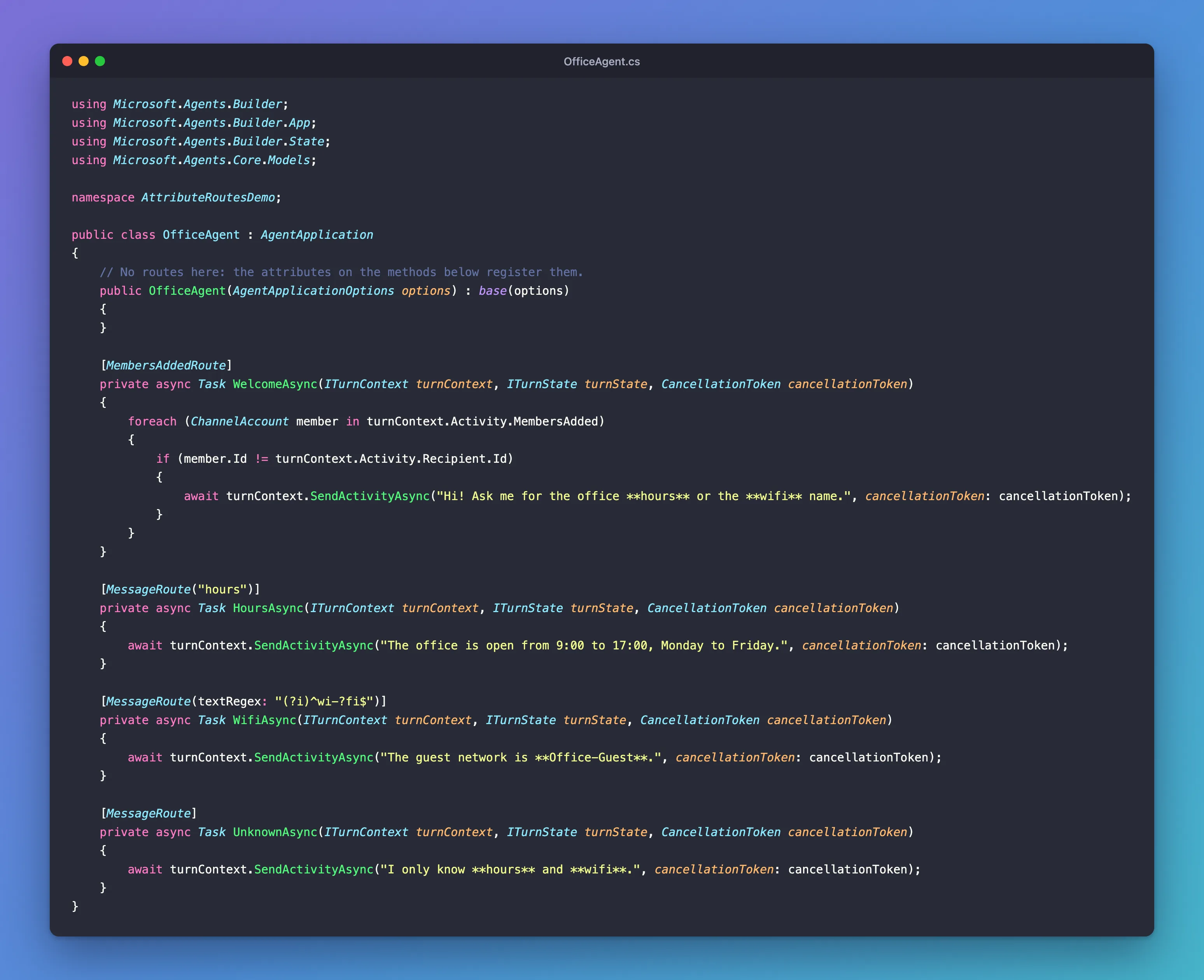
It's one class in an ASP.NET Core project with the Agents SDK, hosted with AddAgent<OfficeAgent>() and listening on port 3978.
Prerequisites
- The Microsoft 365 Agents Playground, to send the agent messages on your own machine.
agentsplayground --versionshould print0.2.30; if the command isn't found, install it withnpm install -g @microsoft/m365agentsplayground.
Step 1: Keep the Constructor
The agent still needs its constructor, to pass AgentApplicationOptions on to AgentApplication. It just doesn't register anything:
// No routes here: the attributes on the methods below register them.
public OfficeAgent(AgentApplicationOptions options) : base(options)
{
}
When AgentApplication's own constructor runs, it looks through your class's methods for route attributes and registers a route for each one.
Step 2: Put an Attribute on Each Handler
Each attribute sits on the line above its handler:
[MembersAddedRoute]
private async Task WelcomeAsync(ITurnContext turnContext, ITurnState turnState, CancellationToken cancellationToken)
{
    // ...
}

[MessageRoute("hours")]
private async Task HoursAsync(ITurnContext turnContext, ITurnState turnState, CancellationToken cancellationToken)
{
    // ...
}

[MessageRoute(textRegex: "(?i)^wi-?fi$")]
private async Task WifiAsync(ITurnContext turnContext, ITurnState turnState, CancellationToken cancellationToken)
{
    // ...
}

[MessageRoute]
private async Task UnknownAsync(ITurnContext turnContext, ITurnState turnState, CancellationToken cancellationToken)
{
    // ...
}
[MembersAddedRoute]welcomes new members, skipping the agent itself.[MessageRoute("hours")]answershours, in any capitalization.[MessageRoute(textRegex: "(?i)^wi-?fi$")]answerswifi,wi-fiandWi-Fi:-?makes the hyphen optional, and(?i)turns on case-insensitive matching inside the pattern.[MessageRoute]has no text, so it takes every message and gets the last rank automatically. It's the catch-all.
The handlers can be private: the SDK finds them anyway.
Step 3: Try It
Run the agent with dotnet run, start the Agents Playground in a second terminal, and send hours, Wi-Fi and parking:
agentsplayground -e http://localhost:3978/api/messages -c emulator
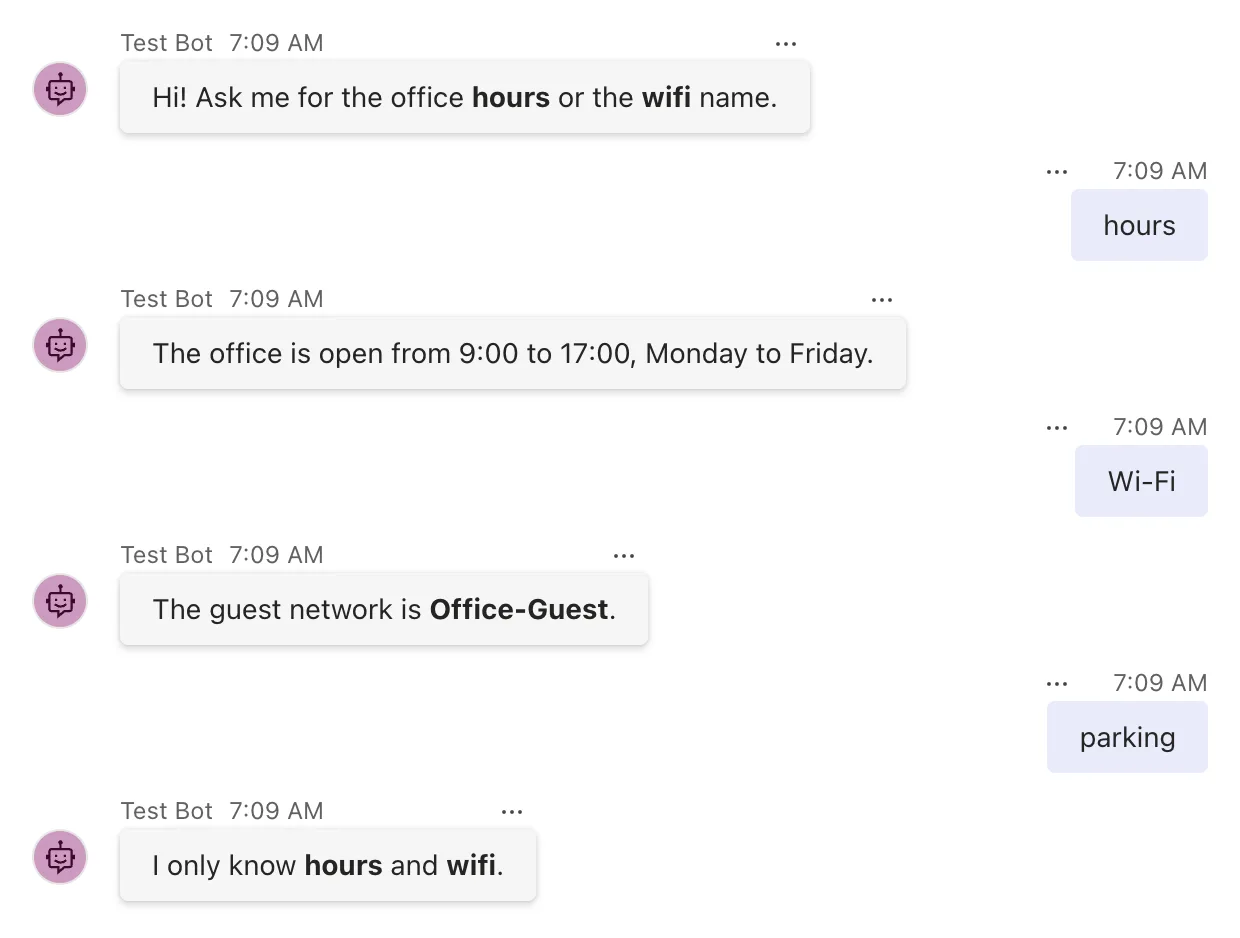
Every attribute registered its route: the welcome arrived on connect, hours and Wi-Fi reached their handlers, and parking fell through to the catch-all.
Step 4: Know That textRegex Is Case-Sensitive
The (?i) at the start of the wifi pattern isn't decoration. Before adding it, the attribute was [MessageRoute(textRegex: "^wi-?fi$")], and this is what happened:
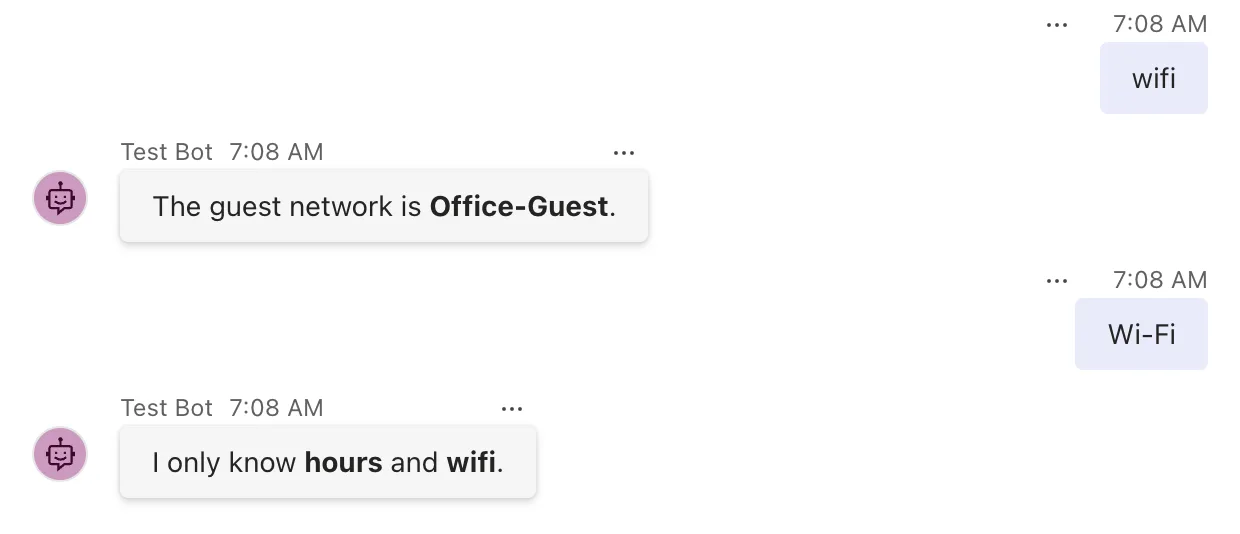
wifi matched, Wi-Fi didn't. [MessageRoute("hours")] ignores case, but textRegex creates a plain regular expression with no options, and .NET regular expressions are case-sensitive by default. An attribute can't take RegexOptions, so put the option inside the pattern: (?i) at the start makes the whole pattern ignore case.
Common Mistakes
| Mistake | What happens | Do this instead |
|---|---|---|
A textRegex pattern without (?i) | Messages with other capitalizations don't match | Start the pattern with (?i) |
| Registering the same route with an attribute and in the constructor | Two routes for one handler | Pick one place for each route |
| Mixing attribute and constructor routes that match the same messages | Attribute routes are tried first, whatever order the code suggests | Give overlapping routes explicit ranks |
Using the obsolete [Route] attribute | A compiler warning | Use the specific attributes, such as [MessageRoute] |
Troubleshooting
| Symptom | Likely cause | Fix |
|---|---|---|
| A message gets the catch-all instead of its route | The pattern is case-sensitive, or doesn't match the text | Add (?i), and check the pattern against the text |
| A handler never runs | The method has no route attribute, or its attribute doesn't match | Check the attribute and its text |
| Every message gets the same handler | A route that matches every message is tried first | Give it rank: RouteRank.Last, or use [MessageRoute] without text |
FAQ
Where do attribute routes go in the route order?
The SDK registers attribute routes while AgentApplication's own constructor runs, before the code in your constructor. Routes with the same rank are tried in the order they were registered, so attribute routes come before routes your constructor adds, in the order the methods appear in the class. Part 2 of the Microsoft 365 Agents SDK Fundamentals shows this in the SDK's route log.
Can I mix attributes and constructor routes?
Yes, in the same class. Keep in mind where attribute routes land in the order, and give routes that could match the same activity explicit ranks.
Why does [MessageRoute] without text come last?
Because a message route with no text matches every message. The SDK gives such a route the last rank when you don't set one, so routes with text are tried first.
Conclusion
Route attributes register a route right on its handler: [MessageRoute("text")] for exact text, [MessageRoute(textRegex: "...")] for a pattern, [MessageRoute] for a catch-all, and one attribute for each other kind of route. Leave the constructor empty, start textRegex patterns with (?i) when capitalization shouldn't matter, and remember that attribute routes are registered before your constructor's.
Additional Resources
- MessageRouteAttribute class — the message route attribute, with examples.
- Regular expression options — inline options such as
(?i).
