How to Decode Base64url Text in the Terminal

Base64url text, the kind you find in JSON Web Tokens, page cursors and links, can't go straight into a standard base64 decoder. Two characters have to be swapped back and the = padding put back first. This guide decodes base64url in bash, zsh and PowerShell, with a small function you can reuse.
Syntax
In bash or zsh, define this function once, then call it with the text to decode:
b64url_decode() {
  local data
  data=$(printf '%s' "$1" | tr '_-' '/+')
  while [ $(( ${#data} % 4 )) -ne 0 ]; do data="$data="; done
  printf '%s' "$data" | openssl base64 -d -A
  echo
}
b64url_decode '<base64url-text>'
| Part | What it does |
|---|---|
b64url_decode() { … } | Defines a function, a named group of commands you can run again by its name. |
local data | Makes data a variable that only this function sees. |
tr '_-' '/+' | Swaps the base64url characters back: every _ becomes /, and every - becomes +. $1 is the text you pass in. |
while [ $(( ${#data} % 4 )) -ne 0 ]; do data="$data="; done | Adds = until the length is a multiple of 4. ${#data} is the length, and % 4 is the remainder after dividing by 4. |
openssl base64 -d -A | Decodes standard base64. -d means decode, and -A reads the input as one line. |
echo | Ends the output with a line break, so your next prompt starts on its own line. |
'<base64url-text>' | The text to decode, between single quotes. |
In PowerShell 7.6:
[Text.Encoding]::UTF8.GetString([System.Buffers.Text.Base64Url]::DecodeFromChars('<base64url-text>'))
| Part | What it does |
|---|---|
[System.Buffers.Text.Base64Url]::DecodeFromChars('<base64url-text>') | .NET's base64url decoder. It accepts text without padding and returns the bytes. |
[Text.Encoding]::UTF8.GetString(…) | Turns the bytes back into text. |
The Example
Many APIs split long lists into pages and give you a cursor, a short piece of base64url text, to fetch the next page. A food app's search for pizza returned this cursor:
eyJxIjoicGl6emE_IiwicGFnZSI6Mn0
It has a _, which standard base64 doesn't use, and it's 31 characters long, which isn't a multiple of 4. Both need fixing before a base64 decoder can read it.
Prerequisites
- macOS or Linux: OpenSSL. macOS includes it, and most Linux distributions do too; check with
openssl version. - Windows: PowerShell 7.6, the current long-term support release. The
Base64Urlclass arrived in .NET 9, which Windows PowerShell 5.1 doesn't run on.
Step 1: Swap the Characters Back and Restore the Padding
- macOS / Linux
- Windows (PowerShell)
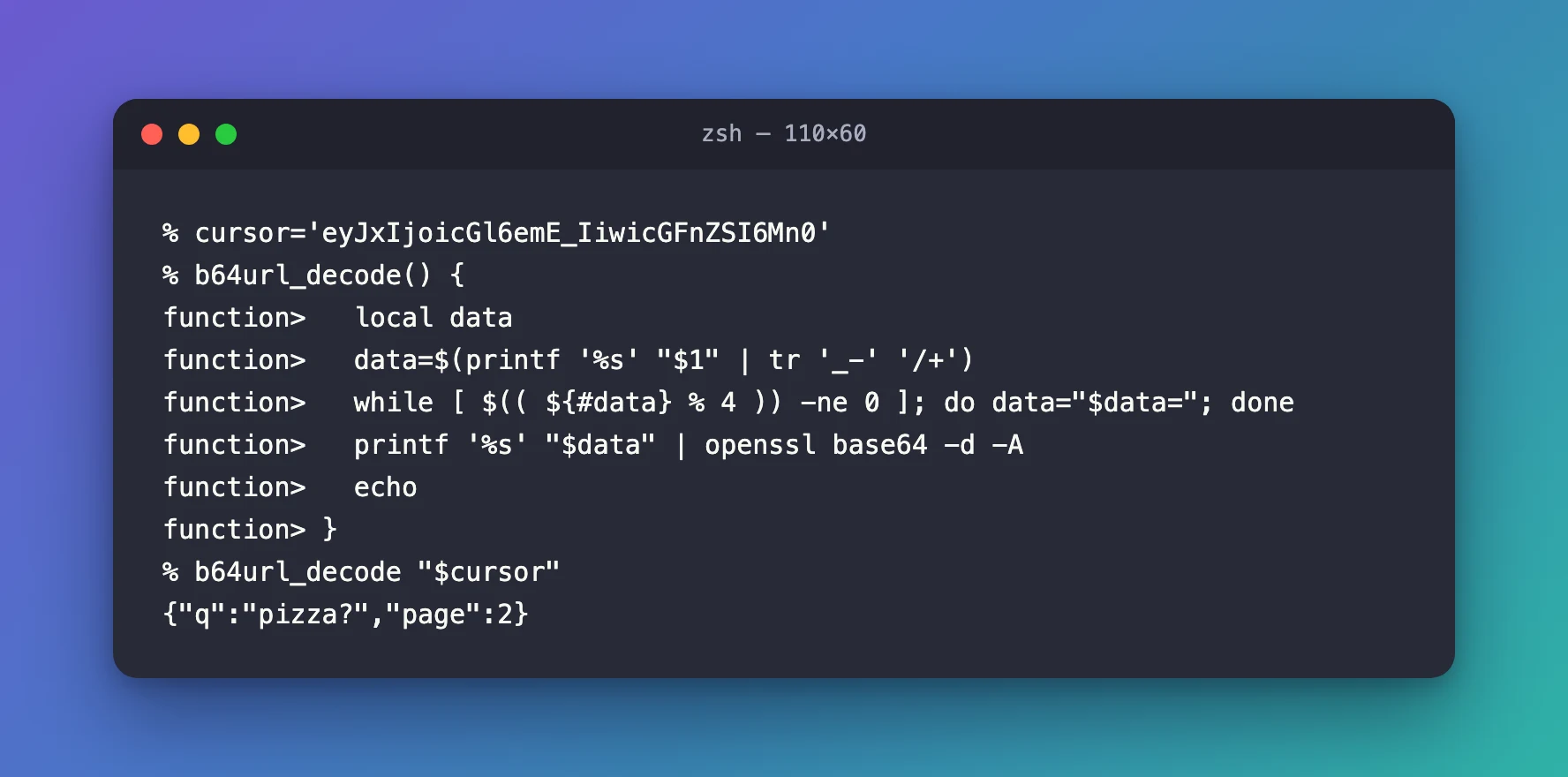
Store the cursor in a variable, then paste the function into your terminal. It prints nothing yet: it only becomes available.
cursor='eyJxIjoicGl6emE_IiwicGFnZSI6Mn0'
b64url_decode() {
  local data
  data=$(printf '%s' "$1" | tr '_-' '/+')
  while [ $(( ${#data} % 4 )) -ne 0 ]; do data="$data="; done
  printf '%s' "$data" | openssl base64 -d -A
  echo
}
Do the swap and the padding by hand first, to see what the decoder needs:
$cursor = 'eyJxIjoicGl6emE_IiwicGFnZSI6Mn0'
$base64 = $cursor.Replace('-', '+').Replace('_', '/')
$base64 = $base64.PadRight($base64.Length + (4 - $base64.Length % 4) % 4, '=')
$base64
eyJxIjoicGl6emE/IiwicGFnZSI6Mn0=
Replace swaps the two characters. PadRight adds = up to the next multiple of 4: (4 - $base64.Length % 4) % 4 works out how many, here one, because 31 leaves a remainder of 3.
Step 2: Decode It
- macOS / Linux
- Windows (PowerShell)
b64url_decode "$cursor"
{"q":"pizza?","page":2}
[Text.Encoding]::UTF8.GetString([Convert]::FromBase64String($base64))
{"q":"pizza?","page":2}
.NET's Base64Url class does the swap and the padding itself, so the original cursor decodes in one call:
[Text.Encoding]::UTF8.GetString([System.Buffers.Text.Base64Url]::DecodeFromChars($cursor))
{"q":"pizza?","page":2}
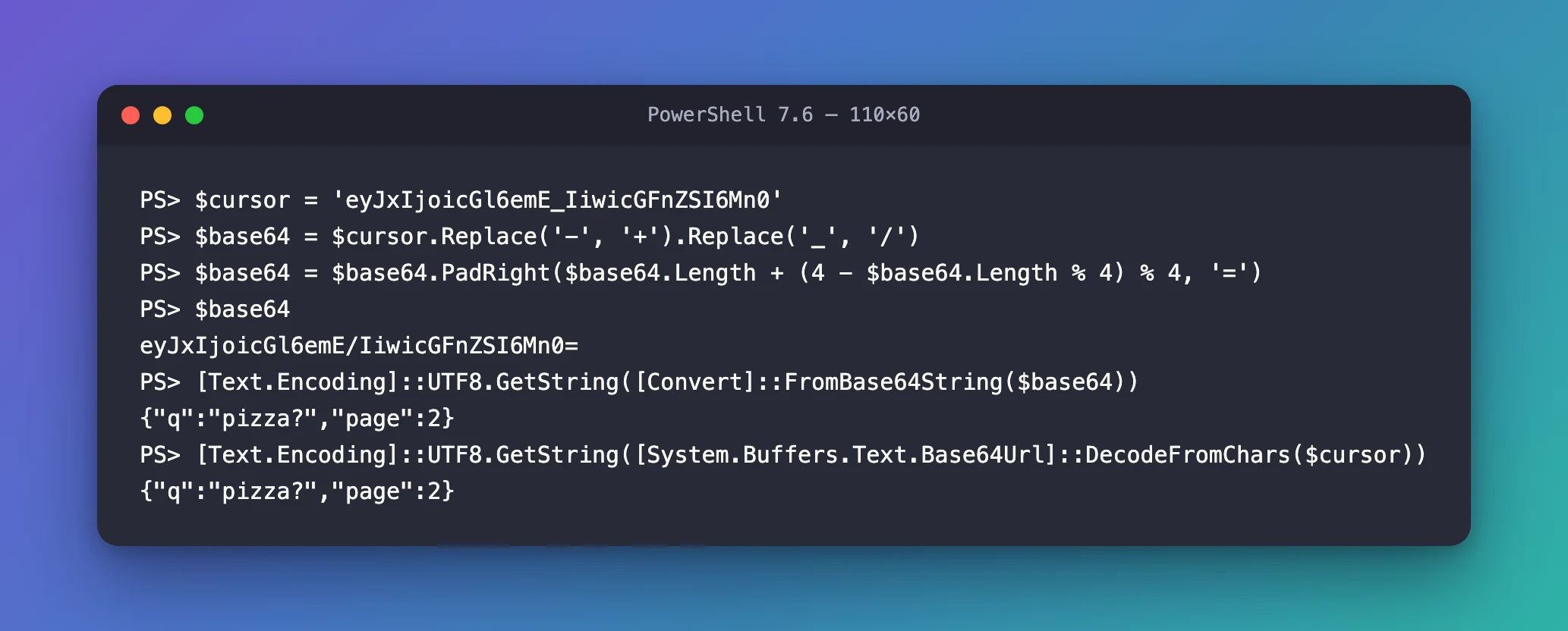
The cursor is plain JSON: the app remembers the search, pizza?, and the page to fetch next, 2. Base64url only packs it into characters that are safe in a web address. It doesn't hide anything, so anyone can read it.
Without the =, openssl base64 -d doesn't report a problem: it prints part of the text, or nothing, and still exits with status 0. Fixed: openssl base64 -d Cuts Off a JWT Payload or Prints Nothing shows it happening. PowerShell's [Convert]::FromBase64String refuses the text instead, with The input is not a valid Base-64 string as it contains a non-base 64 character, more than two padding characters, or an illegal character among the padding characters. The fixes post for that error shows both causes.
Common Mistakes
| Mistake | What happens | Do this instead |
|---|---|---|
| Decoding without restoring the padding | OpenSSL returns part of the text, or nothing | Add = until the length is a multiple of 4 |
| Swapping the characters the wrong way | - and _ stay in, and the decoder can't read them | _ becomes /, and - becomes + |
| Expecting base64url to hide data | Anyone can decode it, as you just did | Never put secrets in base64url text |
Troubleshooting
| Symptom | Likely cause | Fix |
|---|---|---|
| The output stops partway, or is empty | The = padding is missing | Use the function above, which adds it |
| PowerShell: The input is not a valid Base-64 string… | FromBase64String was given base64url, or text without padding | Swap the characters and pad first, or use Base64Url.DecodeFromChars |
| The output looks like random symbols | The text holds binary data, not text | Save it to a file instead of printing it |
FAQ
How many = does the text need?
It depends on the remainder when you divide the length by 4. RFC 7515's Appendix C gives the rule: a remainder of 2 needs ==, a remainder of 3 needs =, and 0 needs nothing. A remainder of 1 means the text is broken.
Can I decode a JWT this way?
Yes, one part at a time: a JWT is three base64url parts joined by dots. How to Decode a JWT in the Terminal splits a token and decodes its header and payload.
How do I encode text as base64url?
How to Base64url Encode Text in the Terminal goes the other way.
Conclusion
To decode base64url in bash or zsh, swap _ and - back to / and +, add = until the length divides by 4, and run openssl base64 -d -A. The b64url_decode function does all three. In PowerShell 7.6, [System.Buffers.Text.Base64Url]::DecodeFromChars handles the swap and the padding for you.
Additional Resources
- RFC 4648, Section 5 — the base64url alphabet.
- RFC 7515, Appendix C — decoding base64url that has no padding.
- openssl-enc — the
-dand-Aoptions ofopenssl base64. - Base64Url.DecodeFromChars — .NET's base64url decoder.
