How to Decode a JWT in the Terminal

A JSON Web Token (JWT) carries readable JSON inside it, only encoded. You can see what a token says without pasting it into a website, which matters because a token is a key: anyone who has it can use it until it expires. This guide decodes a token's header and payload with a small function in bash, zsh and PowerShell.
Syntax
A JWT is three base64url parts joined by dots: header, payload and signature. The functions below decode the first two, which are JSON. The third is binary signature data, not text.
In bash or zsh, define the function once, then call it with a token:
jwt_decode() {
  local part data
  for part in 1 2; do
    data=$(echo "$1" | cut -d. -f"$part" | tr '_-' '/+')
    while [ $(( ${#data} % 4 )) -ne 0 ]; do data="$data="; done
    printf '%s' "$data" | openssl base64 -d -A
    echo
  done
}
jwt_decode '<token>'
| Part | What it does |
|---|---|
for part in 1 2; do … done | Runs the lines inside twice: once for the header (part 1), once for the payload (part 2). |
cut -d. -f"$part" | Splits the token at each . and keeps one part. $1 is the token you pass in. |
tr '_-' '/+' | Turns base64url back into base64: _ becomes /, and - becomes +. |
while [ $(( ${#data} % 4 )) -ne 0 ]; do data="$data="; done | Puts back the = padding that JWTs leave out, until the length is a multiple of 4. |
openssl base64 -d -A | Decodes the base64 text. -A reads it as one line. |
echo | Starts a new line after each part. |
In PowerShell 7.6:
function ConvertFrom-Jwt([string] $Token) {
  foreach ($part in $Token.Split('.')[0..1]) {
    $base64 = $part.Replace('-', '+').Replace('_', '/')
    $base64 = $base64.PadRight($base64.Length + (4 - $base64.Length % 4) % 4, '=')
    [Text.Encoding]::UTF8.GetString([Convert]::FromBase64String($base64))
  }
}
ConvertFrom-Jwt '<token>'
| Part | What it does |
|---|---|
$Token.Split('.')[0..1] | Splits the token at each . and keeps the first two parts. |
.Replace('-', '+').Replace('_', '/') | Turns base64url back into base64. |
.PadRight(…, '=') | Adds the = padding until the length is a multiple of 4. |
[Convert]::FromBase64String(…) and UTF8.GetString(…) | Decodes the base64 and turns the bytes into text. |
The Example
A recipe app signed Meera in and gave her app this token:
eyJhbGciOiJIUzI1NiIsInR5cCI6IkpXVCJ9.eyJzdWIiOiJtZWVyYSIsIm5hbWUiOiJNZWVyYSIsInBsYW4iOiJwcm8iLCJpYXQiOjE3OTU1OTk2ODIsImV4cCI6MTc5NTY4NjA4Mn0.0HXrUPn72PogatqS10W5UcQHSiOQyPJSwsZSq2ed0eE
Its payload part is 103 characters long, not a multiple of 4, so the decoder has to put back one = first.
Prerequisites
- macOS or Linux: OpenSSL. macOS includes it, and most Linux distributions do too; check with
openssl version. - Windows: PowerShell 7.6, the current long-term support release.
Step 1: Store the Token and Add the Function
- macOS / Linux
- Windows (PowerShell)
token='eyJhbGciOiJIUzI1NiIsInR5cCI6IkpXVCJ9.eyJzdWIiOiJtZWVyYSIsIm5hbWUiOiJNZWVyYSIsInBsYW4iOiJwcm8iLCJpYXQiOjE3OTU1OTk2ODIsImV4cCI6MTc5NTY4NjA4Mn0.0HXrUPn72PogatqS10W5UcQHSiOQyPJSwsZSq2ed0eE'
jwt_decode() {
  local part data
  for part in 1 2; do
    data=$(echo "$1" | cut -d. -f"$part" | tr '_-' '/+')
    while [ $(( ${#data} % 4 )) -ne 0 ]; do data="$data="; done
    printf '%s' "$data" | openssl base64 -d -A
    echo
  done
}
Both commands print nothing. The token is now in $token, and jwt_decode is available until you close the terminal.
$token = 'eyJhbGciOiJIUzI1NiIsInR5cCI6IkpXVCJ9.eyJzdWIiOiJtZWVyYSIsIm5hbWUiOiJNZWVyYSIsInBsYW4iOiJwcm8iLCJpYXQiOjE3OTU1OTk2ODIsImV4cCI6MTc5NTY4NjA4Mn0.0HXrUPn72PogatqS10W5UcQHSiOQyPJSwsZSq2ed0eE'
function ConvertFrom-Jwt([string] $Token) {
  foreach ($part in $Token.Split('.')[0..1]) {
    $base64 = $part.Replace('-', '+').Replace('_', '/')
    $base64 = $base64.PadRight($base64.Length + (4 - $base64.Length % 4) % 4, '=')
    [Text.Encoding]::UTF8.GetString([Convert]::FromBase64String($base64))
  }
}
Both commands print nothing. The token is now in $token, and ConvertFrom-Jwt is available until you close PowerShell.
Step 2: Decode the Token
- macOS / Linux
- Windows (PowerShell)
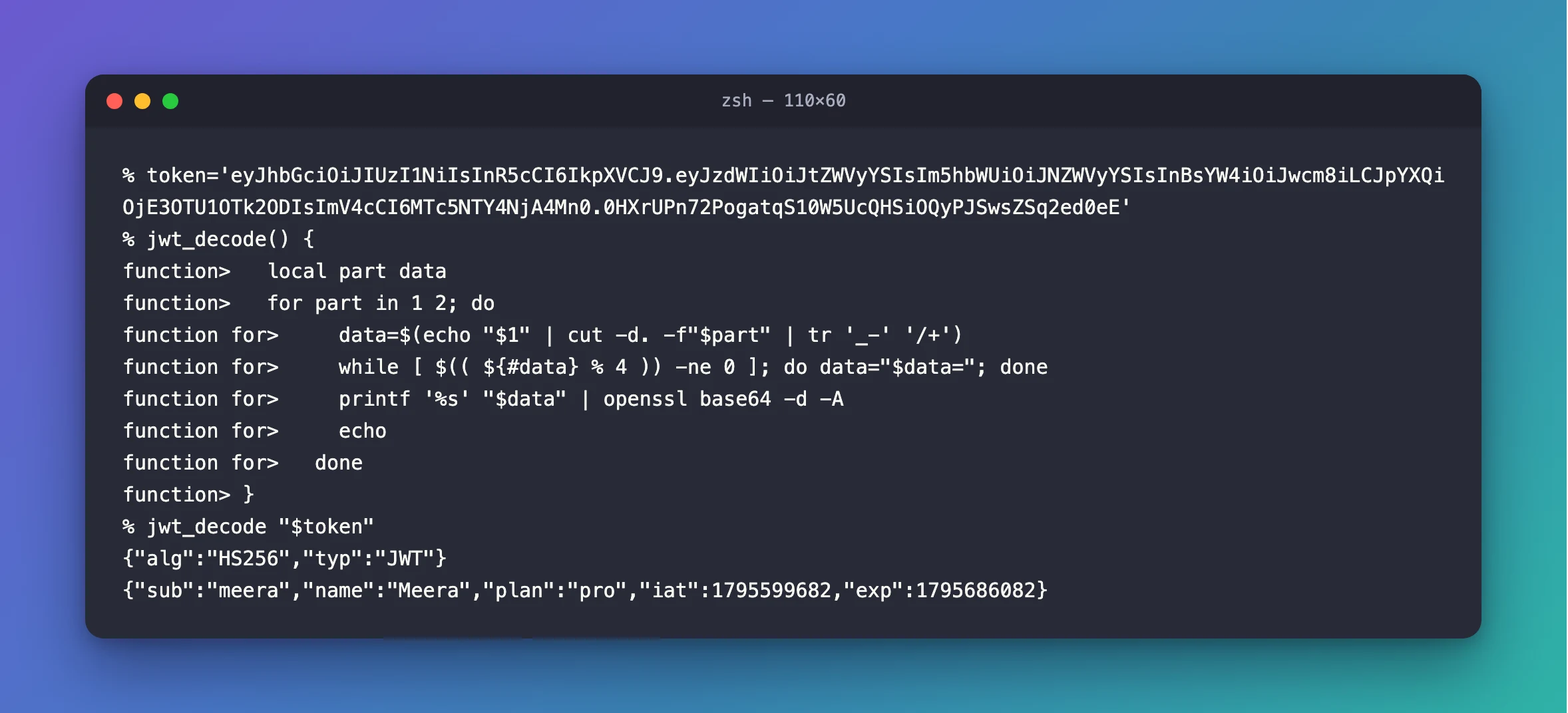
jwt_decode "$token"
{"alg":"HS256","typ":"JWT"}
{"sub":"meera","name":"Meera","plan":"pro","iat":1795599682,"exp":1795686082}
ConvertFrom-Jwt $token
{"alg":"HS256","typ":"JWT"}
{"sub":"meera","name":"Meera","plan":"pro","iat":1795599682,"exp":1795686082}
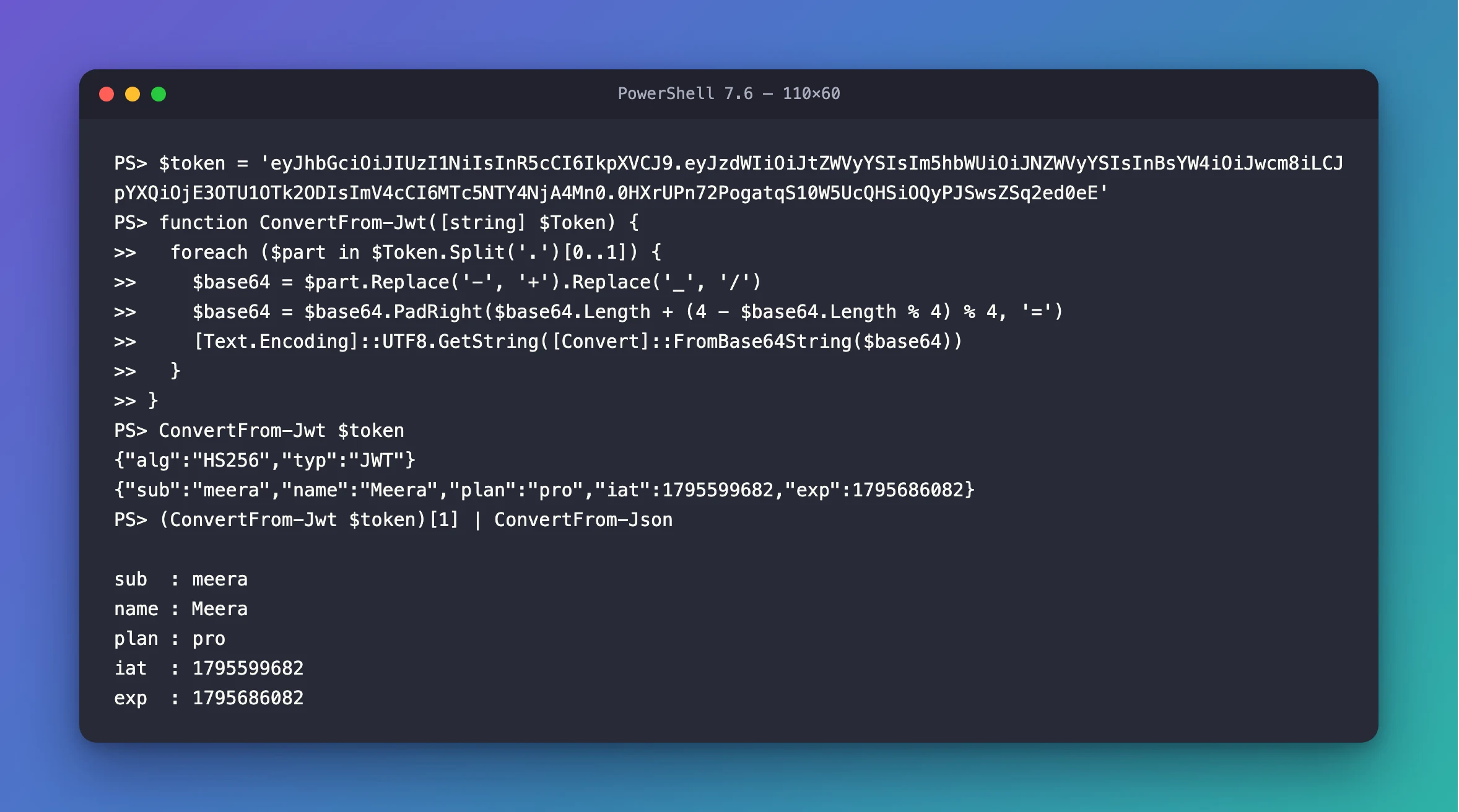
PowerShell can also turn the payload into an object, with one property per claim. [1] picks the second line, the payload, and ConvertFrom-Json reads it:
(ConvertFrom-Jwt $token)[1] | ConvertFrom-Json
sub  : meera
name : Meera
plan : pro
iat  : 1795599682
exp  : 1795686082
What the Token Says
- The header says the token is a JWT (
typ) signed with HMAC-SHA256 (alg:HS256). - The payload holds the claims: the user (
sub, short for subject), her name and plan, when the token was issued (iat), and when it expires (exp). Both times are Unix timestamps;expis 86,400 seconds, one day, afteriat. How to Convert a Unix Timestamp to a Date in the Terminal turns them into dates.
Anyone can decode a token and read its claims, and anyone can write a token that decodes to whatever they like. Only checking the signature proves the token came from the app that holds the key and that nobody changed it. Never decide who someone is from a decoded token alone. How to Check a JWT's HS256 Signature in the Terminal shows the check.
Common Mistakes
| Mistake | What happens | Do this instead |
|---|---|---|
| Pasting a real token into a website to read it | The site, and anyone watching it, gets a working key | Decode it locally, as here |
Decoding without restoring the = padding | openssl returns part of the payload, or nothing | Keep the padding loop in the function |
| Decoding the third part as text | It's binary signature data, so it prints random symbols | Decode only parts 1 and 2 |
| Trusting the decoded claims | Anyone can write any claims | Check the signature first |
Troubleshooting
| Symptom | Likely cause | Fix |
|---|---|---|
| The payload stops partway, or is empty | The = padding wasn't put back | Use the function as written; the fixes post explains why |
| PowerShell: The input is not a valid Base-64 string… | A part of the token was decoded without the swap or the padding | Use ConvertFrom-Jwt as written; the fixes post explains the error |
FAQ
Is decoding a JWT safe?
Decoding on your own computer is. The risk is sending the token somewhere else, because anyone holding it can use it until exp.
Can I decode an encrypted JWT this way?
No. An encrypted JWT (a JWE) has five parts, not three, and its payload can only be read with the right key.
What's in the third part?
The signature: the result of signing the first two parts with the app's key. It's binary data, stored as base64url.
Conclusion
A JWT's header and payload are base64url-encoded JSON, so decoding them takes a split at the dots, a character swap, the = padding and a base64 decode. The jwt_decode and ConvertFrom-Jwt functions do all of that on your own computer, so the token never leaves it. Reading the claims tells you what a token says; only the signature tells you whether to believe it.
Additional Resources
- RFC 7519: JSON Web Token (JWT) — the JWT standard, including the registered claims
sub,iatandexp. - RFC 7515, Appendix C — decoding base64url without padding.
- ConvertFrom-Json — turning JSON into PowerShell objects.
