How to Create and Set an MLflow Experiment

An MLflow experiment is a folder for related runs: one per project, or one per question you're trying to answer. Every run belongs to exactly one experiment. This guide creates experiments two ways, reads their ID and artifact location, shows the error you get for a duplicate name, and finds them in the UI, with real output from MLflow 3.18.0.
Syntax
import mlflow

experiment = mlflow.set_experiment("<name>")
experiment_id = mlflow.create_experiment("<name>", tags={"<key>": "<value>"})
| Part | What it means |
|---|---|
mlflow.set_experiment(name) | Makes the experiment active, so the runs you start next go into it. If no experiment has that name, MLflow creates it first. It returns the experiment |
mlflow.set_experiment(experiment_id="<ID>") | The same, by ID. That experiment must exist: "If an experiment with this ID does not exist, an exception is thrown" |
mlflow.create_experiment(name, artifact_location=None, tags=None) | Creates a new experiment and returns its ID. The name "must be a non-empty unique string" |
tags= | Labels for the experiment, as a dictionary of text keys and values |
Names are case-sensitive: Demo and demo are two different experiments.
Prerequisites
- MLflow in a uv project and a running tracking server at
http://127.0.0.1:8080. See How to Start an MLflow Tracking Server on Your Computer.
Step 1: Set an Experiment, Creating It If Needed
mlflow.set_experiment() is the one call most code needs: it makes an experiment the active one, and creates it first if it doesn't exist.
import mlflow
from mlflow import MlflowClient

mlflow.set_tracking_uri("http://127.0.0.1:8080")

experiment = mlflow.set_experiment("experiments-demo")
print("ID:", experiment.experiment_id)
print("Name:", experiment.name)
print("Artifact location:", experiment.artifact_location)
print("Lifecycle stage:", experiment.lifecycle_stage)

again = mlflow.set_experiment("experiments-demo")
print("Second call, same ID:", again.experiment_id)
Step 2: Create an Experiment with Tags
MlflowClient().create_experiment() creates an experiment explicitly, and can attach tags to it. Add at the end of the file:
client = MlflowClient()
tagged_id = client.create_experiment(
    "experiments-demo-tagged", tags={"team": "data-science", "project": "demo"}
)
print("create_experiment returned ID:", tagged_id)
print("Its tags:", mlflow.get_experiment_by_name("experiments-demo-tagged").tags)
Run the script:
uv run python experiments_demo.py
2026/11/13 17:07:40 INFO mlflow.tracking.fluent: Experiment with name 'experiments-demo' does not exist. Creating a new experiment.
ID: 2
Name: experiments-demo
Artifact location: mlflow-artifacts:/2
Lifecycle stage: active
Second call, same ID: 2
create_experiment returned ID: 3
Its tags: {'team': 'data-science', 'project': 'demo'}
What happened:
- The first
set_experiment()created the experiment, and MLflow logged that it did. It got ID 2: the server numbers experiments in order, andDefaultis always 0. - The artifact location is
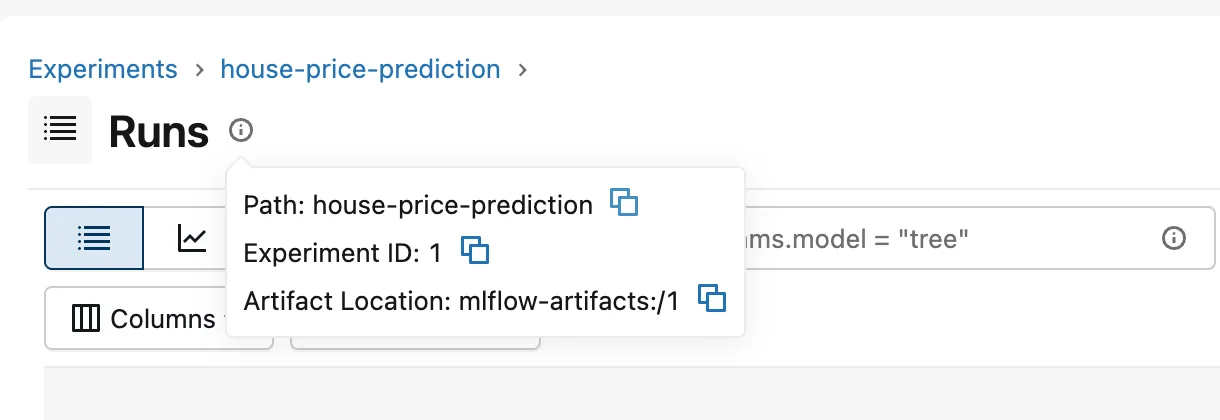
mlflow-artifacts:/2: files logged in this experiment go to the server's artifact store, in a folder named after the ID. - The second
set_experiment()found it and returned the same ID, with no log line. create_experiment()returned only the new ID, 3.get_experiment_by_name()fetched the whole experiment, tags included.
Step 3: Find Them in the UI
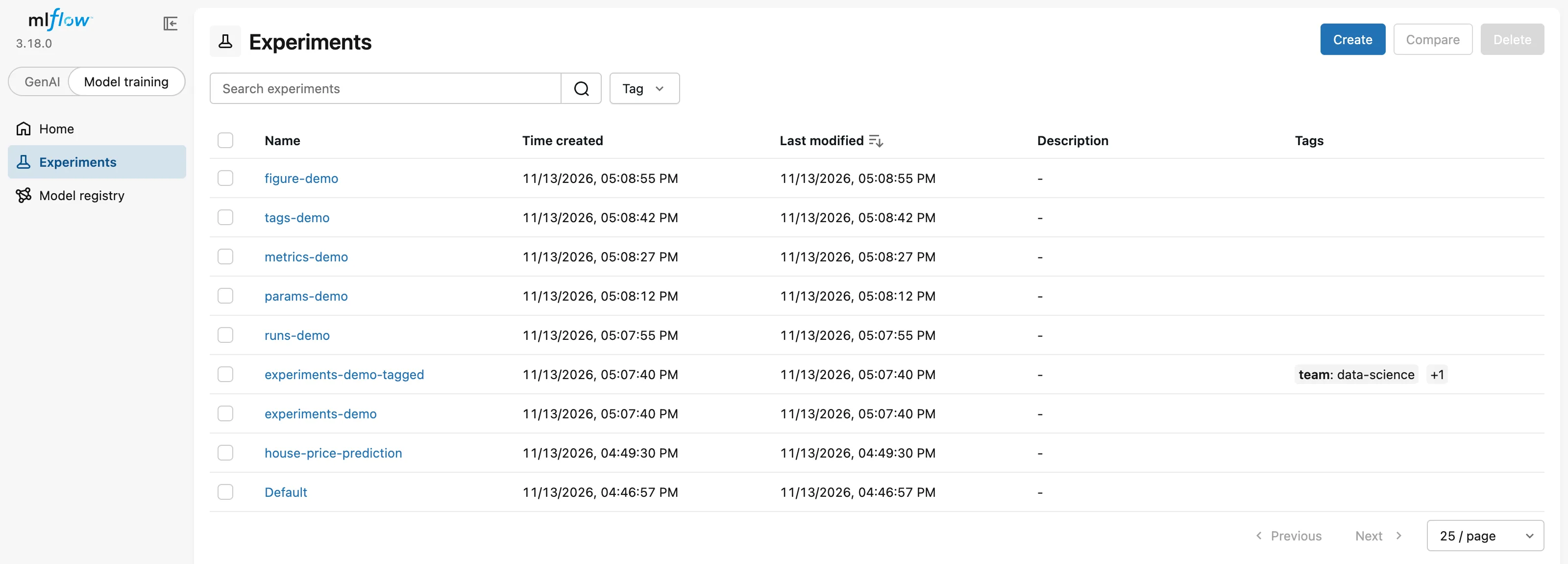
The Experiments page lists them all, tags included:
Open an experiment and click the ⓘ icon next to Runs for its path, ID and artifact location:
Names Must Be Unique
create_experiment() refuses a name that already exists:
from mlflow import MlflowClient

client = MlflowClient("http://127.0.0.1:8080")
client.create_experiment("experiments-demo")
uv run python create_existing_experiment.py
mlflow.exceptions.RestException: RESOURCE_ALREADY_EXISTS: Experiment(name=experiments-demo) already exists. Error: (sqlite3.IntegrityError) UNIQUE constraint failed: experiments.workspace, experiments.name
[SQL: INSERT INTO experiments (name, workspace, artifact_location, lifecycle_stage, creation_time, last_update_time) VALUES (?, ?, ?, ?, ?, ?)]
[parameters: ('experiments-demo', 'default', '', 'active', 1794569868111, 1794569868111)]
(Background on this error at: https://sqlalche.me/e/21/gkpj)
set_experiment() never has this problem, because it uses the existing experiment instead. That's why training code should call set_experiment(), and create_experiment() is for when you need tags or a custom setup.
Which One to Use
| Call | Creates if missing | Fails if it exists | Makes it active | Tags |
|---|---|---|---|---|
mlflow.set_experiment(name) | Yes | No | Yes | No |
MlflowClient().create_experiment(name, tags=...) | Yes | Yes | No | Yes |
mlflow.get_experiment_by_name(name) | No | No | No | Reads them |
Common Mistakes
| Mistake | What happens | Do this instead |
|---|---|---|
| Logging runs without setting an experiment | They land in Default (ID 0) and mix with everything else | mlflow.set_experiment("your-project") before start_run() |
Calling create_experiment() on every run | The second run fails with RESOURCE_ALREADY_EXISTS | Use set_experiment() |
Expecting create_experiment() to activate the experiment | The next run still goes to the previously active experiment | Call set_experiment() too, or pass experiment_id to start_run() |
Troubleshooting
| Symptom | Likely cause | Fix |
|---|---|---|
RESOURCE_ALREADY_EXISTS: Experiment(name=…) already exists | The name is taken | Use set_experiment(), or another name |
| The experiment isn't in the UI | It was created on another tracking URI | Check mlflow.get_tracking_uri(): How to Set the MLflow Tracking URI in Python |
FAQ
What makes a good experiment name?
The project or the question: house-price-prediction, churn-model. Lowercase with dashes keeps URLs and commands simple.
Can I rename or delete an experiment?
Yes, with MlflowClient().rename_experiment() and delete_experiment(); the Experiments page also has a Delete button. A deleted experiment moves to a "deleted" state and can be restored with restore_experiment(). Only mlflow gc removes deleted runs for good.
What's the Default experiment for?
It catches runs that didn't set an experiment. Keep your own runs out of it.
Conclusion
mlflow.set_experiment("experiments-demo") created experiment 2 with the artifact location mlflow-artifacts:/2 and returned the same experiment on the second call. MlflowClient().create_experiment() created experiment 3 with tags, but refused a name that already existed with RESOURCE_ALREADY_EXISTS. The Experiments page and the ⓘ popover show it all in the UI.
Additional Resources
- mlflow.set_experiment — the API reference.
- MlflowClient.create_experiment — creating experiments with tags and artifact locations.
- MLflow Tracking — how experiments and runs fit together.
