How to Create an Excel Workbook in a SharePoint Document Library

A workbook made in a SharePoint document library belongs to the team, not to one person's OneDrive. You don't need to make it on your computer and upload it: the library's Create or upload menu creates a blank workbook in place and opens it in Excel for the web.
The example creates a workbook called Team Budget in the Documents library of a SharePoint site.
Step 1: Open the Library
Open the SharePoint site and the library, here Documents. If the workbook should go in a folder, open the folder first (How to Create a Folder in a SharePoint Document Library).
Step 2: Select Create or upload, Then Excel workbook
Select Create or upload, then Excel workbook:
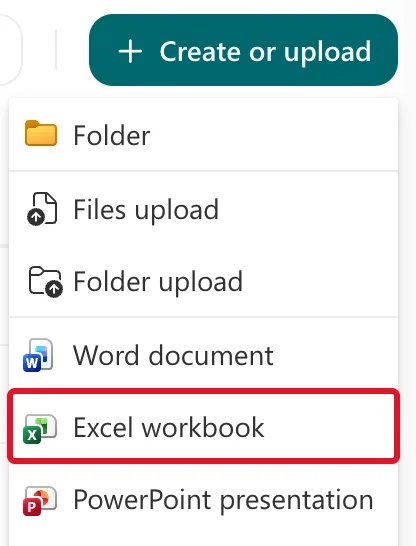
A new tab opens with a blank workbook in Excel for the web. Microsoft's Create a new file in a document library says Your new file is automatically saved to the document library and has a generic file name. Mine was called Book.
Step 3: Give It a Name
Select the name, Book, at the top of the page, type the new one, here Team Budget, and press Enter (How to Rename an Excel Workbook in Excel for the Web):

The cloud with a green tick next to the name means the change is saved:

The Result
Back in the library's tab, after a refresh, Team Budget.xlsx is in the list:
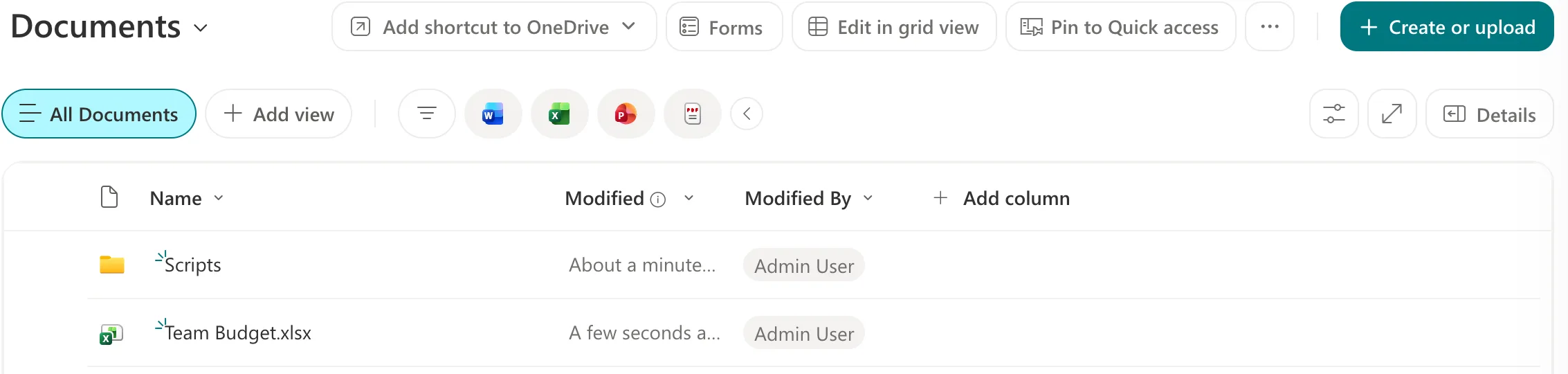
Everyone who can open the library can open the workbook, and Power Automate can find it by its library and name.
Common Mistakes
| Mistake | What happens | Do this instead |
|---|---|---|
| Leaving the generic name Book | New workbooks are hard to tell apart in the library | Rename it as soon as it opens |
| Creating it in your OneDrive and sharing it | The file lives in your OneDrive, not with the team's files | Create it in the team's library |
| Looking for a Save button | Excel for the web saves as you go | Check the cloud icon next to the name |
Troubleshooting
| Symptom | Likely cause | Fix |
|---|---|---|
| Excel workbook isn't on the menu | The library offers only the file types its owner has set up | Ask the site owner |
| The workbook isn't in the list | The library's tab hasn't refreshed | Refresh the browser |
| Others can't edit the new workbook | Microsoft's article says a library that requires check-out leaves a new file checked out to you | Check it in |
FAQ
Can I rename it from the library instead?
Yes. Microsoft's article: select ... (Show more actions) next to the file, then Rename, enter a name and select Rename.
Do I have to close the tab to save?
No. The workbook saves itself; switch back to the library's tab when you're done.
Can I create Word or PowerPoint files the same way?
Yes: Word document and PowerPoint presentation are on the same menu.
Conclusion
Create or upload → Excel workbook creates a blank workbook in the library and opens it in Excel for the web. Rename it from the top of the page, and it's saved to the library as you work.
