How to Create a Unique Index with EF Core and MySQL

Some values must never repeat: a product's SKU, a category's name, a user's email. Checking in code isn't enough, because two requests at the same moment can both pass the check. A unique index makes the database refuse the second one. This guide adds two from EF Core's model, applies them to MySQL 9.7, and shows what MySQL treats as a duplicate, which isn't always what you'd expect.
What a Unique Index Is
An index helps the database find rows by a column's value quickly. A unique index also forbids two rows with the same value. EF Core's indexes page explains the default and the switch: "By default, indexes aren't unique: multiple rows are allowed to have the same value(s) for the index's column set." Made unique, "Attempting to insert more than one entity with the same values for the index's column set will cause an exception to be thrown."
Prerequisites
- A .NET C# project using EF Core with MySQL. The examples use EF Core 10 with Oracle's
MySql.EntityFrameworkCoreand MySQL 9.7, from How to Connect a .NET C# Web API to a MySQL Database — Part 1. - The EF Core tools: How to Install dotnet-ef as a Local Tool in a .NET C# Project.
Step 1: Give the String a Maximum Length First
Index a string column that has no maximum length, and Oracle's provider changes the column for you. I tried a unique index on a category name that was still longtext:
modelBuilder.Entity<Category>().HasIndex(c => c.Name).IsUnique();
Build started...
Build succeeded.
An operation was scaffolded that may result in the loss of data. Please review the migration for accuracy.
Done. To undo this action, use 'ef migrations remove'
migrationBuilder.AlterColumn<string>(
    name: "Name",
    table: "categories",
    type: "varchar(255)",
    nullable: false,
    oldClrType: typeof(string),
    oldType: "longtext");

migrationBuilder.CreateIndex(
    name: "IX_categories_Name",
    table: "categories",
    column: "Name",
    unique: true);
MySQL can't index a whole longtext column, so the provider quietly shortened it to varchar(255), which is where the "loss of data" warning comes from. A length you didn't choose is a bad surprise, so I removed that migration and set real limits first, with HasMaxLength: 100 characters for a category name, 32 for a SKU. How to Set a Maximum String Length in EF Core covers that step.
Step 2: Add the Unique Indexes
With the lengths set, add the indexes in the entities' configurations:
builder.Property(c => c.Name)
    .HasMaxLength(100);

builder.HasIndex(c => c.Name)
    .IsUnique();
builder.Property(p => p.Sku)
    .HasMaxLength(32);

builder.HasIndex(p => p.Sku)
    .IsUnique();
HasIndex(c => c.Name)creates an index on the column. The docs: "You can specify an index over a column as follows"..IsUnique()makes it refuse duplicates.
Step 3: Create and Apply the Migration
dotnet ef migrations add AddUniqueIndexes --project src/Dewiride.Inventory.Data --startup-project src/Dewiride.Inventory.Api
dotnet ef database update --project src/Dewiride.Inventory.Data --startup-project src/Dewiride.Inventory.Api
migrationBuilder.CreateIndex(
    name: "IX_products_Sku",
    table: "products",
    column: "Sku",
    unique: true);

migrationBuilder.CreateIndex(
    name: "IX_categories_Name",
    table: "categories",
    column: "Name",
    unique: true);
Applying migration '20261103044122_AddUniqueIndexes'.
      CREATE UNIQUE INDEX `IX_products_Sku` ON `products` (`Sku`);
      CREATE UNIQUE INDEX `IX_categories_Name` ON `categories` (`Name`);
Done.
The names follow EF Core's convention, which its docs describe: "By convention, indexes created in a relational database are named IX_<type name>_<property name>." With ToTable, the table name takes the type name's place. To choose a name yourself, add .HasDatabaseName("UX_categories_Name").
If the table already holds duplicates, creating the index fails with a duplicate-key error. Find them first with SELECT Name, COUNT(*) FROM categories GROUP BY Name HAVING COUNT(*) > 1;.
Step 4: See What MySQL Treats as a Duplicate
The table has one category, Adapters. From the mysql client, insert the same name, the same name in lowercase, and a new one:
INSERT INTO categories (Name, CreatedAtUtc) VALUES ('Adapters', UTC_TIMESTAMP(6));
INSERT INTO categories (Name, CreatedAtUtc) VALUES ('adapters', UTC_TIMESTAMP(6));
INSERT INTO categories (Name, CreatedAtUtc) VALUES ('Chargers', UTC_TIMESTAMP(6));
ERROR 1062 (23000): Duplicate entry 'Adapters' for key 'categories.IX_categories_Name'
ERROR 1062 (23000): Duplicate entry 'adapters' for key 'categories.IX_categories_Name'
Query OK, 1 row affected (0.001 sec)
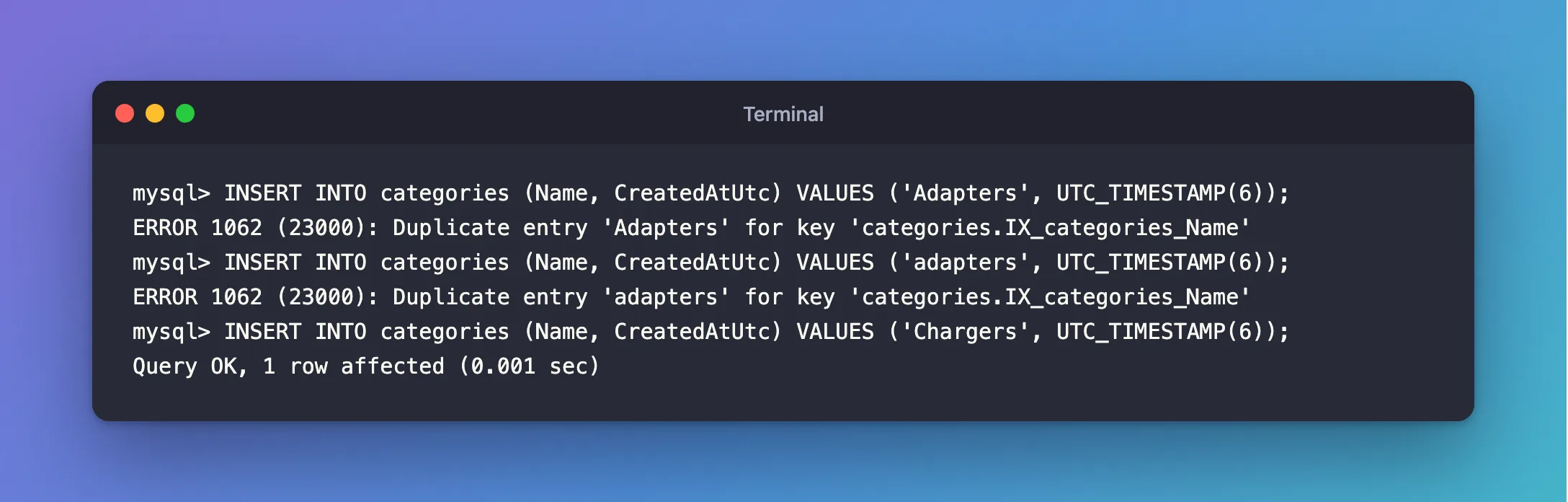
adapters counts as a duplicate of Adapters. The column's collation, MySQL's default utf8mb4_0900_ai_ci, compares text without regard to case or accents, and the unique index uses the same comparison. For names that's usually what you want. Fixed: ERROR 1062 Duplicate entry shows how to make a column case-sensitive if you need to, and how to update the existing row instead with INSERT … ON DUPLICATE KEY UPDATE.
Step 5: Handle the Duplicate in Your API
From EF Core, a duplicate arrives as a DbUpdateException from SaveChangesAsync, with MySql.Data's MySqlException inside, Number 1062. Catch exactly that and answer 409 Conflict:
try
{
    await db.SaveChangesAsync();
}
catch (DbUpdateException ex) when (ex.InnerException is MySqlException { Number: 1062 })
{
    // 1062: a unique index refused a duplicate value.
    return Results.Conflict(new { error = $"A category named '{name}' already exists." });
}
HTTP/1.1 409 Conflict
Content-Type: application/json; charset=utf-8

{"error":"A category named 'desks' already exists."}
Don't replace the index with a "does it exist?" query before inserting. Two requests at the same moment can both find nothing and both insert; only the index stops the second one.
Common Mistakes
| Mistake | What happens | Do this instead |
|---|---|---|
| Indexing a string with no maximum length | The provider changes the column to varchar(255) | Set HasMaxLength first |
| Checking for duplicates in code only | Concurrent requests both get through | Keep the unique index; catch 1062 |
| Creating the index on a table with duplicates | The migration fails | Find and resolve duplicates first |
Expecting Adapters and adapters to differ | 1062 on the second | Know your collation |
Troubleshooting
| Symptom | Likely cause | Fix |
|---|---|---|
Duplicate entry '…' for key '…' | The value exists, maybe in another case | Look it up with the collation in mind |
| The migration changes a string column you didn't touch | The index needs a bounded column | Set the maximum length yourself |
| The index name isn't what you expected | EF Core's IX_ convention | .HasDatabaseName(...) |
FAQ
Can a unique index span two columns?
Yes: HasIndex(l => new { l.OrderId, l.ProductId }).IsUnique() forbids the same product twice in one order. How to Create a Composite Index on Two Columns with EF Core and MySQL covers multi-column indexes.
Do NULL values count as duplicates?
Not in MySQL: a unique index allows several rows whose value is NULL. Make the column required if every row must have a distinct value.
Conclusion
HasIndex(c => c.Name).IsUnique() creates a unique index named IX_<table>_<column>, and MySQL then refuses duplicates with error 1062, compared the column's way, so case-insensitive by default. Give strings a maximum length before indexing them, resolve existing duplicates before applying the migration, and turn error 1062 into 409 Conflict in your API.
Additional Resources
- Indexes and Constraints —
HasIndex, uniqueness and naming. - Server Error Message Reference — error 1062.
