How to Create a Python Project with uv

uv init turns a folder into a complete Python project in about a second: a pyproject.toml, a pinned Python version, a source folder, a .gitignore and a Git repository. This guide explains the command's syntax first, then creates a small hello-world project and walks through every file uv writes, with real output from uv 0.13.8.
Syntax
uv init [OPTIONS] [PATH]
From uv's command reference:
| Part | What it means |
|---|---|
uv init | Creates a new Python project |
[OPTIONS] | Settings that change what uv creates. The common ones are in the next table |
[PATH] | The folder for the project. uv creates it if it doesn't exist. Leave it out to make the folder you're in into a project |
Square brackets mark a part you can leave out, so uv init on its own is a complete command. You don't type the brackets.
The options you'll use most:
| Option | What it does |
|---|---|
--python <version> | Which Python the project uses, for example --python 3.15. uv pins it for the folder and makes it the oldest version the project accepts |
--name <name> | The project's name. Without it, uv uses the folder's name |
--package | An installable package with a src/ folder and a build system. This is the default, so you don't need to type it |
--no-package | A plain folder with a main.py file and no build system |
--lib | A library: code that other projects import |
--bare | Only a pyproject.toml, and nothing else |
Prerequisites
- uv, Astral's Python project and package manager. Check it with
uv --version; this guide usesuv 0.13.8. - Python doesn't have to be installed first. uv uses a Python it finds on your computer, and downloads one automatically when it can't find the version you ask for. This guide uses Python 3.15.2, which was already installed.
Every command here works the same in Terminal (macOS), PowerShell (Windows) and Linux shells.
Step 1: Create the Project
The example is a small project called hello-world. Open a terminal in the folder where you keep your code and run:
uv init --python 3.15 hello-world
Initialized project `hello-world` at `/Users/you/source/hello-world`
| Part of the command | What it does |
|---|---|
uv init | Creates a new project |
--python 3.15 | Uses Python 3.15, the newest release, for this project |
hello-world | The folder to create. There's no --name, so it's also the project's name |
There's no --package either, so uv made its default kind of project: an installable package with a src/ folder. The other kinds are further down.
Without --python, uv chooses a Python itself, and it prefers the ones it installed over the ones already on your computer. On my Mac, a plain uv init hello-world picked an older Python 3.14 that uv had installed earlier, even though 3.15 was there too:
requires-python = ">=3.14"
Naming the version gives the same result on every computer.
Step 2: Look at What uv Created
hello-world/
├── .git/
├── .gitignore
├── .python-version
├── README.md
├── pyproject.toml
└── src/
    └── hello_world/
        └── __init__.py
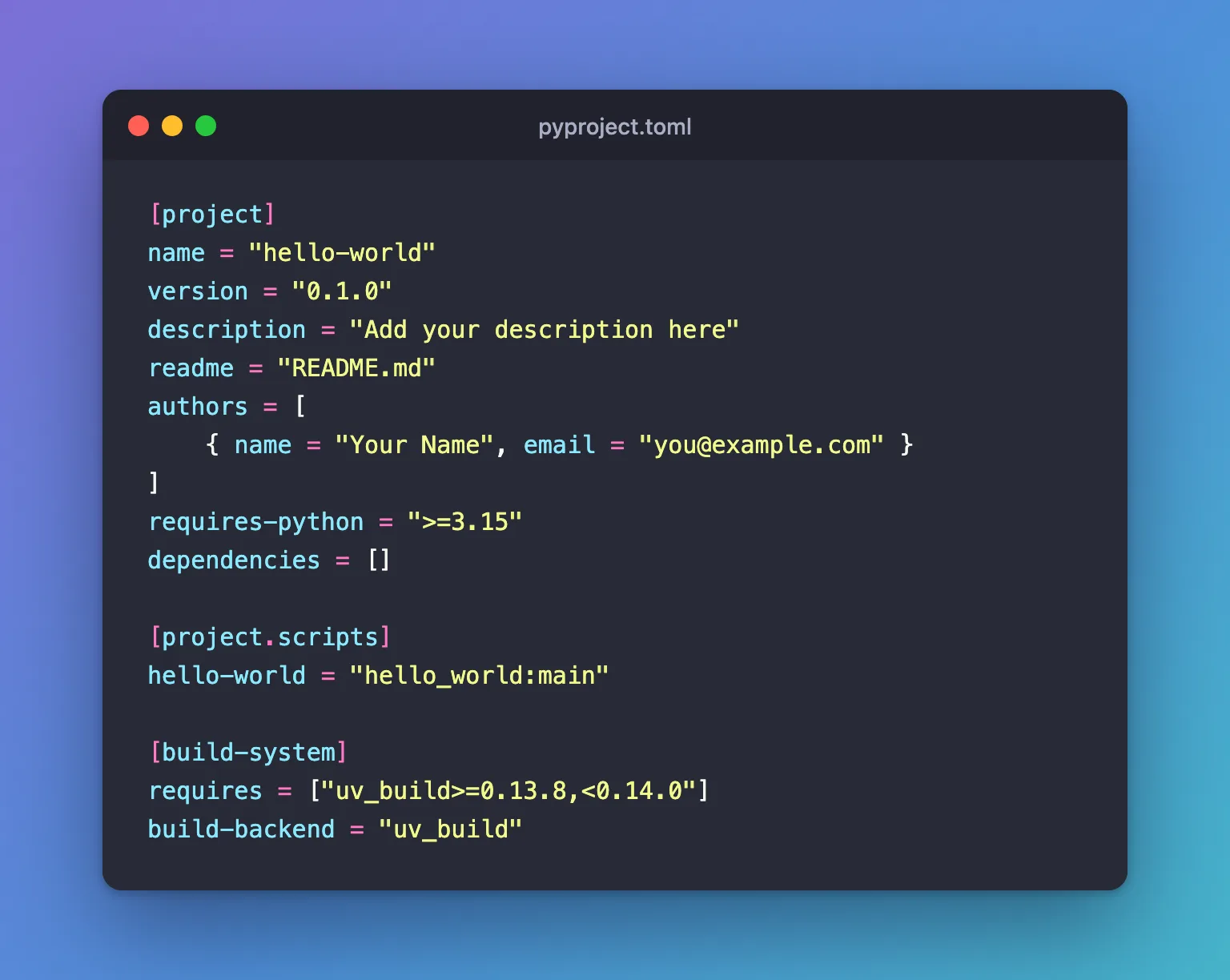
pyproject.toml describes the project. uv fills authors from your Git settings:
[project]
name = "hello-world"
version = "0.1.0"
description = "Add your description here"
readme = "README.md"
authors = [
    { name = "Your Name", email = "you@example.com" }
]
requires-python = ">=3.15"
dependencies = []

[project.scripts]
hello-world = "hello_world:main"

[build-system]
requires = ["uv_build>=0.13.8,<0.14.0"]
build-backend = "uv_build"
| Section | What it means |
|---|---|
[project] | The project's identity: name, version, description and authors |
requires-python | The oldest Python the project accepts. --python 3.15 set it to >=3.15 |
dependencies | The packages your code needs. Empty until you run uv add |
[project.scripts] | A command, hello-world, that runs the main() function in the hello_world package |
[build-system] | How to build the package. uv_build is uv's own build backend, matched to your uv version |
src/hello_world/__init__.py is where the project's code starts. uv put a sample main() function in it:
def main() -> None:
    print("Hello from hello-world!")
The folder is called hello_world, with an underscore, because Python names can't contain dashes.
The other files:
.python-versionholds one line,3.15. uv uses that Python in this folder..gitignorekeeps Python's cache files, build output and the.venvenvironment out of Git.README.mdis empty, ready for your notes..git/: uv also rangit init, so the folder is a Git repository. It doesn't create one inside a folder that's already in a repository.
Step 3: Run the Sample Command
Move into the project and run the command from [project.scripts]:
cd hello-world
uv run hello-world
Using CPython 3.15.2 interpreter at: /Library/Frameworks/Python.framework/Versions/3.15/bin/python3.15
Creating virtual environment at: .venv
      Built hello-world @ file:///Users/you/source/hello-world
Installed 1 package in 5ms
Hello from hello-world!
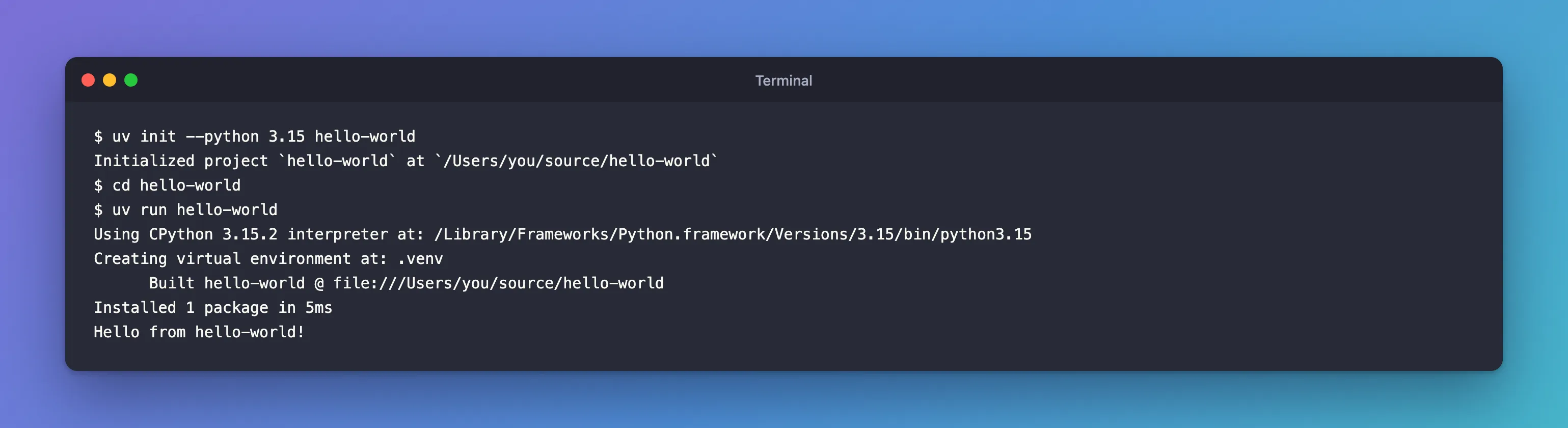
The first uv run created the virtual environment (.venv), a private Python environment for this project, installed your project into it, then ran the command. It also wrote uv.lock, the exact record of everything installed, so the project now has two more entries:
hello-world/
├── .venv/
└── uv.lock
uv run is explained in full in How to Run a Python Script with uv run. Next, add the packages your code needs: How to Add a Package to a Python Project with uv.
The Other Kinds of Project
uv init has four layouts. Each one below was created with --python 3.15, in the same folder as hello-world:
| Command | Files | Use it for |
|---|---|---|
uv init --python 3.15 --app my-app | pyproject.toml, src/my_app/__init__.py, .python-version, README.md, .gitignore | Applications and tools you install and run. It's the default, so --app is optional: hello-world got the same files |
uv init --python 3.15 --no-package my-script-app | pyproject.toml, main.py, .python-version, README.md, .gitignore | A simple folder of scripts with no build step |
uv init --python 3.15 --lib my-lib | pyproject.toml, src/my_lib/__init__.py, src/my_lib/py.typed, .python-version, README.md, .gitignore | Libraries other projects import. py.typed says the code has type hints |
uv init --python 3.15 --bare my-tools | pyproject.toml only | A folder where you only install and run tools, with no code of your own |
A packaged project, the default, gets a [build-system] and a src/ folder. A project created with --no-package gets neither, and its code starts in main.py:
[project]
name = "my-script-app"
version = "0.1.0"
description = "Add your description here"
readme = "README.md"
requires-python = ">=3.15"
dependencies = []
def main():
    print("Hello from my-script-app!")


if __name__ == "__main__":
    main()
--bare is the smallest. It writes only pyproject.toml, with no Git repository and no .python-version:
uv init --python 3.15 --bare my-tools
Initialized project `my-tools` at `/Users/you/source/my-tools`
[project]
name = "my-tools"
version = "0.1.0"
requires-python = ">=3.15"
dependencies = []
Common Mistakes
| Mistake | What happens | Do this instead |
|---|---|---|
Leaving out --python | uv picks a Python itself, preferring the ones it installed, which may not be the newest | Name the version: --python 3.15 |
Running uv init inside another uv project | uv prints Adding `nested` as member of workspace and adds a [tool.uv.workspace] table to the outer project | Create projects in a plain folder, such as source |
| Using dashes in Python imports | import hello-world stops with SyntaxError: invalid syntax | Import with underscores: import hello_world |
Committing .venv | The environment's files land in Git, though Python's venv documentation says an environment is "not considered as movable or copyable" | Keep the .gitignore uv created |
Troubleshooting
| Symptom | Likely cause | Fix |
|---|---|---|
uv: command not found | uv isn't installed, or its folder isn't on your PATH | Install uv from Astral's documentation and open a new terminal |
.python-version holds an older version than you wanted | The project was created without --python | Run uv python pin 3.15 in the project. It prints Updated `.python-version` from `3.14` -> `3.15`. Then raise requires-python in pyproject.toml to match |
No .git folder after uv init | The folder is inside a Git repository already, or you used --bare | Expected; run git init yourself if you want a separate repository |
uv run prints Creating virtual environment | There's no .venv yet, or it was deleted | Expected: uv creates it and installs everything from uv.lock |
FAQ
Do I need --package?
No. uv's reference says packaging is "the default behavior", so uv init and uv init --package create the same project.
What's the difference between the folder name and the project name?
By default they're the same: uv init hello-world names the project hello-world. Add --name <name> to give the project a different name from its folder. The folder is just where the files live; the name in pyproject.toml is the project's identity, and Python imports it with underscores.
Can I use another Python version?
Yes. Change --python 3.15 to the version you want. If it isn't on your computer, uv downloads it.
Where's the virtual environment?
uv creates .venv inside the project the first time you run uv run, uv add or uv sync. The reference puts it this way: the environment and uv.lock "are lazily created during the first sync".
Conclusion
uv init [OPTIONS] [PATH] creates a project. uv init --python 3.15 hello-world made a packaged project with a src/ layout, a pyproject.toml, a pinned Python, a .gitignore and a Git repository, and uv run hello-world ran its sample command in a fresh virtual environment. For other jobs, --no-package gives a flat folder of scripts, --lib a library, and --bare just a pyproject.toml.
Additional Resources
- Creating projects — uv's guide to
uv initand its project types. - uv init reference — every option of the command.
- Python versions — how uv finds, prefers and downloads Python.
- Writing your pyproject.toml — the Python Packaging Authority's guide to the file.
