How to Create a JWT in Python with PyJWT encode

PyJWT is the Python library behind import jwt, and jwt.encode is how it creates a JSON Web Token: give it the claims as a dictionary, a key and an algorithm, and it returns the signed token as a string.
Syntax
token: str = jwt.encode(<payload>, <key>, algorithm="<algorithm>", headers=<headers>)
| Part | What it does |
|---|---|
<payload> | The claims, as a dict, such as {"sub": "ada", "exp": ...}. datetime values for exp, iat and nbf are turned into Unix times. |
<key> | The signing key. For HS256, the shared secret as bytes or str. |
algorithm="<algorithm>" | The signing algorithm, such as "HS256", which is also the default. |
headers=<headers> | Optional. Extra header fields, such as {"kid": "key-2026-11"}. |
The PyJWT API reference documents it as jwt.encode(payload, key, algorithm='HS256', headers=None, json_encoder=None) → str and says it will "Encode the payload as JSON Web Token."
The Example
The example creates a token for the user ada with the role reader, issued now and valid for 10 minutes, signs it with HS256 and prints it.
The key is 32 random bytes, made with openssl rand -base64 32 and written as base64. It sits in the code only so the example runs as it is. A real application loads its key from configuration, such as an environment variable or a secret store, and never keeps it in the source.
Prerequisites
Step 1: Create the Project
uv init --no-package demo
cd demo
uv add pyjwt
uv init --no-package demo creates a project folder with a pyproject.toml and a starter main.py. uv add pyjwt creates the project's virtual environment and installs the library:
Using CPython 3.15.2 interpreter at: /Library/Frameworks/Python.framework/Versions/3.15/bin/python3.15
Creating virtual environment at: .venv
Resolved 2 packages in 496ms
Prepared 1 package in 205ms
Installed 1 package in 2ms
 + pyjwt==2.15.1
The package is called pyjwt, but the code imports it as jwt.
Step 2: Write the Code
Replace the contents of main.py with:
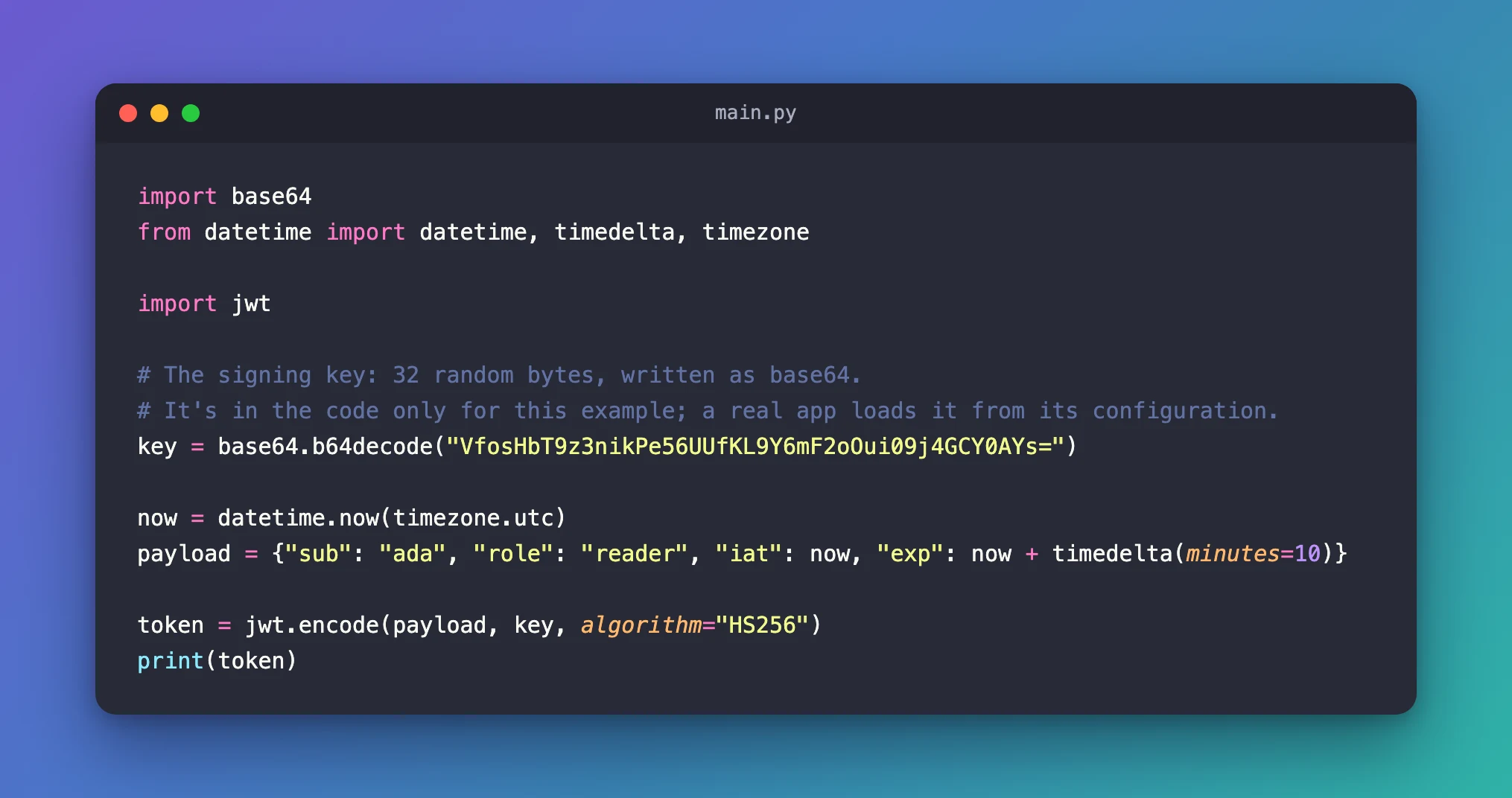
import base64
from datetime import datetime, timedelta, timezone

import jwt

# The signing key: 32 random bytes, written as base64.
# It's in the code only for this example; a real app loads it from its configuration.
key = base64.b64decode("VfosHbT9z3nikPe56UUfKL9Y6mF2oOui09j4GCY0AYs=")

now = datetime.now(timezone.utc)
payload = {"sub": "ada", "role": "reader", "iat": now, "exp": now + timedelta(minutes=10)}

token = jwt.encode(payload, key, algorithm="HS256")
print(token)
base64.b64decode turns the base64 text into the 32 key bytes. iat and exp are timezone-aware datetime values, which PyJWT writes as Unix times.
Step 3: Run It
uv run main.py
eyJhbGciOiJIUzI1NiIsInR5cCI6IkpXVCJ9.eyJzdWIiOiJhZGEiLCJyb2xlIjoicmVhZGVyIiwiaWF0IjoxNzk1NjgyNDYzLCJleHAiOjE3OTU2ODMwNjN9.7jktmkkigBcHtIlI_lL2WJjy-CwSK6qfMOKMHVFzogw
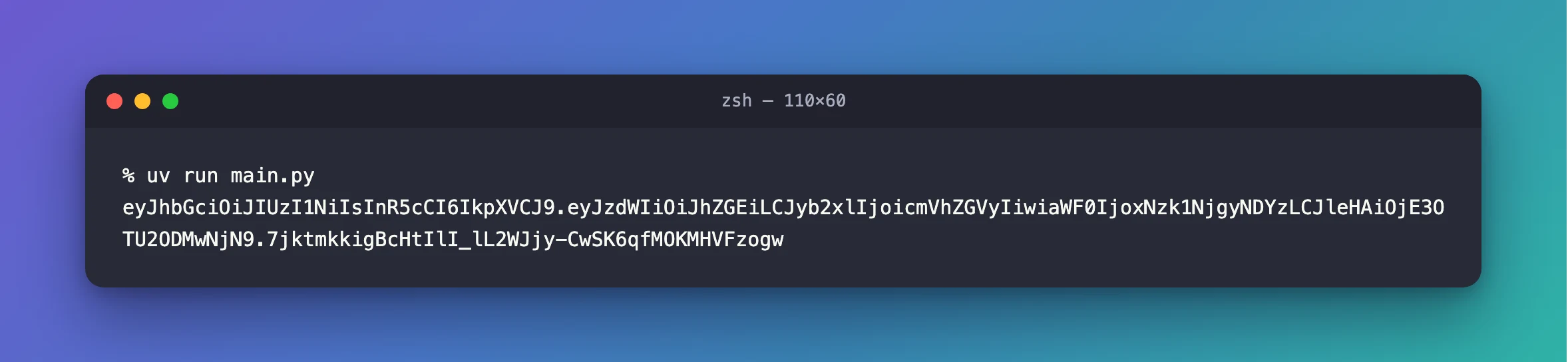
uv run runs the file with the project's Python and packages. Your token will differ, because iat and exp hold the time you run it. Decoded from base64url, the header and payload read:
{"alg":"HS256","typ":"JWT"}
{"sub":"ada","role":"reader","iat":1795682463,"exp":1795683063}
PyJWT added "typ":"JWT" to the header on its own, and the two datetime values became Unix seconds, 600 apart.
Add a Header Field
headers adds fields to the header, such as kid, the ID of the key that signed the token. jwt.encode({"sub": "ada"}, key, algorithm="HS256", headers={"kid": "key-2026-11"}) gave this header:
{"alg":"HS256","kid":"key-2026-11","typ":"JWT"}
Common Mistakes
| Mistake | What happens | Do this instead |
|---|---|---|
A short key, such as b"short-key" | InsecureKeyLengthWarning: The HMAC key is 9 bytes long, which is below the minimum recommended length of 32 bytes for SHA256. See RFC 7518 Section 3.2. The token is still made. | Use 32 random bytes or more |
A value JSON can't hold, such as a set | TypeError: Object of type set is not JSON serializable | Use a list, str, number, bool or dict |
A misspelled algorithm, "HS257" | NotImplementedError: Algorithm not supported | Use a supported name, such as "HS256" |
Leaving out algorithm | The default, HS256, is used | Write it anyway, so the code says what it does |
Troubleshooting
| Symptom | Likely cause | Fix |
|---|---|---|
ModuleNotFoundError: No module named 'jwt' | PyJWT isn't installed in this environment | Run uv add pyjwt in the project |
InsecureKeyLengthWarning | The key is shorter than 32 bytes | Generate a longer key |
… is not JSON serializable | A claim holds a Python object | Convert it to a JSON type first |
FAQ
Does encode return a string or bytes?
A string, str: type(token).__name__ printed str with PyJWT 2.15.1.
Can I pass the key as text?
Yes, PyJWT accepts a str key and signs with its UTF-8 bytes. Random bytes, stored as base64 as in the example, make a stronger key than typed text.
Conclusion
jwt.encode(payload, key, algorithm="HS256") turns a dictionary of claims into a signed JWT string. Use timezone-aware datetime values for the time claims, a key of at least 32 random bytes, and headers for extra header fields.
Additional Resources
- API Reference and Usage Examples, in the PyJWT documentation.
- RFC 7519: JSON Web Token.
