How to Create a JWT in Java with the JJWT Builder

JJWT creates JSON Web Tokens in Java with a builder: Jwts.builder() starts the token, a chain of methods sets its claims, signWith(key) signs it, and compact() returns the finished token string.
Syntax
String token = Jwts.builder()
        .subject("<subject>")
        .claim("<name>", <value>)
        .issuedAt(<Date>)
        .expiration(<Date>)
        .signWith(<key>)
        .compact();
| Part | What it does |
|---|---|
Jwts.builder() | Starts a new token. |
.subject("<subject>") | Sets the sub claim: who the token is about. |
.claim("<name>", <value>) | Adds a claim of your own, such as role. |
.issuedAt(<Date>), .expiration(<Date>) | Set the iat and exp claims from java.util.Date values. |
.signWith(<key>) | Signs with the key, using the algorithm the key is for: HS256 for a 32-byte HMAC key. |
.compact() | Builds the token and returns it as a String. |
From the JJWT Javadoc: Jwts.builder() "Returns a new JwtBuilder instance that can be configured and then used to create JWT compact serialized strings", signWith(Key key) "Signs the constructed JWT with the specified key using the key's recommended signature algorithm", and compact() "Actually builds the JWT and serializes it to a compact, URL-safe string according to the JWT Compact Serialization rules."
The Example
The example creates a token for the user ada with the role reader, issued now and valid for 10 minutes, signs it with HS256 and prints it.
The key is 32 random bytes, made with openssl rand -base64 32 and written as base64. It sits in the code only so the example runs as it is. A real application loads its key from configuration and never keeps it in the source.
Prerequisites
- A JDK and Maven. This guide uses JDK 25.0.5.1 and Maven 3.10.2.
Step 1: Create the Project
JJWT comes as three parts: jjwt-api, which your code uses, and jjwt-impl and jjwt-jackson, which it needs at run time. Create a folder named demo with this pom.xml in it:
<?xml version="1.0" encoding="UTF-8"?>
<project xmlns="http://maven.apache.org/POM/4.0.0"
         xmlns:xsi="http://www.w3.org/2001/XMLSchema-instance"
         xsi:schemaLocation="http://maven.apache.org/POM/4.0.0 https://maven.apache.org/xsd/maven-4.0.0.xsd">
  <modelVersion>4.0.0</modelVersion>
  <groupId>com.example</groupId>
  <artifactId>demo</artifactId>
  <version>1.0.0</version>
  <properties>
    <maven.compiler.release>25</maven.compiler.release>
    <project.build.sourceEncoding>UTF-8</project.build.sourceEncoding>
    <jjwt.version>0.13.0</jjwt.version>
  </properties>
  <dependencyManagement>
    <dependencies>
      <!-- jjwt-jackson asks for Jackson 2.12.7.1. This makes Maven use the newest Jackson 2 instead. -->
      <dependency>
        <groupId>com.fasterxml.jackson</groupId>
        <artifactId>jackson-bom</artifactId>
        <version>2.23.0</version>
        <type>pom</type>
        <scope>import</scope>
      </dependency>
    </dependencies>
  </dependencyManagement>
  <dependencies>
    <dependency>
      <groupId>io.jsonwebtoken</groupId>
      <artifactId>jjwt-api</artifactId>
      <version>${jjwt.version}</version>
    </dependency>
    <dependency>
      <groupId>io.jsonwebtoken</groupId>
      <artifactId>jjwt-impl</artifactId>
      <version>${jjwt.version}</version>
      <scope>runtime</scope>
    </dependency>
    <dependency>
      <groupId>io.jsonwebtoken</groupId>
      <artifactId>jjwt-jackson</artifactId>
      <version>${jjwt.version}</version>
      <scope>runtime</scope>
    </dependency>
  </dependencies>
  <build>
    <plugins>
      <plugin>
        <groupId>org.codehaus.mojo</groupId>
        <artifactId>exec-maven-plugin</artifactId>
        <version>3.7.0</version>
        <configuration>
          <mainClass>com.example.Main</mainClass>
        </configuration>
      </plugin>
    </plugins>
  </build>
</project>
jackson-bom makes Maven use the newest Jackson 2 release, because the version jjwt-jackson asks for is old. exec-maven-plugin runs the com.example.Main class.
Step 2: Write the Code
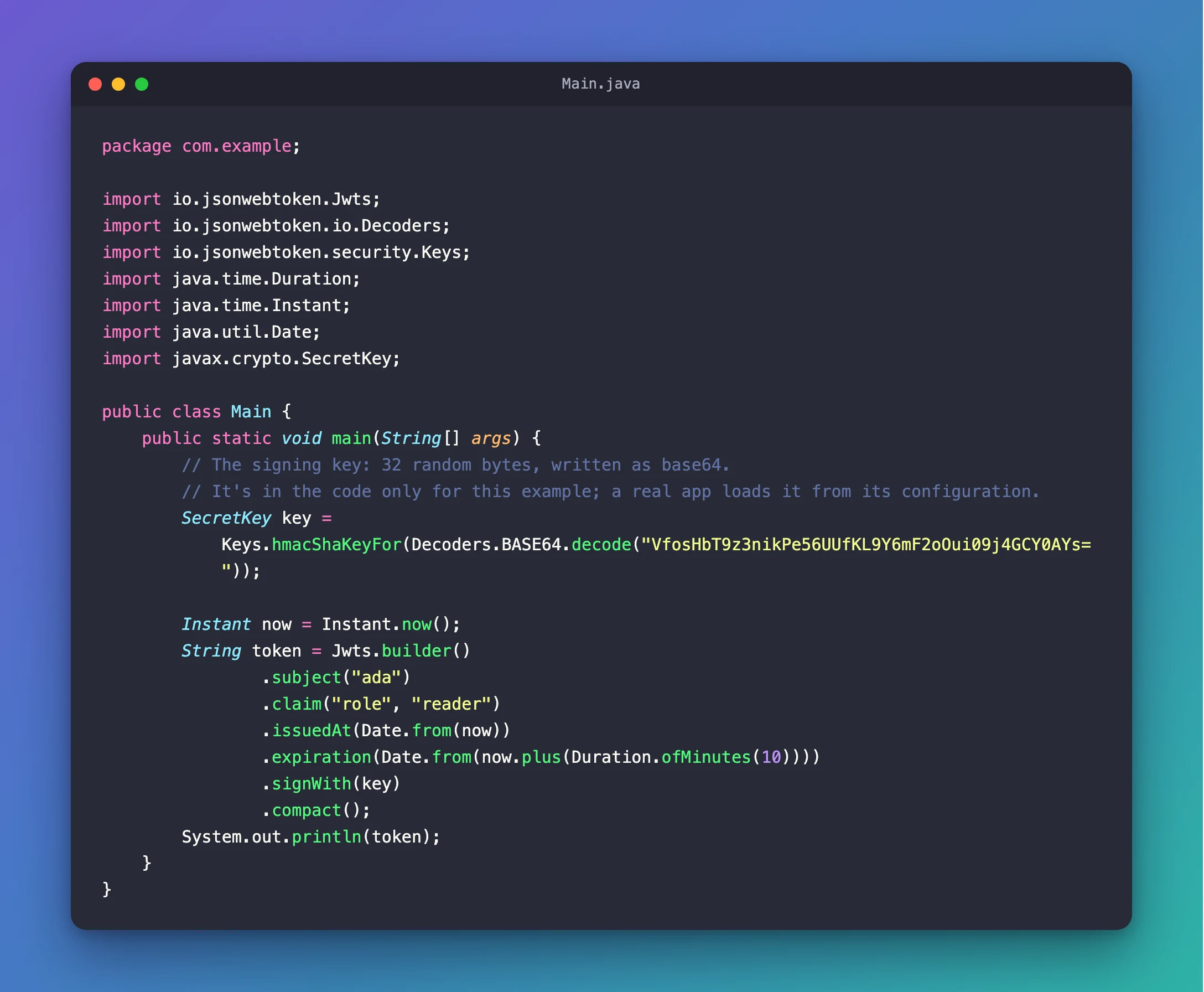
Inside demo, create the folders src/main/java/com/example and save this as Main.java there:
package com.example;

import io.jsonwebtoken.Jwts;
import io.jsonwebtoken.io.Decoders;
import io.jsonwebtoken.security.Keys;
import java.time.Duration;
import java.time.Instant;
import java.util.Date;
import javax.crypto.SecretKey;

public class Main {
    public static void main(String[] args) {
        // The signing key: 32 random bytes, written as base64.
        // It's in the code only for this example; a real app loads it from its configuration.
        SecretKey key = Keys.hmacShaKeyFor(Decoders.BASE64.decode("VfosHbT9z3nikPe56UUfKL9Y6mF2oOui09j4GCY0AYs="));

        Instant now = Instant.now();
        String token = Jwts.builder()
                .subject("ada")
                .claim("role", "reader")
                .issuedAt(Date.from(now))
                .expiration(Date.from(now.plus(Duration.ofMinutes(10))))
                .signWith(key)
                .compact();
        System.out.println(token);
    }
}
Keys.hmacShaKeyFor turns the decoded bytes into an HMAC key. Date.from(now) converts the Instant into the Date that issuedAt and expiration take.
Step 3: Run It
From the demo folder:
mvn -q compile exec:java
eyJhbGciOiJIUzI1NiJ9.eyJzdWIiOiJhZGEiLCJyb2xlIjoicmVhZGVyIiwiaWF0IjoxNzk1NjgyNjAyLCJleHAiOjE3OTU2ODMyMDJ9.H6p6Btq8HHt4xnEvLJYN0HtIg38KO9GpjyjnDoOGbBM
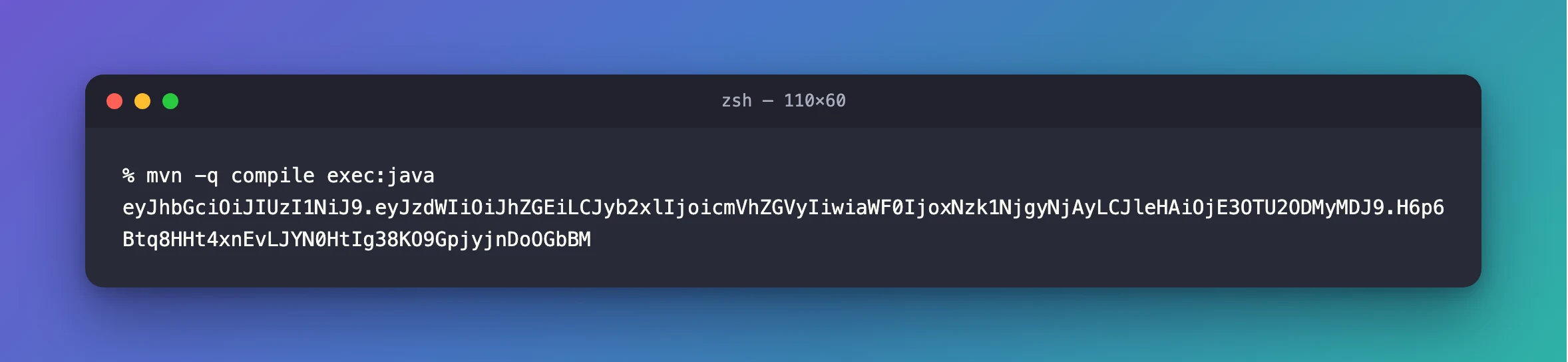
mvn -q compile exec:java compiles the code and runs it, and -q hides Maven's own messages. Your token will differ, because iat and exp hold the time you run it. Decoded from base64url, the header and payload read:
{"alg":"HS256"}
{"sub":"ada","role":"reader","iat":1795682602,"exp":1795683202}
JJWT wrote only alg in the header, chose HS256 because the key is 32 bytes long, and turned the two Date values into Unix seconds, 600 apart.
Common Mistakes
| Mistake | What happens | Do this instead |
|---|---|---|
Leaving out signWith | No error: the token's header is {"alg":"none"} and it ends with a dot, unsigned. JJWT's own parser rejects it by default | Always call signWith |
| A key of 48 or 64 bytes when you meant HS256 | The token is signed with HS384 or HS512 | Use a 32-byte key for HS256 |
Leaving jjwt-impl out of the POM | The code compiles, then fails at run time with Unable to load class named [io.jsonwebtoken.impl.security.KeysBridge] … Have you remembered to include the jjwt-impl.jar in your runtime classpath? | Keep all three JJWT dependencies |
Troubleshooting
| Symptom | Likely cause | Fix |
|---|---|---|
WeakKeyException from hmacShaKeyFor | The key is shorter than 32 bytes | Use a longer key |
The header says HS384 or HS512 | The key is 48 or 64 bytes long, or longer | Use a 32-byte key for HS256 |
| The token ends with a dot | signWith wasn't called | Add it |
FAQ
What other registered claims can the builder set?
issuer, notBefore and id, next to subject, issuedAt and expiration, each taking one value. The audience goes through audience().add("…").and(), because a token can have several. Anything else goes through claim.
Is the payload encrypted?
No. It's base64url text, readable by anyone with the token. The signature stops changes; it doesn't hide anything.
Conclusion
Jwts.builder() with subject, claim, issuedAt and expiration, then signWith(key) and compact(), gives you a signed JWT string. The key's length picks the algorithm, so a 32-byte key gives HS256.
Additional Resources
- JwtBuilder, in the JJWT Javadoc.
- JJWT README, on GitHub.
