How to Create a JWT in .NET C# with JsonWebTokenHandler.CreateToken

In .NET C#, JsonWebTokenHandler from the Microsoft.IdentityModel.JsonWebTokens package creates JSON Web Tokens. You describe the token in a SecurityTokenDescriptor, its claims, expiry and signing key, and CreateToken returns the signed token as a string.
Syntax
var descriptor = new SecurityTokenDescriptor
{
    Claims = new Dictionary<string, object> { ["<claim>"] = <value> },
    Expires = <expiry time in UTC>,
    SigningCredentials = new SigningCredentials(<key>, SecurityAlgorithms.HmacSha256),
};
string token = new JsonWebTokenHandler().CreateToken(descriptor);
| Part | What it does |
|---|---|
Claims | The token's claims, by name, such as ["sub"] = "ada". |
Expires | When the token expires, as a UTC DateTime. It becomes the exp claim. |
SigningCredentials | The key and the algorithm that sign the token. Leave it out and the token isn't signed at all. |
<key> | For HS256, a SymmetricSecurityKey made from the secret bytes. |
CreateToken(descriptor) | Builds the token and returns it as a compact string. |
The Microsoft Learn reference for CreateToken(SecurityTokenDescriptor): it "Creates a JWT that can be a JWS or JWE" and returns "A JWT in Compact Serialization format."
The Example
The example creates a token for the user ada with the role reader, valid for 10 minutes and signed with HS256, and prints it.
The key is 32 random bytes, made with openssl rand -base64 32 and written as base64. It sits in the code only so the example runs as it is. A real application loads its key from configuration, such as user secrets, environment variables or a key vault, and never keeps it in the source.
Prerequisites
- .NET SDK. This guide uses .NET SDK 10.0.404.
Step 1: Create the Project
dotnet new console -o demo
cd demo
dotnet add package Microsoft.IdentityModel.JsonWebTokens
dotnet new console -o demo creates a console app in a demo folder and prints The template "Console App" was created successfully. dotnet add package downloads the newest version of the package, 8.23.0 here, with the packages it needs, and adds a PackageReference to demo.csproj.
Step 2: Write the Code
Replace the contents of Program.cs with:
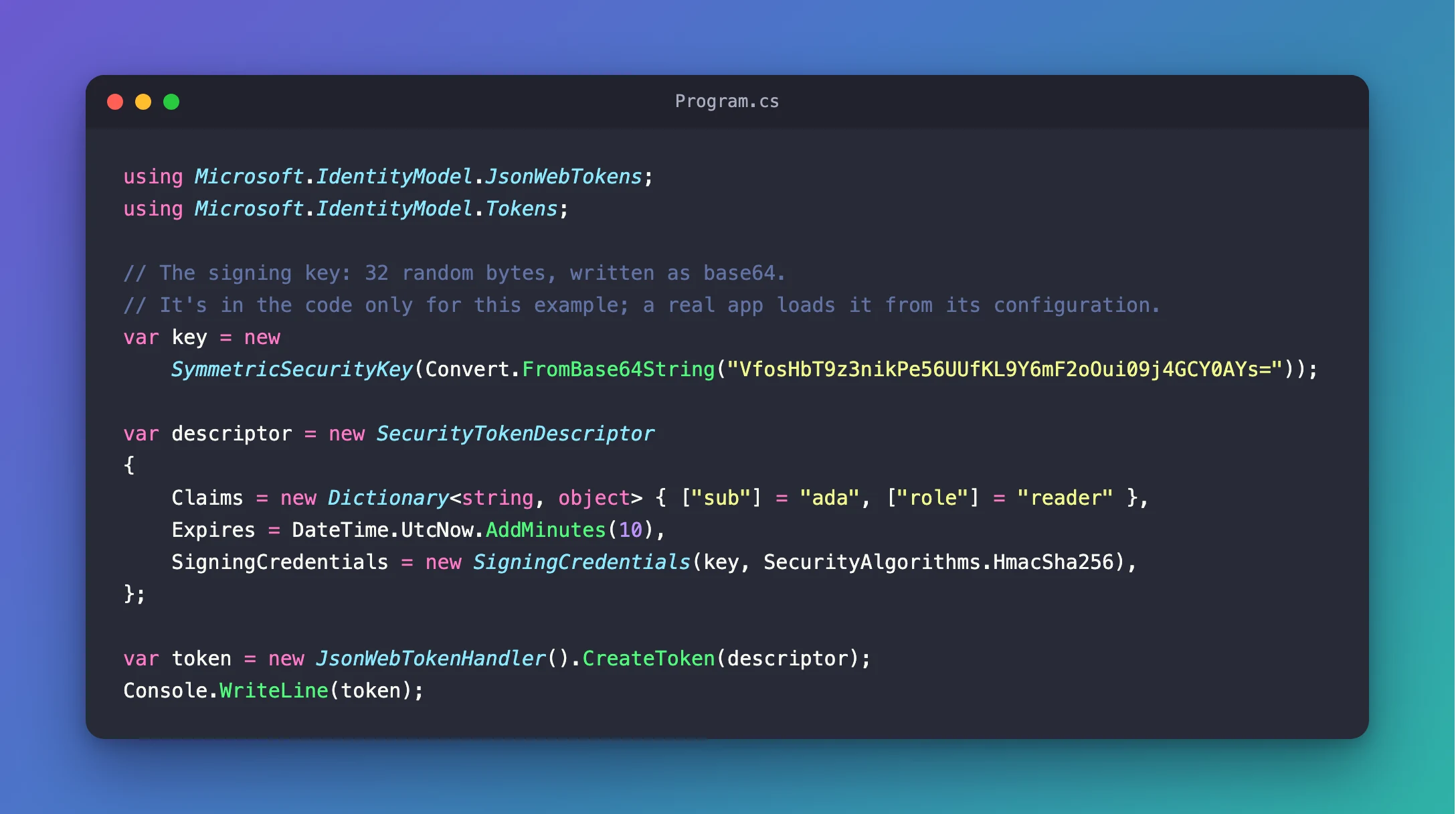
using Microsoft.IdentityModel.JsonWebTokens;
using Microsoft.IdentityModel.Tokens;

// The signing key: 32 random bytes, written as base64.
// It's in the code only for this example; a real app loads it from its configuration.
var key = new SymmetricSecurityKey(Convert.FromBase64String("VfosHbT9z3nikPe56UUfKL9Y6mF2oOui09j4GCY0AYs="));

var descriptor = new SecurityTokenDescriptor
{
    Claims = new Dictionary<string, object> { ["sub"] = "ada", ["role"] = "reader" },
    Expires = DateTime.UtcNow.AddMinutes(10),
    SigningCredentials = new SigningCredentials(key, SecurityAlgorithms.HmacSha256),
};

var token = new JsonWebTokenHandler().CreateToken(descriptor);
Console.WriteLine(token);
Convert.FromBase64String turns the base64 text into the 32 key bytes, and SymmetricSecurityKey wraps them for signing. SecurityAlgorithms.HmacSha256 is the constant for HS256.
Step 3: Run It
dotnet run
eyJhbGciOiJIUzI1NiIsInR5cCI6IkpXVCJ9.eyJleHAiOjE3OTU2ODMwNzksInN1YiI6ImFkYSIsInJvbGUiOiJyZWFkZXIiLCJpYXQiOjE3OTU2ODI0NzksIm5iZiI6MTc5NTY4MjQ3OX0.z5xMHRGumfM0CHV-hQ5hbOs_NYpghJo7_F_yt7B59Eg
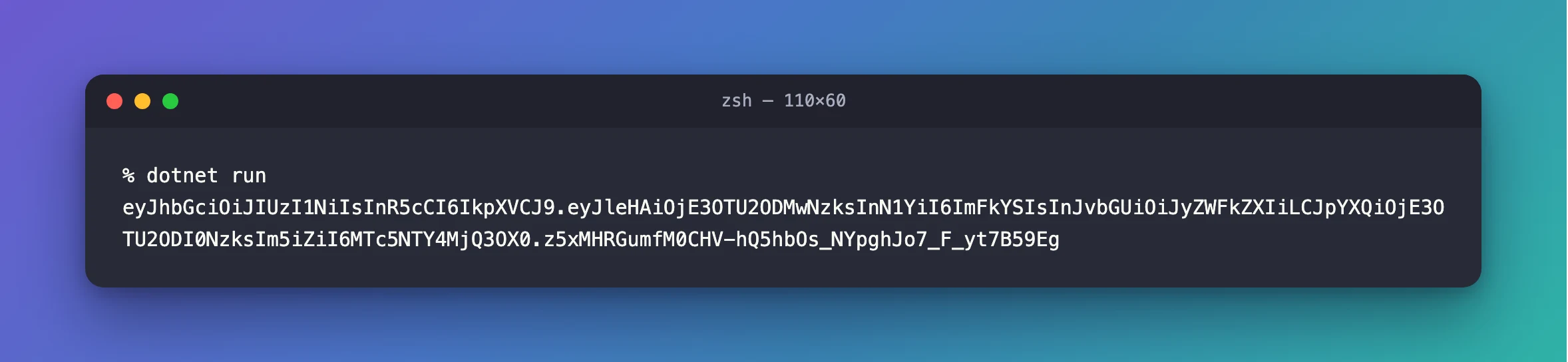
dotnet run builds the project and runs it. Your token will differ, because the time claims hold the time you run it. Decoded from base64url, the header and payload read:
{"alg":"HS256","typ":"JWT"}
{"exp":1795683079,"sub":"ada","role":"reader","iat":1795682479,"nbf":1795682479}
CreateToken added two claims the code didn't set: iat, when the token was issued, and nbf, the time before which it isn't valid, both the current time.
Common Mistakes
| Mistake | What happens | Do this instead |
|---|---|---|
| A key shorter than 32 bytes | ArgumentOutOfRangeException: IDX10720: Unable to create KeyedHashAlgorithm for algorithm 'HS256', the key size must be greater than: '256' bits, key has '128' bits. | Use 32 random bytes or more |
Leaving out SigningCredentials | No error: the token's header says "alg":"none" and it has no signature, so anyone could have written it | Always set SigningCredentials |
Troubleshooting
| Symptom | Likely cause | Fix |
|---|---|---|
IDX10720: … the key size must be greater than: '256' bits | The key is too short for HS256 | Generate a 32-byte key |
| The token ends with a dot and nothing after it | No SigningCredentials | Add them |
error CS0234: The type or namespace name 'IdentityModel' does not exist in the namespace 'Microsoft' (are you missing an assembly reference?) | The package isn't referenced | Run dotnet add package Microsoft.IdentityModel.JsonWebTokens |
FAQ
Why are there two JWT handlers in .NET?
JsonWebTokenHandler, used here, is the newer one, in Microsoft.IdentityModel.JsonWebTokens. The older JwtSecurityTokenHandler lives in System.IdentityModel.Tokens.Jwt. Microsoft's ASP.NET Core 8 breaking-change note calls JwtSecurityToken "the previous generation of JSON Web Token (JWT) implementation" and lists a "30% performance improvement" among the new handler's benefits.
Can a claim hold several values?
Yes: a dictionary holds one value per name, so make that value an array. ["roles"] = new[] { "reader", "editor" } became "roles":["reader","editor"] in the payload.
Conclusion
Describe the token in a SecurityTokenDescriptor, set Claims, Expires and SigningCredentials, and new JsonWebTokenHandler().CreateToken(descriptor) returns the signed JWT, with iat and nbf added for you. Sign with at least 32 random bytes from configuration.
Additional Resources
- JsonWebTokenHandler.CreateToken, on Microsoft Learn.
- SecurityTokenDescriptor, on Microsoft Learn.
