How to Create a Folder in the Terminal with mkdir

Every project starts as a folder, and the terminal makes one with a single command: mkdir on macOS and Linux, and New-Item in PowerShell. One extra option creates a whole path of folders at once, however many of them are missing.
Syntax
On macOS and Linux:
mkdir [-p] <folder>
| Part | What it does |
|---|---|
mkdir | Short for "make directory". Creates the folder. |
-p | Optional. Also creates every missing folder in the path, and stays quiet when the folder already exists. |
<folder> | The folder's name, or a path such as projects/website. A name on its own is created inside the folder you're in. List several to create them all. |
In PowerShell:
New-Item -ItemType Directory -Path <folder>
| Part | What it does |
|---|---|
New-Item | Creates a new item, such as a file or a folder. |
-ItemType Directory | Makes the new item a folder. |
-Path <folder> | The folder's name or path. New-Item creates any missing folders in the path by itself. |
The Example
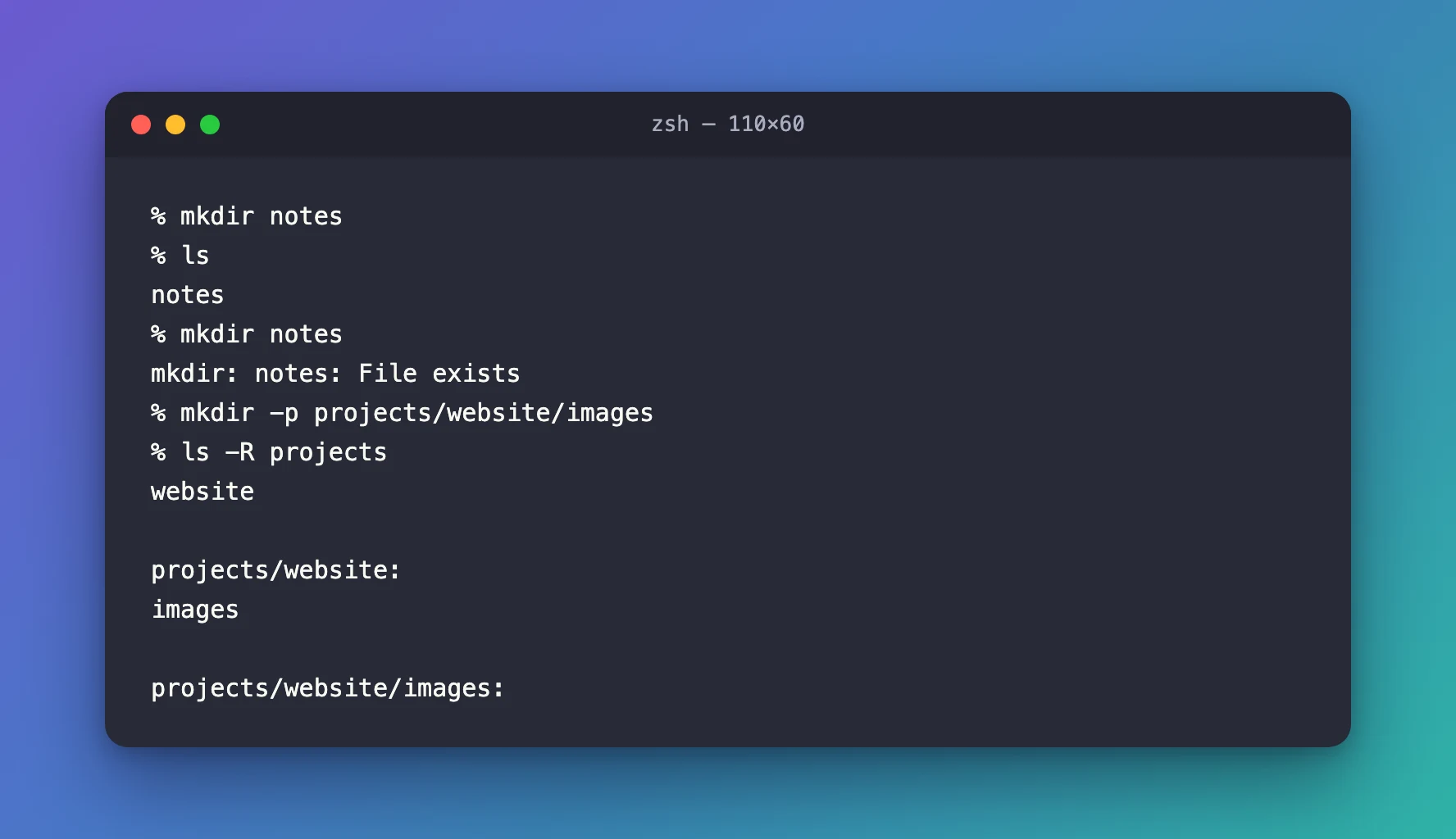
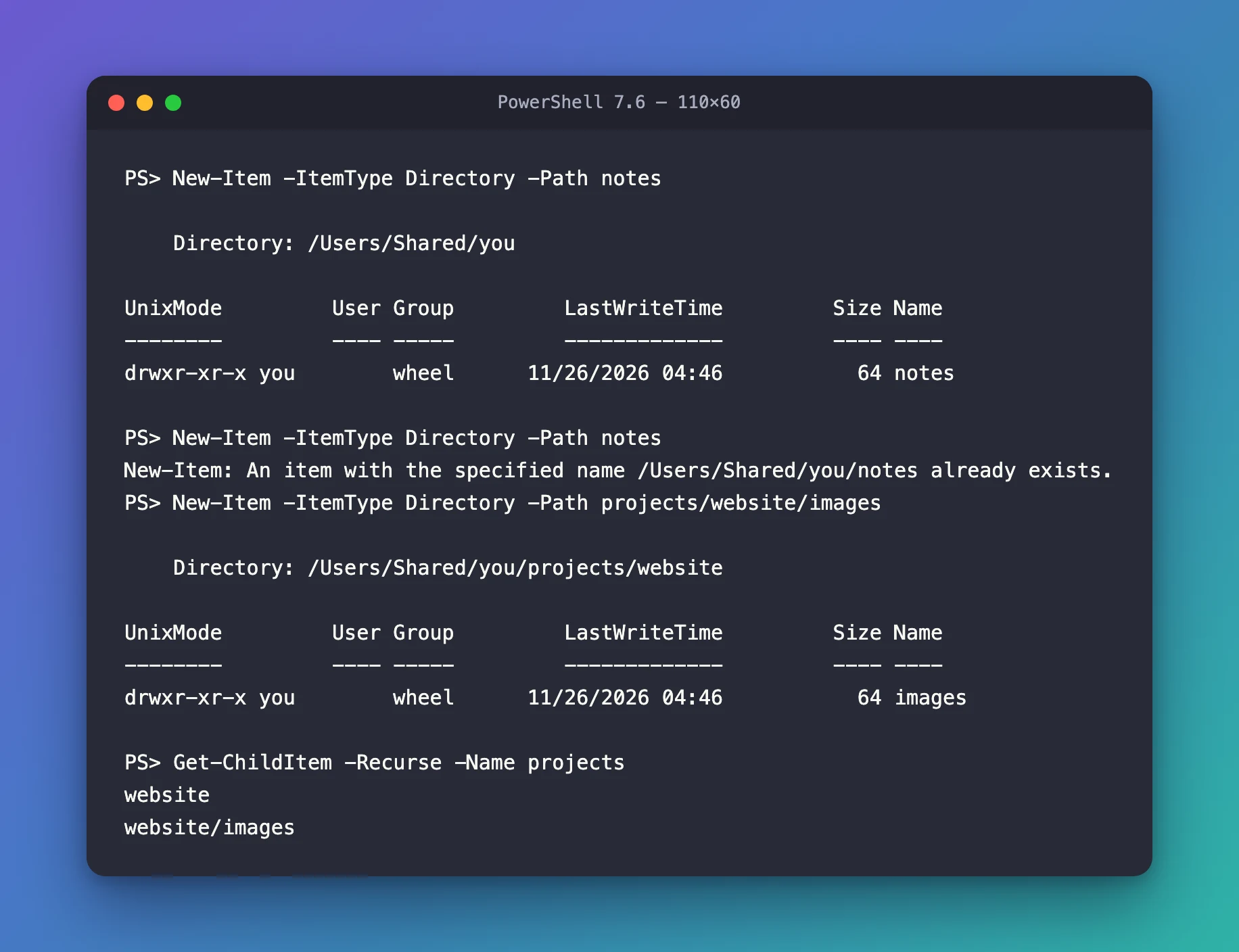
The example creates a notes folder, tries to create it a second time, and then creates images inside website inside projects, three folders deep, with one command.
Step 1: Create a Folder
- macOS / Linux
- Windows (PowerShell)
mkdir notes
ls
notes
mkdir prints nothing when it works, so ls lists the folder's contents to show the new folder is there.
New-Item -ItemType Directory -Path notes
    Directory: /Users/Shared/you

UnixMode         User Group         LastWriteTime         Size Name
--------         ---- -----         -------------         ---- ----
drwxr-xr-x you        wheel      11/26/2026 04:46           64 notes
New-Item prints the new folder's details: where it is, who owns it, when it was made and its name.
Step 2: Create a Folder That Already Exists
Run the same command again:
- macOS / Linux
- Windows (PowerShell)
mkdir notes
mkdir: notes: File exists
New-Item -ItemType Directory -Path notes
New-Item: An item with the specified name /Users/Shared/you/notes already exists.
The command refuses, and the folder and everything in it stay as they were. A folder is never emptied or replaced by creating it again.
Step 3: Create Nested Folders in One Command
- macOS / Linux
- Windows (PowerShell)
mkdir -p projects/website/images
ls -R projects
website

projects/website:
images

projects/website/images:
-p created projects, then website inside it, then images inside that. ls -R lists a folder and every folder inside it.
New-Item -ItemType Directory -Path projects/website/images
Get-ChildItem -Recurse -Name projects
    Directory: /Users/Shared/you/projects/website

UnixMode         User Group         LastWriteTime         Size Name
--------         ---- -----         -------------         ---- ----
drwxr-xr-x you        wheel      11/26/2026 04:46           64 images

website
website/images
New-Item created the missing projects and website folders on its own. Get-ChildItem -Recurse -Name lists every folder inside projects by its path.
Common Mistakes
| Mistake | What happens | Do this instead |
|---|---|---|
A name with a space and no quotes: mkdir my notes | Two folders, my and notes | Quote it: mkdir "my notes" |
A path whose parent folders don't exist, without -p | mkdir: projects/website: No such file or directory, and nothing is created | Add -p |
| Creating the folder somewhere you didn't mean to | It lands in the folder you're in | Check where you are with pwd first |
Troubleshooting
| Symptom | Likely cause | Fix |
|---|---|---|
mkdir: notes: File exists | The folder is already there | Use it as it is, or use mkdir -p, which skips existing folders without a message |
mkdir: projects/website: No such file or directory | A folder in the path doesn't exist yet | mkdir -p projects/website/images |
New-Item: An item with the specified name … already exists. | The folder is already there | Use it as it is |
FAQ
Where does the new folder go?
Into the folder you're in, unless the path says otherwise. How to Move into a Folder in the Terminal with cd shows how to see where you are and how to move.
Can I create several folders with one command?
Yes. mkdir notes photos music creates all three.
Does mkdir work in PowerShell too?
Yes, with a difference. On Windows, PowerShell's mkdir creates the folder with New-Item. On macOS and Linux, PowerShell leaves mkdir to the system's own command, so it behaves exactly like the first tab. New-Item -ItemType Directory works the same everywhere.
Conclusion
mkdir <folder> creates a folder on macOS and Linux, mkdir -p creates every missing folder in a path, and New-Item -ItemType Directory -Path <folder> does both in PowerShell. Creating a folder that already exists changes nothing.
Additional Resources
- mkdir, in the POSIX standard, including the
-poption. - New-Item, PowerShell's command for new files and folders.
- Using aliases, on which commands such as
mkdirmean in PowerShell on each system.
