How to Create a Folder in a SharePoint Document Library

A folder groups files inside a SharePoint document library, the same way a folder does on your computer. You create one from the library itself: Create or upload, Folder, a name, and Create.
The example adds a folder called Scripts to the Documents library of a SharePoint site, a place to keep a team's Office Scripts.
Step 1: Open the Library
Open the SharePoint site and the library, here Documents. If the folder should go inside another folder, open that folder first: the new one is created where you are.
Step 2: Select Create or upload, Then Folder
Select Create or upload at the top right, then Folder:
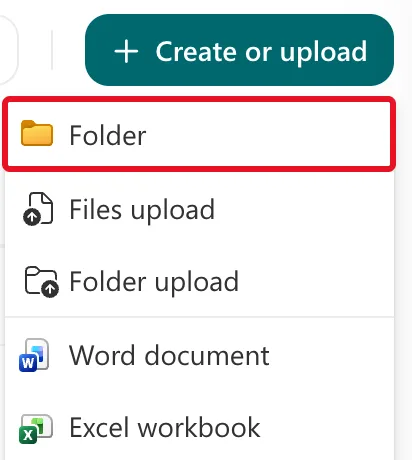
Microsoft's Create a folder in a document library calls the button + New; in my library it was Create or upload, with the same Folder command.
Step 3: Name the Folder
The Create a folder dialog opens. Type the name in Name, here Scripts. Folder color is optional: the first colour, yellow, is already chosen. Select Create:
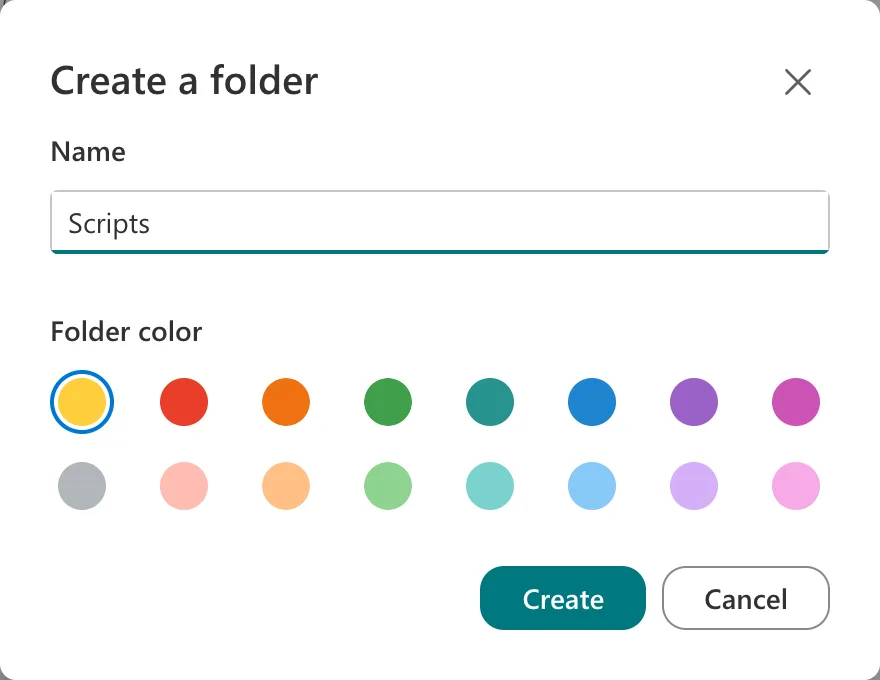
The Result
The folder is at the top of the library, modified a few seconds ago:

Select its name to open it. Files you create or upload while you're inside it go into the folder.
Common Mistakes
| Mistake | What happens | Do this instead |
|---|---|---|
| Creating the folder in the wrong library | The files end up somewhere people don't look | Check the library's name at the top before Create or upload |
| Starting from inside another folder by accident | The new folder is a subfolder | Go back to the library's top level first |
| Using folders where a view would do | Files are hard to find across folders | Microsoft's article suggests views to filter, group and sort files |
Troubleshooting
| Symptom | Likely cause | Fix |
|---|---|---|
| Folder isn't on the menu | The library's Make "New Folder" command available setting is No | A library owner sets it to Yes under Library settings, More library settings, Advanced settings |
| The new folder isn't in the list | The page hasn't refreshed | Refresh the browser |
| The page looks different, with a ribbon | The library uses the classic experience | On the ribbon, Files, then New Folder |
FAQ
How do I rename a folder?
Select ... next to its name, then Rename, type the new name and select Update, as Microsoft's article describes.
Can I create a folder inside a folder?
Yes. Open the folder, then Create or upload, Folder again.
Can I create folders from my computer?
Yes. Microsoft's article says you can create folders from your device when the library is synced, as well as from the library on the web.
Conclusion
In a SharePoint document library, Create or upload → Folder → a name → Create adds a folder where you are. Open it, and new files go inside.
