How to Convert Minutes to a Time in Excel by Dividing by 1440

Excel measures time in days, so a number of minutes isn't a time until you convert it. A day has 24 × 60 = 1440 minutes, so minutes / 1440 is the time: 30 / 1440 is half an hour. That's how a timesheet's Break (mins) column becomes something you can subtract from hours worked.
The example is the old overtime timesheet from Part 1 of the Overtime Timesheet series, where breaks are recorded in minutes: 0, 15, 30 or 60.
Prerequisites
- A cell with a number of minutes, such as the Break (mins) column of a timesheet.
Why 1440
| Value | As a fraction of a day | Why |
|---|---|---|
| 1 day | 1 | Excel's unit for dates and times |
| 1 hour | 1/24 | 24 hours in a day |
| 1 minute | 1/1440 | 24 × 60 = 1440 minutes in a day |
| 30 minutes | 30/1440 = 0.0208 | Half an hour |
Step 1: Divide the Minutes by 1440
To use the break in a time calculation, divide it by 1440 inside the formula. In the timesheet's OvertimeLog table:
=MOD([@Finish]-[@Start],1)-[@[Break (mins)]]/1440
[@[Break (mins)]]/1440 turns this row's break, 30, into 0:30, which is then subtracted from the shift's length.
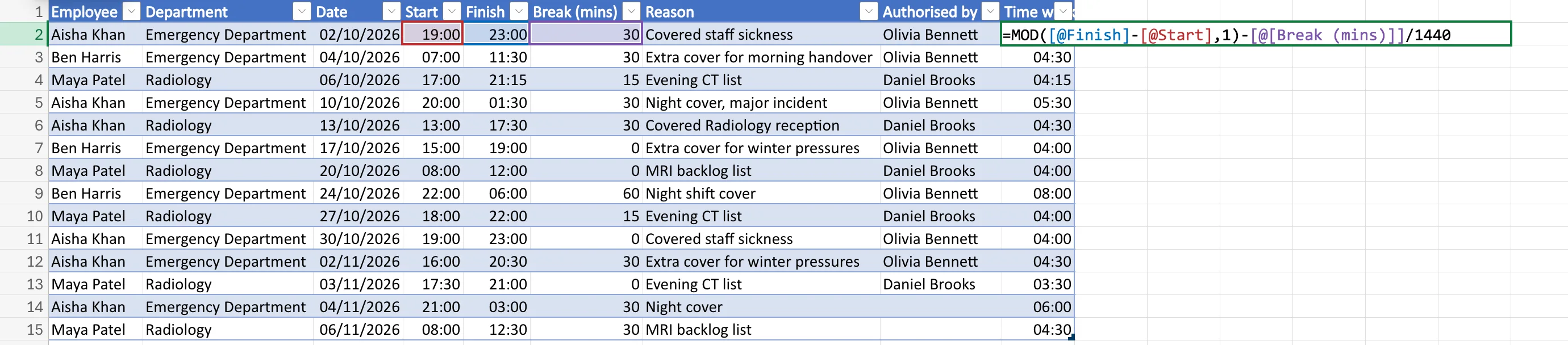
Step 2: Check the Result
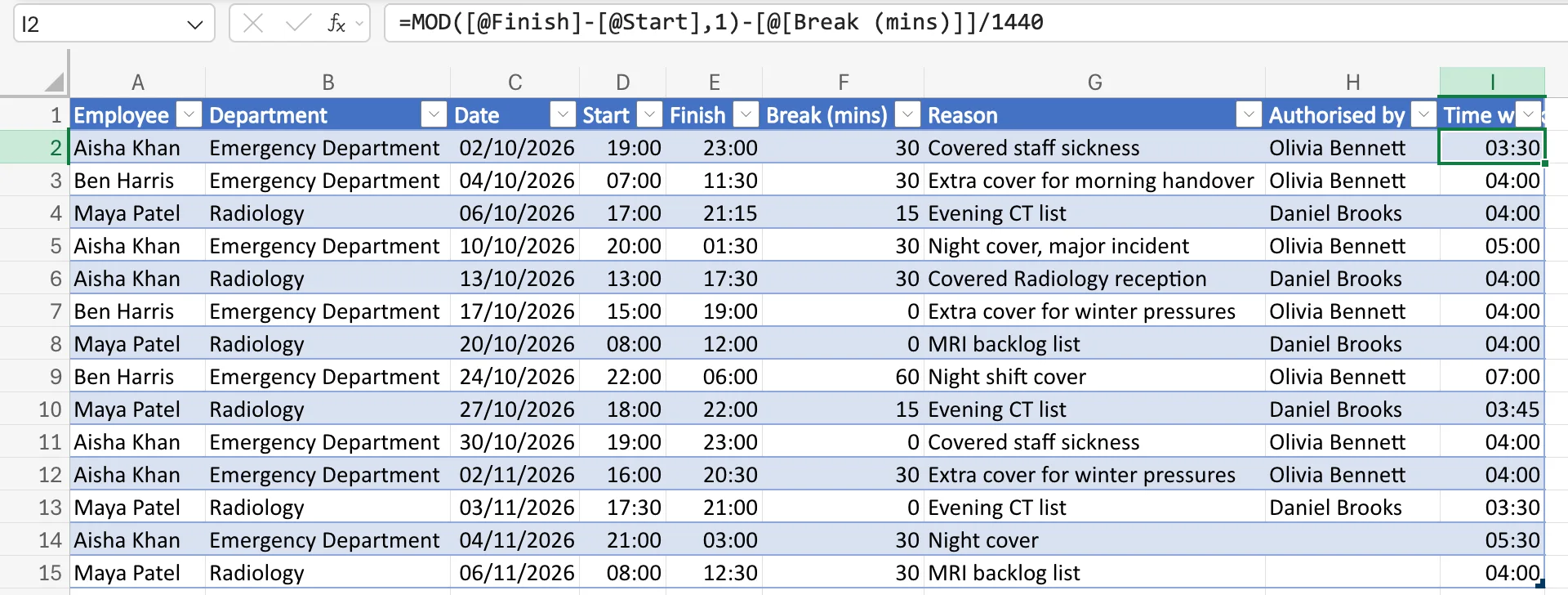
Press Enter. Aisha Khan's first shift, 19:00 to 23:00 with a 30-minute break, goes from 04:00 to 03:30. Shifts with a 0-minute break don't change:
Showing Minutes as a Time on Their Own
To see the converted value in its own cell, type =F2/1440 and give the cell a time format such as hh:mm. 30 shows as 00:30. Without a time format it shows the fraction, 0.0208.
Common Mistakes
| Mistake | What happens | Do this instead |
|---|---|---|
Subtracting the minutes directly, as in -[@[Break (mins)]] | 30 is taken as 30 days | Divide by 1440 first |
| Dividing by 60 | You get hours as a number, not a time | Divide by 1440 for a time; by 60 for decimal hours |
Recording breaks as 0:30 in some rows and 30 in others | The formula is right for only one of them | Use one unit for the whole column |
Troubleshooting
| Symptom | Likely cause | Fix |
|---|---|---|
Every row shows ######## | The break was subtracted as days | Divide by 1440 |
| The converted value shows 0.0208 | The cell isn't formatted as a time | Give it a time format |
FAQ
How do I convert minutes to decimal hours instead?
Divide by 60: 30 / 60 = 0.5 hours.
What about seconds?
A day has 86,400 seconds, so seconds / 86400 is the time.
Conclusion
Minutes / 1440 is the time Excel understands. Use it to subtract breaks, add minutes to a start time, or show minutes as hh:mm.
