How to Combine Text in Power Automate with concat()

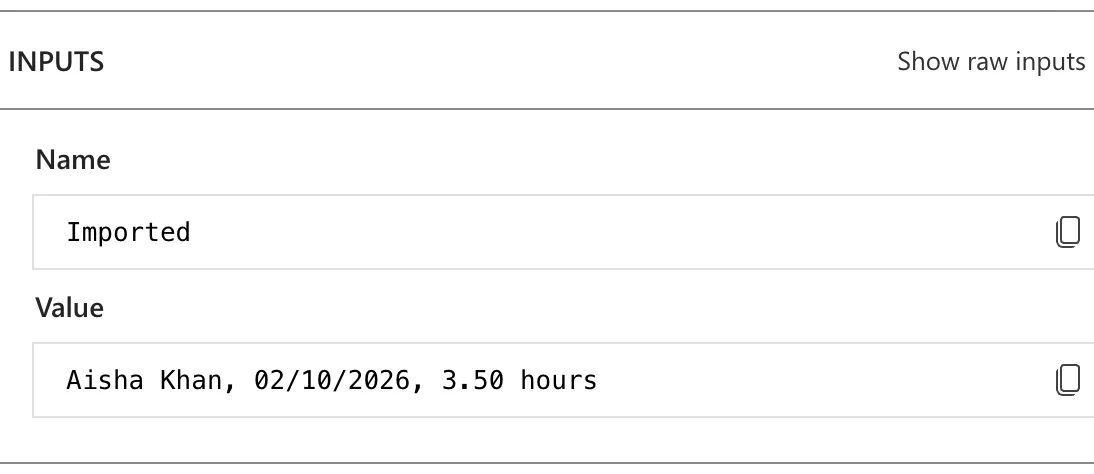
A comment like Authorised by Olivia Bennett in the old overtime timesheet., or a line like Aisha Khan, 02/10/2026, 3.50 hours: both are fixed words with values from the flow in between. concat() joins any number of texts into one.
Syntax
concat('<text1>', '<text2>', ...)
From Microsoft's functions reference:
<text1>,<text2>, ... (required): at least two texts to combine, in order.- The result is one text made of all of them. The reference notes that it can't be longer than 104,857,600 characters.
Microsoft's example: concat('Hello', 'World') returns HelloWorld. Nothing is added between the pieces, so spaces and commas go in as pieces of their own.
The example is Import Old Overtime Timesheet, a flow of the Overtime Timesheet app that copies the rows of an old Excel timesheet into SharePoint. For each row it imports, it adds a line to a list, so that it can say at the end what it imported.
Step 1: Write the Pieces in Order
The line should read name, date, hours hours. Its pieces, from the current row of the loop For each old row and the flow's Hours step:
| Piece | Expression | Example |
|---|---|---|
| The name | items('For_each_old_row')?['Employee'] | Aisha Khan |
| A comma and a space | ', ' | , |
| The date, UK style | formatDateTime(items('For_each_old_row')?['Date'], 'dd/MM/yyyy') | 02/10/2026 |
| A comma and a space | ', ' | , |
| The hours, already text | outputs('Hours') | 3.50 |
| A space and a word | ' hours' | hours |
Text you type goes in single quotes. The date comes from How to Format a Date in Power Automate with formatDateTime, and the hours from How to Format a Number with Two Decimal Places in Power Automate.
Step 2: Put Them in concat()
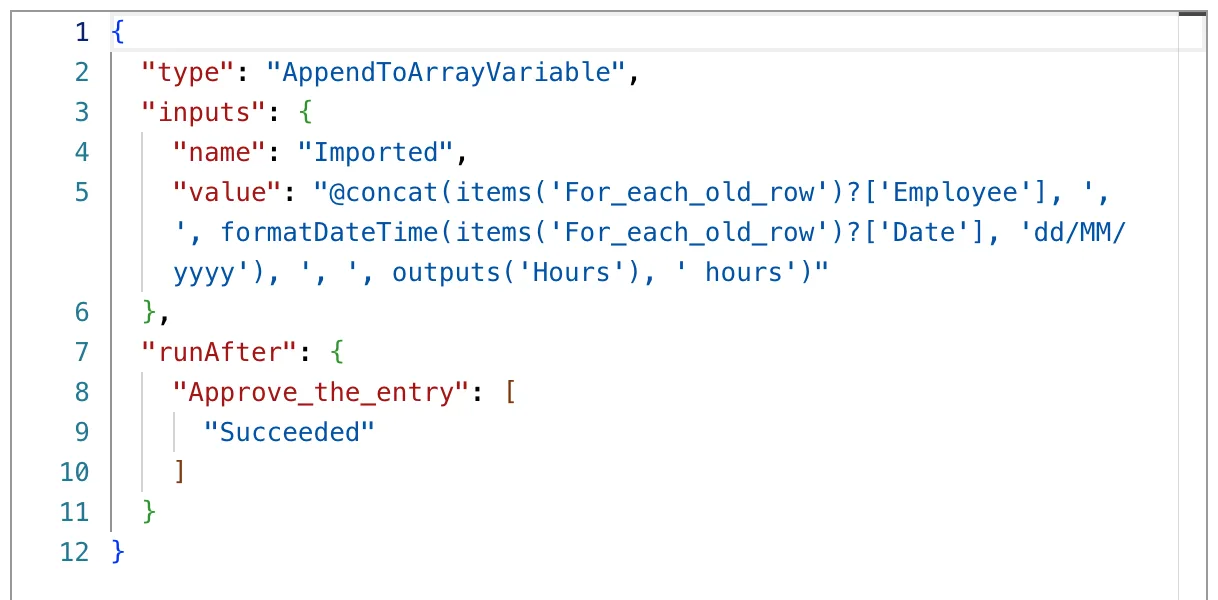
In the flow, an Append to array variable action named Add to Imported adds the line to the variable Imported (How to Add Items to an Array Variable in Power Automate). Its Value is this expression (How to Add an Expression in Power Automate):
concat(items('For_each_old_row')?['Employee'], ', ', formatDateTime(items('For_each_old_row')?['Date'], 'dd/MM/yyyy'), ', ', outputs('Hours'), ' hours')
Code view:
The Result
For the first row, the action added:
Step 3: Turn Numbers into Text First
At the end, the flow writes a summary that starts with how many rows it imported. length() returns a number (How to Count the Items in an Array in Power Automate with length()), and the reference describes concat()'s pieces as texts, so the number goes through string() first:
concat('Imported ', string(length(variables('Imported'))), ': ', join(variables('Imported'), '; '))
join() turns the whole list into one text with ; between the lines (How to Join an Array into Text in Power Automate).
Common Mistakes
| Mistake | What happens | Do this instead |
|---|---|---|
| Forgetting the separators | Aisha Khan02/10/20263.50 hours | Add ', ' and ' ' as pieces |
| Text without single quotes | Expressions take fixed text only in single quotes | 'hours' |
A number straight into concat() | The reference describes the pieces as texts | string() first |
concat() to join a list | One piece per item, written by hand | join() |
Troubleshooting
| Symptom | Likely cause | Fix |
|---|---|---|
| Words run together | No space piece between them | Add ' ' |
A date shows as 2026-10-02T00:00:00.000Z | It went in as it came | Format it with formatDateTime() |
| An apostrophe breaks the expression | ' ends the text | Write it twice: 'Olivia''s' |
| This expression has a problem when you add it | The designer showed it for correct expressions too | Select Add again (Fixed: "This expression has a problem" in Power Automate) |
FAQ
What's the difference between concat() and join()?
concat() joins the pieces you list, one by one. join() joins every item of an array, with the same separator between each.
Can a piece be another function?
Yes: any expression that returns text, such as formatDateTime(), outputs() or string() in the examples above.
Conclusion
concat(text1, text2, ...) joins its pieces in order, with nothing in between unless you add it. Put fixed text in quotes, format dates and numbers before they go in, and turn counts into text with string().
