How to Combine Conditions in Power Apps with And and Or

Most real conditions have more than one part: this job title and still active, not loading and nothing to show. And is true only when all parts are true; Or is true when any part is.
Three Ways to Write Them
| Function | Operator | Also allowed |
|---|---|---|
And( a, b ) | a && b | a And b |
Or( a, b ) | a || b | a Or b |
Not( a ) | !a | Not a |
All three forms work the same (And, Or, and Not functions). They take true-or-false values, so each part is a comparison or a test, such as x > 1 or IsEmpty(t). Not has its own guide: How to Use Not in Power Apps.
Example 1: And in a SharePoint Filter
The Career Development Plan app shows the competencies that are for the person's job title and still active:
Filter(RoleCompetencies, JobTitle = MyJobTitle && IsActive)
Inside Filter, separating conditions with commas does the same: all must be true (How to Filter a Table in Power Apps with Filter).
Example 2: And in a Visible Property
A "no plan yet" message shows only when the screen has finished loading and there are no competencies:
!locIsLoading && IsEmpty(locMyPlan)
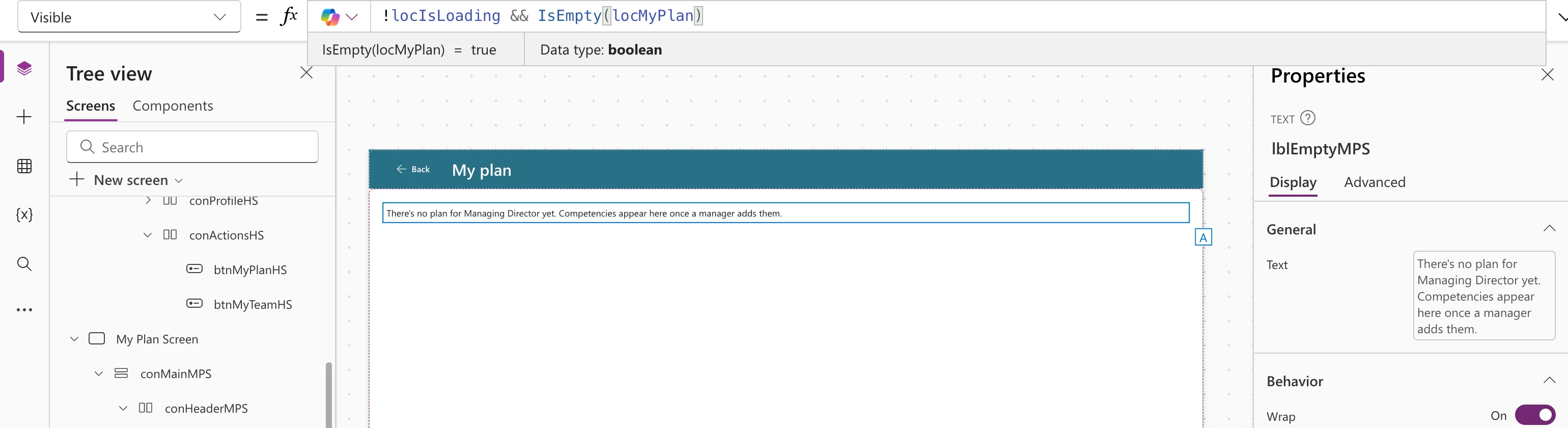
With the cursor on one part, the preview strip shows that part's value, here IsEmpty(locMyPlan) = true. That's a quick way to find which part of a long condition is false.
Example 3: Or
While designing the same screen, the gallery temporarily showed two job titles' competencies at once:
Filter(RoleCompetencies, JobTitle = "Sales Engineer" || JobTitle = "Head of Sales")
It returned the two Sales Engineer competencies and the three for Head of Sales.
Delegation
For SharePoint, Microsoft says expressions joined with And or Or are delegable, and Not isn't (SharePoint delegation). Each part still has to be delegable on its own. See What Is Delegation in Power Apps?
Common Mistakes
| Mistake | What happens | Do this instead |
|---|---|---|
& instead of && | & joins text, so the result isn't a true-or-false value | Use && |
Mixing && and || without brackets | The parts group differently from what you meant | Add brackets: a && (b || c) |
JobTitle = "A" || "B" | The second part isn't a comparison | JobTitle = "A" || JobTitle = "B" |
Troubleshooting
| Symptom | Likely cause | Fix |
|---|---|---|
| The condition is never true | One part is always false | Put the cursor on each part and read the preview strip |
| A delegation warning with Not | Not can't be delegated to SharePoint | Rewrite it, for example IsActive = false |
FAQ
&& or And?
They're the same. This series uses && and ||, the JavaScript-style operators Microsoft lists alongside the words.
Can I use them in If?
Yes, anywhere a true-or-false value goes: If(a && b, "both", "not both") (How to Use the If Function in Power Apps).
Conclusion
a && b is true when both are true, a || b when either is. Use them in filters, Visible and If conditions, and check each part with the preview strip.
