How to Check Whether a String Is Null, Empty or Whitespace in C#

A name field that holds only spaces is as empty as one that holds nothing, but value == "" treats it as filled in. string.IsNullOrWhiteSpace answers the real question in one call: is there any visible text at all?
Syntax
bool <isBlank> = string.IsNullOrWhiteSpace(<value>);
bool <isEmpty> = string.IsNullOrEmpty(<value>);
| Part | What it does |
|---|---|
string.IsNullOrWhiteSpace(<value>) | true when <value> is null, "", or nothing but white-space characters such as spaces. |
string.IsNullOrEmpty(<value>) | true only when <value> is null or "". A string of spaces counts as filled in. |
<value> | The string to check. It may be null; neither method throws for it. |
Microsoft's String.IsNullOrWhiteSpace reference: "Indicates whether a specified string is null, empty, or consists only of white-space characters."
The Example
The example checks four values with both methods: null, an empty string, three spaces, and the name Leo. Each line prints the value between square brackets, so you can see the spaces, followed by both results.
Prerequisites
- The .NET 10 SDK or newer, which runs a single
.csfile withdotnet run. This guide uses .NET SDK 10.0.404.
Step 1: Write the Code
Create a file named main.cs in an empty folder:
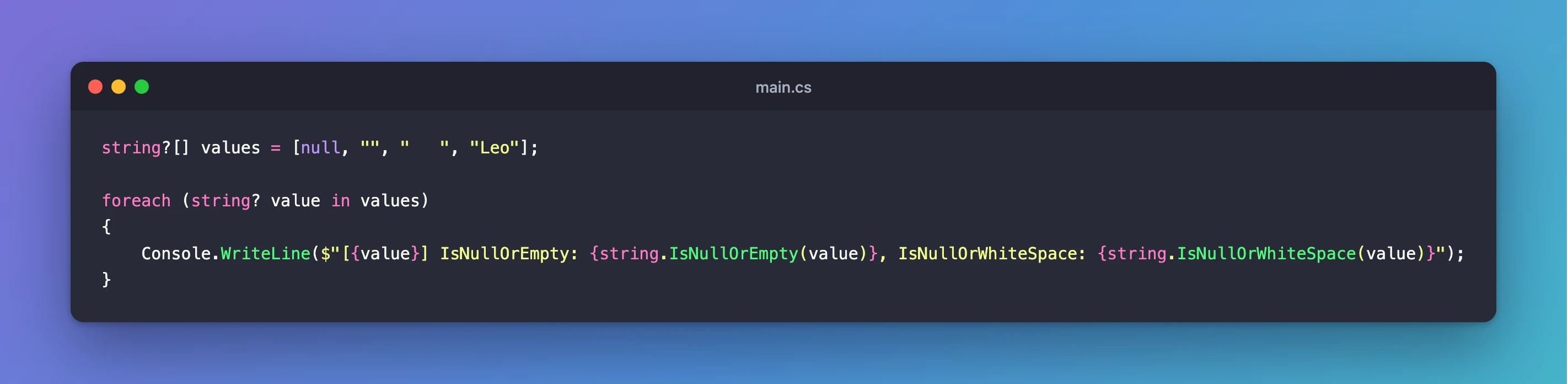
string?[] values = [null, "", "   ", "Leo"];

foreach (string? value in values)
{
    Console.WriteLine($"[{value}] IsNullOrEmpty: {string.IsNullOrEmpty(value)}, IsNullOrWhiteSpace: {string.IsNullOrWhiteSpace(value)}");
}
string? says the array may hold null as well as strings.
Step 2: Run It
dotnet run main.cs
[] IsNullOrEmpty: True, IsNullOrWhiteSpace: True
[] IsNullOrEmpty: True, IsNullOrWhiteSpace: True
[   ] IsNullOrEmpty: False, IsNullOrWhiteSpace: True
[Leo] IsNullOrEmpty: False, IsNullOrWhiteSpace: False
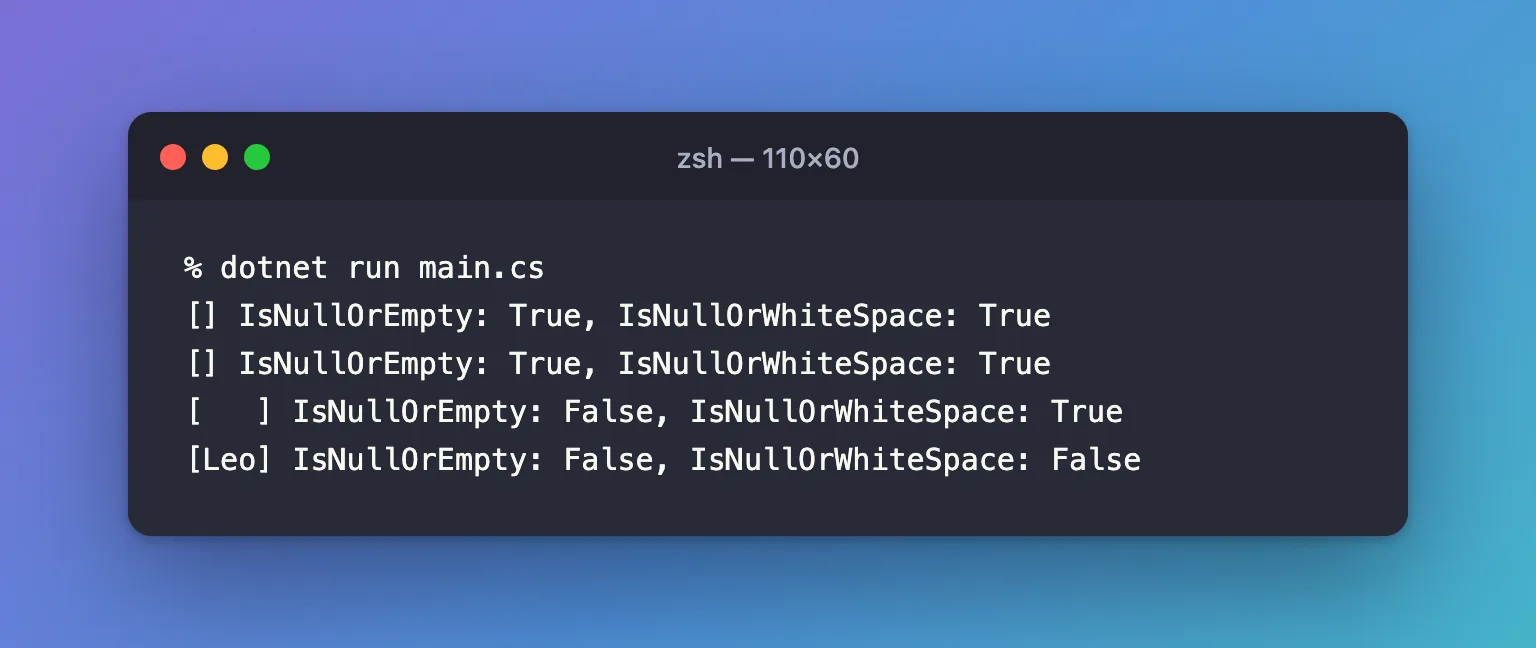
The first two lines are null and "": both methods say True. (An interpolated string prints null as nothing, so both show [].) The third line is where they differ: three spaces aren't empty, so IsNullOrEmpty says False, but there's no visible text, so IsNullOrWhiteSpace says True. Leo is real text for both. The command is the same in zsh, bash and PowerShell.
Common Mistakes
| Mistake | What happens | Do this instead |
|---|---|---|
Checking value == "" | null and " " both pass as filled in | Use string.IsNullOrWhiteSpace(value) |
Using IsNullOrEmpty for something a person typed | A value of only spaces passes the check | Use IsNullOrWhiteSpace |
Calling value.Trim() before the check | A null value throws NullReferenceException | Call string.IsNullOrWhiteSpace(value), which accepts null |
Troubleshooting
| Symptom | Likely cause | Fix |
|---|---|---|
| A blank-looking value passes validation | It holds spaces, and the check is IsNullOrEmpty or == "" | Switch to IsNullOrWhiteSpace |
NullReferenceException in a check | A method was called on a null string | Use the static string.IsNullOrWhiteSpace |
FAQ
Which one should I use?
IsNullOrWhiteSpace for anything a person types, such as names and search terms, where spaces alone mean nothing was entered. IsNullOrEmpty when spaces are real content, such as a separator.
Is IsNullOrWhiteSpace the same as trimming and checking the length?
Almost. The reference calls it "a convenience method that is similar to the following code, except that it offers superior performance":
return String.IsNullOrEmpty(value) || value.Trim().Length == 0;
What counts as white space?
More than the space bar. The reference: "White-space characters are defined by the Unicode standard." Tabs and line breaks count too, so a value of only tabs or only newlines is also treated as blank.
Conclusion
string.IsNullOrWhiteSpace(value) is true for null, "" and strings of only spaces, and false as soon as there's visible text. IsNullOrEmpty stops at null and "". Both are static and safe to call with null.
Additional Resources
- String.IsNullOrWhiteSpace, on Microsoft Learn.
- String.IsNullOrEmpty, on Microsoft Learn.
