How to Check Two Conditions at Once in Excel with AND

AND checks several conditions at once and returns TRUE only if every one of them is true. =AND(A10<$C$7,B10>$C$7) asks "did this shift start before C7 and finish after it?". And because Excel treats TRUE as 1 in arithmetic, the answer can be added straight into a total.
The example is from the Clock change sheet in How to Calculate Hours Worked Across a Daylight Saving Time Change in Excel. C7 holds the moment the clocks go back, 25/10/2026 02:00, and B7 the moment they go forward, 29/03/2026 01:00.
Prerequisites
- Values to compare, such as each shift's start and finish in columns A and B.
Step 1: Type the AND Formula
In E10, next to the first shift:
=AND(A10<$C$7,B10>$C$7)
A10<$C$7: the shift started before the clocks went back.B10>$C$7: and it finished after.
In F10, the same test for the clocks going forward: =AND(A10<$B$7,B10>$B$7). The $ keeps both formulas pointing at row 7 when they're copied down (How to Use Absolute and Mixed Cell References in Excel).
Step 2: Copy It Down and Read the Results
I copied E10:F10 to rows 11 and 12:
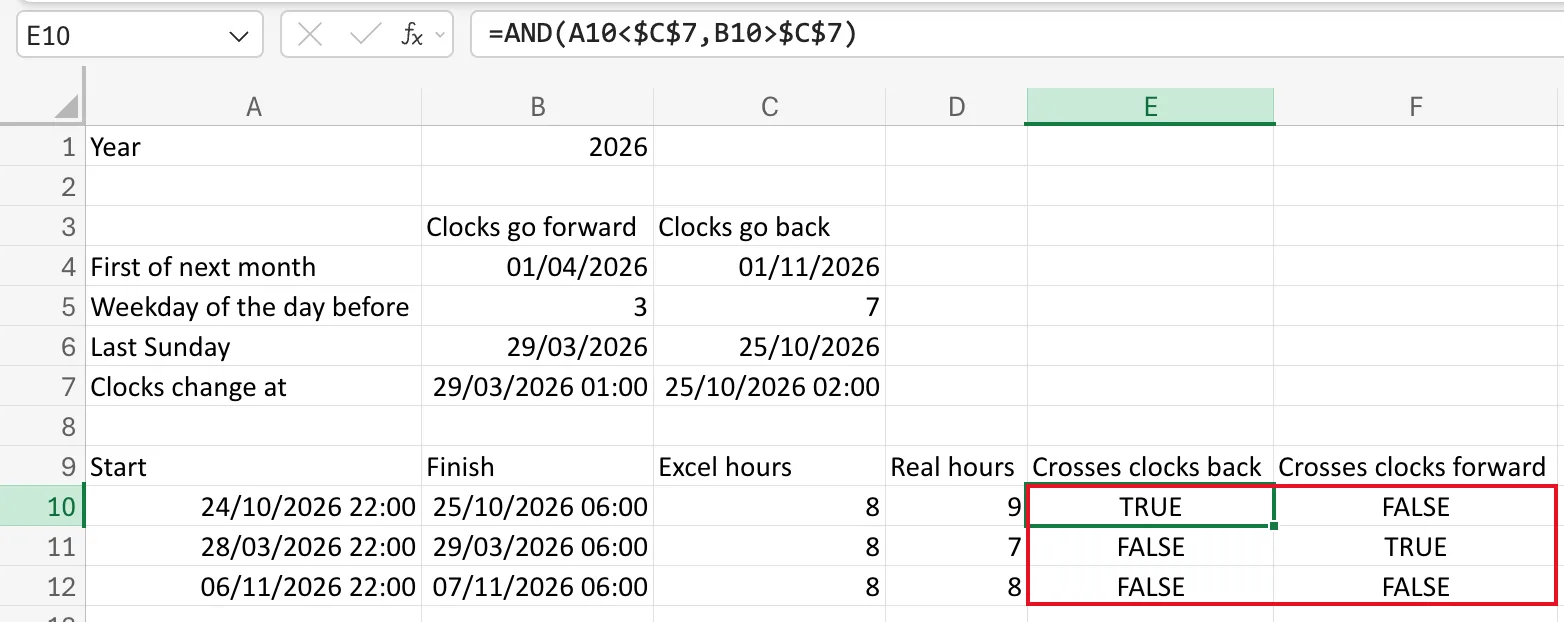
- Row 10, 24 to 25 October, crosses the clocks going back: TRUE, FALSE.
- Row 11, 28 to 29 March, crosses the clocks going forward: FALSE, TRUE.
- Row 12, 6 to 7 November, crosses neither: FALSE, FALSE.
Microsoft's AND function page: AND returns TRUE if all its arguments are TRUE, and FALSE if one or more are FALSE.
Step 3: Use TRUE and FALSE as 1 and 0
In arithmetic, Excel converts TRUE to 1 and FALSE to 0. The N function page lists those conversions and says Excel converts values automatically when a formula needs it. So an AND can be added or subtracted directly. The Real hours column does exactly that:
=C10+AND(A10<$C$7,B10>$C$7)-AND(A10<$B$7,B10>$B$7)
Excel's 8 hours, plus 1 if the shift crossed the clocks going back, minus 1 if it crossed them going forward: 9, 7 and 8.
Common Mistakes
| Mistake | What happens | Do this instead |
|---|---|---|
AND(A10<C7,B10>C7) without $, then copying down | Row 11 compares with C8, an empty cell | $C$7 |
Using OR when both must be true | TRUE when only one is | AND |
| Comparing a date-time with a date only | A date alone is midnight, so times that day count as after it | Compare like with like |
Troubleshooting
| Symptom | Likely cause | Fix |
|---|---|---|
| Every row shows FALSE | A reference points at the wrong cell | Check the outlined cells while editing the formula |
| A row you expected to be TRUE shows FALSE | Its start or finish is a typed date without a time | Enter the full date and time |
FAQ
How many conditions can AND take?
Many more than two. Separate each test with a comma.
Can I show Yes or No instead of TRUE or FALSE?
Yes, with IF: =IF(AND(…),"Yes","No"). Keep AND alone when you want to add the result.
Conclusion
=AND(test1, test2) is TRUE only when both are true. In arithmetic it counts as 1 or 0, so it can switch an adjustment on or off inside a total.
