How to Check for Pending Model Changes in EF Core

Change an entity, forget dotnet ef migrations add, and the code and the database quietly disagree until something fails. EF Core has a command that catches exactly that: dotnet ef migrations has-pending-model-changes. This guide shows both of its answers, what it actually compares, how to use its exit code in a build, and how it proves that a refactor of your model configuration changed nothing.
What It Checks
EF Core's managing migrations page describes the purpose: "Sometimes you may want to check if there have been any model changes made since the last migration. This can help you know when you or a teammate forgot to add a migration." It's been available since EF Core 8: "This feature was added in EF Core 8.0."
It compares two things:
- Your current model, built from the entities, the configuration and the conventions in your code.
- The model snapshot, the file
…ModelSnapshot.csin theMigrationsfolder. The docs describe it as "A snapshot of your current model. Used to determine what changed when adding the next migration."
It doesn't connect to the database. Whether migrations are applied is a different question, answered by dotnet ef migrations list.
Prerequisites
- A .NET C# project with EF Core 8 or later and at least one migration. The examples use EF Core 10, with the
DbContextin a class library. dotnet ef: How to Install dotnet-ef as a Local Tool in a .NET C# Project.
Step 1: Run It on an Up-to-Date Model
dotnet ef migrations has-pending-model-changes --project src/Dewiride.Inventory.Data --startup-project src/Dewiride.Inventory.Api
Build started...
Build succeeded.
No changes have been made to the model since the last migration.
The model and the last migration agree.
Step 2: Run It After a Change
I changed a product's Description from string? to required string, which makes its column NOT NULL, and ran the same command before creating a migration:
Build started...
Build succeeded.
Changes have been made to the model since the last migration. Add a new migration.
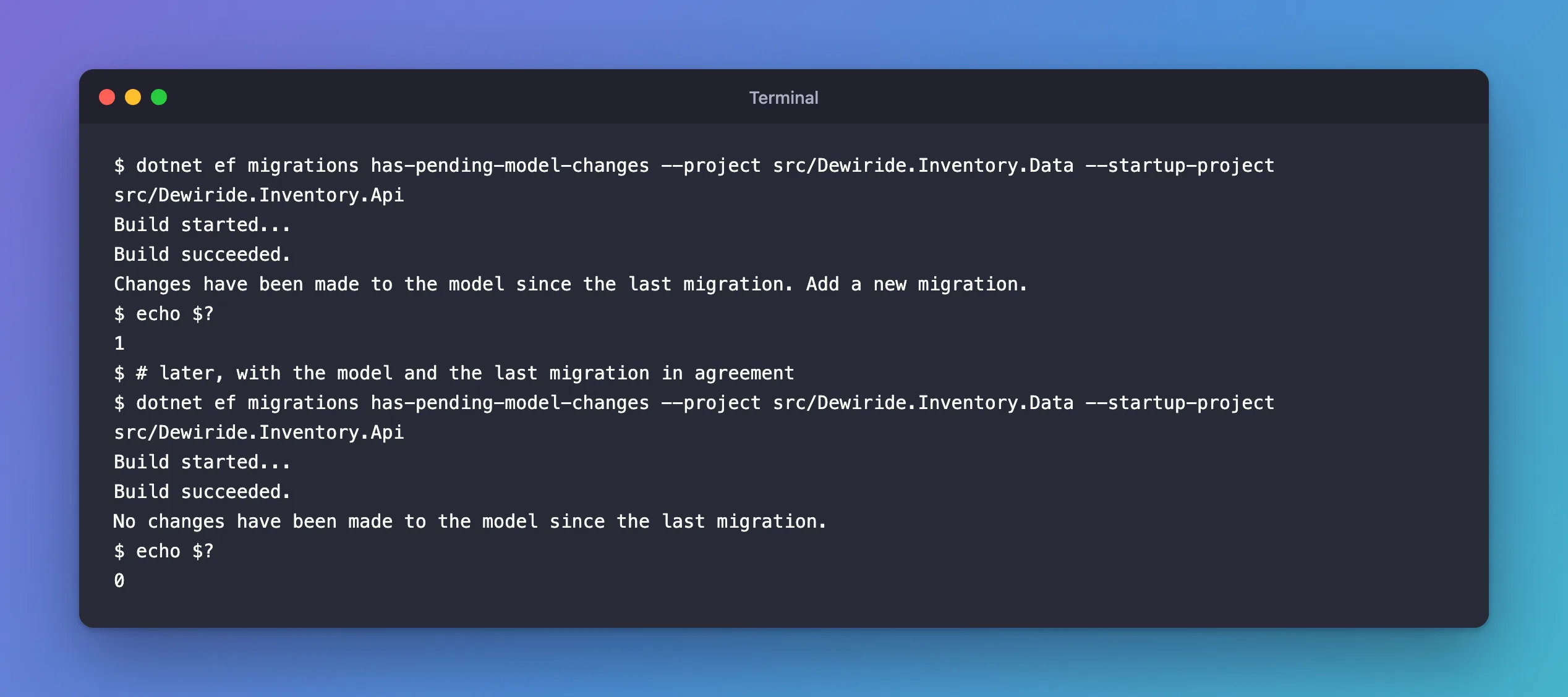
That's the reminder: create the migration, with dotnet ef migrations add, before committing.
Step 3: Use the Exit Code in a Build
The command's exit code is what makes it useful in automation. It was 1 when changes were pending, and 0 when there were none:
- bash / zsh
- PowerShell
dotnet ef migrations has-pending-model-changes --project src/Dewiride.Inventory.Data --startup-project src/Dewiride.Inventory.Api
echo $?
dotnet ef migrations has-pending-model-changes --project src/Dewiride.Inventory.Data --startup-project src/Dewiride.Inventory.Api
$LASTEXITCODE
No changes have been made to the model since the last migration.
0
A build pipeline step that runs this command fails on its own when someone forgets a migration, because almost every CI system treats a non-zero exit code as a failure. The docs also mention a C# way, for a test: "You can also perform this check programmatically using context.Database.HasPendingModelChanges(). This can be used to write a unit test that fails when you forget to add a migration."
Step 4: Prove a Refactor Changed Nothing
The command is just as useful when you don't expect changes. I moved every entity's configuration out of OnModelCreating into separate IEntityTypeConfiguration classes, a pure refactor, and checked:
No changes have been made to the model since the last migration.
Proof that the classes say exactly what OnModelCreating said. Then I commented out the one line that registers those classes, ApplyConfigurationsFromAssembly, and checked again:
Changes have been made to the model since the last migration. Add a new migration.
The build still succeeded, and nothing else complained, but without that line every table name, length, index and constraint had fallen back to EF Core's defaults. Run this check after every change to how the model is configured: conventions, configuration classes, converters. How to Configure EF Core Entities in Separate Classes with IEntityTypeConfiguration shows that refactor.
What Counts as a Change
| Change | Pending? |
|---|---|
| A new property, entity or index | Yes |
| A different length, precision, nullability or table name | Yes |
Moving configuration between OnModelCreating, configuration classes and conventions, with the same result | No |
A value converter that keeps the column type, such as DateTime to DateTime | No |
| A change to your app's logic that doesn't touch the model | No |
The converter row comes from a real check: adding a UTC converter for every DateTime reported "No changes", because the columns stay datetime(6).
Common Mistakes
| Mistake | What happens | Do this instead |
|---|---|---|
| Running it to see whether the database is up to date | It doesn't look at the database | Use dotnet ef migrations list |
| Ignoring "Changes have been made" before committing | The next developer's migration contains your change too | Add the migration in the same commit |
| Editing the snapshot by hand to silence it | The next migration is wrong | Add or remove migrations with the tools |
FAQ
Does it work in EF Core 7 or earlier?
No: the command was added in EF Core 8.0. Update the EF Core packages and the dotnet ef tool.
Does it need the startup project?
Yes, like every dotnet ef command: it builds the model by running the app's startup code. It doesn't open a database connection.
Conclusion
dotnet ef migrations has-pending-model-changes compares your model with the last migration's snapshot and answers "No changes" or "Changes have been made", with exit codes 0 and 1 that a build can act on. Run it before committing, so no change goes without a migration, and after any refactor of the model's configuration, so you know the refactor kept the model the same.
