How to Check a JWT's HS256 Signature in the Terminal

When an app rejects a JSON Web Token with "invalid signature", the first question is whether the token was signed with the key you think it was. For tokens signed with HS256, you can answer that in the terminal: sign the token's first two parts again with the key and compare the result with its third part.
Syntax
An HS256 signature is the HMAC-SHA256 of the token's header and payload, exactly as they appear in the token, with the dot between them, stored as base64url. The function recomputes it and compares.
In bash or zsh:
jwt_check_hs256() {
  local data expected
  data=$(echo "$1" | cut -d. -f1-2)
  expected=$(printf '%s' "$data" | openssl dgst -sha256 -hmac "$2" -binary | openssl base64 -A)
  expected=$(printf '%s' "$expected" | tr '+/' '-_' | tr -d '=')
  if [ "$expected" = "$(echo "$1" | cut -d. -f3)" ]; then
    echo "valid signature"
  else
    echo "INVALID signature"
  fi
}
jwt_check_hs256 '<token>' '<secret>'
| Part | What it does |
|---|---|
cut -d. -f1-2 | Keeps the first two parts of the token, with the dot between them: the text that was signed. |
openssl dgst -sha256 -hmac "$2" -binary | Computes HMAC-SHA256 of that text with the secret, the second argument, as raw bytes. |
openssl base64 -A and tr '+/' '-_' | tr -d '=' | Turns the bytes into base64url, the way JWTs store signatures. |
cut -d. -f3 | The token's own signature, its third part. |
if [ … = … ] | Compares the two and prints the result. |
In PowerShell 7.6:
function Test-JwtHs256([string] $Token, [string] $Secret) {
  $parts = $Token.Split('.')
  $key = [Text.Encoding]::UTF8.GetBytes($Secret)
  $data = [Text.Encoding]::UTF8.GetBytes($parts[0] + '.' + $parts[1])
  $hash = [Security.Cryptography.HMACSHA256]::HashData($key, $data)
  $expected = [Convert]::ToBase64String($hash).TrimEnd('=').Replace('+', '-').Replace('/', '_')
  if ($expected -ceq $parts[2]) { 'valid signature' } else { 'INVALID signature' }
}
Test-JwtHs256 '<token>' '<secret>'
| Part | What it does |
|---|---|
$parts[0] + '.' + $parts[1] | The signed text: header, dot, payload. |
HMACSHA256::HashData($key, $data) | HMAC-SHA256 with the secret's bytes as the key. |
ToBase64String(…).TrimEnd('=').Replace(…) | Turns the result into base64url. |
-ceq | Compares the two with letter case. PowerShell's plain -eq ignores case, and a and A are different characters in a signature. |
Both functions use the secret's text as the key, which is how most JWT libraries treat a secret given as a string.
The Example
A library app gives Omar a token that lets him read the catalogue for 30 minutes. The app signs its tokens with HS256 and this secret:
eyJhbGciOiJIUzI1NiIsInR5cCI6IkpXVCJ9.eyJzdWIiOiJvbWFyIiwic2NvcGUiOiJyZWFkOmJvb2tzIiwiaWF0IjoxNzk1NTk5NjgyLCJleHAiOjE3OTU2MDE0ODJ9.NOtuwU9W7ryNdIuGBYnyuKrRbN7q5sEMbnzdHDEfO3w
XxTHoQ1p2jQrmY+2ZxDzgCeLWfJuiVwOdZGM3lLG1uE=
The check should pass with this secret and fail with any other.
Prerequisites
- macOS or Linux: OpenSSL. macOS includes it, and most Linux distributions do too; check with
openssl version. - Windows: PowerShell 7.6, the current long-term support release.
Step 1: Store the Token and the Secret
- macOS / Linux
- Windows (PowerShell)
token='eyJhbGciOiJIUzI1NiIsInR5cCI6IkpXVCJ9.eyJzdWIiOiJvbWFyIiwic2NvcGUiOiJyZWFkOmJvb2tzIiwiaWF0IjoxNzk1NTk5NjgyLCJleHAiOjE3OTU2MDE0ODJ9.NOtuwU9W7ryNdIuGBYnyuKrRbN7q5sEMbnzdHDEfO3w'
secret='XxTHoQ1p2jQrmY+2ZxDzgCeLWfJuiVwOdZGM3lLG1uE='
$token = 'eyJhbGciOiJIUzI1NiIsInR5cCI6IkpXVCJ9.eyJzdWIiOiJvbWFyIiwic2NvcGUiOiJyZWFkOmJvb2tzIiwiaWF0IjoxNzk1NTk5NjgyLCJleHAiOjE3OTU2MDE0ODJ9.NOtuwU9W7ryNdIuGBYnyuKrRbN7q5sEMbnzdHDEfO3w'
$secret = 'XxTHoQ1p2jQrmY+2ZxDzgCeLWfJuiVwOdZGM3lLG1uE='
With a real secret, read it from an environment variable such as $JWT_SECRET instead of typing it, so it doesn't end up in your shell's history.
Step 2: Add the Function
Paste the function into the same terminal. It prints nothing until you call it.
- macOS / Linux
- Windows (PowerShell)
jwt_check_hs256() {
  local data expected
  data=$(echo "$1" | cut -d. -f1-2)
  expected=$(printf '%s' "$data" | openssl dgst -sha256 -hmac "$2" -binary | openssl base64 -A)
  expected=$(printf '%s' "$expected" | tr '+/' '-_' | tr -d '=')
  if [ "$expected" = "$(echo "$1" | cut -d. -f3)" ]; then
    echo "valid signature"
  else
    echo "INVALID signature"
  fi
}
function Test-JwtHs256([string] $Token, [string] $Secret) {
  $parts = $Token.Split('.')
  $key = [Text.Encoding]::UTF8.GetBytes($Secret)
  $data = [Text.Encoding]::UTF8.GetBytes($parts[0] + '.' + $parts[1])
  $hash = [Security.Cryptography.HMACSHA256]::HashData($key, $data)
  $expected = [Convert]::ToBase64String($hash).TrimEnd('=').Replace('+', '-').Replace('/', '_')
  if ($expected -ceq $parts[2]) { 'valid signature' } else { 'INVALID signature' }
}
Step 3: Check with the Right Secret, Then a Wrong One
- macOS / Linux
- Windows (PowerShell)
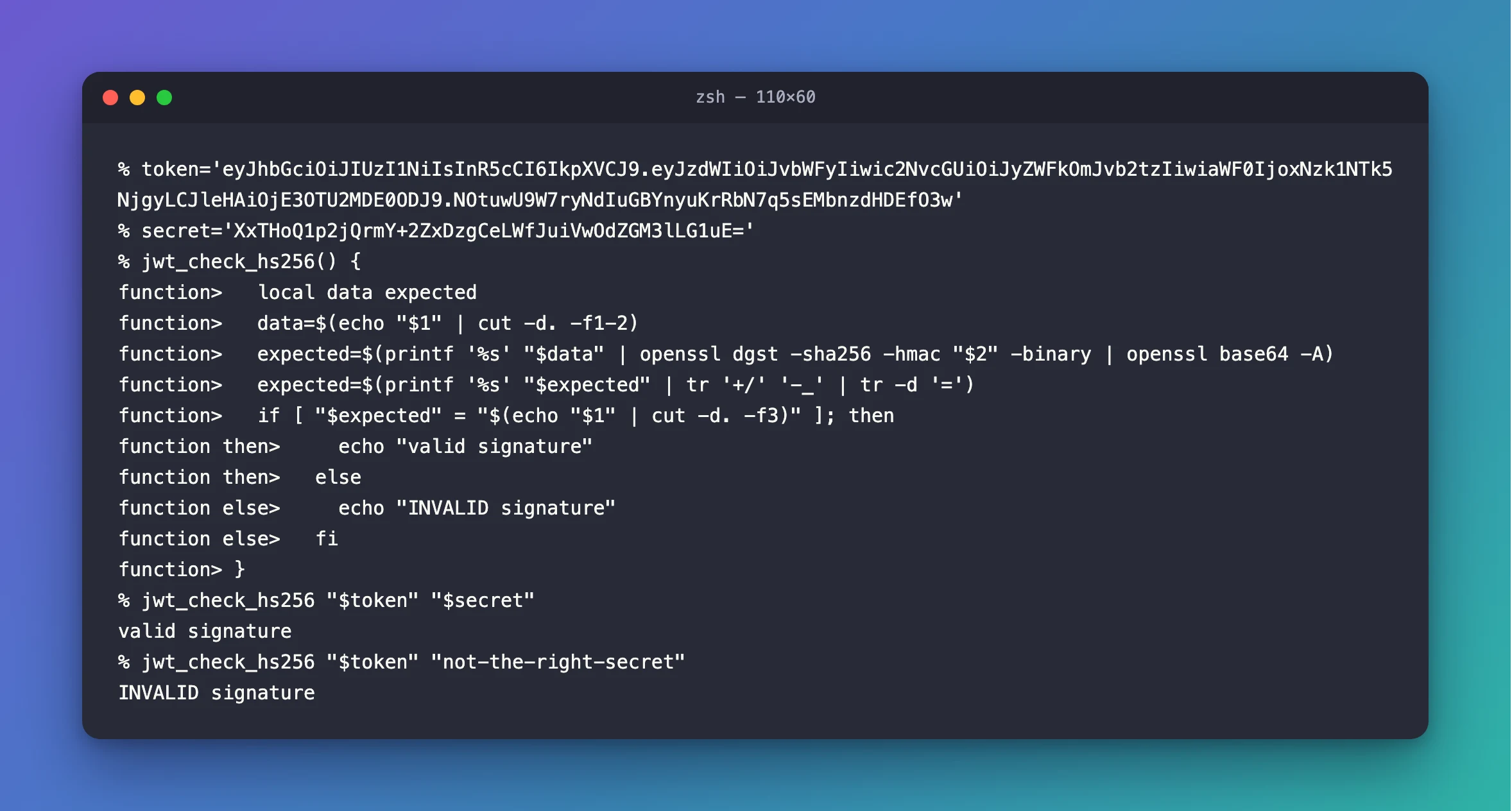
jwt_check_hs256 "$token" "$secret"
jwt_check_hs256 "$token" "not-the-right-secret"
valid signature
INVALID signature
Test-JwtHs256 $token $secret
Test-JwtHs256 $token 'not-the-right-secret'
valid signature
INVALID signature
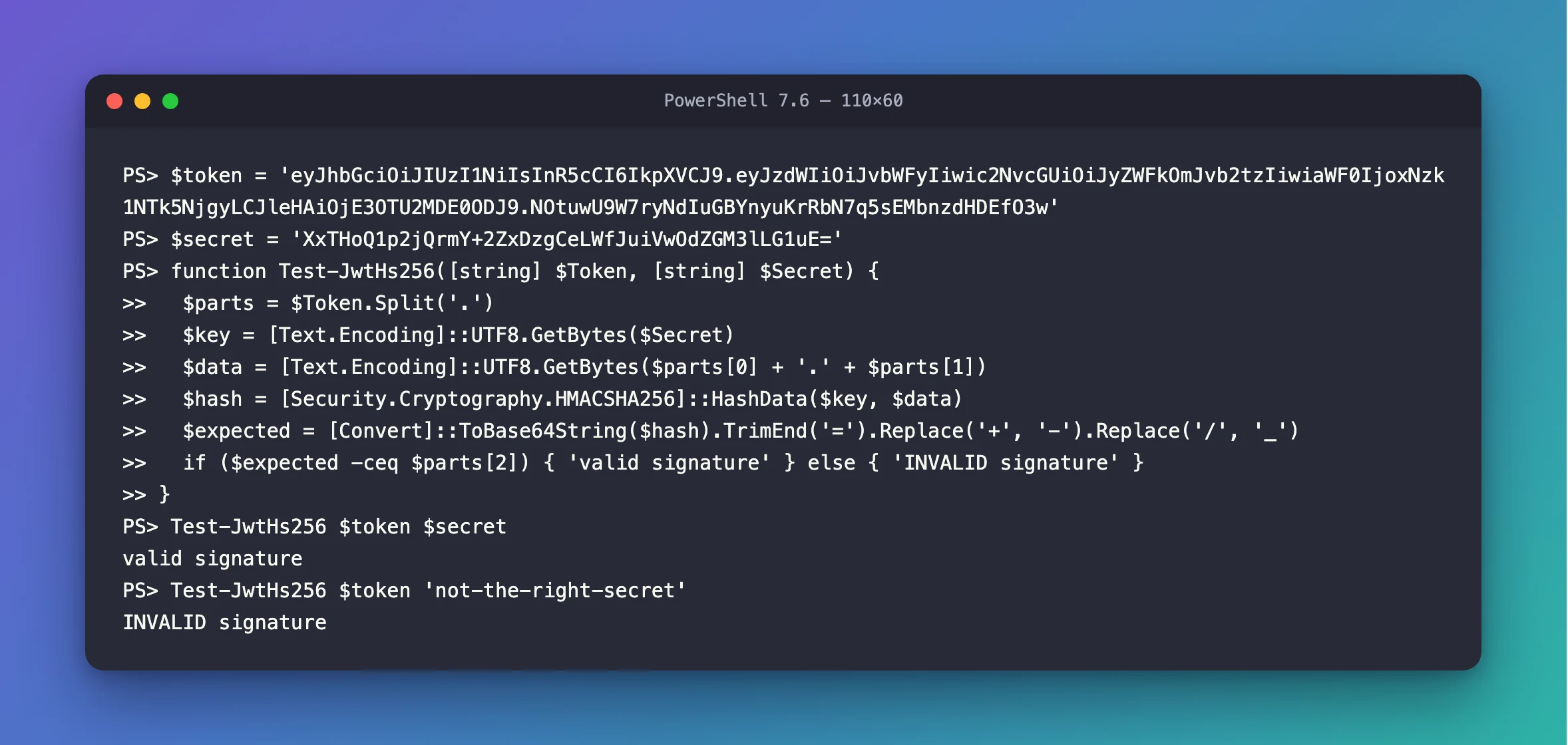
The app's secret reproduces the signature exactly. Any other secret gives a completely different one, so the check fails. That's what makes a signature trustworthy: without the secret, nobody can produce one that matches.
What This Check Doesn't Do
A valid signature proves the token was made with this secret and hasn't changed since. It doesn't prove the token should be accepted:
- Expiry. The signature stays valid after
exphas passed. An app must also check the time. - The algorithm. This works only for tokens whose header says
"alg":"HS256". Decode the header first; How to Decode a JWT in the Terminal shows how. - Who it's for. A token signed for another app with the same secret would pass too.
The JWT course covers full validation later. Use this check to answer one question: was this token signed with this key?
An ordinary string comparison stops at the first different character, so it takes slightly longer the more characters match. Over many tries, that timing can help an attacker guess a signature. Applications should use a JWT library, or a constant-time comparison such as .NET's CryptographicOperations.FixedTimeEquals. In a terminal, for debugging, the comparison above is fine.
Common Mistakes
| Mistake | What happens | Do this instead |
|---|---|---|
| Signing the payload alone | The signature never matches | Sign header.payload, with the dot |
Using -eq in PowerShell | Letter case is ignored, so different signatures can look equal | Use -ceq |
| Using the decoded key when the app uses the text, or the other way round | The check fails with the right secret | Use the key the way the app does |
| Treating "valid signature" as "valid token" | An expired token still passes | Also check exp and the other claims |
Troubleshooting
| Symptom | Likely cause | Fix |
|---|---|---|
INVALID signature with the secret you expected | The token was signed with another key, or the app uses the key as decoded bytes | Check which key and form the issuing app uses |
INVALID signature for a token from an identity provider | Its header says RS256 or ES256, signed with a private key | Those need the provider's public key, not an HMAC secret |
| The function prints nothing | It was defined but not called, or the paste was cut | Paste the whole function again, then call it |
FAQ
Why does a different secret give a completely different signature?
HMAC is built so that changing any bit of the key or the message changes the result unpredictably. You can't adjust a signature a little; you either have the key or you don't.
Can I check RS256 tokens the same way?
Not with an HMAC. RS256 uses a private key to sign and a public key to check, and the JWT course covers it in its own tutorial.
Is it safe to type the secret into the terminal?
For a test key, yes. For a real one, avoid it: your shell may save the command in its history file. Read it from an environment variable instead.
Conclusion
To check an HS256 signature, compute HMAC-SHA256 of the token's header.payload text with the secret, turn it into base64url, and compare it with the token's third part. jwt_check_hs256 and Test-JwtHs256 do that and print valid signature or INVALID signature. A match proves the token was signed with that key and hasn't changed; it doesn't prove the token is still valid.
Additional Resources
- RFC 7515, Appendix A.1: Example JWS Using HMAC SHA-256 — the standard's own worked example of an
HS256signature. - RFC 7518, Section 3.2: HMAC with SHA-2 Functions — how
HS256signatures are made and checked. - CryptographicOperations.FixedTimeEquals — constant-time comparison in .NET.
