How to Check a Flow for Errors with Flow Checker in Power Automate

Flow checker lists a flow's errors and warnings in the designer, before you publish. Open it from the toolbar, fix what it finds, and publish. Publishing checks the flow again, and it can still refuse things Flow checker didn't mention.
Microsoft's Flow checker article says: Flow checker in Power Automate promotes higher quality flows by ensuring you follow best practices when you design flows. It also says Flow checker also opens automatically when you save the flow if there are errors or warnings.
The example is the approval flow of the Overtime Timesheet app, checked as a draft before its first publish.
Prerequisites
- A flow open in the new designer (How to Save a Draft and Publish a Flow in Power Automate).
Step 1: Open Flow Checker
In the designer's toolbar, select Flow checker, the stethoscope icon next to Save draft. A pane opens with two tabs, Errors and Warnings, each with a count.
Step 2: Read the Results
For the approval flow's draft, both were empty:
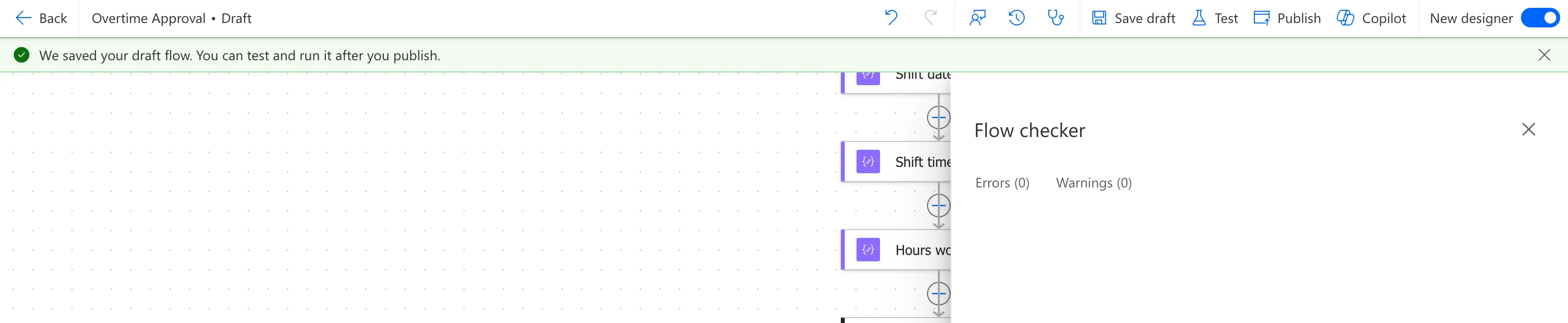
When it lists something, fix the action it names, and check again.
What It Didn't Catch
The draft that Flow checker passed had two action names that publishing rejected, one after the other:
- An apostrophe in Get the employee's manager broke the expression that read its output: Fixed: "The input parameter(s) of operation contains invalid expression(s)" in Power Automate.
- A question mark in the condition Anyone left to approve?: Fixed: "The provided workflow run action name has these invalid characters" (InvalidWorkflowRunActionName) in Power Automate.
Neither showed in Flow checker. So run it, and then publish: the publish is the final check.
Common Mistakes
| Mistake | What happens | Do this instead |
|---|---|---|
| Treating Errors (0) as ready to run | Publishing can still fail | Publish and read the banner |
| Ignoring warnings | Best-practice problems stay in the flow | Read each one |
| Checking only once | New actions bring new problems | Check after each change |
Troubleshooting
| Symptom | Likely cause | Fix |
|---|---|---|
| Flow checker opens by itself | The flow was saved with errors or warnings | Read the list |
| No errors, but Publish fails | Something Flow checker doesn't look at | Read the publish error |
| An error you can't find on the canvas | It's inside a collapsed condition or branch | Expand the conditions |
FAQ
Does Flow checker run the flow?
No. It checks the flow's design; it doesn't run anything. To see how a flow behaves, publish it and look at its runs (How to See a Flow's Run History in Power Automate).
Is it in the classic designer too?
Yes, the classic designer's toolbar has Flow checker as well.
Conclusion
Flow checker in the toolbar lists a draft's errors and warnings; fix them before you publish. An empty list doesn't guarantee a clean publish, so publish and read what it says.
Additional Resources
- Find and fix errors with Flow checker: what it checks and when it opens.
