How to Change the Field That Routes Adaptive Card Submits in the Microsoft 365 Agents SDK in C#

AdaptiveCards.OnActionSubmit finds the right handler for a card's button by looking at one field in the button's data: verb. Cards written for other code often use a different name, such as action. Rather than rewriting every card, tell the SDK which field to read, with one setting.
The Setting
{
  "AgentApplication": {
    "AdaptiveCards": {
      "ActionSubmitFilter": "action"
    }
  }
}
AgentApplicationis the configuration section the SDK reads itsAgentApplicationoptions from.AdaptiveCardsholds the options for Adaptive Card routes.ActionSubmitFilteris the name of the field in a submit'sdatathatOnActionSubmitcompares with the verb you register. It'sverbwhen you don't set it.
The setting is read when the agent's options are created, and applies to every OnActionSubmit route registered after that, which includes all the routes in your agent's constructor.
The Example
The agent for this post invites people to a team lunch. Send it lunch, and it answers with a card with Yes and No buttons. The card was written for code that used a field called action:
{
  "type": "AdaptiveCard",
  "version": "1.5",
  "body": [
    {
      "type": "TextBlock",
      "text": "Team lunch on Friday at 12:30. Are you coming?",
      "wrap": true
    }
  ],
  "actions": [
    { "type": "Action.Submit", "title": "Yes", "data": { "action": "rsvpYes" } },
    { "type": "Action.Submit", "title": "No", "data": { "action": "rsvpNo" } }
  ]
}
The agent registers a route for each answer, and a help message ranked last for anything else:
    public RsvpAgent(AgentApplicationOptions options) : base(options)
    {
        OnMessage("lunch", SendRsvpCardAsync);
        AdaptiveCards.OnActionSubmit("rsvpYes", RsvpYesAsync);
        AdaptiveCards.OnActionSubmit("rsvpNo", RsvpNoAsync);
        OnActivity(ActivityTypes.Message, HelpAsync, rank: RouteRank.Last);
    }
RsvpYesAsync answers Great, see you at lunch on Friday., and HelpAsync answers Send lunch to answer the team lunch invitation. The agent is one class in an ASP.NET Core project with the Agents SDK, hosted with AddAgent<RsvpAgent>() and listening on port 3978.
Prerequisites
- The Microsoft 365 Agents Playground, to chat with the agent on your own machine.
agentsplayground --versionshould print0.2.30; if the command isn't found, install it withnpm install -g @microsoft/m365agentsplayground.
Step 1: See the Button Miss Its Route
Run the agent with dotnet run, then start the Agents Playground in a second terminal:
agentsplayground -e http://localhost:3978/api/messages -c emulator
Send lunch, and select Yes:
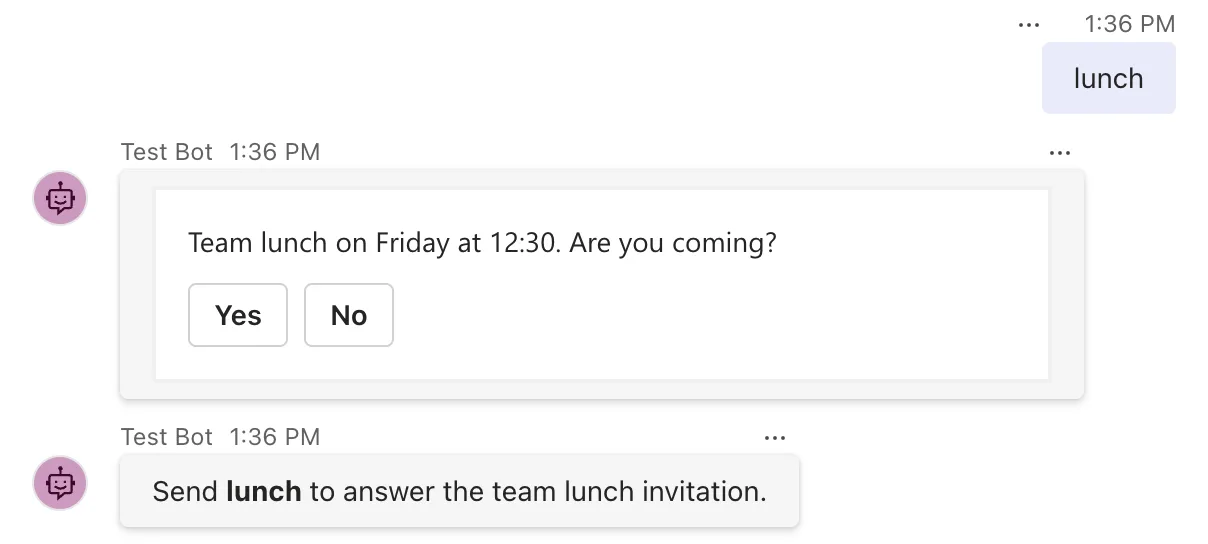
The help message answered. The submit arrived with "action": "rsvpYes", but the routes looked for a verb field, found none, and didn't match, so the catch-all took it.
Step 2: Set ActionSubmitFilter
Stop the agent, and add the AgentApplication section to appsettings.json, next to what the project template put there:
{
  "Logging": {
    "LogLevel": {
      "Default": "Information",
      "Microsoft.AspNetCore": "Warning"
    }
  },
  "AllowedHosts": "*",
  "AgentApplication": {
    "AdaptiveCards": {
      "ActionSubmitFilter": "action"
    }
  }
}
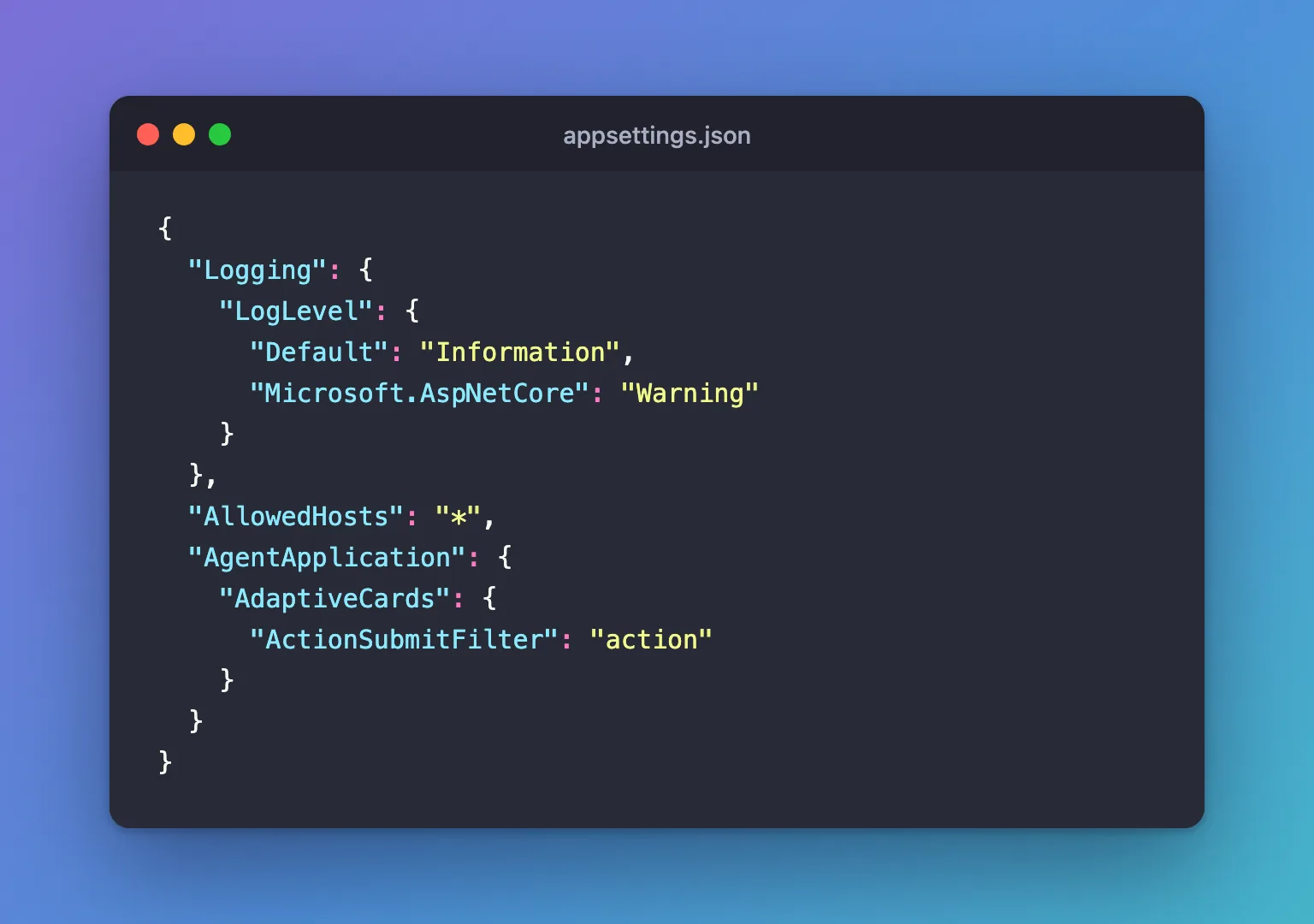
Nothing in the code changes.
Step 3: Try It Again
Run the agent again, send lunch, and select Yes:
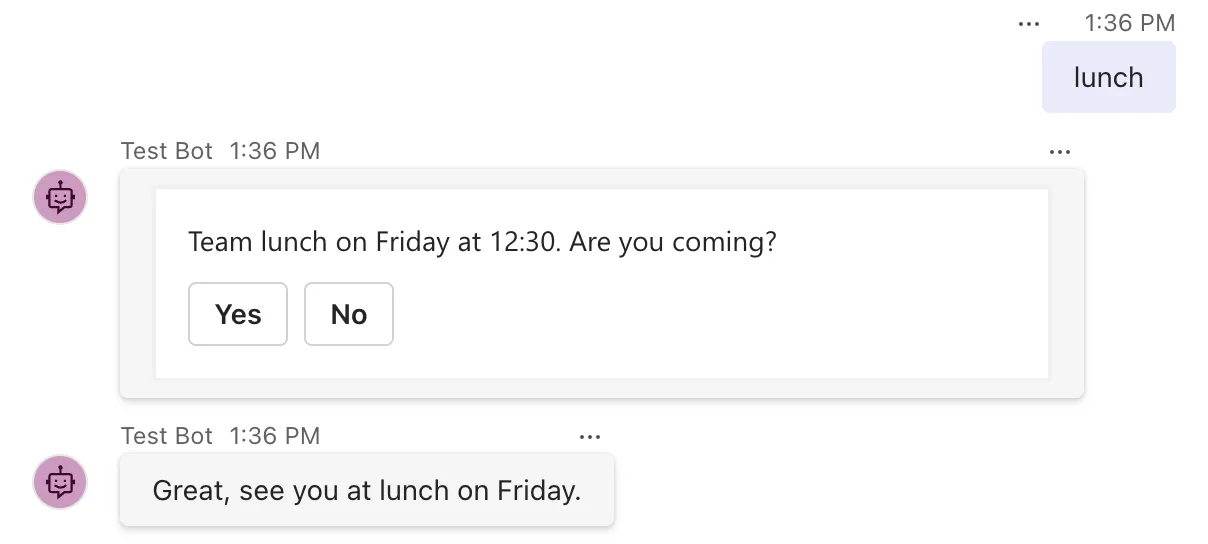
The route for rsvpYes answered this time: the SDK read the button's action field and found the verb there.
Common Mistakes
| Mistake | What happens | Do this instead |
|---|---|---|
Putting ActionSubmitFilter at the top level of appsettings.json | The SDK doesn't find it | Nest it in AgentApplication, then AdaptiveCards |
Mixing cards that use verb with cards that use another field | Only one field is read, so the other cards miss their routes | Use one field name for all the agent's cards |
| Setting the filter to an empty string | The SDK rejects it: ActionSubmitFilter must not be empty when configured. | Leave the setting out to keep verb |
Troubleshooting
| Symptom | Likely cause | Fix |
|---|---|---|
| Buttons still reach the catch-all | The setting isn't in the configuration the agent reads, or the field name differs from the card's | Check the section names and the field's spelling, case included |
| A different route answers the button | Two routes match; the first one registered wins | Give each button its own value |
FAQ
Can I set it in code instead?
Yes. AgentApplicationOptions has an AdaptiveCards property of type AdaptiveCardsOptions, whose ActionSubmitFilter is the same setting. Configuration keeps it out of the code, which suits a value that depends on your cards.
Does it change how Action.Execute is routed?
No. Action.Execute buttons have a verb property of their own, outside data, and OnActionExecute routes by it.
Conclusion
OnActionSubmit reads the verb from a field in the button's data, verb by default. When your cards use another name, set AgentApplication:AdaptiveCards:ActionSubmitFilter to it in appsettings.json, and the same routes match without changing a single card.
Additional Resources
- Use adaptive cards in agents — the submit route and the
AgentApplication:AdaptiveCards:ActionSubmitFiltersetting. - AdaptiveCardsOptions.ActionSubmitFilter property — the API reference.
