How to Change SharePoint List Settings with the REST API in Power Automate

Most of a SharePoint list's settings are properties of the list, and the REST API changes them with a MERGE request: send only the properties you want to change, and the rest stay as they are. This guide sets a list's description, attachments, version history, navigation link and search setting from a flow.
Prerequisites
- Send an HTTP request to SharePoint: see How to Use Send an HTTP Request to SharePoint.
- A list, created by hand or by the flow (How to Create a SharePoint List with the REST API).
The example is Update the list settings in the setup flow from Part 11 of the Career Development Plan series. It runs for each list, right after the list is created or found, and applies the settings Part 2 made by hand.
Step 1: Set Up the Request
| Field | Value |
|---|---|
| Site Address | The site, here the trigger's Site URL |
| Method | POST |
| Uri | _api/web/lists/getbytitle(' + the title + ') |
| Headers | Accept: application/json;odata=nometadata |
Content-Type: application/json;odata=verbose | |
IF-MATCH: * | |
X-HTTP-Method: MERGE |
_api/web/lists/getbytitle('@{items('For_each_list')?['title']}')
The two extra headers make the POST an update:
- X-HTTP-Method: MERGE: Microsoft's article Complete basic operations using SharePoint REST endpoints explains that MERGE changes only the properties in the body;
- IF-MATCH: *: Microsoft's REST examples send either the object's version tag (ETag) or
*here.*means "whatever version it's at now".
Step 2: Write the Body
{
  "__metadata": { "type": "SP.List" },
  "Description": "@{items('For_each_list')?['description']}",
  "EnableAttachments": false,
  "EnableVersioning": true,
  "MajorVersionLimit": 50,
  "OnQuickLaunch": true,
  "NoCrawl": @{if(items('For_each_list')?['noCrawl'], 'true', 'false')}
}
| Property | What it sets |
|---|---|
Description | The list's description, here from the list definitions |
EnableAttachments | false turns off attachments on items |
EnableVersioning | true keeps version history |
MajorVersionLimit | How many versions to keep |
OnQuickLaunch | true shows the list in the site's navigation |
NoCrawl | true keeps the list's items out of search results |
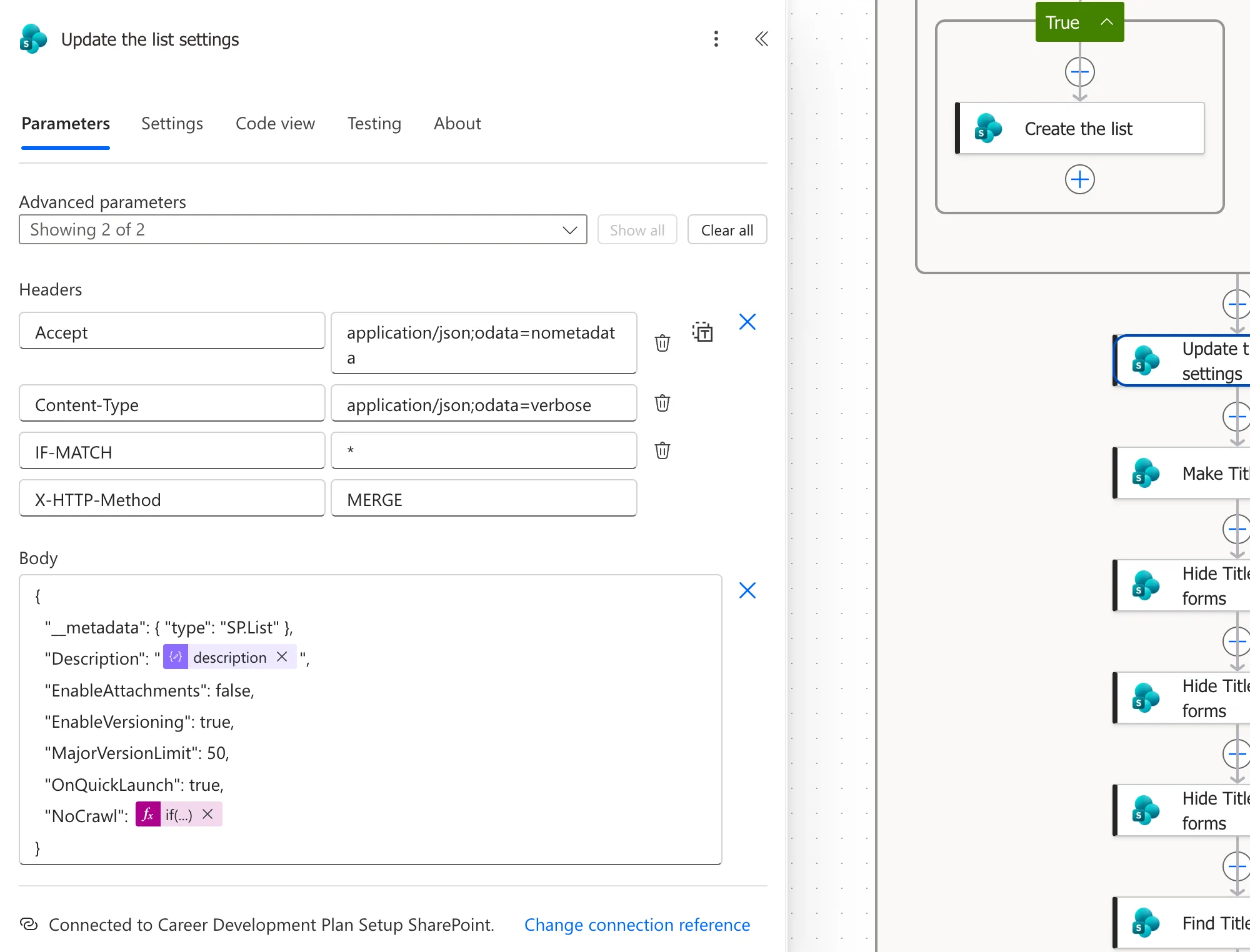
The values match what Part 2 set by hand, including the 50 versions a new list keeps by default. How to Turn Off Attachments and Hide a SharePoint List from Search shows the same settings in SharePoint.
A True-or-False Value from Data
NoCrawl comes from the list definitions: false for one list and true for the other. Writing it as @{items(...)?['noCrawl']} sends False with a capital F, which isn't JSON, and SharePoint rejects the request with Invalid JSON. The if() expression writes true or false in lowercase instead (Fixed: "Invalid JSON. A Token Was Not Recognized in the JSON Content").
Check the Result
After the run, both test lists had their descriptions, attachments off, version history on with 50 versions, and a link in the site's navigation, and CompetencyResponses was hidden from search. I compared the settings with Part 2's lists through the REST API, and they matched.
Because MERGE sets values rather than adding anything, running the step again changes nothing. The repeat runs of the setup flow ran it without errors.
Common Mistakes
| Mistake | What happens | Do this instead |
|---|---|---|
No X-HTTP-Method: MERGE | The POST isn't an update | Add the header |
A Boolean from data through @{...} | Invalid JSON | Use if(value, 'true', 'false') |
Quotes around true or false | The value is sent as text | Write them without quotes |
Troubleshooting
| Symptom | Likely cause | Fix |
|---|---|---|
| Invalid JSON. A token was not recognized | A value isn't valid JSON | Read the body in the run's Show raw inputs |
| The step fails because the list isn't found | The title in the Uri differs from the list's | Check the title |
FAQ
Can I change one setting only?
Yes. With MERGE, send only that property, with __metadata.
Why getbytitle and not the list's ID?
The flow knows the title, from its definitions. The ID would need another lookup first.
Conclusion
To change a list's settings, POST to _api/web/lists/getbytitle('<title>') with X-HTTP-Method: MERGE, IF-MATCH: * and the verbose content type, and send only the properties to change, as an SP.List. Write Booleans from data with if().
Additional Resources
- Complete basic operations using SharePoint REST endpoints: MERGE and the X-HTTP-Method header.
- Working with lists and list items with REST: updating a list.
