How to Calculate Hours for an Overnight Shift in Power Apps

A shift from 22:00 to 06:00 lasts eight hours, but on one day's clock 06:00 comes before 22:00, so a plain subtraction goes negative. When the finish time is earlier than the start, put it on the next day, then count the minutes between the two moments.
The example is the Overtime Timesheet app, where people log night shifts by choosing a date, a start time and a finish time.
The Rule
- The date people choose is the day the shift started.
- If the finish time is earlier than the start time, the shift finished the next day.
- If it's later, the shift finished the same day.
Equal times are a different matter: a shift from 22:00 to 22:00 is more likely a slip than 24 hours of work, so the example asks people to correct it (How to Validate a Form Without an Edit Form in Power Apps).
Prerequisites
- Building a date and time from a date and a time: How to Combine a Date and a Time in Power Apps with DateTime.
- Adding a day: How to Add Days or Minutes to a Date in Power Apps with DateAdd.
- Counting minutes: How to Calculate the Minutes Between Two Times in Power Apps with DateDiff.
Step 1: Put the Finish on the Right Day
The example keeps the rule in a user-defined function in App.Formulas (How to Create a User-Defined Function in Power Apps):
ShiftEnd(ShiftDate: Date, StartAt: Time, EndAt: Time): DateTime =
    With(
        {EndDate: If(EndAt < StartAt, DateAdd(ShiftDate, 1, TimeUnit.Days), ShiftDate)},
        DateTime(Year(EndDate), Month(EndDate), Day(EndDate), Hour(EndAt), Minute(EndAt), 0)
    );
EndAt < StartAtcompares the two times of day.- DateAdd moves the date on by one day when the finish is earlier.
- DateTime puts the finish time on that day.
For a shift starting on 6 November at 22:00 and finishing at 06:00, the finish is the 7th:
Text(ShiftEnd(Date(2026, 11, 6), Time(22, 0, 0), Time(6, 0, 0)), "dd/mm/yyyy hh:mm")

Step 2: Count the Minutes
With the start built the same way, by a ShiftStart function, DateDiff counts the minutes between them:
ShiftMinutes(ShiftDate: Date, StartAt: Time, EndAt: Time): Number =
    DateDiff(ShiftStart(ShiftDate, StartAt), ShiftEnd(ShiftDate, StartAt, EndAt), TimeUnit.Minutes);
22:00 to 06:00 is 480 minutes:

Step 3: Take Off the Break
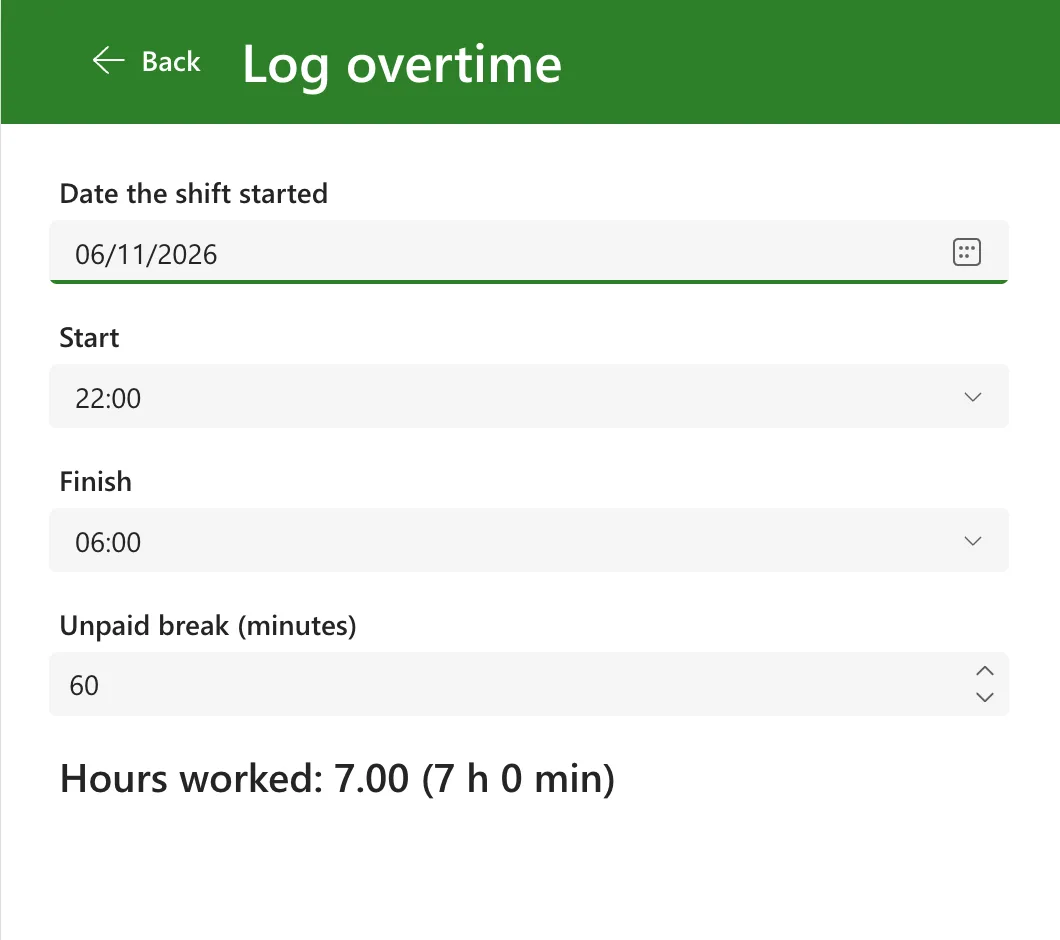
Subtract the unpaid break, in minutes, and divide by 60. In the app, with a 60-minute break, the screen shows 7.00 hours as soon as both times are chosen:
On the two nights a year the clocks change, the same shift is an hour longer or shorter in real time. Because the app counts between real moments, DateDiff gets those right too: How to Calculate Hours Across a Daylight Saving Time Change in Power Apps.
Common Mistakes
| Mistake | What happens | Do this instead |
|---|---|---|
| Putting the finish on the start date | 22:00 to 06:00 is minus 16 hours | Move it to the next day when it's earlier than the start |
Comparing with <= | Equal times become a 24-hour shift | Use < and treat equal times as a mistake |
| Counting with times only, no dates | The day the shift finished is lost | Build both moments with DateTime |
| Counting in TimeUnit.Hours | Part hours are dropped | Count minutes, then divide by 60 |
Troubleshooting
| Symptom | Likely cause | Fix |
|---|---|---|
| Hours are negative for a night shift | The finish is on the same day as the start | Use the ShiftEnd rule |
| A daytime shift shows 24 or more hours | The comparison put an equal or later finish on the next day | Compare EndAt < StartAt |
| The hours are 2 for a shift with no finish | A blank finish counts as midnight | Check that both times are chosen first |
FAQ
What if a shift lasts more than 24 hours?
Two times of day can't tell you that. The example refuses a shift longer than 24 hours with the message A shift can't be longer than 24 hours.; a longer stretch can be logged as two entries.
How does Excel do this?
With MOD, which wraps a negative difference round the clock: How to Calculate Hours for an Overnight Shift in Excel with MOD.
Conclusion
When the finish time is earlier than the start, the shift finished the next day: add a day with DateAdd, build the finish with DateTime, and count minutes with DateDiff. 22:00 to 06:00 is 480 minutes, or 7 hours after an hour's break.
Additional Resources
- DateAdd, DateDiff, and TimeZoneOffset functions: adding a day and counting minutes.
- Date, DateTime, and Time functions: building the finish time.
