How to Calculate Hours for an Overnight Shift in Excel with MOD

A shift from 22:00 to 06:00 is eight hours, but =Finish-Start in Excel gives a negative time and shows ########. =MOD(Finish-Start,1) gives 08:00: it counts forward from the start time to the finish time, past midnight if needed, and leaves daytime shifts as they were.
The example is the OvertimeLog table of the old overtime timesheet from Part 1 of the Overtime Timesheet series, which has three night shifts.
Prerequisites
- Start and finish times as Excel times, such as
22:00and06:00.
Step 1: Type the Formula
In the Time worked column, type in the first row:
=MOD([@Finish]-[@Start],1)
Outside a table, with start in D2 and finish in E2: =MOD(E2-D2,1).
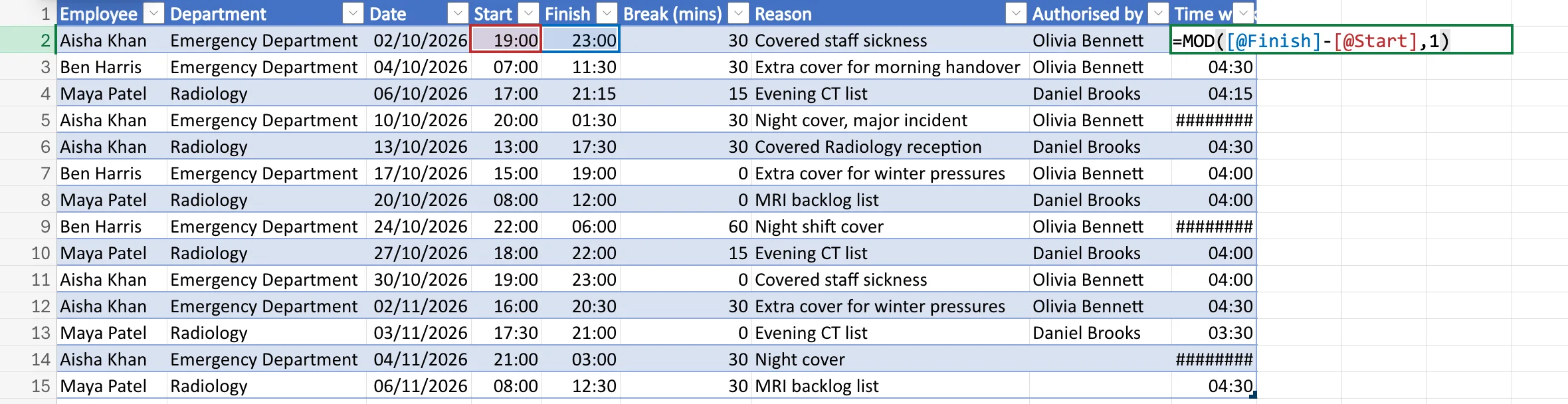
Step 2: Check the Night Shifts
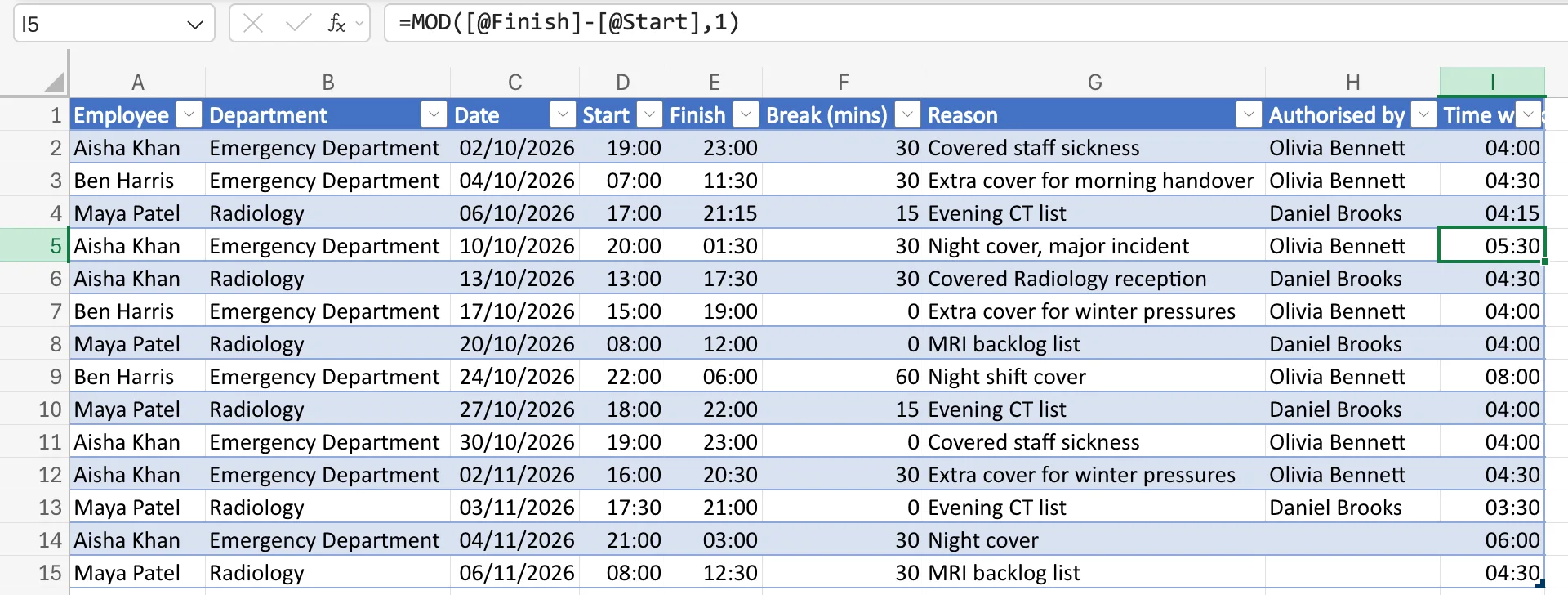
Press Enter. In a table, Excel updates the whole column. The night shifts now have times: 20:00 to 01:30 is 05:30, 22:00 to 06:00 is 08:00 and 21:00 to 03:00 is 06:00. The daytime shifts didn't change:
How MOD Works Here
MOD(number, divisor) returns the remainder after dividing number by divisor. Microsoft's MOD function page adds the part that matters here: the result has the same sign as the divisor. With a divisor of 1, a whole day, the result is always between 0 and 1, a time of day.
| Shift | Finish − Start (days) | MOD(…, 1) | Shown as |
|---|---|---|---|
| 19:00 to 23:00 | 0.1667 | 0.1667 | 04:00 |
| 20:00 to 01:30 | −0.7708 | 0.2292 | 05:30 |
| 22:00 to 06:00 | −0.6667 | 0.3333 | 08:00 |
A negative difference gets a day added; a positive one is already between 0 and 1 and comes back unchanged.
Common Mistakes
| Mistake | What happens | Do this instead |
|---|---|---|
ABS(Finish-Start) | 20:00 to 01:30 gives 18:30, the wrong way round the clock | MOD(Finish-Start,1) |
| Expecting it to handle shifts of 24 hours or more | Two clock times can't show more than a day | Record dates as well as times |
Troubleshooting
| Symptom | Likely cause | Fix |
|---|---|---|
| A shift from 08:00 to 08:00 shows 00:00 | MOD can't tell a full day from none | Use dates with times for such shifts |
| A night shift across a clock change is an hour out | Excel ignores daylight saving time | How to Calculate Hours Worked Across a Daylight Saving Time Change in Excel |
FAQ
Does MOD work in every version of Excel?
Yes. It's one of Excel's standard maths functions, in Excel for the web and the desktop apps.
How do I then take off a break?
Subtract it after the MOD: How to Subtract an Unpaid Break from Hours Worked in Excel.
Conclusion
For shifts that can cross midnight, use =MOD(Finish-Start,1) instead of =Finish-Start. It gives the right hours for night shifts and leaves day shifts alone.
