How to Calculate Hours Across a Daylight Saving Time Change in Power Apps

Twice a year, a night shift is not the length its clock times suggest. When UK clocks go back in October, 22:00 to 06:00 is nine real hours; when they go forward in March, it's seven. Build the start and finish as real moments with DateTime and count minutes with DateDiff, and Power Apps counts the real time on both nights.
The example is the Overtime Timesheet app, built for a UK team. Its old Excel timesheet got this wrong: one night shift on the October clock change was recorded an hour short (How to Calculate Hours Worked Across a Daylight Saving Time Change in Excel).
The Two Nights in 2026
From the UK government's When do the clocks change? page:
| Night | What happens | 22:00 to 06:00 is |
|---|---|---|
| 28 to 29 March | Clocks go forward an hour | 7 real hours |
| 24 to 25 October | Clocks go back an hour | 9 real hours |
How Power Apps Holds Times
Microsoft's data types page says canvas apps hold and calculate all date/time values … in UTC, and show them in the user's time zone, taken from the browser or device. A date and time in a formula is a real moment, so the gap between two of them can include the extra or missing hour.
The app in this example ran in a browser set to London time.
Prerequisites
- Real moments from the date and times people choose: How to Combine a Date and a Time in Power Apps with DateTime, and the next day for the finish: How to Calculate Hours for an Overnight Shift in Power Apps.
- Counting minutes: How to Calculate the Minutes Between Two Times in Power Apps with DateDiff.
Step 1: Count the October Night
I put each formula into a text control's Text for a moment, so Studio's preview strip shows the result:
DateDiff(DateTime(2026, 10, 24, 22, 0, 0), DateTime(2026, 10, 25, 6, 0, 0), TimeUnit.Minutes)
540 minutes, nine hours:

Step 2: Count the March Night
DateDiff(DateTime(2026, 3, 28, 22, 0, 0), DateTime(2026, 3, 29, 6, 0, 0), TimeUnit.Minutes)
420 minutes, seven hours:

On an ordinary night, such as 6 to 7 November, the same times are 480 minutes.
Step 3: See Why with TimeZoneOffset
TimeZoneOffset returns the number of minutes between the user's local time and UTC for a given moment. Microsoft's date and time troubleshooting guide calls it the same offset that the Date Picker control and Power Fx use to adjust time zones and daylight savings.
At the start of the October shift, London was on summer time, an hour ahead of UTC:
TimeZoneOffset(DateTime(2026, 10, 24, 22, 0, 0))

At the finish, it was back on UTC:
TimeZoneOffset(DateTime(2026, 10, 25, 6, 0, 0))

The offset changed by 60 minutes during the shift: that's the extra hour DateDiff counted.
Step 4: The Hours in the App
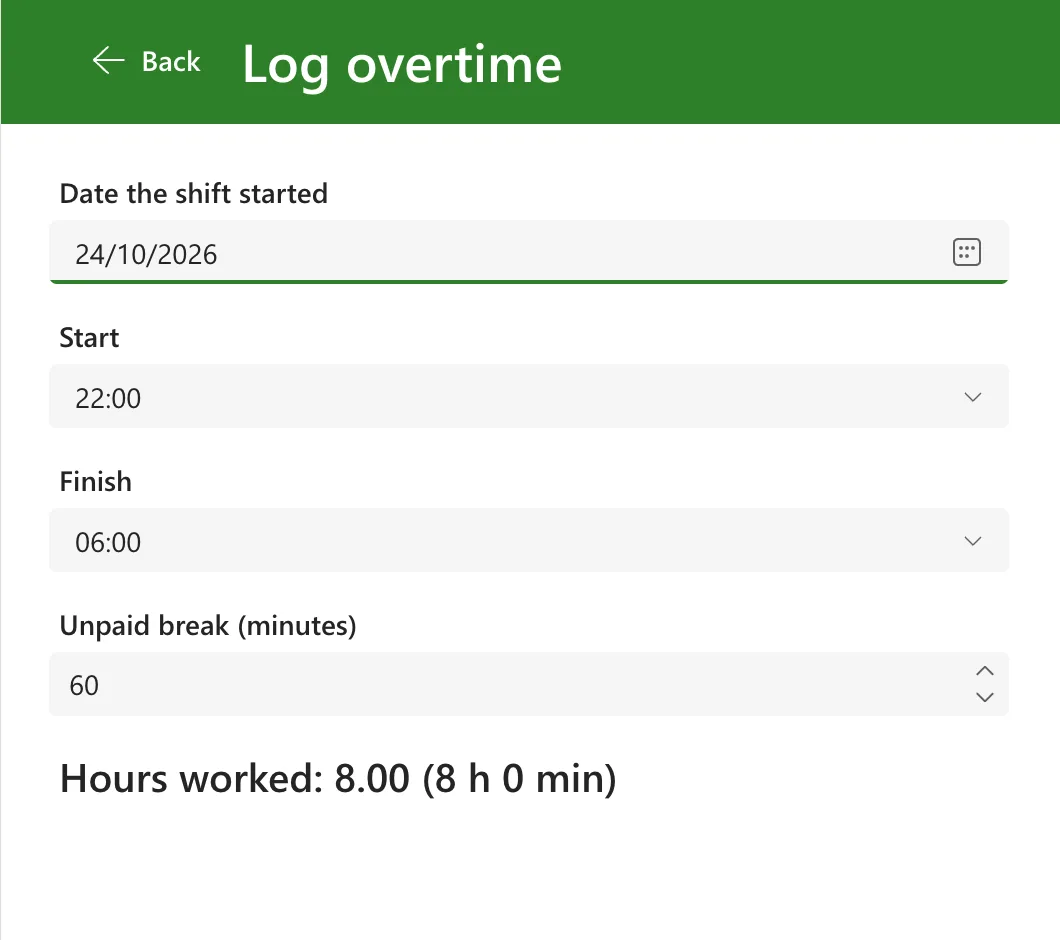
The app builds each shift's start and finish with DateTime, counts with DateDiff, and takes off the unpaid break. On the October night, with a 60-minute break, the screen shows 8.00 hours; Excel's clock arithmetic had recorded 7:
On the March night, the same times and break come to 6.00 hours:
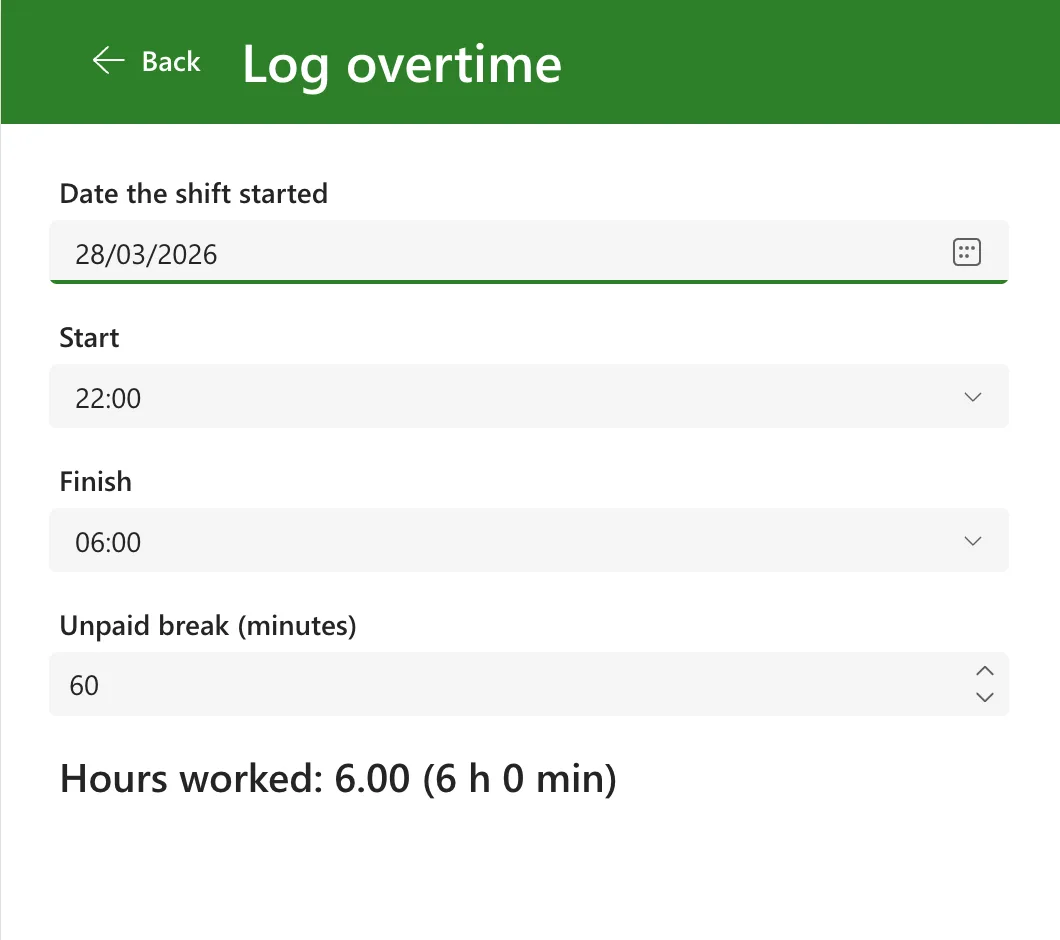
No special case for the clock change is needed: the formula is the same every night.
Common Mistakes
| Mistake | What happens | Do this instead |
|---|---|---|
| Counting from the clock times alone | Every night is 8 hours, including the two that aren't | Count between real moments with DateDiff |
| Counting in TimeUnit.Hours | Part hours are dropped | Count minutes, then divide by 60 |
| Checking only an ordinary night | The two clock-change nights go untested | Try 28 March and 24 October |
| Running the app in a different time zone from its users | The clock change happens on other dates | Check in the time zone people work in |
Troubleshooting
| Symptom | Likely cause | Fix |
|---|---|---|
| The October night shows 8 hours before the break | The times were counted without dates | Build both moments with DateTime |
| The clock-change night isn't different | The device's time zone has no daylight saving | Check TimeZoneOffset() on that device |
| The hours look right in Studio but not for a user | Their device is set to another time zone | Times follow each device's time zone |
FAQ
What about a shift that starts during the repeated hour?
On 25 October, the hour from 01:00 to 02:00 happens twice, so a time in it names two different moments. The example didn't try a shift that starts or ends in that hour; check those by hand.
Do I need TimeZoneOffset in the calculation?
Not here. DateDiff between two real moments already includes the change. TimeZoneOffset is for showing or converting to UTC: How to Convert Local Time to UTC in Power Apps with TimeZoneOffset.
Does SharePoint store the right times?
The app saved this shift's start and finish to SharePoint, and the list showed 24/10/2026 22:00 and 25/10/2026 06:00 in the site's London time zone: How to Save a Date and Time to a SharePoint List with Patch in Power Apps.
Conclusion
Build the start and finish as real moments with DateTime, count minutes with DateDiff, and the clock changes take care of themselves: 540 minutes on the October night and 420 in March, against 480 on any other.
Additional Resources
- Data types: Date, Time, and DateTime: values held in UTC and shown in the user's time zone.
- DateAdd, DateDiff, and TimeZoneOffset functions: counting minutes and the offset from UTC.
- When do the clocks change?: UK clock change dates.
