How to Build an Adaptive Card in Code in the Microsoft 365 Agents SDK in C#

Some cards are fixed and live happily in a JSON file. Others show something different every time: a name, a date, a note someone typed. For those, build the card in C# with JsonObject and JsonArray, and every value goes into the JSON safely, quotes and all.
Syntax
JsonObject card = new()
{
    ["type"] = "AdaptiveCard",
    ["version"] = "1.5",
    ["body"] = new JsonArray
    {
        element,
        element
    }
};
JsonObject, fromSystem.Text.Json.Nodes, is a JSON object you build in code. Each["name"] = valueline sets one property. A value can be text, a number,trueorfalse, anotherJsonObject, or aJsonArray.JsonArrayis a JSON array. The items between its braces are its elements in order.elementis one card element, itself aJsonObject, such asnew JsonObject { ["type"] = "TextBlock", ["text"] = someText }.type,versionandbodyare what every Adaptive Card has: its type, the version of the card format, and the elements it shows from top to bottom.
To send the result, use it as the Content of an attachment with the content type ContentTypes.AdaptiveCard.
The Example
The agent for this post turns a message such as note Team lunch moved to "Luigi's" at 12:30 into a card: Note from the sender's name, the note itself, and the time it was saved. Every one of those values comes from the message, so the card has to be built when the message arrives. The note is the interesting part: people type quotes and other characters that mean something in JSON, and the card has to show them as typed.
The agent is one class in an ASP.NET Core project with the Agents SDK, hosted with AddAgent<NoteAgent>() and listening on port 3978.
Prerequisites
- The Microsoft 365 Agents Playground, to chat with the agent on your own machine.
agentsplayground --versionshould print0.2.30; if the command isn't found, install it withnpm install -g @microsoft/m365agentsplayground.
Step 1: Build the Card from the Message
using System.Globalization;
using System.Text.Json.Nodes;
using System.Text.RegularExpressions;
using Microsoft.Agents.Builder;
using Microsoft.Agents.Builder.App;
using Microsoft.Agents.Builder.State;
using Microsoft.Agents.Core.Models;

namespace NoteCard;

public class NoteAgent : AgentApplication
{
    private static readonly Regex NotePattern = new(@"^note\s+(.{1,200})$", RegexOptions.IgnoreCase);

    public NoteAgent(AgentApplicationOptions options) : base(options)
    {
        OnMessage(NotePattern, SendNoteCardAsync);
    }

    private async Task SendNoteCardAsync(ITurnContext turnContext, ITurnState turnState, CancellationToken cancellationToken)
    {
        string note = NotePattern.Match(turnContext.Activity.Text).Groups[1].Value.Trim();
        string author = turnContext.Activity.From.Name ?? "Someone";
        DateTimeOffset sent = turnContext.Activity.LocalTimestamp ?? DateTimeOffset.UtcNow;

        JsonObject card = new()
        {
            ["type"] = "AdaptiveCard",
            ["version"] = "1.5",
            ["body"] = new JsonArray
            {
                new JsonObject
                {
                    ["type"] = "TextBlock",
                    ["text"] = $"Note from {author}",
                    ["size"] = "Medium",
                    ["weight"] = "Bolder"
                },
                new JsonObject
                {
                    ["type"] = "TextBlock",
                    ["text"] = note,
                    ["wrap"] = true
                },
                new JsonObject
                {
                    ["type"] = "TextBlock",
                    ["text"] = $"Saved at {sent.ToString("HH:mm", CultureInfo.InvariantCulture)}",
                    ["isSubtle"] = true,
                    ["size"] = "Small"
                }
            }
        };

        Attachment attachment = new()
        {
            ContentType = ContentTypes.AdaptiveCard,
            Content = card
        };

        await turnContext.SendActivityAsync(MessageFactory.Attachment(attachment), cancellationToken);
    }
}
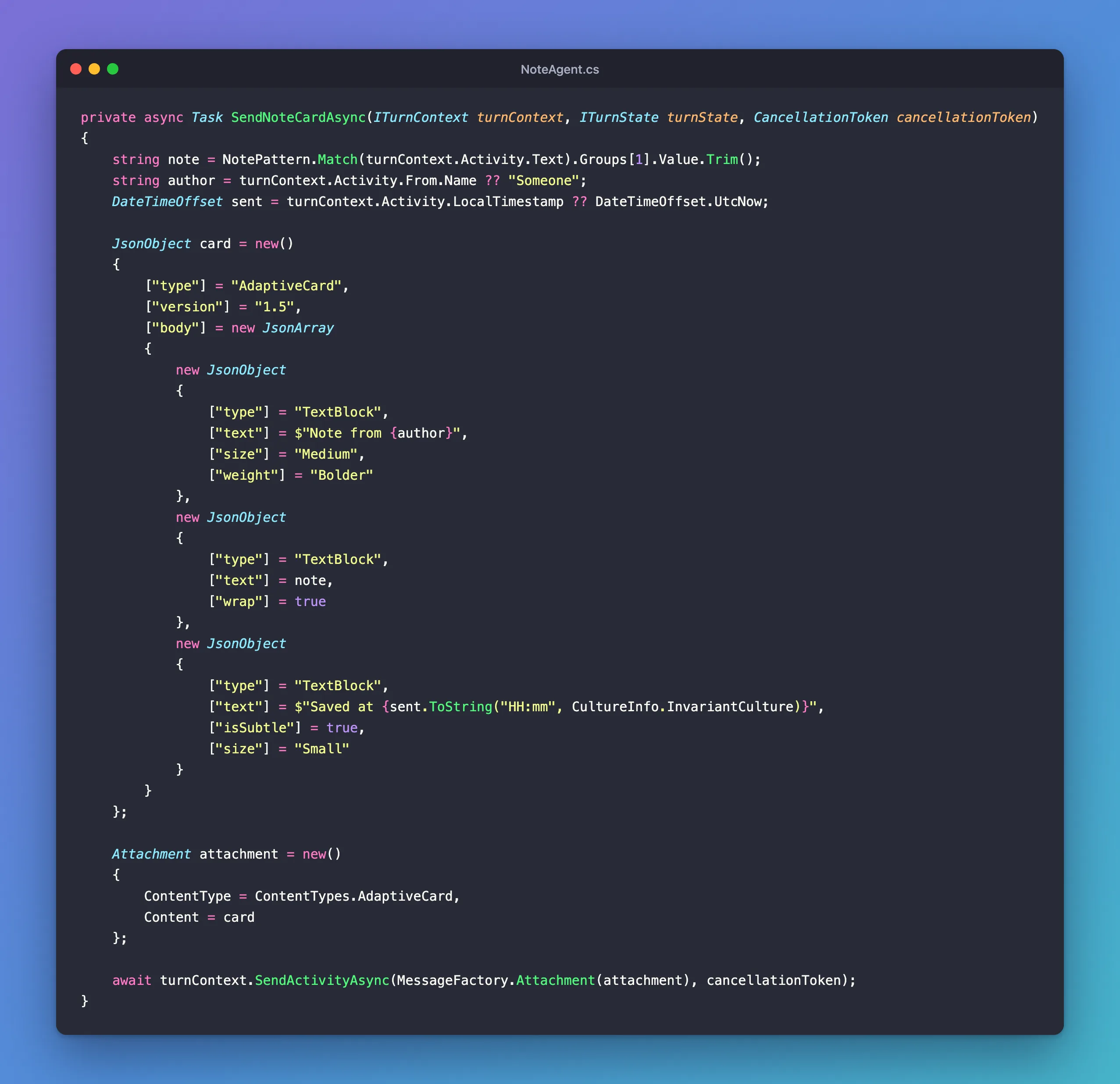
NotePatternmatchesnote, a space and up to 200 characters, which it captures as the note.turnContext.Activity.From.Nameis the sender's display name, andLocalTimestampis when they sent the message, in their own time zone.- Three
TextBlockelements make the card: a bold title, the note withwrapso long notes wrap instead of being cut off, and the time in small, subtle text. ["text"] = noteputs the note in as a value.System.Text.Jsonwrites it as a JSON string and escapes whatever needs escaping, so no character a person types can end the string early or break the card.
Step 2: Try It with Quotes
Run the agent with dotnet run, then start the Agents Playground in a second terminal:
agentsplayground -e http://localhost:3978/api/messages -c emulator
Send a note with quotes and an apostrophe in it:
note Team lunch moved to "Luigi's" at 12:30
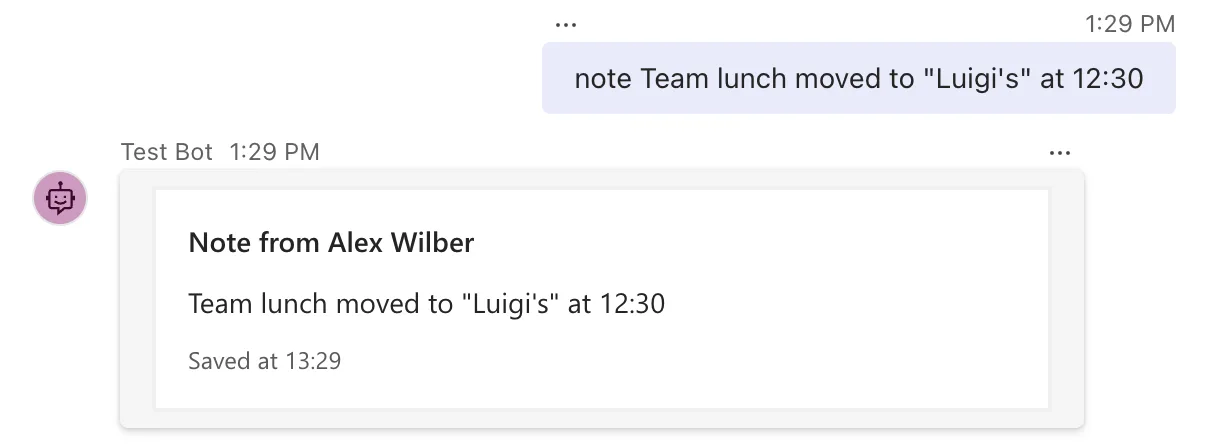
The quotes came through exactly as typed. To see why, select the last message 201 entry in the Playground's Log Panel: it's the activity the agent sent. Its attachment holds the card:
"attachments": [
  {
    "contentType": "application/vnd.microsoft.card.adaptive",
    "content": {
      "type": "AdaptiveCard",
      "version": "1.5",
      "body": [
        {
          "type": "TextBlock",
          "text": "Note from Alex Wilber",
          "size": "Medium",
          "weight": "Bolder"
        },
        {
          "type": "TextBlock",
          "text": "Team lunch moved to \"Luigi's\" at 12:30",
          "wrap": true
        },
        {
          "type": "TextBlock",
          "text": "Saved at 13:29",
          "isSubtle": true,
          "size": "Small"
        }
      ]
    }
  }
]
The note's quotes were written as \", the JSON way of putting a quote inside a string. Had the card been made by pasting the note into a string of JSON, the first quote in the note would have ended the text value early and left broken JSON behind.
Common Mistakes
| Mistake | What happens | Do this instead |
|---|---|---|
Pasting values into a JSON string with $"..." | A quote or backslash in a value breaks the card | Set each value with JsonObject |
Building the whole card as one JsonObject with no JsonArray for body | body must be an array of elements | Use new JsonArray { ... } for body, actions and facts |
Forgetting wrap on long text | The chat app may cut the text off | Set ["wrap"] = true |
Troubleshooting
| Symptom | Likely cause | Fix |
|---|---|---|
| The route doesn't answer | The message didn't match the pattern | Check the message starts with note and a space |
| A value shows in the wrong place | It was set on the wrong element | Compare the JsonObject with the card you meant to build |
FAQ
Can I mix a JSON file with values from code?
Yes. Load the file with JsonNode.Parse, call AsObject() on the result to get a JsonObject, and set or add properties on it before you send it.
Can I build the card from my own C# classes instead?
Yes: anything that serializes to the card's JSON can be the attachment's Content. JsonObject keeps the code close to the JSON it produces, which makes it easy to compare with the Adaptive Card documentation.
How do I add buttons to a card built in code?
The same way, with an actions array: ["actions"] = new JsonArray { new JsonObject { ["type"] = "Action.Submit", ["title"] = "OK", ["data"] = new JsonObject { ["verb"] = "ok" } } }.
Conclusion
When a card shows values that change, build it in C# with JsonObject for each object and JsonArray for each list, and send it as the Content of an Adaptive Card attachment. The serializer writes every value as proper JSON, so names, dates and anything people type appear in the card exactly as they are.
Additional Resources
- JsonObject class — the API reference.
- Use a JSON DOM in System.Text.Json — building and changing JSON with
JsonNode,JsonObjectandJsonArray. - Use adaptive cards in agents — sending cards from an Agents SDK agent.
